<?xml version="1.0" encoding="utf-8"?>
<!DOCTYPE html PUBLIC "-//W3C//DTD XHTML 1.0 Transitional//EN" "http://www.w3.org/TR/xhtml1/DTD/xhtml1-transitional.dtd">
<html xml:lang="en" lang="en" xmlns="http://www.w3.org/1999/xhtml">
  <head>
    <meta http-equiv="X-UA-Compatible" content="IE=edge,chrome=1" />
    <!-- PageID 382 - published by RedDot 7.5 - 7.5.1.69 - 22111 -->
    <meta http-equiv="Content-Type" content="text/html; charset=utf-8" />
    <META name="keywords" />
    <META name="description" />
    <META name="product" content="Data_Security, Email_Security, Email_Security_Gateway, Email_Security_Gateway_Anywhere, TRITON_Enterprise, Web_Filtering_and_Security, Web_Security_Gateway, Web_Security_Gateway_Anywhere, V_Series" />
    <META name="version" content="v76" />
    <title>Integrating Web Security with Squid Web Proxy Cache</title>
    <link rel="stylesheet" type="text/css" href="/content/support/library/tech_library_styles.css" />
    <link rel="StyleSheet" href="css/IntegrationDeployment.css" type="text/css" media="all" />
    <link rel="StyleSheet" href="css/webworks.css" type="text/css" media="all" />
    <!--[if IE 6]>
            <link rel="stylesheet" type="text/css" href="/Content/4.css" />
        <![endif]-->
    <!--[if IE 7]>
            <link rel="stylesheet" type="text/css" href="/Content/5.css" />
        <![endif]-->
    <!--include style tags in following StyleVariable-->
    <script type="text/javascript" src="http://ajax.googleapis.com/ajax/libs/jquery/1.3.2/jquery.min.js"></script>
    <script type="text/javascript" src="http://ajax.googleapis.com/ajax/libs/jqueryui/1.7.2/jquery-ui.min.js"></script>
    <script type="text/javascript" src="/controls/jws.js"></script>
  </head>
  <body>
    <!--googleoff: all-->
    <!--
		<wsApp:UserAccess ID="useraccess1" runat="server" IsSecure="False" />
		-->
    <script type="text/javascript" language="javascript" src="/include/s_code.js"></script>
    <div class="site-wrapper">
      <!--	    <div class="container">   -->
      <div class="tech-header">
        <img src="/Content/Assets/Images/wsLogo.jpg" />
			   Deployment and Installation Center<br />Websense TRITON Enterprise v7.6.x
			<div class="search-bar"><form action="/content/kb-search.aspx" method="get"><div class="submit"><div class="left"></div><input type="submit" value="Search" class="submit-button"></input><div class="right"></div></div><input type="text" name="q"></input><input type="hidden" name="site" value="TechLibrary"></input><label for="library-search"></label><p>Library Search: </p></form></div></div>
      <!--END TECH HEADER-->
      <br class="clear" />
    </div>
    <!-- Site Wrapper End Div-->
    <!-- Set this value to Yes to display "Overview" in the menu and the manually entered page section title if page not part of navigation: No-->
    <!-- Main menu tab paint -->
    <div class="body-wrapper">
      <!--SubMenu-->
      <div class="container2">
        <div class="contentHeader"></div>
        <div class="shadow2">
          <div class="shadow1">
            <div class="content ">
              <!--BEGIN EPUBLISHER OUTPUT-->
              <!-- New Navigation DIV -->
              <div class="toolBarBkg" style="text-align: left;">
                <table cellspacing="0" class="toolBarTable" summary="">
                  <!-- End New Navigation DIV -->
                  <tr>
                    <td>
                      <!-- New Go To TOC -->
                      <a href="toc.aspx"><img src="images/toc.png" alt="Go to the table of contents" border="0" /></a>
                      <!-- End Go To TOC -->
                    </td>
                    <td>
                      <!-- New Previous -->
                      <a href="dic_ws_chkpt_int_deploy.aspx"><img src="images/prev.png" alt="Go to the previous page" border="0" /></a>
                      <!-- End New Previous -->
                    </td>
                    <td>
                      <!-- New Next (Active) -->
                      <a href="dic_ws_int_citrix.aspx"><img src="images/next.png" alt="Go to the next page" border="0" /></a>
                      <!-- End New Next (Active) -->
                    </td>
                    <td>
                      <!-- New Index (Active) -->
                      <a href="ix.aspx"><img src="images/index.png" alt="Go to the index" border="0" /></a>
                      <!-- End Index (Active) -->
                    </td>
                    <td>
                      <!-- New PDF -->
                      <!-- End New PDF -->
                    </td>
                    <!--Start JR breadcrumbs -->
                    <td width="20px"></td>
                    <td>
                      <div class="WebWorks_Breadcrumbs" style="text-align: left;">
                        <a class="WebWorks_Breadcrumb_Link" href="dic_ws_int.aspx#597162">Integrating Web Security with Other Products</a> &gt; Integrating Web Security with Squid Web Proxy Cache</div>
                    </td>
                    <!--End JR breadcrumbs -->
                  </tr>
                </table>
              </div>
              <!-- Removing HR
    <hr wwpage:condition="header-exists" align="left" /> -->
              <br clear="all" />
              <!--googleon: all-->
              <blockquote>
                <div class="N1H-Heading1"><a name="597162">Integrating Web Security with Squid Web Proxy Cache</a></div>
                <div class="N2HN-HeadNoTopic2">
                  <span class="Heading_Number"></span><a name="607862">Applies to</a></div>
                <div class="B1-Bullet1_outer" style="margin-left: 0pt">
                  <table border="0" cellspacing="0" cellpadding="0" summary="">
                    <tr style="vertical-align: baseline">
                      <td>
                        <div class="B1-Bullet1_inner" style="width: 18pt; white-space: nowrap">
                          <img src="b1.jpg" alt="*" border="0" width="11" height="11" />
                        </div>
                      </td>
                      <td width="100%">
                        <div class="B1-Bullet1_inner"><a name="607863">Web Filter v7.6</a></div>
                      </td>
                    </tr>
                  </table>
                </div>
                <div class="B1-Bullet1_outer" style="margin-left: 0pt">
                  <table border="0" cellspacing="0" cellpadding="0" summary="">
                    <tr style="vertical-align: baseline">
                      <td>
                        <div class="B1-Bullet1_inner" style="width: 18pt; white-space: nowrap">
                          <img src="b1.jpg" alt="*" border="0" width="11" height="11" />
                        </div>
                      </td>
                      <td width="100%">
                        <div class="B1-Bullet1_inner"><a name="607864">Web Security v7.6</a></div>
                      </td>
                    </tr>
                  </table>
                </div>
                <div class="N2HN-HeadNoTopic2">
                  <span class="Heading_Number"></span><a name="609145">In this topic</a></div>
                <div class="B1-Bullet_outer" style="margin-left: 0pt">
                  <table border="0" cellspacing="0" cellpadding="0" summary="">
                    <tr style="vertical-align: baseline">
                      <td>
                        <div class="B1-Bullet_inner" style="width: 18pt; white-space: nowrap">
                          <span class="BS1-BulletSymbol1">u	</span>
                        </div>
                      </td>
                      <td width="100%">
                        <div class="B1-Bullet_inner"><span class="LEM-LinkEmphasis"><a href="#609152" title="Integrating Web Security with Squid Web Proxy Cache" name="609174">Overview</a></span></div>
                      </td>
                    </tr>
                  </table>
                </div>
                <div class="B1-Bullet_outer" style="margin-left: 0pt">
                  <table border="0" cellspacing="0" cellpadding="0" summary="">
                    <tr style="vertical-align: baseline">
                      <td>
                        <div class="B1-Bullet_inner" style="width: 18pt; white-space: nowrap">
                          <span class="BS1-BulletSymbol1">u	</span>
                        </div>
                      </td>
                      <td width="100%">
                        <div class="B1-Bullet_inner"><span class="LEM-LinkEmphasis"><a href="#595237" title="Integrating Web Security with Squid Web Proxy Cache" name="609190">Single Squid Web Proxy Cache configuration</a></span></div>
                      </td>
                    </tr>
                  </table>
                </div>
                <div class="B1-Bullet_outer" style="margin-left: 0pt">
                  <table border="0" cellspacing="0" cellpadding="0" summary="">
                    <tr style="vertical-align: baseline">
                      <td>
                        <div class="B1-Bullet_inner" style="width: 18pt; white-space: nowrap">
                          <span class="BS1-BulletSymbol1">u	</span>
                        </div>
                      </td>
                      <td width="100%">
                        <div class="B1-Bullet_inner"><span class="LEM-LinkEmphasis"><a href="#595257" title="Integrating Web Security with Squid Web Proxy Cache" name="609200">Array configuration</a></span></div>
                      </td>
                    </tr>
                  </table>
                </div>
                <div class="N2HN-HeadNoTopic2">
                  <span class="Heading_Number"></span><a name="609152">Overview</a></div>
                <div class="B-Body"><a name="597147">Websense filtering components can be installed on the same machine as Squid Web </a>Proxy Cache, on a separate machine, or on multiple machines. Squid Web Proxy Cache machines may be deployed in an array to share the load in a larger network. A Websense Squid redirector plug-in must be installed on each machine running Squid Web Proxy Cache.</div>
                <div class="N2HN-HeadNoTopic2">
                  <span class="Heading_Number"></span><a name="595237">Single Squid Web Proxy Cache configuration</a></div>
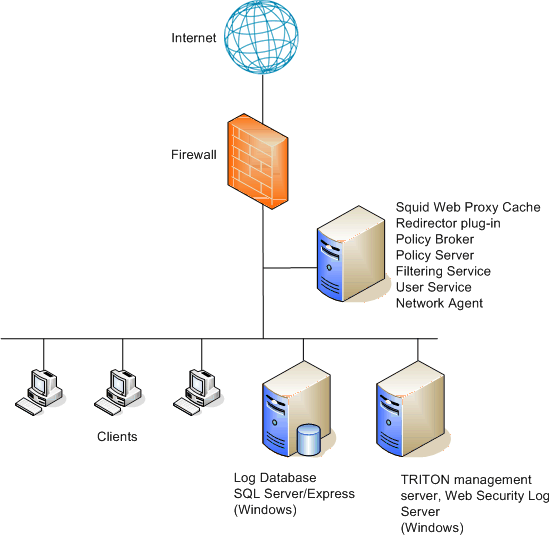
                <div class="B-Body"><a name="595238">The following illustration shows the Websense filtering components, the Websense </a>redirector plug-in, and Squid Web Proxy Cache running on the same machine. You can also install a Websense transparent identification agent on the same machine, or on a separate machine. </div>
                <div class="F-Frame"><a name="609912"><img class="Default" src="images/Squid_On-Box.gif" width="554" height="536" style="display: block; float: none; left: 0.0; top: 0.0" alt="" /></a></div>
                <div class="B-Body"><a name="604764">The diagram provides a general overview and best practice location for your </a>integration product, but does not show all Websense components. Larger networks require Websense components to be distributed across several dedicated machines.</div>
                <div class="B-Body"><a name="597185">An alternative deployment places all Websense filtering components on a separate </a>machine from Squid Web Proxy Cache. This configuration eases the load on the Squid Web Proxy Cache machine.</div>
                <div class="B1-Bullet1_outer" style="margin-left: 0pt">
                  <table border="0" cellspacing="0" cellpadding="0" summary="">
                    <tr style="vertical-align: baseline">
                      <td>
                        <div class="B1-Bullet1_inner" style="width: 18pt; white-space: nowrap">
                          <img src="b1.jpg" alt="*" border="0" width="11" height="11" />
                        </div>
                      </td>
                      <td width="100%">
                        <div class="B1-Bullet1_inner"><a name="598553">The Websense redirector plug-in must be installed on the Squid Web Proxy Cache </a>machine to enable communication with Filtering Service.</div>
                      </td>
                    </tr>
                  </table>
                </div>
                <div class="B1-Bullet1_outer" style="margin-left: 0pt">
                  <table border="0" cellspacing="0" cellpadding="0" summary="">
                    <tr style="vertical-align: baseline">
                      <td>
                        <div class="B1-Bullet1_inner" style="width: 18pt; white-space: nowrap">
                          <img src="b1.jpg" alt="*" border="0" width="11" height="11" />
                        </div>
                      </td>
                      <td width="100%">
                        <div class="B1-Bullet1_inner"><a name="599863">The Filtering Service and Squid Web Proxy Cache machines must be able to </a>communicate over the network</div>
                      </td>
                    </tr>
                  </table>
                </div>
                <div class="N2HN-HeadNoTopic2">
                  <span class="Heading_Number"></span><a name="595257">Array configuration</a></div>
                <div class="B-Body"><a name="595258">Websense software is compatible with most array configurations, including Cache </a>Array Routing Protocol (CARP) arrays. If the Squid Web Proxy Cache machines in an array can run Websense software without a performance impact, install the main Websense filtering components on one of the array machines.</div>
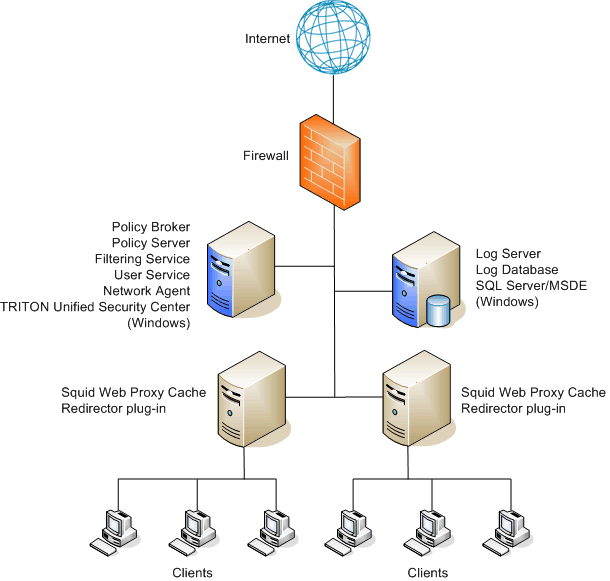
                <div class="B-Body"><a name="595259">The following illustration shows the Websense filtering components running on a </a>Squid Web Proxy Cache machine, with Websense reporting components on a separate machine.</div>
                <div class="F-Frame"><a name="597772"><img class="Default" src="images/Squid_Array1.gif" width="611" height="575" style="display: block; float: none; left: 0.0; top: 0.0" alt="" /></a></div>
                <div class="B-Body"><a name="604800">The diagram provides a general overview and best practice location for your </a>integration product, but does not show all Websense components. Larger networks require Websense components to be distributed across several dedicated machines.</div>
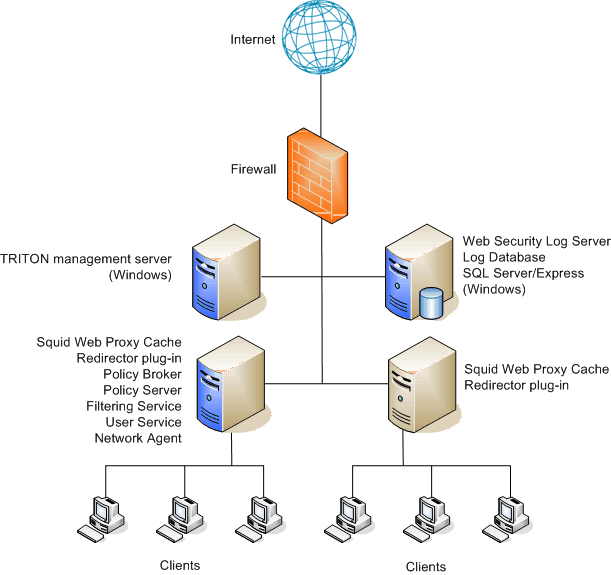
                <div class="B-Body"><a name="597775">If installing Websense filtering components on the Squid Web Proxy Cache machine </a>is likely to have a performance impact, install Websense software on a separate machine outside the array, and then install the Websense redirector plug-in on each member of the array. See the following illustration.</div>
                <div class="B-Body"><a name="598577">When Websense software is installed in this configuration, all array members send </a>Internet requests to Filtering Service outside the array.</div>
                <div class="F-Frame"><a name="595269"><img class="Default" src="images/Squid_Array2.gif" width="610" height="581" style="display: block; float: none; left: 0.0; top: 0.0" alt="" /></a></div>
                <div class="B-Body"><a name="595271">Other configurations are possible. See your Squid Web Proxy Cache documentation </a>for information about array configurations. See <span class="LEM-LinkEmphasis"><a href="dic_ws_int_squid_2.aspx#579684" title="Squid Web Proxy Cache Integration">Squid Web Proxy Cache Integration</a></span> Websense software configuration instructions.</div>
                <div class="B-Body"><a name="604852">The diagram provides a general overview and best practice location for your </a>integration product, but does not show all Websense components. Larger networks require Websense components to be distributed across several dedicated machines. Also, the Web filtering components are shown above on a Windows machine. The TRITON Unified Security Center must run on Windows; the remaining components can be installed on Linux instead.</div>
              </blockquote>
              <!--googleoff: all-->
              <!-- Quick Links -->
              <div class="right-rail">
                <div class="right-pod">
                  <h4>Quick Links</h4>
                  <div class="pod-content">
                    <ul>
                      <li>
                        <a href="/content/support/library/deployctr/v76/first.aspx" target="_self">Deployment and Installation Center Home</a>
                      </li>
                      <li>
                        <a href="/library/" target="_self">Technical Library Home</a>
                      </li>
                      <li>
                        <a href="/support/" target="_self">Support &amp; Knowledge Base</a>
                      </li>
                      <li>
                        <a href="http://community.websense.com/forums/" target="_blank">Forums</a>
                      </li>
                    </ul>
                  </div>
                </div>
                <br class="clear" />
                <!-- Feedback Form -->
                <div class="right-pod">
                  <script type="text/javascript">
                   jws.removeFormComments("_wsAppFeedbackForm");
                </script>
                  <form runat="server" class="_wsAppFeedbackForm">
                    <!--
                        <wsApp:Feedback id="Feedback" Runat="server"   />
                   -->
                  </form>
                </div>
              </div>
              <br class="clear" />
              <!-- New Navigation DIV -->
              <div class="toolBarBkgBot" style="text-align: left;">
                <table cellspacing="0" class="toolBarTable" summary="">
                  <!-- End New Navigation DIV -->
                  <tr>
                    <td>
                      <!-- New Go To TOC -->
                      <a href="toc.aspx"><img src="images/toc.png" alt="Go to the table of contents" border="0" /></a>
                      <!-- End Go To TOC -->
                    </td>
                    <td>
                      <!-- New Previous -->
                      <a href="dic_ws_chkpt_int_deploy.aspx"><img src="images/prev.png" alt="Go to the previous page" border="0" /></a>
                      <!-- End New Previous -->
                    </td>
                    <td>
                      <!-- New Next (Active) -->
                      <a href="dic_ws_int_citrix.aspx"><img src="images/next.png" alt="Go to the next page" border="0" /></a>
                      <!-- End New Next (Active) -->
                    </td>
                    <td>
                      <!-- New Index (Active) -->
                      <a href="ix.aspx"><img src="images/index.png" alt="Go to the index" border="0" /></a>
                      <!-- End Index (Active) -->
                    </td>
                    <td>
                      <!-- New PDF -->
                      <!-- End New PDF -->
                    </td>
                    <!--Start JR breadcrumbs -->
                    <td width="20px"></td>
                    <td>
                      <div class="WebWorks_Breadcrumbs" style="text-align: left;">
                        <a class="WebWorks_Breadcrumb_Link" href="dic_ws_int.aspx#597162">Integrating Web Security with Other Products</a> &gt; Integrating Web Security with Squid Web Proxy Cache</div>
                    </td>
                    <!--End JR breadcrumbs -->
                  </tr>
                </table>
              </div>
              <!--END   EPUBLISHER OUTPUT-->
            </div>
          </div>
        </div>
        <div class="contentFooter"></div>
      </div>
    </div>
    <SCRIPT>
function getFileName() {
//this gets the full url
var url = document.location.href;
//this removes the anchor at the end, if there is one
url = url.substring(0, (url.indexOf("#") == -1) ? url.length : url.indexOf("#"));
//this removes the query after the file name, if there is one
url = url.substring(0, (url.indexOf("?") == -1) ? url.length : url.indexOf("?"));
//this removes everything before the last slash in the path
url = url.substring(url.lastIndexOf("/") + 1, url.length);
//return
return url;
}

var url = document.URL;
var Docname = getFileName()
s.pageName= "enu:support:technical library:wte76xdic:" + Docname;
s.prop1="enu:support";
s.prop2="enu:support:technical library";
s.channel="support";
// <!--
s.server="<%= System.Environment.MachineName %>";
//--></SCRIPT>
    <!-- footer contains a context menu (see the list below) and the copyright info -->
    <div class="footer">
      <div class="foot-wrap">
        <ul class="left">
          <li>
            <a href="/site/footer/careers.html">Careers</a>
            <span class="sepFnav">&nbsp;</span>
          </li>
          <li>
            <a href="/content/contact-us.aspx">Contact Us</a>
            <span class="sepFnav">&nbsp;</span>
          </li>
          <li>
            <a href="http://community.websense.com/blogs/">Newsroom</a>
            <span class="sepFnav">&nbsp;</span>
          </li>
          <li>
            <a href="https://www.forcepoint.com/site/sitemap.html">Site Map</a>
            <span class="sepFnav">&nbsp;</span>
          </li>
          <li>
            <a href="/content/Legal-Overview.aspx">Legal Information</a>
            <span class="sepFnav">&nbsp;</span>
          </li>
          <li>
            <a href="https://www.forcepoint.com/site/footer/privacypolicy.html">Privacy Policy</a>
          </li>
        </ul>
        <span class=" copyright right">(c) 2011 Websense, Inc.  All Rights Reserved.</span>
      </div>
    </div>
    <script language="javascript1.1" type="text/javascript">
/********Do Not alter below this line ***********/
var s_code=s.t(); if (s_code) document.write(s_code)
//--&gt;</script>
  </body>
  <!--"GENERALQUARTERSALLHANDSMANYOURSTATIONS"-->
</html>