<?xml version="1.0" encoding="utf-8"?>
<!DOCTYPE html PUBLIC "-//W3C//DTD XHTML 1.0 Transitional//EN" "http://www.w3.org/TR/xhtml1/DTD/xhtml1-transitional.dtd">
<html xml:lang="en" lang="en" xmlns="http://www.w3.org/1999/xhtml">
  <head runat="server">
    <!-- PageID 382 - published by RedDot 7.5 - 7.5.1.69 - 22111 -->
    <META name="PublicArticle" content="True" />
    <META http-equiv="Content-Type" content="text/html; charset=utf-8" />
    <META name="keywords" />
    <META name="summary" />
    <META name="product" content="Data_Security,Email_Security_Gateway,Email_Security_Gateway_Anywhere,Web_Filtering_and_Security,Web_Security_Gateway,Web_Security_Gateway_Anywhere,V_Series,X_Series,V5K,V10K,X10G" />
    <META name="version" content="v77" />
    <META name="book" content="Deployment and Installation Center 7.7" />
    <title>Positioning Network Agent in the network</title>
    <!--Loading the 2016 fonts.-->
    <script type="text/javascript" src="//fast.fonts.net/jsapi/c504d579-e135-4f75-8335-4906f6c6ce67.js"></script>
    <!--Library content styles.-->
    <link rel="StyleSheet" href="https://help.forcepoint.com/docs/ni/assets/css/help2016.css" type="text/css" media="all" />
    <!--2016 font support -->
    <link type="text/css" rel="stylesheet" href="//fast.fonts.net/cssapi/c504d579-e135-4f75-8335-4906f6c6ce67.css" />
  </head>
  <body>
    <!--googleoff: all-->
    <a href="http://www.forcepoint.com">
      <img class="logo" alt="Forcepoint logo" src="https://help.forcepoint.com/docs/ni/assets/logo1.png" />
    </a>
    <div class="extLinksContainer">
      <a class="extLinks" href="http:https://help.forcepoint.com/docs/technical-library.aspx">Technical Library</a> | <a class="extLinks" href="http://www.websense.com/content/support.aspx?intcmp=nav-mm-support#/?intcmp=nav-mm-support">Support</a></div>
    <!--
		<wsApp:UserAccess ID="useraccess1" runat="server" IsSecure="False" />
		-->
    <div class="spacer1"></div>
    <br />
    <!-- New Navigation DIV -->
    <div class="TL_nav" style="text-align: left;">
      <table cellspacing="0" class="toolBarTable" summary="">
        <!-- End New Navigation DIV -->
        <tr>
          <td>
            <!-- New Go To TOC -->
            <a href="toc.aspx"><img src="images/toc.png" alt="Go to the table of contents" border="0" /></a>
            <!-- End Go To TOC -->
          </td>
          <td>
            <!-- New Previous -->
            <a href="dic_dep_na.aspx"><img src="images/prev.png" alt="Go to the previous page" border="0" /></a>
            <!-- End New Previous -->
          </td>
          <td>
            <!-- New Next (Active) -->
            <a href="dic_ws_rfs_n_clnt.aspx"><img src="images/next.png" alt="Go to the next page" border="0" /></a>
            <!-- End New Next (Active) -->
          </td>
          <!--Start JR breadcrumbs -->
          <td width="20px"></td>
          <td>
            <div class="WebWorks_Breadcrumbs" style="text-align: left;">
              <a class="WebWorks_Breadcrumb_Link" href="dic_dep_rec_ws.aspx">Web Security Deployment Recommendations</a> &gt; Positioning Network Agent in the network</div>
          </td>
          <!--End JR breadcrumbs -->
        </tr>
      </table>
    </div>
    <!--googleon: all-->
    <div>
      <div class="N1H-Heading1"><a name="601466">Positioning Network Agent in the network</a></div>
      <div class="B-Body" style="color: #666666; font-style: normal; font-variant: normal; font-weight: normal; margin-bottom: 7.0pt; margin-top: 7.0pt; text-transform: none; vertical-align: baseline"><span style="color: #666666; font-style: normal; font-variant: normal; font-weight: normal; text-transform: none; vertical-align: baseline"><a name="612332">Collection: Deployment and Installation Center&nbsp;| Product: Web Security&nbsp;| Version: 7.7.x</a></span></div>
      <div class="F-Frame"><a name="612361">&nbsp;</a></div>
      <table class="BodyTable" style="text-align: left" summary="">
        <caption></caption>
        <tr>
          <td style="border-bottom-color: #808080; border-bottom-style: solid; border-bottom-width: thin; border-left-color: #808080; border-left-style: solid; border-left-width: thin; border-right-color: #808080; border-right-style: solid; border-right-width: thin; border-top-color: #808080; border-top-style: solid; border-top-width: thin; padding-bottom: 3.5pt; padding-left: 6pt; padding-right: 6pt; padding-top: 4.5pt; vertical-align: top">
            <div class="CHD-CellHeadDark"><a name="612335">Applies&nbsp;to:&nbsp;&nbsp;&nbsp;&nbsp;&nbsp;&nbsp;&nbsp;&nbsp;&nbsp;&nbsp;&nbsp;&nbsp;&nbsp;&nbsp;&nbsp;&nbsp;&nbsp;&nbsp;&nbsp;&nbsp;&nbsp;&nbsp;&nbsp;&nbsp;&nbsp;&nbsp;&nbsp;&nbsp;&nbsp;&nbsp;&nbsp;&nbsp;&nbsp;&nbsp;&nbsp;&nbsp;&nbsp;&nbsp;&nbsp;&nbsp;&nbsp;</a></div>
          </td>
          <td style="border-bottom-color: #808080; border-bottom-style: solid; border-bottom-width: thin; border-left-color: #808080; border-left-style: solid; border-left-width: thin; border-right-color: #808080; border-right-style: solid; border-right-width: thin; border-top-color: #808080; border-top-style: solid; border-top-width: thin; padding-bottom: 3.5pt; padding-left: 6pt; padding-right: 6pt; padding-top: 4.5pt; vertical-align: top">
            <div class="CHD-CellHeadDark"><a name="612337">In&nbsp;this&nbsp;topic&nbsp;&nbsp;&nbsp;&nbsp;&nbsp;&nbsp;&nbsp;&nbsp;&nbsp;&nbsp;&nbsp;&nbsp;&nbsp;&nbsp;&nbsp;&nbsp;&nbsp;&nbsp;&nbsp;&nbsp;&nbsp;&nbsp;&nbsp;&nbsp;&nbsp;&nbsp;&nbsp;&nbsp;&nbsp;&nbsp;&nbsp;&nbsp;&nbsp;&nbsp;&nbsp;&nbsp;&nbsp;&nbsp;&nbsp;</a></div>
          </td>
        </tr>
        <tr>
          <td style="border-bottom-color: #808080; border-bottom-style: solid; border-bottom-width: thin; border-left-color: #808080; border-left-style: solid; border-left-width: thin; border-right-color: #808080; border-right-style: solid; border-right-width: thin; border-top-color: #808080; border-top-style: solid; border-top-width: thin; padding-bottom: 3.5pt; padding-left: 6pt; padding-right: 6pt; padding-top: 4.5pt; vertical-align: top">
            <div class="B1-Bullet1_outer" style="margin-left: 0pt">
              <table border="0" cellspacing="0" cellpadding="0" summary="" role="presentation">
                <tr style="vertical-align: baseline">
                  <td>
                    <div class="B1-Bullet1_inner" style="width: 18pt; white-space: nowrap">
                      <img src="b1.png" alt="*" border="0" width="8" height="8" />
                    </div>
                  </td>
                  <td width="100%">
                    <div class="B1-Bullet1_inner"><a name="612339">Web Filter, Web Security, and Web Security Gateway (Anywhere), v7.7.x</a></div>
                  </td>
                </tr>
              </table>
            </div>
          </td>
          <td style="border-bottom-color: #808080; border-bottom-style: solid; border-bottom-width: thin; border-left-color: #808080; border-left-style: solid; border-left-width: thin; border-right-color: #808080; border-right-style: solid; border-right-width: thin; border-top-color: #808080; border-top-style: solid; border-top-width: thin; padding-bottom: 3.5pt; padding-left: 6pt; padding-right: 6pt; padding-top: 4.5pt; vertical-align: top">
            <div class="B1-Bullet1_outer" style="margin-left: 0pt">
              <table border="0" cellspacing="0" cellpadding="0" summary="" role="presentation">
                <tr style="vertical-align: baseline">
                  <td>
                    <div class="B1-Bullet1_inner" style="width: 18pt; white-space: nowrap">
                      <img src="b1.png" alt="*" border="0" width="8" height="8" />
                    </div>
                  </td>
                  <td width="100%">
                    <div class="B1-Bullet1_inner"><span class="LEM-LinkEmphasis"><a href="#601980" title="Positioning Network Agent in the network" name="612440">Locating Network Agent in a single-segment network</a></span></div>
                  </td>
                </tr>
              </table>
            </div>
            <div class="B1-Bullet1_outer" style="margin-left: 0pt">
              <table border="0" cellspacing="0" cellpadding="0" summary="" role="presentation">
                <tr style="vertical-align: baseline">
                  <td>
                    <div class="B1-Bullet1_inner" style="width: 18pt; white-space: nowrap">
                      <img src="b1.png" alt="*" border="0" width="8" height="8" />
                    </div>
                  </td>
                  <td width="100%">
                    <div class="B1-Bullet1_inner"><span class="LEM-LinkEmphasis"><a href="#602149" title="Positioning Network Agent in the network" name="612471">Locating Network Agent in a multiple-segment network</a></span></div>
                  </td>
                </tr>
              </table>
            </div>
            <div class="B1-Bullet1_outer" style="margin-left: 0pt">
              <table border="0" cellspacing="0" cellpadding="0" summary="" role="presentation">
                <tr style="vertical-align: baseline">
                  <td>
                    <div class="B1-Bullet1_inner" style="width: 18pt; white-space: nowrap">
                      <img src="b1.png" alt="*" border="0" width="8" height="8" />
                    </div>
                  </td>
                  <td width="100%">
                    <div class="B1-Bullet1_inner"><span class="LEM-LinkEmphasis"><a href="#603226" title="Positioning Network Agent in the network" name="612510">Network Agent on a gateway</a></span></div>
                  </td>
                </tr>
              </table>
            </div>
          </td>
        </tr>
      </table>
      <div class="B-Body"><a name="601660">Network Agent must be able to see all outgoing and incoming Internet traffic on the network segment that it is assigned to monitor.</a></div>
      <div class="B-Body"><a name="635206">If the Network Agent machine connects to a switch:</a></div>
      <div class="B1-Bullet1_outer" style="margin-left: 0pt">
        <table border="0" cellspacing="0" cellpadding="0" summary="" role="presentation">
          <tr style="vertical-align: baseline">
            <td>
              <div class="B1-Bullet1_inner" style="width: 18pt; white-space: nowrap">
                <img src="b1.png" alt="*" border="0" width="8" height="8" />
              </div>
            </td>
            <td width="100%">
              <div class="B1-Bullet1_inner"><a name="635207">Configure the switch to use a mirror or span port, and connect Network Agent to this port, to allow the agent to see Internet requests from all monitored machines.</a></div>
            </td>
          </tr>
        </table>
      </div>
      <div class="F-Frame"><a name="601782">&nbsp;</a></div>
      <table class="NoteTable" style="text-align: left" border="0" cellpadding="1" cellspacing="0" summary="">
        <caption></caption>
        <tr>
          <td style="padding-bottom: 3.5pt; padding-left: 4pt; padding-right: 4pt; padding-top: 4.5pt; vertical-align: top; width: 36pt">
            <div class="NI-NoteIcon">
              <img src="note.gif" alt="*" border="0" width="33" height="33" /><a name="601749">&nbsp;</a></div>
          </td>
          <td style="padding-bottom: 3.5pt; padding-left: 4pt; padding-right: 4pt; padding-top: 4.5pt; vertical-align: top; width: 266.4pt">
            <div class="N-Note">Note<a name="601751">&nbsp;</a></div>
            <div class="NT-NoteText"><a name="601761">Not all switches support port spanning or mirroring. Contact the switch vendor to verify that spanning or mirroring is available, and for configuration instructions.</a></div>
          </td>
        </tr>
      </table>
      <div class="B1-Bullet1_outer" style="margin-left: 0pt">
        <table border="0" cellspacing="0" cellpadding="0" summary="" role="presentation">
          <tr style="vertical-align: baseline">
            <td>
              <div class="B1-Bullet1_inner" style="width: 18pt; white-space: nowrap">
                <img src="b1.png" alt="*" border="0" width="8" height="8" />
              </div>
            </td>
            <td width="100%">
              <div class="B1-Bullet1_inner"><a name="601674">Optionally, use a switch that supports bidirectional spanning. This allows Network Agent to use a single network interface card (NIC) to both monitor traffic and send block pages.</a></div>
            </td>
          </tr>
        </table>
      </div>
      <div class="I-IndentedText"><a name="601676">If the switch does not support bidirectional spanning, the Network Agent machine must have at least 2 NICs: one for monitoring and one for blocking.</a></div>
      <div class="B-Body"><a name="601677">Network Agent can also be installed on a dedicated machine, connected to an unmanaged, unswitched hub located between an external router and the network.</a></div>
      <div class="B-Body"><a name="601679">To ensure that Network Agent is able to monitor the expected traffic, it must both be positioned properly and configured in TRITON&nbsp;- Web Security. See </a><span class="URL-URL">Network Agent </span><span class="URL-URL"><a href="http:https://help.forcepoint.com/docs/web/v77/triton_web_help/na_config.aspx" target="external_window">configuration</a></span> in the TRITON&nbsp;- Web Security Help for instructions.</div>
      <div class="N2HN-HeadNoTopic2">
        <span class="Heading_Number"></span><a name="601980">Locating Network Agent in a single-segment network</a></div>
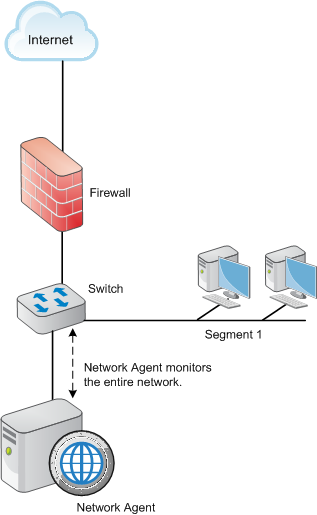
      <div class="B-Body"><a name="602071">A single segment network is a series of logically connected nodes (computers, printers, and so on) operating in the same portion of the network. In a single segment network, Filtering Service and Network Agent must be positioned to monitor Internet traffic across the entire network.</a></div>
      <div class="B-Body"><a name="602072">The following illustration shows the filtering components in a stand-alone Web Security deployment, installed in a central location to see both HTTP and non-HTTP traffic.</a></div>
      <div class="F-Frame"><a name="601996"><img class="Default" src="images/na_one_segment.png" width="317" height="515" style="display: block; float: none; left: 0.0; top: 0.0" alt="" /></a></div>
      <div class="N2HN-HeadNoTopic2">
        <span class="Heading_Number"></span><a name="602149">Locating Network Agent in a multiple-segment network</a></div>
      <div class="B-Body"><a name="602176">Depending on the device used to connect network segments, some traffic may not be sent to all segments. A router, bridge, or smart hub serves as traffic control, preventing unneeded traffic from being sent to a segment. In this environment:</a></div>
      <div class="B1-Bullet1_outer" style="margin-left: 0pt">
        <table border="0" cellspacing="0" cellpadding="0" summary="" role="presentation">
          <tr style="vertical-align: baseline">
            <td>
              <div class="B1-Bullet1_inner" style="width: 18pt; white-space: nowrap">
                <img src="b1.png" alt="*" border="0" width="8" height="8" />
              </div>
            </td>
            <td width="100%">
              <div class="B1-Bullet1_inner"><a name="602177">Filtering Service must be installed where it can receive and manage Internet requests from Network Agent and any integration product. </a></div>
            </td>
          </tr>
        </table>
      </div>
      <div class="B1-Bullet1_outer" style="margin-left: 0pt">
        <table border="0" cellspacing="0" cellpadding="0" summary="" role="presentation">
          <tr style="vertical-align: baseline">
            <td>
              <div class="B1-Bullet1_inner" style="width: 18pt; white-space: nowrap">
                <img src="b1.png" alt="*" border="0" width="8" height="8" />
              </div>
            </td>
            <td width="100%">
              <div class="B1-Bullet1_inner"><a name="602179">Each Network Agent instance must be able to see all Internet requests on the segment or segments that it is configured to monitor. </a></div>
            </td>
          </tr>
        </table>
      </div>
      <div class="B-Body"><a name="602212">Multiple Network Agent instances may be needed to capture all Internet requests. A Network Agent can be installed on each segment to monitor the Internet requests from that segment.</a></div>
      <div class="F-Frame"><a name="602213"> </a></div>
      <table class="NoteTable" style="text-align: left" border="0" cellpadding="1" cellspacing="0" summary="">
        <caption></caption>
        <tr>
          <td style="padding-bottom: 3.5pt; padding-left: 4pt; padding-right: 4pt; padding-top: 4.5pt; vertical-align: top; width: 36pt">
            <div class="NI-NoteIcon">
              <img src="note.gif" alt="*" border="0" width="33" height="33" /><a name="602247">&nbsp;</a></div>
          </td>
          <td style="padding-bottom: 3.5pt; padding-left: 4pt; padding-right: 4pt; padding-top: 4.5pt; vertical-align: top; width: 266.4pt">
            <div class="N-Note">Note<a name="602249">&nbsp;</a></div>
            <div class="NT-NoteText"><a name="602266">A limit of 4 Network Agents is suggested for each Filtering Service. It may be possible to use more agent instances, depending on system and network configuration and the volume of Internet requests.</a></div>
          </td>
        </tr>
      </table>
      <div class="B-Body"><a name="602217">If multiple Network Agent instances are installed:</a></div>
      <div class="B1-Bullet1_outer" style="margin-left: 0pt">
        <table border="0" cellspacing="0" cellpadding="0" summary="" role="presentation">
          <tr style="vertical-align: baseline">
            <td>
              <div class="B1-Bullet1_inner" style="width: 18pt; white-space: nowrap">
                <img src="b1.png" alt="*" border="0" width="8" height="8" />
              </div>
            </td>
            <td width="100%">
              <div class="B1-Bullet1_inner"><a name="602218">Ensure that the instances are deployed so that, together, they monitor the entire network. Partial deployment results in incomplete filtering and loss of log data in network segments not visible to Network Agent.</a></div>
            </td>
          </tr>
        </table>
      </div>
      <div class="B1-Bullet1_outer" style="margin-left: 0pt">
        <table border="0" cellspacing="0" cellpadding="0" summary="" role="presentation">
          <tr style="vertical-align: baseline">
            <td>
              <div class="B1-Bullet1_inner" style="width: 18pt; white-space: nowrap">
                <img src="b1.png" alt="*" border="0" width="8" height="8" />
              </div>
            </td>
            <td width="100%">
              <div class="B1-Bullet1_inner"><a name="602220">Each Network Agent instance must monitor a non-overlapping set of IP addresses. An overlap can result in inaccurate logging and network bandwidth measurements, and improper bandwidth-based filtering.</a></div>
            </td>
          </tr>
        </table>
      </div>
      <div class="I-IndentedText"><a name="602222">The network segment or IP address range monitored by each Network Agent instance is determined by the NIC settings for the agent, configured in TRITON&nbsp;- Web Security. See the TRITON&nbsp;- Web Security Help for instructions.</a></div>
      <div class="B1-Bullet1_outer" style="margin-left: 0pt">
        <table border="0" cellspacing="0" cellpadding="0" summary="" role="presentation">
          <tr style="vertical-align: baseline">
            <td>
              <div class="B1-Bullet1_inner" style="width: 18pt; white-space: nowrap">
                <img src="b1.png" alt="*" border="0" width="8" height="8" />
              </div>
            </td>
            <td width="100%">
              <div class="B1-Bullet1_inner"><a name="602223">Avoid deploying Network Agent across different LANs. If you install Network Agent on a machine in the 10.22.x.x network, and configure it to communicate with a Filtering Service machine in the 10.30.x.x network, communication may be slow enough to prevent Network Agent from blocking an Internet request before the site is returned to the user. </a></div>
            </td>
          </tr>
        </table>
      </div>
      <div class="N3HN-HeadNoTopic3"><a name="602224">Central Network Agent placement</a></div>
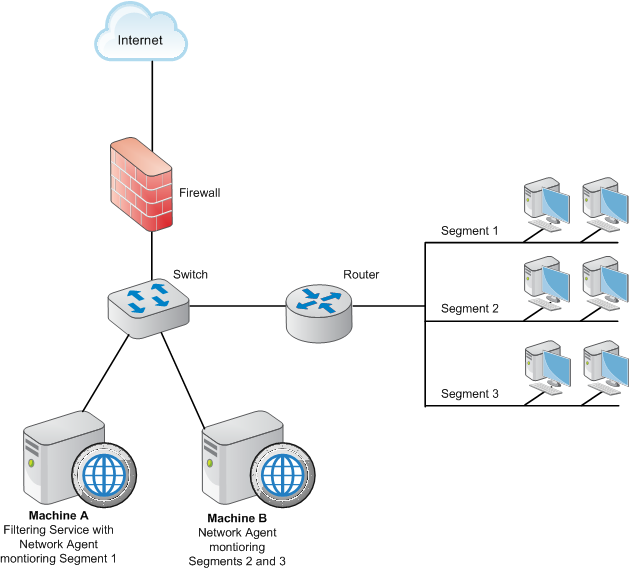
      <div class="B-Body"><a name="602451">A network with multiple segments can be filtered from a single location. Install Filtering Service where it can receive Internet requests from each Network Agent and any integration product.</a></div>
      <div class="B-Body"><a name="602452">If the network contains multiple switches, Network Agent instances are inserted into the network at the last switch in the series. This switch must be connected to the gateway that goes out to the Internet.</a></div>
      <div class="B-Body"><a name="602453">In the following illustration:</a></div>
      <div class="B1-Bullet1_outer" style="margin-left: 0pt">
        <table border="0" cellspacing="0" cellpadding="0" summary="" role="presentation">
          <tr style="vertical-align: baseline">
            <td>
              <div class="B1-Bullet1_inner" style="width: 18pt; white-space: nowrap">
                <img src="b1.png" alt="*" border="0" width="8" height="8" />
              </div>
            </td>
            <td width="100%">
              <div class="B1-Bullet1_inner"><a name="602454">One Network Agent instance is installed with Filtering Service on Machine A. This machine is connected to the network via a switch that is configured to mirror or span the traffic of network Segment 1. </a></div>
            </td>
          </tr>
        </table>
      </div>
      <div class="B1-Bullet1_outer" style="margin-left: 0pt">
        <table border="0" cellspacing="0" cellpadding="0" summary="" role="presentation">
          <tr style="vertical-align: baseline">
            <td>
              <div class="B1-Bullet1_inner" style="width: 18pt; white-space: nowrap">
                <img src="b1.png" alt="*" border="0" width="8" height="8" />
              </div>
            </td>
            <td width="100%">
              <div class="B1-Bullet1_inner"><a name="602456">A second Network Agent is installed on Machine B, which is connected to the same switch as Machine A. Machine B is connected to a different port that is configured to mirror the traffic of Segments 2 and 3. </a></div>
            </td>
          </tr>
        </table>
      </div>
      <div class="B1-Bullet1_outer" style="margin-left: 0pt">
        <table border="0" cellspacing="0" cellpadding="0" summary="" role="presentation">
          <tr style="vertical-align: baseline">
            <td>
              <div class="B1-Bullet1_inner" style="width: 18pt; white-space: nowrap">
                <img src="b1.png" alt="*" border="0" width="8" height="8" />
              </div>
            </td>
            <td width="100%">
              <div class="B1-Bullet1_inner"><a name="602458">Each Network Agent is positioned to see all traffic for the network segment it monitors, and to communicate with other Websense components. </a></div>
            </td>
          </tr>
        </table>
      </div>
      <div class="B1-Bullet1_outer" style="margin-left: 0pt">
        <table border="0" cellspacing="0" cellpadding="0" summary="" role="presentation">
          <tr style="vertical-align: baseline">
            <td>
              <div class="B1-Bullet1_inner" style="width: 18pt; white-space: nowrap">
                <img src="b1.png" alt="*" border="0" width="8" height="8" />
              </div>
            </td>
            <td width="100%">
              <div class="B1-Bullet1_inner"><a name="602460">The switch is connected to the gateway, allowing the Network Agent instances to monitor network traffic for all network segments. </a></div>
            </td>
          </tr>
        </table>
      </div>
      <div class="F-Frame"><a name="602461"><img class="Default" src="images/na_multiple_segments.png" width="629" height="569" style="display: block; float: none; left: 0.0; top: 0.0" alt="" /></a></div>
      <div class="N3HN-HeadNoTopic3"><a name="602166">Distributed Network Agent placement</a></div>
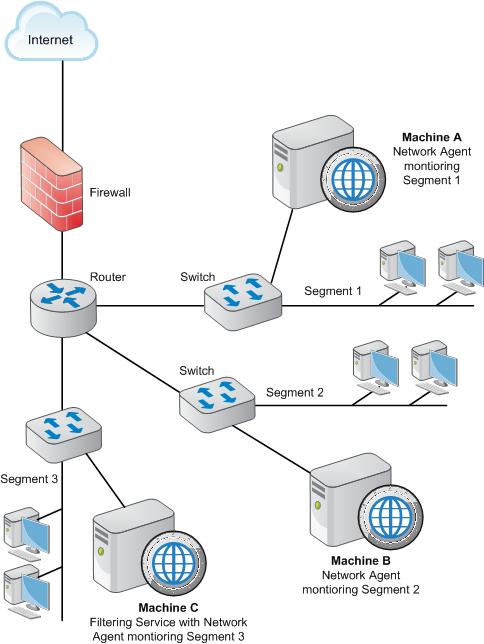
      <div class="B-Body"><a name="602544">The network diagram below shows a single Filtering Service with 3 Network Agents, one for each network segment. A deployment like this might be useful in organizations with satellite offices, for example.</a></div>
      <div class="B1-Bullet1_outer" style="margin-left: 0pt">
        <table border="0" cellspacing="0" cellpadding="0" summary="" role="presentation">
          <tr style="vertical-align: baseline">
            <td>
              <div class="B1-Bullet1_inner" style="width: 18pt; white-space: nowrap">
                <img src="b1.png" alt="*" border="0" width="8" height="8" />
              </div>
            </td>
            <td width="100%">
              <div class="B1-Bullet1_inner"><a name="602545">Filtering Service (Machine C) must be installed where it is able to receive and manage Internet requests from each Network Agent instance and any integration product.</a></div>
            </td>
          </tr>
        </table>
      </div>
      <div class="B1-Bullet1_outer" style="margin-left: 0pt">
        <table border="0" cellspacing="0" cellpadding="0" summary="" role="presentation">
          <tr style="vertical-align: baseline">
            <td>
              <div class="B1-Bullet1_inner" style="width: 18pt; white-space: nowrap">
                <img src="b1.png" alt="*" border="0" width="8" height="8" />
              </div>
            </td>
            <td width="100%">
              <div class="B1-Bullet1_inner"><a name="602547">Each Network Agent (machines A, B and C) is connected to the network segment it monitors via the switch's span or mirror port.</a></div>
            </td>
          </tr>
        </table>
      </div>
      <div class="B-Body"><a name="602671">In the following illustration, the switches are not connected in a series. However, each switch is connected to the router, which is connected to the gateway.</a></div>
      <div class="F-Frame"><a name="602675"><img class="Default" src="images/na_distributed.png" width="484" height="644" style="display: block; float: none; left: 0.0; top: 0.0" alt="" /></a></div>
      <div class="N2HN-HeadNoTopic2">
        <span class="Heading_Number"></span><a name="603226">Network Agent on a gateway</a></div>
      <div class="B-Body"><a name="603258">A gateway provides a connection between two networks. The networks do not need to use the same network communication protocol. The gateway can also connect a network to the Internet.</a></div>
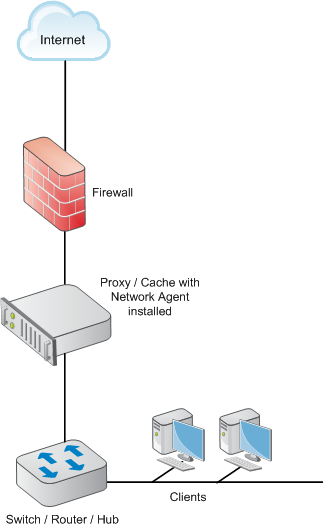
      <div class="B-Body"><a name="603259">Network Agent can be installed on the gateway machine, allowing Network Agent to manage and monitor all Internet traffic. The gateway can either be a third-party proxy server or a network appliance.</a></div>
      <div class="B-Body"><a name="603412">Do not install Network Agent on a firewall. Also, if your network includes a software installation of Content Gateway, do not install Network Agent on the Content Gateway machine. (Content Gateway and Network Agent can reside on the same V-Series appliance.)</a></div>
      <div class="B-Body"><a name="603286">The following illustration shows Network Agent monitoring the Internet traffic at the proxy gateway or caching appliance directly attached to the firewall.</a></div>
      <div class="F-Frame"><a name="603244">&nbsp;</a></div>
      <table class="ImpTable" style="text-align: left" border="0" cellpadding="1" cellspacing="0" summary="">
        <caption></caption>
        <tr>
          <td style="padding-bottom: 3.5pt; padding-left: 4pt; padding-right: 4pt; padding-top: 4.5pt; vertical-align: top; width: 36pt">
            <div class="II-ImpIcon">
              <img src="important.gif" alt="*" border="0" width="30" height="34" /><a name="603438">&nbsp;</a></div>
          </td>
          <td style="padding-bottom: 3.5pt; padding-left: 4pt; padding-right: 4pt; padding-top: 4.5pt; vertical-align: top; width: 266.4pt">
            <div class="IMP-Important">
              <span class="Bold">Important</span><a name="603440">&nbsp;</a></div>
            <div class="NT-NoteText"><a name="603441">The gateway configuration shown here is best used in small to medium networks.</a></div>
            <div class="NT-NoteText"><a name="603442">In larger networks, performance can suffer as a result of resource competition between the gateway software and Network Agent.</a></div>
          </td>
        </tr>
      </table>
      <div class="F-Frame"><a name="603465"><img class="Default" src="images/na_gateway.png" width="323" height="527" style="display: block; float: none; left: 0.0; top: 0.0" alt="" /></a></div>
    </div>
    <!--googleoff: all-->
    <div class="library_search">
      <form class="support_search" action="/content/kb-search.aspx" method="get">
        <label></label>
        <label></label>
        <input type="text" name="q" value=" Search eSupport" onfocus="if (this.value == ' Search eSupport') {this.value = '';}" onblur="if (this.value == '') {this.value = ' Search eSupport';}"></input>
        <input type="submit" value=" "></input>
      </form>
    </div>
    <br class="clear" />
    <!-- New Navigation DIV -->
    <div class="TL_nav" style="text-align: left;">
      <table cellspacing="0" class="toolBarTable" summary="">
        <!-- End New Navigation DIV -->
        <tr>
          <td>
            <!-- New Go To TOC -->
            <a href="toc.aspx"><img src="images/toc.png" alt="Go to the table of contents" border="0" /></a>
            <!-- End Go To TOC -->
          </td>
          <td>
            <!-- New Previous -->
            <a href="dic_dep_na.aspx"><img src="images/prev.png" alt="Go to the previous page" border="0" /></a>
            <!-- End New Previous -->
          </td>
          <td>
            <!-- New Next (Active) -->
            <a href="dic_ws_rfs_n_clnt.aspx"><img src="images/next.png" alt="Go to the next page" border="0" /></a>
            <!-- End New Next (Active) -->
          </td>
          <!--Start JR breadcrumbs -->
          <td width="20px"></td>
          <td>
            <div class="WebWorks_Breadcrumbs" style="text-align: left;">
              <a class="WebWorks_Breadcrumb_Link" href="dic_dep_rec_ws.aspx">Web Security Deployment Recommendations</a> &gt; Positioning Network Agent in the network</div>
          </td>
          <!--End JR breadcrumbs -->
        </tr>
      </table>
    </div>
    <div class="extFooterContainer">
      <div class="extFooter">
        <div align="center">Copyright 2016 Forcepoint LLC. All rights reserved.</div>
      </div>
    </div>
    <SCRIPT>
   function getFileName() {
      //this gets the full url
      var url = document.location.href;
      //this removes the anchor at the end, if there is one
      url = url.substring(0, (url.indexOf("#") == -1) ? url.length : url.indexOf("#"));
      //this removes the query after the file name, if there is one
      url = url.substring(0, (url.indexOf("?") == -1) ? url.length : url.indexOf("?"));
      //this removes everything before the last slash in the path
      url = url.substring(url.lastIndexOf("/") + 1, url.length);
      //return
      return url;
   }

   var url = document.URL;
   var Docname = getFileName()
   s.pageName = "enu:support:technical library:dic77:" + Docname;
   s.prop1 = "enu:support";
   s.prop2 = "enu:support:technical library";
   s.channel = "support";
   // <!--
   s.server = "<%= System.Environment.MachineName %>";
   //--></SCRIPT>
    <script language="javascript1.1" type="text/javascript">
   /********Do Not alter below this line ***********/
   var s_code = s.t(); if (s_code) document.write(s_code)
   //--&gt;</script>
  </body>
  <!--"GENERALQUARTERSALLHANDSMANYOURSTATIONS"-->
</html>