<?xml version="1.0" encoding="utf-8"?>
<!DOCTYPE html PUBLIC "-//W3C//DTD XHTML 1.0 Transitional//EN" "http://www.w3.org/TR/xhtml1/DTD/xhtml1-transitional.dtd">
<html xml:lang="en" lang="en" xmlns="http://www.w3.org/1999/xhtml">
  <head runat="server">
    <!-- PageID 382 - published by RedDot 7.5 - 7.5.1.69 - 22111 -->
    <META name="PublicArticle" content="True" />
    <META http-equiv="Content-Type" content="text/html; charset=utf-8" />
    <META name="keywords" />
    <META name="summary" />
    <META name="product" content="apdata,apemail,apweb,webfs,V_Series,X_Series,V5K,V10K,X10G" />
    <META name="version" content="v82" />
    <META name="book" content="Deployment and Installation Center" />
    <title>Managing Internet requests from Citrix server users</title>
    <!--Loading the 2016 fonts.-->
    <script type="text/javascript" src="//fast.fonts.net/jsapi/c504d579-e135-4f75-8335-4906f6c6ce67.js"></script>
    <!--Library content styles.-->
    <link rel="StyleSheet" href="https://help.forcepoint.com/docs/ni/assets/css/help2016.css" type="text/css" media="all" />
    <!--2016 font support -->
    <link type="text/css" rel="stylesheet" href="//fast.fonts.net/cssapi/c504d579-e135-4f75-8335-4906f6c6ce67.css" />
  </head>
  <body>
    <!--googleoff: all-->
    <a href="https://www.forcepoint.com">
      <img class="logo" alt="Forcepoint logo" src="https://help.forcepoint.com/docs/ni/assets/logo1.png" />
    </a>
    <div class="extLinksContainer">
      <a class="extLinks" href="https://help.forcepoint.com/docs/technical-library.aspx">Technical Library</a> | <a class="extLinks" href="http://www.websense.com/content/support.aspx?intcmp=nav-mm-support#/?intcmp=nav-mm-support">Support</a></div>
    <!--
		<wsApp:UserAccess ID="useraccess1" runat="server" IsSecure="False" />
		-->
    <div class="spacer1"></div>
    <br />
    <!-- New Navigation DIV -->
    <div class="TL_nav" style="text-align: left;">
      <table cellspacing="0" class="toolBarTable" summary="">
        <!-- End New Navigation DIV -->
        <tr>
          <td>
            <!-- New Go To TOC -->
            <a href="toc.aspx"><img src="images/toc.png" alt="Go to the table of contents" border="0" /></a>
            <!-- End Go To TOC -->
          </td>
          <td>
            <!-- New Previous -->
            <a href="dic_citrix_int.aspx"><img src="images/prev.png" alt="Go to the previous page" border="0" /></a>
            <!-- End New Previous -->
          </td>
          <td>
            <!-- New Next (Active) -->
            <a href="dic_citrix_inst.aspx"><img src="images/next.png" alt="Go to the next page" border="0" /></a>
            <!-- End New Next (Active) -->
          </td>
          <!--Start JR breadcrumbs -->
          <td width="20px"></td>
          <td>
            <div class="WebWorks_Breadcrumbs" style="text-align: left;">
              <a class="WebWorks_Breadcrumb_Link" href="dic_citrix_int.aspx">Integrating Web Filter &amp; Security with Citrix</a> &gt; Managing Internet requests from Citrix server users</div>
          </td>
          <!--End JR breadcrumbs -->
        </tr>
      </table>
    </div>
    <!--googleon: all-->
    <div>
      <div class="N1H-Heading1"><a name="608853">Managing Internet requests from Citrix server users</a></div>
      <div class="IN-TopicInfo"><a name="603739">Deployment and Installation Center&nbsp;| Web Filter &amp; Security&nbsp;| v8.2.x</a></div>
      <table class="BodyTable" style="text-align: left" summary="">
        <caption></caption>
        <tr>
          <td style="border-bottom-color: #808080; border-bottom-style: solid; border-bottom-width: thin; border-left-color: #808080; border-left-style: solid; border-left-width: thin; border-right-color: #808080; border-right-style: solid; border-right-width: thin; border-top-color: #808080; border-top-style: solid; border-top-width: thin; padding-bottom: 3.5pt; padding-left: 6pt; padding-right: 6pt; padding-top: 4.5pt; vertical-align: top">
            <div class="CHD-CellHeadDark"><span style="color: #000000; font-style: normal; font-variant: normal; font-weight: bold; text-transform: none; vertical-align: baseline"><a name="620023">In&nbsp;this&nbsp;topic&nbsp;&nbsp;&nbsp;&nbsp;&nbsp;&nbsp;&nbsp;&nbsp;&nbsp;&nbsp;&nbsp;&nbsp;&nbsp;&nbsp;&nbsp;&nbsp;&nbsp;&nbsp;&nbsp;&nbsp;&nbsp;&nbsp;&nbsp;&nbsp;&nbsp;&nbsp;&nbsp;&nbsp;&nbsp;&nbsp;&nbsp;&nbsp;&nbsp;&nbsp;&nbsp;&nbsp;&nbsp;&nbsp;&nbsp;</a></span></div>
          </td>
        </tr>
        <tr>
          <td style="border-bottom-color: #808080; border-bottom-style: solid; border-bottom-width: thin; border-left-color: #808080; border-left-style: solid; border-left-width: thin; border-right-color: #808080; border-right-style: solid; border-right-width: thin; border-top-color: #808080; border-top-style: solid; border-top-width: thin; padding-bottom: 3.5pt; padding-left: 6pt; padding-right: 6pt; padding-top: 4.5pt; vertical-align: top">
            <div class="B1-Bullet1_outer" style="margin-left: 0pt">
              <table border="0" cellspacing="0" cellpadding="0" summary="" role="presentation">
                <tr style="vertical-align: baseline">
                  <td>
                    <div class="B1-Bullet1_inner" style="width: 18pt; white-space: nowrap">
                      <img src="b1.png" alt="*" border="0" width="8" height="8" />
                    </div>
                  </td>
                  <td width="100%">
                    <div class="B1-Bullet1_inner"><span class="LEM-LinkEmphasis"><a href="#598014" title="Managing Internet requests from Citrix server users" name="620027">Managing Internet requests for both Citrix and non-Citrix users</a></span></div>
                  </td>
                </tr>
              </table>
            </div>
          </td>
        </tr>
      </table>
      <div class="B-Body"><a name="597991">When Web Filter &amp; Security is integrated with Citrix:</a></div>
      <div class="B1-Bullet1_outer" style="margin-left: 0pt">
        <table border="0" cellspacing="0" cellpadding="0" summary="" role="presentation">
          <tr style="vertical-align: baseline">
            <td>
              <div class="B1-Bullet1_inner" style="width: 18pt; white-space: nowrap">
                <img src="b1.png" alt="*" border="0" width="8" height="8" />
              </div>
            </td>
            <td width="100%">
              <div class="B1-Bullet1_inner"><a name="597992">A recommended maximum of 10 Citrix servers can connected to one Filtering Service instance. This number can be configured and depends on the user load.</a></div>
            </td>
          </tr>
        </table>
      </div>
      <div class="I-IndentedText"><a name="611498">Multiple Filtering Service instances are needed if more than 15 Citrix servers are used, with each Citrix server handling about 20 to 30 Citrix users.</a></div>
      <div class="B1-Bullet1_outer" style="margin-left: 0pt">
        <table border="0" cellspacing="0" cellpadding="0" summary="" role="presentation">
          <tr style="vertical-align: baseline">
            <td>
              <div class="B1-Bullet1_inner" style="width: 18pt; white-space: nowrap">
                <img src="b1.png" alt="*" border="0" width="8" height="8" />
              </div>
            </td>
            <td width="100%">
              <div class="B1-Bullet1_inner"><a name="597994">The Filtering Service and Network Agent monitoring Citrix traffic should be installed on a dedicated machine, and not on a Citrix server.</a></div>
            </td>
          </tr>
        </table>
      </div>
      <div class="B1-Bullet1_outer" style="margin-left: 0pt">
        <table border="0" cellspacing="0" cellpadding="0" summary="" role="presentation">
          <tr style="vertical-align: baseline">
            <td>
              <div class="B1-Bullet1_inner" style="width: 18pt; white-space: nowrap">
                <img src="b1.png" alt="*" border="0" width="8" height="8" />
              </div>
            </td>
            <td width="100%">
              <div class="B1-Bullet1_inner"><a name="615153">Separate Filtering Service and Network Agent instances must be used to monitor non-Citrix traffic.</a></div>
            </td>
          </tr>
        </table>
      </div>
      <div class="B1-Bullet1_outer" style="margin-left: 0pt">
        <table border="0" cellspacing="0" cellpadding="0" summary="" role="presentation">
          <tr style="vertical-align: baseline">
            <td>
              <div class="B1-Bullet1_inner" style="width: 18pt; white-space: nowrap">
                <img src="b1.png" alt="*" border="0" width="8" height="8" />
              </div>
            </td>
            <td width="100%">
              <div class="B1-Bullet1_inner"><a name="597995">The Filtering Service and Network Agent instances monitoring Citrix traffic use the same Policy Broker, Policy Server, User Service, and other components as the Filtering Service and Network Agent instances used to monitor non-Citrix traffic.</a></div>
            </td>
          </tr>
        </table>
      </div>
      <div class="B1-Bullet1_outer" style="margin-left: 0pt">
        <table border="0" cellspacing="0" cellpadding="0" summary="" role="presentation">
          <tr style="vertical-align: baseline">
            <td>
              <div class="B1-Bullet1_inner" style="width: 18pt; white-space: nowrap">
                <img src="b1.png" alt="*" border="0" width="8" height="8" />
              </div>
            </td>
            <td width="100%">
              <div class="B1-Bullet1_inner"><a name="597997">Do not configure a separate integration product to filter HTTP, HTTPS, FTP, or SSL requests from Citrix servers.</a></div>
            </td>
          </tr>
        </table>
      </div>
      <div class="I-IndentedText"><a name="597998">If you want to use Network Agent to manage other protocol traffic from the Citrix servers:</a></div>
      <div class="B2-Bullet2_outer" style="margin-left: 18pt">
        <table border="0" cellspacing="0" cellpadding="0" summary="" role="presentation">
          <tr style="vertical-align: baseline">
            <td>
              <div class="B2-Bullet2_inner" style="width: 18pt; white-space: nowrap">
                <img src="b2.png" alt="*" border="0" width="8" height="7" />
              </div>
            </td>
            <td width="100%">
              <div class="B2-Bullet2_inner"><a name="597999">Network Agent must be located where it can see all of the traffic between the Citrix servers and Filtering Service instances. For example, the machine running Network Agent could be connected to a span port on the same network switch as the machines running Filtering Service.</a></div>
            </td>
          </tr>
        </table>
      </div>
      <div class="B2-Bullet2_outer" style="margin-left: 18pt">
        <table border="0" cellspacing="0" cellpadding="0" summary="" role="presentation">
          <tr style="vertical-align: baseline">
            <td>
              <div class="B2-Bullet2_inner" style="width: 18pt; white-space: nowrap">
                <img src="b2.png" alt="*" border="0" width="8" height="7" />
              </div>
            </td>
            <td width="100%">
              <div class="B2-Bullet2_inner"><a name="598000">If the Citrix server is configured to use virtual IP addresses, configure Network Agent to monitor the entire range of the IP addresses. Also, a single policy should be set for this range. See the "Network Configuration" topic in the </a><span class="URL-URL"><a href="https://help.forcepoint.com/docs/web/v82/triton_web_help/first.aspx" target="external_window">Administrator Help</a></span> for instructions on configuring IP address ranges for Network Agent.</div>
            </td>
          </tr>
        </table>
      </div>
      <div class="B2-Bullet2_outer" style="margin-left: 18pt">
        <table border="0" cellspacing="0" cellpadding="0" summary="" role="presentation">
          <tr style="vertical-align: baseline">
            <td>
              <div class="B2-Bullet2_inner" style="width: 18pt; white-space: nowrap">
                <img src="b2.png" alt="*" border="0" width="8" height="7" />
              </div>
            </td>
            <td width="100%">
              <div class="B2-Bullet2_inner"><a name="598001">If you have standalone instances of Filtering Service (not configured to integrate with Citrix or any other integration product), use a dedicated instance of Network Agent to monitor users of the Citrix servers. Do not monitor non-Citrix traffic with this Network Agent. </a></div>
            </td>
          </tr>
        </table>
      </div>
      <div class="I2-IndentedText2"><a name="611530">While Network Agent can be used to manages protocols for Citrix, user-based and group-based policies cannot be applied. Policies can be applied to individual computers and network ranges, identified by IP address or range. Otherwise, the Default policy is applied to all users.</a></div>
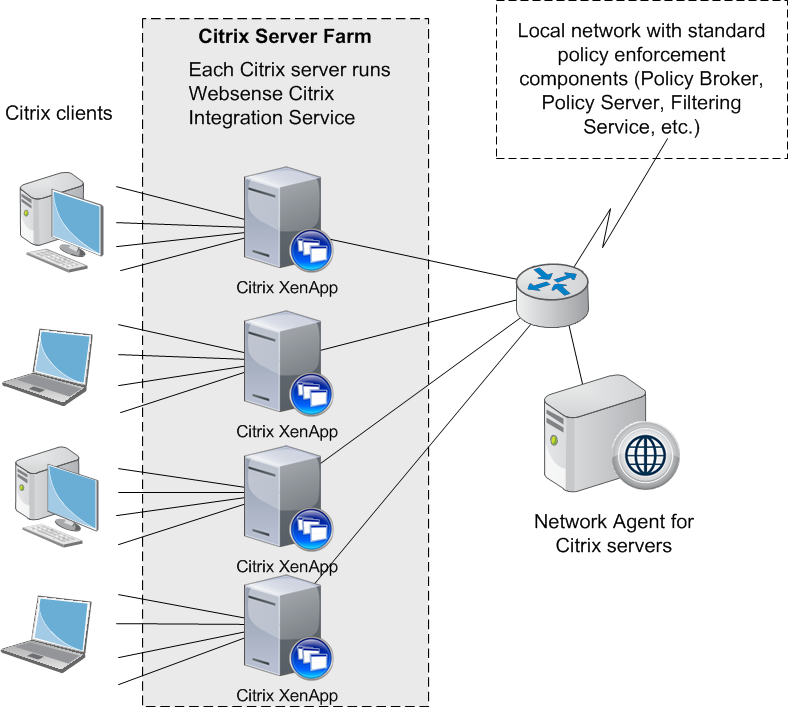
      <div class="B-Body"><a name="598004">This diagram shows a typical deployment to manage requests from users who access the Internet through a Citrix server. To simplify the diagram, not all components are shown.</a></div>
      <div class="F-Frame"><a name="601022"><img class="Default" src="images/citrix_deploy.png" width="788" height="707" style="display: block; float: none; left: 0.0; top: 0.0" alt="" /></a></div>
      <div class="B-Body"><a name="598012">The main web policy enforcement components are installed on a separate, dedicated machine that can communicate with all of the Citrix server machines, and non-Citrix users, if applicable. The Citrix Integration Service must be installed on each Citrix server to allow it to communicate with Filtering Service. No other web protection components should be installed on the Citrix server machines.</a></div>
      <div class="N2HN-HeadNoTopic2">
        <span class="Heading_Number"></span><a name="598014">Managing Internet requests for both Citrix and non-Citrix users</a></div>
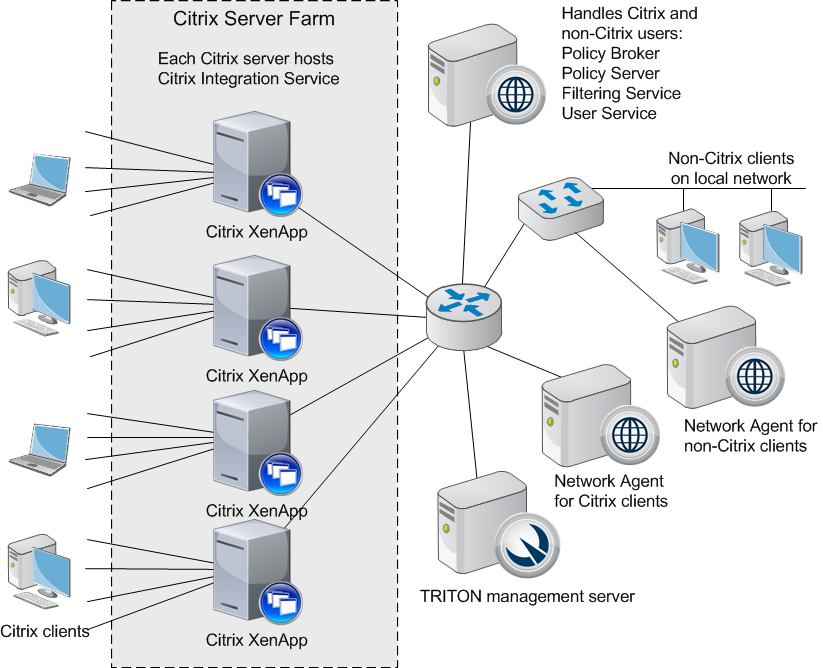
      <div class="B-Body"><a name="598015">If your network includes some users who access the Internet via a Citrix server, and others who access the Internet through another gateway (firewall, caching appliance, or proxy server), the integrations can be configured to work together.</a></div>
      <div class="F-Frame"><a name="609189"><img class="Default" src="images/citrix_integration.png" width="823" height="668" style="display: block; float: none; left: 0.0; top: 0.0" alt="" /></a></div>
      <div class="B1-Bullet1_outer" style="margin-left: 0pt">
        <table border="0" cellspacing="0" cellpadding="0" summary="" role="presentation">
          <tr style="vertical-align: baseline">
            <td>
              <div class="B1-Bullet1_inner" style="width: 18pt; white-space: nowrap">
                <img src="b1.png" alt="*" border="0" width="8" height="8" />
              </div>
            </td>
            <td width="100%">
              <div class="B1-Bullet1_inner"><a name="598019">To install the Citrix Integration Service on a Citrix Server, see </a><span class="LEM-LinkEmphasis"><a href="dic_citrix_inst.aspx" title="Citrix Integration Service installation overview">Citrix Integration Service installation overview</a></span>.</div>
            </td>
          </tr>
        </table>
      </div>
      <div class="B1-Bullet1_outer" style="margin-left: 0pt">
        <table border="0" cellspacing="0" cellpadding="0" summary="" role="presentation">
          <tr style="vertical-align: baseline">
            <td>
              <div class="B1-Bullet1_inner" style="width: 18pt; white-space: nowrap">
                <img src="b1.png" alt="*" border="0" width="8" height="8" />
              </div>
            </td>
            <td width="100%">
              <div class="B1-Bullet1_inner"><a name="598020">If you have Citrix users and non-Citrix users in your network, the same web proteciton components, except for Network Agent, can be used for both sets of users. A separate installation of Network Agent is needed for the Citrix users. See </a><span class="LEM-LinkEmphasis"><a href="dic_integratefs_citrix.aspx" title="Install Filtering Service and Network Agent to integrate with Citrix">Install Filtering Service and Network Agent to integrate with Citrix</a></span> for instructions.</div>
            </td>
          </tr>
        </table>
      </div>
      <div class="B1-Bullet1_outer" style="margin-left: 0pt">
        <table border="0" cellspacing="0" cellpadding="0" summary="" role="presentation">
          <tr style="vertical-align: baseline">
            <td>
              <div class="B1-Bullet1_inner" style="width: 18pt; white-space: nowrap">
                <img src="b1.png" alt="*" border="0" width="8" height="8" />
              </div>
            </td>
            <td width="100%">
              <div class="B1-Bullet1_inner"><a name="598028">To configure the web protection components installed with the non-Citrix integration to communicate with Citrix, refer to the section pertaining to your integration in </a><span class="LEM-LinkEmphasis"><a href="dic_citrix_init_set.aspx#598419" title="Initial Setup of Citrix integration">Combining Citrix with another integration</a></span>.</div>
            </td>
          </tr>
        </table>
      </div>
    </div>
    <!--googleoff: all-->
    <div class="library_search">
      <form class="support_search" action="/content/kb-search.aspx" method="get">
        <label></label>
        <label></label>
        <input type="text" name="q" value=" Search eSupport" onfocus="if (this.value == ' Search eSupport') {this.value = '';}" onblur="if (this.value == '') {this.value = ' Search eSupport';}"></input>
        <input type="submit" value=" "></input>
      </form>
    </div>
    <br class="clear" />
    <!-- New Navigation DIV -->
    <div class="TL_nav" style="text-align: left;">
      <table cellspacing="0" class="toolBarTable" summary="">
        <!-- End New Navigation DIV -->
        <tr>
          <td>
            <!-- New Go To TOC -->
            <a href="toc.aspx"><img src="images/toc.png" alt="Go to the table of contents" border="0" /></a>
            <!-- End Go To TOC -->
          </td>
          <td>
            <!-- New Previous -->
            <a href="dic_citrix_int.aspx"><img src="images/prev.png" alt="Go to the previous page" border="0" /></a>
            <!-- End New Previous -->
          </td>
          <td>
            <!-- New Next (Active) -->
            <a href="dic_citrix_inst.aspx"><img src="images/next.png" alt="Go to the next page" border="0" /></a>
            <!-- End New Next (Active) -->
          </td>
          <!--Start JR breadcrumbs -->
          <td width="20px"></td>
          <td>
            <div class="WebWorks_Breadcrumbs" style="text-align: left;">
              <a class="WebWorks_Breadcrumb_Link" href="dic_citrix_int.aspx">Integrating Web Filter &amp; Security with Citrix</a> &gt; Managing Internet requests from Citrix server users</div>
          </td>
          <!--End JR breadcrumbs -->
        </tr>
      </table>
    </div>
    <div class="extFooterContainer">
      <div class="extFooter">
        <div align="center">Copyright 2016 Forcepoint LLC. All rights reserved.</div>
      </div>
    </div>
    <SCRIPT>
   function getFileName() {
      //this gets the full url
      var url = document.location.href;
      //this removes the anchor at the end, if there is one
      url = url.substring(0, (url.indexOf("#") == -1) ? url.length : url.indexOf("#"));
      //this removes the query after the file name, if there is one
      url = url.substring(0, (url.indexOf("?") == -1) ? url.length : url.indexOf("?"));
      //this removes everything before the last slash in the path
      url = url.substring(url.lastIndexOf("/") + 1, url.length);
      //return
      return url;
   }

   var url = document.URL;
   var Docname = getFileName()
   s.pageName = "enu:support:technical library:dic82:" + Docname;
   s.prop1 = "enu:support";
   s.prop2 = "enu:support:technical library";
   s.channel = "support";
   // <!--
   s.server = "<%= System.Environment.MachineName %>";
   //--></SCRIPT>
    <script language="javascript1.1" type="text/javascript">
   /********Do Not alter below this line ***********/
   var s_code = s.t(); if (s_code) document.write(s_code)
   //--&gt;</script>
  </body>
  <!--"GENERALQUARTERSALLHANDSMANYOURSTATIONS"-->
</html>