<?xml version="1.0" encoding="utf-8"?>
<!DOCTYPE html PUBLIC "-//W3C//DTD XHTML 1.0 Transitional//EN" "http://www.w3.org/TR/xhtml1/DTD/xhtml1-transitional.dtd">
<html xml:lang="en" lang="en" xmlns="http://www.w3.org/1999/xhtml">
  <head runat="server">
    <!-- PageID 382 - published by RedDot 7.5 - 7.5.1.69 - 22111 -->
    <META name="PublicArticle" content="True" />
    <META http-equiv="Content-Type" content="text/html; charset=utf-8" />
    <META name="keywords" />
    <META name="summary" />
    <META name="product" content="apdata,apemail,apweb,webfs,V_Series,X_Series,V5K,V10K,X10G" />
    <META name="version" content="v82" />
    <META name="book" content="Deployment and Installation Center" />
    <title>TRITON Enterprise deployment overview</title>
    <!--Loading the 2016 fonts.-->
    <script type="text/javascript" src="//fast.fonts.net/jsapi/c504d579-e135-4f75-8335-4906f6c6ce67.js"></script>
    <!--Library content styles.-->
    <link rel="StyleSheet" href="https://help.forcepoint.com/docs/ni/assets/css/help2016.css" type="text/css" media="all" />
    <!--2016 font support -->
    <link type="text/css" rel="stylesheet" href="//fast.fonts.net/cssapi/c504d579-e135-4f75-8335-4906f6c6ce67.css" />
  </head>
  <body>
    <!--googleoff: all-->
    <a href="https://www.forcepoint.com">
      <img class="logo" alt="Forcepoint logo" src="https://help.forcepoint.com/docs/ni/assets/logo1.png" />
    </a>
    <div class="extLinksContainer">
      <a class="extLinks" href="https://help.forcepoint.com/docs/technical-library.aspx">Technical Library</a> | <a class="extLinks" href="http://www.websense.com/content/support.aspx?intcmp=nav-mm-support#/?intcmp=nav-mm-support">Support</a></div>
    <!--
		<wsApp:UserAccess ID="useraccess1" runat="server" IsSecure="False" />
		-->
    <div class="spacer1"></div>
    <br />
    <!-- New Navigation DIV -->
    <div class="TL_nav" style="text-align: left;">
      <table cellspacing="0" class="toolBarTable" summary="">
        <!-- End New Navigation DIV -->
        <tr>
          <td>
            <!-- New Go To TOC -->
            <a href="toc.aspx"><img src="images/toc.png" alt="Go to the table of contents" border="0" /></a>
            <!-- End Go To TOC -->
          </td>
          <td>
            <!-- New Previous -->
            <a href="dic_triton_deployment.aspx"><img src="images/prev.png" alt="Go to the previous page" border="0" /></a>
            <!-- End New Previous -->
          </td>
          <td>
            <!-- New Next (Active) -->
            <a href="dic_dep_rec_ws.aspx"><img src="images/next.png" alt="Go to the next page" border="0" /></a>
            <!-- End New Next (Active) -->
          </td>
          <!--Start JR breadcrumbs -->
          <td width="20px"></td>
          <td>
            <div class="WebWorks_Breadcrumbs" style="text-align: left;">
              <a class="WebWorks_Breadcrumb_Link" href="dic_triton_deployment.aspx">Deployment Planning for TRITON Solutions</a> &gt; TRITON Enterprise deployment overview</div>
          </td>
          <!--End JR breadcrumbs -->
        </tr>
      </table>
    </div>
    <!--googleon: all-->
    <div>
      <div class="N1H-Heading1"><a name="598301">TRITON Enterprise deployment overview</a></div>
      <div class="IN-TopicInfo"><a name="598486">Deployment and Installation Center&nbsp;| Web, Data, and Email Protection&nbsp;| v8.2.x</a></div>
      <div class="B-Body"><a name="598331">TRITON Enterprise includes TRITON AP-WEB, TRITON&nbsp;AP-DATA, and TRITON AP-EMAIL.</a></div>
      <div class="B1-Bullet1_outer" style="margin-left: 0pt">
        <table border="0" cellspacing="0" cellpadding="0" summary="" role="presentation">
          <tr style="vertical-align: baseline">
            <td>
              <div class="B1-Bullet1_inner" style="width: 18pt; white-space: nowrap">
                <img src="b1.png" alt="*" border="0" width="8" height="8" />
              </div>
            </td>
            <td width="100%">
              <div class="B1-Bullet1_inner"><a name="598332">The TRITON Manager, the management interface for web, data, and email advanced protection solutions, resides on a Windows server.</a></div>
            </td>
          </tr>
        </table>
      </div>
      <div class="B1-Bullet1_outer" style="margin-left: 0pt">
        <table border="0" cellspacing="0" cellpadding="0" summary="" role="presentation">
          <tr style="vertical-align: baseline">
            <td>
              <div class="B1-Bullet1_inner" style="width: 18pt; white-space: nowrap">
                <img src="b1.png" alt="*" border="0" width="8" height="8" />
              </div>
            </td>
            <td width="100%">
              <div class="B1-Bullet1_inner"><a name="598333">TRITON AP-WEB may be deployed on Forcepoint appliances, dedicated Windows or Linux servers, or a combination of platforms.</a></div>
            </td>
          </tr>
        </table>
      </div>
      <div class="B1-Bullet1_outer" style="margin-left: 0pt">
        <table border="0" cellspacing="0" cellpadding="0" summary="" role="presentation">
          <tr style="vertical-align: baseline">
            <td>
              <div class="B1-Bullet1_inner" style="width: 18pt; white-space: nowrap">
                <img src="b1.png" alt="*" border="0" width="8" height="8" />
              </div>
            </td>
            <td width="100%">
              <div class="B1-Bullet1_inner"><a name="598334">TRITON&nbsp;AP-DATA runs on Windows servers, optional protector appliances, and elsewhere in the network.</a></div>
            </td>
          </tr>
        </table>
      </div>
      <div class="B1-Bullet1_outer" style="margin-left: 0pt">
        <table border="0" cellspacing="0" cellpadding="0" summary="" role="presentation">
          <tr style="vertical-align: baseline">
            <td>
              <div class="B1-Bullet1_inner" style="width: 18pt; white-space: nowrap">
                <img src="b1.png" alt="*" border="0" width="8" height="8" />
              </div>
            </td>
            <td width="100%">
              <div class="B1-Bullet1_inner"><a name="598335">TRITON AP-EMAIL enforcement components reside only on Forcepoint appliances. Management and reporting components reside on Windows servers.</a></div>
            </td>
          </tr>
        </table>
      </div>
      <div class="N2HN-HeadNoTopic2">
        <span class="Heading_Number"></span><a name="598613">High-level deployment diagram</a></div>
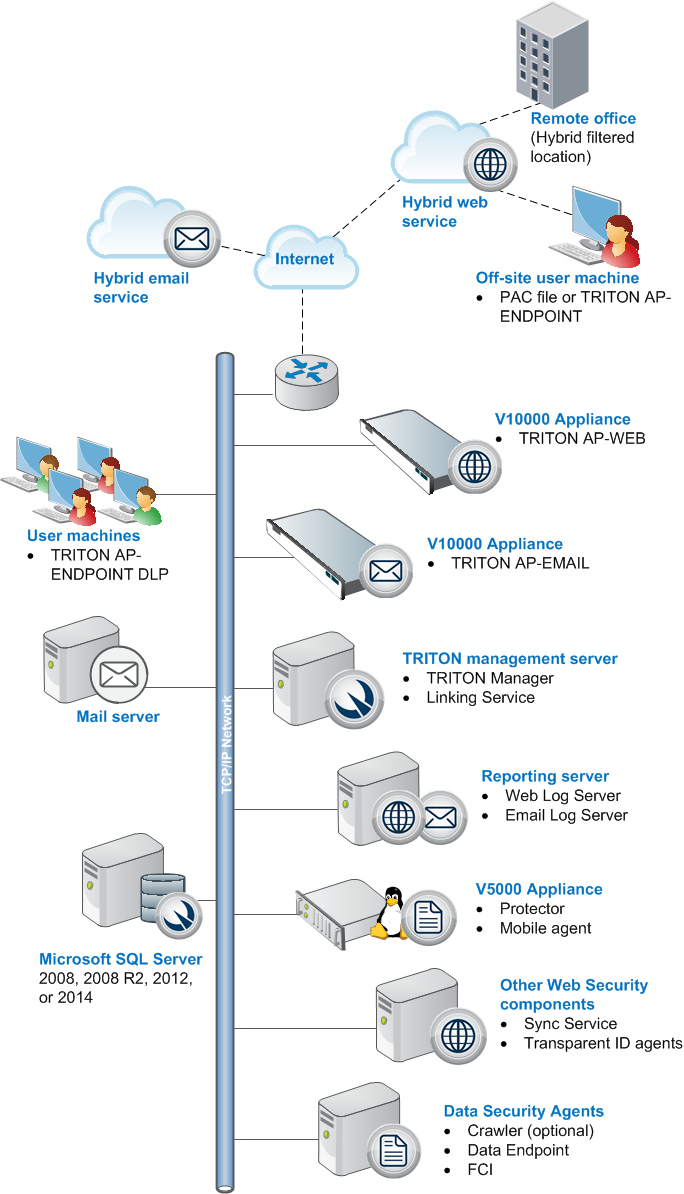
      <div class="B-Body"><a name="598336">The diagram shows an appliance-based deployment:</a></div>
      <div class="F-Frame"><a name="598340"><img class="Default" src="images/triton_ent_deploy.png" width="684" height="1194" style="display: block; float: none; left: 0.0; top: 0.0" alt="" /></a></div>
      <div class="N2HN-HeadNoTopic2">
        <span class="Heading_Number"></span><a name="598341">Remote office and off-site users</a></div>
      <div class="B-Body"><a name="598342">With the Web Hybrid module, you can use the hybrid service in the cloud to provide security for small remote offices. This is accomplished by designating a remote office as a hybrid filtered location.</a></div>
      <div class="B-Body"><a name="598346">The hybrid service can also provide policy enforcement and reporting for off-site users (e.g., telecommuters or traveling personnel).</a></div>
      <div class="B-Body"><a name="598347">To direct user requests to the hybrid service, you can install a PAC file or TRITON&nbsp;AP-ENDPOINT&nbsp;Web on the user's machine. Web requests from that machine are then directed to the hybrid service for policy enforcement.</a></div>
      <div class="N2HN-HeadNoTopic2">
        <span class="Heading_Number"></span><a name="598352">Hybrid services</a></div>
      <div class="B-Body"><a name="598353">If your subscription includes the Web Hybrid module and Email Hybrid module:</a></div>
      <div class="B1-Bullet1_outer" style="margin-left: 0pt">
        <table border="0" cellspacing="0" cellpadding="0" summary="" role="presentation">
          <tr style="vertical-align: baseline">
            <td>
              <div class="B1-Bullet1_inner" style="width: 18pt; white-space: nowrap">
                <img src="b1.png" alt="*" border="0" width="8" height="8" />
              </div>
            </td>
            <td width="100%">
              <div class="B1-Bullet1_inner"><a name="598354">The cloud-based hybrid web service can provide Internet security for remote offices and off-site users.</a></div>
            </td>
          </tr>
        </table>
      </div>
      <div class="B1-Bullet1_outer" style="margin-left: 0pt">
        <table border="0" cellspacing="0" cellpadding="0" summary="" role="presentation">
          <tr style="vertical-align: baseline">
            <td>
              <div class="B1-Bullet1_inner" style="width: 18pt; white-space: nowrap">
                <img src="b1.png" alt="*" border="0" width="8" height="8" />
              </div>
            </td>
            <td width="100%">
              <div class="B1-Bullet1_inner"><a name="598355">The cloud-based email hybrid service provides an extra layer of email scanning, stopping spam, virus, phishing, and other malware attacks before they reach your network and possibly reducing email bandwidth and storage requirements. You can also use the hybrid service to encrypt outbound email before delivery to its recipient.</a></div>
            </td>
          </tr>
        </table>
      </div>
      <div class="N2HN-HeadNoTopic2">
        <span class="Heading_Number"></span><a name="598356">TRITON AP-WEB and AP-EMAIL appliances</a></div>
      <div class="B-Body"><a name="598357">Forcepoint appliances may be used to deploy core web and email protection functionality.</a></div>
      <div class="B1-Bullet1_outer" style="margin-left: 0pt">
        <table border="0" cellspacing="0" cellpadding="0" summary="" role="presentation">
          <tr style="vertical-align: baseline">
            <td>
              <div class="B1-Bullet1_inner" style="width: 18pt; white-space: nowrap">
                <img src="b1.png" alt="*" border="0" width="8" height="8" />
              </div>
            </td>
            <td width="100%">
              <div class="B1-Bullet1_inner"><a name="598358">The Web Content Gateway proxy on the appliance manages web traffic. Both TRITON AP-WEB and AP-DATA include Content Gateways modules.</a></div>
            </td>
          </tr>
        </table>
      </div>
      <div class="B1-Bullet1_outer" style="margin-left: 0pt">
        <table border="0" cellspacing="0" cellpadding="0" summary="" role="presentation">
          <tr style="vertical-align: baseline">
            <td>
              <div class="B1-Bullet1_inner" style="width: 18pt; white-space: nowrap">
                <img src="b1.png" alt="*" border="0" width="8" height="8" />
              </div>
            </td>
            <td width="100%">
              <div class="B1-Bullet1_inner"><a name="602614">Incoming email flows from the email hybrid service (if enabled) to the Forcepoint appliance and to your mail server. The Forcepoint appliance also provides the Personal Email Manager facility for end users to manage quarantined email.</a></div>
            </td>
          </tr>
        </table>
      </div>
      <div class="N2HN-HeadNoTopic2">
        <span class="Heading_Number"></span><a name="602615">TRITON&nbsp;AP-DATA appliance</a></div>
      <div class="B-Body"><a name="602616">The TRITON AP-DATA appliance can be used in protector or mobile agent mode. The protector monitors and reports data loss and leaks of sensitive information. Using PreciseID technology, the protector can be configured to accurately monitor sensitive information-in-transit on any port.</a></div>
      <div class="B-Body"><a name="605419">The mobile agent monitors and blocks data downloaded to mobile devices that perform synchronization operations with the Exchange server. With the mobile agent, you can monitor and block data transmitted in email messages, calendar events, and tasks.</a></div>
      <div class="B-Body"><a name="605386">&nbsp;</a></div>
      <div class="N2HN-HeadNoTopic2">
        <span class="Heading_Number"></span><a name="598362">Components that may not be installed on Forcepoint appliances</a></div>
      <div class="N3HN-HeadNoTopic3"><a name="598363">TRITON management server</a></div>
      <div class="B-Body"><a name="598364">The TRITON management server is the Windows server on which the TRITON Manager (console) is installed. The TRITON console is the management and reporting interface for Forcepoint web, data, and email protection solutions. </a></div>
      <div class="B-Body"><a name="598365">The Data Security Management Server and, typically, Crawler also reside on the TRITON management server machine to provide key TRITON&nbsp;AP-DATA functions, including web and email DLP (data loss prevention) features.</a></div>
      <div class="B-Body"><a name="598366">Linking Service also usually resides on the management server. </a></div>
      <div class="N3HN-HeadNoTopic3"><a name="598367">Web and Email Log Server</a></div>
      <div class="B-Body"><a name="598368">A separate Windows machine hosts two instances of Log Server: one for TRITON AP-WEB and one for TRITON&nbsp;AP-DATA. These services receive information about web and email traffic and process it into their respective Log Database.</a></div>
      <div class="N3HN-HeadNoTopic3"><a name="598369">Optional web protection components</a></div>
      <div class="B-Body"><a name="598370">Sync Service and transparent identification agents (DC Agent, Logon Agent, eDirectory Agent, and RADIUS Agent) may not reside on Forcepoint appliances.</a></div>
      <div class="B-Body"><a name="598371">Also, you can install additional instances of several web protection components on Windows or Linux servers, if needed.</a></div>
      <div class="N3HN-HeadNoTopic3"><a name="598372">TRITON&nbsp;AP-DATA agents</a></div>
      <div class="B-Body"><a name="598373">The Crawler, FCI agent, and TRITON&nbsp;AP-ENDPOINT DLP are installed on appropriate machines.</a></div>
      <div class="B-Body"><a name="598377">See </a><span class="LEM-LinkEmphasis"><a href="dic_ds_main.aspx" title="Installing TRITON AP‑DATA">Installing TRITON&nbsp;AP-DATA</a></span> for details.</div>
      <div class="N3HN-HeadNoTopic3"><a name="598378">TRITON&nbsp;AP-ENDPOINT DLP (User Machine)</a></div>
      <div class="B-Body"><a name="598379">TRITON&nbsp;AP-ENDPOINT DLP</a><span class="URL-URL"> </span>can be installed on supported Windows, Mac, and Linux machines.</div>
      <div class="N2HN-HeadNoTopic2">
        <span class="Heading_Number"></span><a name="598380">Third-party components</a></div>
      <div class="N3HN-HeadNoTopic3"><a name="598381">Microsoft SQL Server</a></div>
      <div class="B-Body"><a name="598382">Microsoft SQL Server, running on a Windows server in your network, is used to store Forcepoint TRITON logging, reporting, and in some cased, configuration data. Quarantined email messages are also stored here.</a></div>
      <div class="B-Body"><a name="598383">When TRITON components are installed, SQL Server must be installed and running, typically on its own machine as shown in the diagram above. SQL Server Express (installed using the TRITON Unified Installer) may be used in small deployments or evaluation environments.</a></div>
      <div class="N3HN-HeadNoTopic3"><a name="598384">Mail server</a></div>
      <div class="B-Body"><a name="598385">Your internal mail server.</a></div>
    </div>
    <!--googleoff: all-->
    <div class="library_search">
      <form class="support_search" action="/content/kb-search.aspx" method="get">
        <label></label>
        <label></label>
        <input type="text" name="q" value=" Search eSupport" onfocus="if (this.value == ' Search eSupport') {this.value = '';}" onblur="if (this.value == '') {this.value = ' Search eSupport';}"></input>
        <input type="submit" value=" "></input>
      </form>
    </div>
    <br class="clear" />
    <!-- New Navigation DIV -->
    <div class="TL_nav" style="text-align: left;">
      <table cellspacing="0" class="toolBarTable" summary="">
        <!-- End New Navigation DIV -->
        <tr>
          <td>
            <!-- New Go To TOC -->
            <a href="toc.aspx"><img src="images/toc.png" alt="Go to the table of contents" border="0" /></a>
            <!-- End Go To TOC -->
          </td>
          <td>
            <!-- New Previous -->
            <a href="dic_triton_deployment.aspx"><img src="images/prev.png" alt="Go to the previous page" border="0" /></a>
            <!-- End New Previous -->
          </td>
          <td>
            <!-- New Next (Active) -->
            <a href="dic_dep_rec_ws.aspx"><img src="images/next.png" alt="Go to the next page" border="0" /></a>
            <!-- End New Next (Active) -->
          </td>
          <!--Start JR breadcrumbs -->
          <td width="20px"></td>
          <td>
            <div class="WebWorks_Breadcrumbs" style="text-align: left;">
              <a class="WebWorks_Breadcrumb_Link" href="dic_triton_deployment.aspx">Deployment Planning for TRITON Solutions</a> &gt; TRITON Enterprise deployment overview</div>
          </td>
          <!--End JR breadcrumbs -->
        </tr>
      </table>
    </div>
    <div class="extFooterContainer">
      <div class="extFooter">
        <div align="center">Copyright 2016 Forcepoint LLC. All rights reserved.</div>
      </div>
    </div>
    <SCRIPT>
   function getFileName() {
      //this gets the full url
      var url = document.location.href;
      //this removes the anchor at the end, if there is one
      url = url.substring(0, (url.indexOf("#") == -1) ? url.length : url.indexOf("#"));
      //this removes the query after the file name, if there is one
      url = url.substring(0, (url.indexOf("?") == -1) ? url.length : url.indexOf("?"));
      //this removes everything before the last slash in the path
      url = url.substring(url.lastIndexOf("/") + 1, url.length);
      //return
      return url;
   }

   var url = document.URL;
   var Docname = getFileName()
   s.pageName = "enu:support:technical library:dic82:" + Docname;
   s.prop1 = "enu:support";
   s.prop2 = "enu:support:technical library";
   s.channel = "support";
   // <!--
   s.server = "<%= System.Environment.MachineName %>";
   //--></SCRIPT>
    <script language="javascript1.1" type="text/javascript">
   /********Do Not alter below this line ***********/
   var s_code = s.t(); if (s_code) document.write(s_code)
   //--&gt;</script>
  </body>
  <!--"GENERALQUARTERSALLHANDSMANYOURSTATIONS"-->
</html>