<?xml version="1.0" encoding="utf-8"?>
<!DOCTYPE html PUBLIC "-//W3C//DTD XHTML 1.0 Transitional//EN" "http://www.w3.org/TR/xhtml1/DTD/xhtml1-transitional.dtd">
<html xml:lang="en" lang="en" xmlns="http://www.w3.org/1999/xhtml">
  <head runat="server">
    <!-- PageID 382 - published by RedDot 7.5 - 7.5.1.69 - 22111 -->
    <META name="PublicArticle" content="True" />
    <META http-equiv="Content-Type" content="text/html; charset=utf-8" />
    <META name="keywords" />
    <META name="summary" />
    <META name="product" content="fp_dlp,fp_email,fp_web,fp_filter,V5K,V10K,X10G" />
    <META name="version" content="v84" />
    <META name="book" content="Deployment and Installation Center" />
    <title>Web protection distributed deployment models</title>
    <!--Loading the 2016 fonts.-->
    <script type="text/javascript" src="//fast.fonts.net/jsapi/c504d579-e135-4f75-8335-4906f6c6ce67.js"></script>
    <!--Library content styles.-->
    <link rel="StyleSheet" href="https://help.forcepoint.com/docs/ni/assets/css/help2016.css" type="text/css" media="all" />
    <!--2016 font support -->
    <link type="text/css" rel="stylesheet" href="//fast.fonts.net/cssapi/c504d579-e135-4f75-8335-4906f6c6ce67.css" />
  </head>
  <body>
    <!--googleoff: all-->
    <a href="https://www.forcepoint.com">
      <img class="logo" alt="Forcepoint logo" src="https://help.forcepoint.com/docs/ni/assets/logo1.png" />
    </a>
    <div class="extLinksContainer">
      <a class="extLinks" href="//support.forcepoint.com/documentation">Documentation</a> | <a class="extLinks" href="//support.forcepoint.com">Support</a></div>
    <!--
		<wsApp:UserAccess ID="useraccess1" runat="server" IsSecure="False" />
		-->
    <div class="spacer1"></div>
    <br />
    <!-- New Navigation DIV -->
    <div class="TL_nav" style="text-align: left;">
      <table cellspacing="0" class="toolBarTable" summary="">
        <!-- End New Navigation DIV -->
        <tr>
          <td>
            <!-- New Go To TOC -->
            <a href="toc.aspx"><img src="images/toc.png" alt="Go to the table of contents" border="0" /></a>
            <!-- End Go To TOC -->
          </td>
          <td>
            <!-- New Previous -->
            <a href="dic_ws_fltr_rem_sites.aspx"><img src="images/prev.png" alt="Go to the previous page" border="0" /></a>
            <!-- End New Previous -->
          </td>
          <td>
            <!-- New Next (Active) -->
            <a href="dic_ws_sec_vpn.aspx"><img src="images/next.png" alt="Go to the next page" border="0" /></a>
            <!-- End New Next (Active) -->
          </td>
          <!--Start JR breadcrumbs -->
          <td width="20px"></td>
          <td>
            <div class="WebWorks_Breadcrumbs" style="text-align: left;">
              <a class="WebWorks_Breadcrumb_Link" href="dic_ws_dist_ent.aspx">Web protection distributed deployments</a> &gt; Web protection distributed deployment models</div>
          </td>
          <!--End JR breadcrumbs -->
        </tr>
      </table>
    </div>
    <!--googleon: all-->
    <div>
      <div class="N1H-Heading1"><a name="1008818">Web protection distributed deployment models</a></div>
      <div class="IN-TopicInfo"><a name="998920">Deployment and Installation Center&nbsp;| Web Protection Solutions&nbsp;| v8.4.x</a></div>
      <table class="BodyTable" style="text-align: left" summary="">
        <caption></caption>
        <tr>
          <td style="border-bottom-color: #808080; border-bottom-style: solid; border-bottom-width: thin; border-left-color: #808080; border-left-style: solid; border-left-width: thin; border-right-color: #808080; border-right-style: solid; border-right-width: thin; border-top-color: #808080; border-top-style: solid; border-top-width: thin; padding-bottom: 3.5pt; padding-left: 6pt; padding-right: 6pt; padding-top: 4.5pt; vertical-align: top">
            <div class="CHD-CellHeadDark"><a name="1009177">In&nbsp;this&nbsp;topic&nbsp;&nbsp;&nbsp;&nbsp;&nbsp;&nbsp;&nbsp;&nbsp;&nbsp;&nbsp;&nbsp;&nbsp;&nbsp;&nbsp;&nbsp;&nbsp;&nbsp;&nbsp;&nbsp;&nbsp;&nbsp;&nbsp;&nbsp;&nbsp;&nbsp;&nbsp;&nbsp;&nbsp;&nbsp;&nbsp;&nbsp;&nbsp;&nbsp;&nbsp;&nbsp;&nbsp;&nbsp;&nbsp;&nbsp;</a></div>
          </td>
        </tr>
        <tr>
          <td style="border-bottom-color: #808080; border-bottom-style: solid; border-bottom-width: thin; border-left-color: #808080; border-left-style: solid; border-left-width: thin; border-right-color: #808080; border-right-style: solid; border-right-width: thin; border-top-color: #808080; border-top-style: solid; border-top-width: thin; padding-bottom: 3.5pt; padding-left: 6pt; padding-right: 6pt; padding-top: 4.5pt; vertical-align: top">
            <div class="B1-Bullet1_outer" style="margin-left: 0pt">
              <table border="0" cellspacing="0" cellpadding="0" summary="" role="presentation">
                <tr style="vertical-align: baseline">
                  <td>
                    <div class="B1-Bullet1_inner" style="width: 18pt; white-space: nowrap">
                      <img src="b1.png" alt="*" border="0" width="8" height="8" />
                    </div>
                  </td>
                  <td width="100%">
                    <div class="B1-Bullet1_inner"><span class="LEM-LinkEmphasis"><a href="#598124" title="Web protection distributed deployment models" name="1009182">Sites in a region</a></span></div>
                  </td>
                </tr>
              </table>
            </div>
            <div class="B1-Bullet1_outer" style="margin-left: 0pt">
              <table border="0" cellspacing="0" cellpadding="0" summary="" role="presentation">
                <tr style="vertical-align: baseline">
                  <td>
                    <div class="B1-Bullet1_inner" style="width: 18pt; white-space: nowrap">
                      <img src="b1.png" alt="*" border="0" width="8" height="8" />
                    </div>
                  </td>
                  <td width="100%">
                    <div class="B1-Bullet1_inner"><span class="LEM-LinkEmphasis"><a href="#598141" title="Web protection distributed deployment models" name="1009185">Expanding sites in a region</a></span></div>
                  </td>
                </tr>
              </table>
            </div>
            <div class="B1-Bullet1_outer" style="margin-left: 0pt">
              <table border="0" cellspacing="0" cellpadding="0" summary="" role="presentation">
                <tr style="vertical-align: baseline">
                  <td>
                    <div class="B1-Bullet1_inner" style="width: 18pt; white-space: nowrap">
                      <img src="b1.png" alt="*" border="0" width="8" height="8" />
                    </div>
                  </td>
                  <td width="100%">
                    <div class="B1-Bullet1_inner"><span class="LEM-LinkEmphasis"><a href="#598157" title="Web protection distributed deployment models" name="1009189">National or worldwide offices</a></span></div>
                  </td>
                </tr>
              </table>
            </div>
          </td>
        </tr>
      </table>
      <div class="B-Body"><a name="598110">Deployment scenarios vary with different enterprise configurations. For example, an organization with 50 remote sites, all located in the same general region, deploys web protection software differently than a company with remote sites spread throughout the world. This section discusses 3 basic example models for distributed enterprises:</a></div>
      <div class="B1-Bullet1_outer" style="margin-left: 0pt">
        <table border="0" cellspacing="0" cellpadding="0" summary="" role="presentation">
          <tr style="vertical-align: baseline">
            <td>
              <div class="B1-Bullet1_inner" style="width: 18pt; white-space: nowrap">
                <img src="b1.png" alt="*" border="0" width="8" height="8" />
              </div>
            </td>
            <td width="100%">
              <div class="B1-Bullet1_inner"><span class="LEM-LinkEmphasis"><a href="#598124" title="Web protection distributed deployment models" name="598114">Sites in a region</a></span>: Remote sites located within one region</div>
            </td>
          </tr>
        </table>
      </div>
      <div class="B1-Bullet1_outer" style="margin-left: 0pt">
        <table border="0" cellspacing="0" cellpadding="0" summary="" role="presentation">
          <tr style="vertical-align: baseline">
            <td>
              <div class="B1-Bullet1_inner" style="width: 18pt; white-space: nowrap">
                <img src="b1.png" alt="*" border="0" width="8" height="8" />
              </div>
            </td>
            <td width="100%">
              <div class="B1-Bullet1_inner"><span class="LEM-LinkEmphasis"><a href="#598141" title="Web protection distributed deployment models" name="1005715">Expanding sites in a region</a></span>: Remote sites located within one region, with a growing number of employees or sites (or both)</div>
            </td>
          </tr>
        </table>
      </div>
      <div class="B1-Bullet1_outer" style="margin-left: 0pt">
        <table border="0" cellspacing="0" cellpadding="0" summary="" role="presentation">
          <tr style="vertical-align: baseline">
            <td>
              <div class="B1-Bullet1_inner" style="width: 18pt; white-space: nowrap">
                <img src="b1.png" alt="*" border="0" width="8" height="8" />
              </div>
            </td>
            <td width="100%">
              <div class="B1-Bullet1_inner"><span class="LEM-LinkEmphasis"><a href="#598157" title="Web protection distributed deployment models" name="1005719">National or worldwide offices</a></span>: Remote sites located nationally or globally</div>
            </td>
          </tr>
        </table>
      </div>
      <div class="N2HN-HeadNoTopic2">
        <span class="Heading_Number"></span><a name="598124">Sites in a region</a></div>
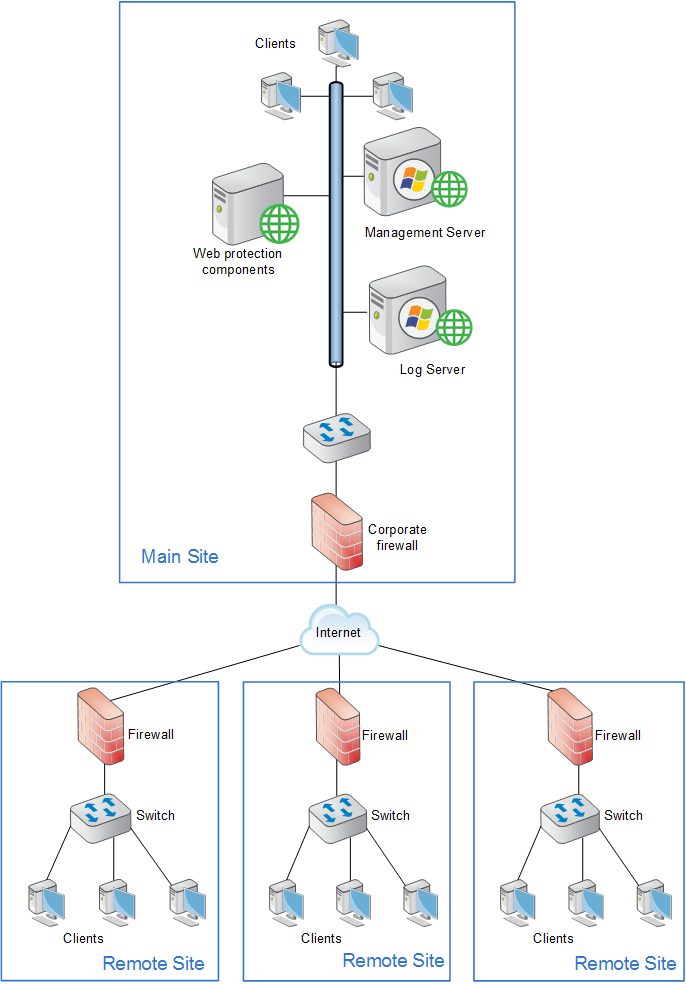
      <div class="B-Body"><a name="997687">The simplest deployment for a distributed enterprise is a network with remote sites in a single region, such as San Diego County, California, U.S.A. Most organizations with sites like this can use a single Forcepoint Web Security or Forcepoint URL Filtering on-premises deployment, centrally located within that region, to provide policy enforcement for all clients.</a></div>
      <div class="F-Frame"><a name="997688"><img class="Default" src="images/distrib_wws_mult_rmt_ofc.png" width="686" height="984" style="display: block; left: 0.0; top: 0.0" alt="" /></a></div>
      <div class="B-Body"><a name="997691">Each remote site would be managed as shown in the illustration under </a><span class="LEM-LinkEmphasis"><a href="dic_ws_fltr_rem_sites.aspx#1008721" title="Web protection for remote users or locations">Forcepoint URL Filtering</a></span>. The site at which the software is deployed is represented as the "main site", but need not be truly a main site in your organization. It is whichever one houses the web protection software.</div>
      <div class="B-Body"><a name="598138">Off-site users, not shown in the above illustration, can be handled using the Web Security Hybrid Module (Forcepoint Web Security) or Remote Filter module (Forcepoint URL Filtering).</a></div>
      <div class="N2HN-HeadNoTopic2">
        <span class="Heading_Number"></span><a name="598141">Expanding sites</a><span style="color: #ff00ff"> </span>in a region</div>
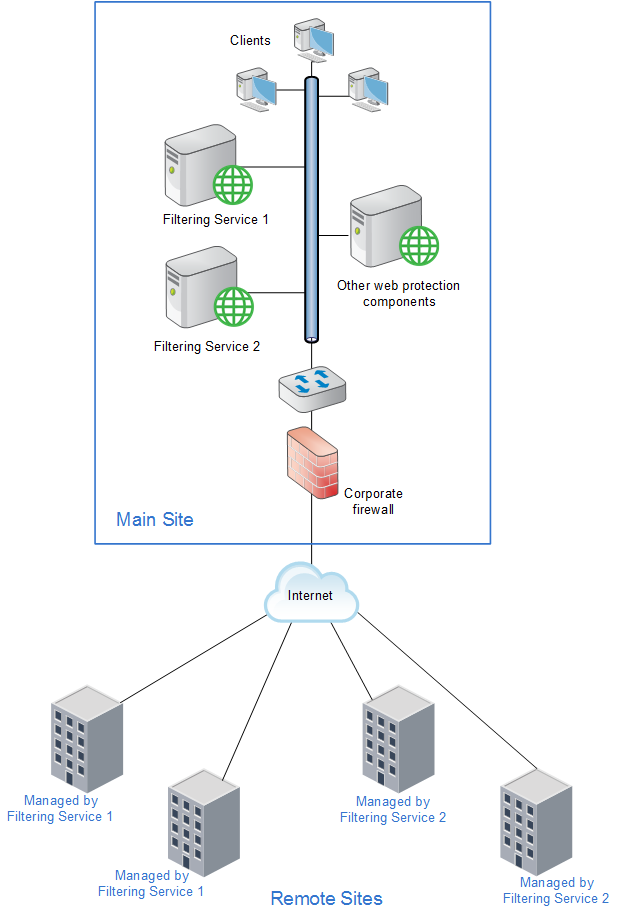
      <div class="B-Body"><a name="598142">Some organizations deploy Forcepoint Web Security or Forcepoint URL Filtering within a given region and later decide to increase the number of remote sites in that area.</a></div>
      <div class="B-Body"><a name="598143">To compensate for the additional sites and employees, the organization can: </a></div>
      <div class="B1-Bullet1_outer" style="margin-left: 0pt">
        <table border="0" cellspacing="0" cellpadding="0" summary="" role="presentation">
          <tr style="vertical-align: baseline">
            <td>
              <div class="B1-Bullet1_inner" style="width: 18pt; white-space: nowrap">
                <img src="b1.png" alt="*" border="0" width="8" height="8" />
              </div>
            </td>
            <td width="100%">
              <div class="B1-Bullet1_inner"><span class="B-Bold"><a name="598144">Improve the performance of the machines running web protection components</a></span>. Increasing the RAM and CPU, and installing faster hard drives on the machines allows web protection software to respond to an increased number of requests without additional latency. This type of upgrade can help with a moderate increase in head count, or the addition of a few more offices.</div>
            </td>
          </tr>
        </table>
      </div>
      <div class="B1-Bullet1_outer" style="margin-left: 0pt">
        <table border="0" cellspacing="0" cellpadding="0" summary="" role="presentation">
          <tr style="vertical-align: baseline">
            <td>
              <div class="B1-Bullet1_inner" style="width: 18pt; white-space: nowrap">
                <img src="b1.png" alt="*" border="0" width="8" height="8" />
              </div>
            </td>
            <td width="100%">
              <div class="B1-Bullet1_inner"><span class="B-Bold"><a name="598145">Deploy additional machines to run web protection components. </a></span>If a significant number of new users or sites is added, the deployment of additional instances of certain components, such as Filtering Service and Network Agent, distributes the load and provides optimum performance for each remote site.</div>
            </td>
          </tr>
        </table>
      </div>
      <div class="F-Frame"><a name="598532"><img class="Default" src="images/distrib_wws_mult_rmt_2.png" width="617" height="919" style="display: block; left: 0.0; top: 0.0" alt="" /></a></div>
      <div class="B-Body"><a name="598153">Additional instances of web protection components can be deployed within the region as the number of offices continues to grow.</a></div>
      <div class="B-Body"><a name="1009505">Off-site users, not shown in the above illustration, can be handled using the Web Security Hybrid Module (Forcepoint Web Security) or Remote Filter module (Forcepoint URL Filtering).</a></div>
      <div class="N2HN-HeadNoTopic2">
        <span class="Heading_Number"></span><a name="598157">National or worldwide offices</a></div>
      <div class="N3HN-HeadNoTopic3"><a name="598158">On-premises only</a></div>
      <div class="B-Body"><a name="598159">Some organizations have hundreds of remote sites spread through a country or around the world. In such cases, one or two Forcepoint Web Security or Forcepoint URL Filtering installations are not enough because:</a></div>
      <div class="B1-Bullet1_outer" style="margin-left: 0pt">
        <table border="0" cellspacing="0" cellpadding="0" summary="" role="presentation">
          <tr style="vertical-align: baseline">
            <td>
              <div class="B1-Bullet1_inner" style="width: 18pt; white-space: nowrap">
                <img src="b1.png" alt="*" border="0" width="8" height="8" />
              </div>
            </td>
            <td width="100%">
              <div class="B1-Bullet1_inner"><a name="598160">Each remote site would be geographically distant from the policy enforcement components. Request lookups would have to travel farther over the Internet for management. This distance increases the total latency of the response and may lead to slower Internet access for end users.</a></div>
            </td>
          </tr>
        </table>
      </div>
      <div class="B1-Bullet1_outer" style="margin-left: 0pt">
        <table border="0" cellspacing="0" cellpadding="0" summary="" role="presentation">
          <tr style="vertical-align: baseline">
            <td>
              <div class="B1-Bullet1_inner" style="width: 18pt; white-space: nowrap">
                <img src="b1.png" alt="*" border="0" width="8" height="8" />
              </div>
            </td>
            <td width="100%">
              <div class="B1-Bullet1_inner"><a name="598161">Large numbers of employees generate more Internet requests than recommended for one or two web protection machines, leading to delays in returning web pages to requesting clients.</a></div>
            </td>
          </tr>
        </table>
      </div>
      <div class="B-Body"><a name="598162">These organizations should divide their sites into logical regions and deploy policy enforcement components in each region. For example, a distributed enterprise might group their United States sites into a western region, a central region, and an eastern region. Web protection components are deployed at a central site in each region.</a></div>
      <div class="B-Body"><a name="598163">The logical division of sites into regions depends on the location and grouping of remote sites and the total number of employees at each site. For example, a company with a large number of remote sites in a concentrated area, such as New York City, may need to deploy multiple web protection machines within that area. Or an enterprise may only have three sites in California with 100 to 250 employees each. In this case, a single web protection installation might be deployed for all three sites. This enterprise also can deploy web protection components locally at each site (rather than using a distributed approach), particularly if IT staff is present at each location.You may consider installing instances of Policy Server, Filtering Service, Content Gateway, and Network Agent to improve response time.</a></div>
      <div class="B-Body"><a name="598164">Given the significant number of variables, large organizations should contact a Forcepoint partner or Sales Engineer to plan a rollout strategy before deployment.</a></div>
      <div class="N3HN-HeadNoTopic3"><a name="598165">With the Forcepoint Web Security Hybrid Module</a></div>
      <div class="B-Body"><a name="598166">The Web Security Hybrid Module for Forcepoint Web Security is particularly well-suited for organizations with sites distributed nationally or worldwide.</a></div>
      <div class="N4H-Heading4"><a name="598167">Single main site</a></div>
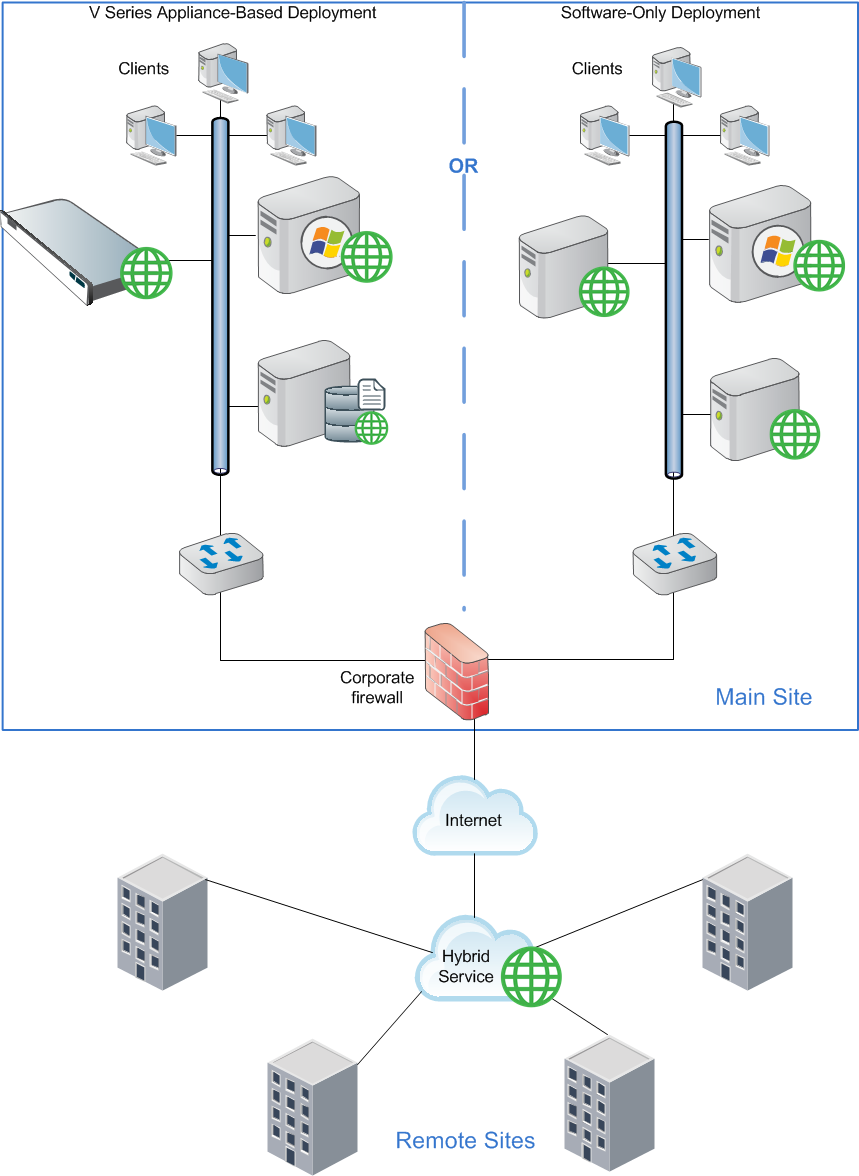
      <div class="B-Body"><a name="996782">An organization with one main site (such as headquarters office or main campus) and multiple, geographically dispersed remote or branch sites can deploy Forcepoint Web Security at the main site (with policy enforcement for main-site users managed by the on-premises components) and have all remote sites managed by the hybrid service.</a></div>
      <div class="F-Frame"><a name="996790"><img class="Default" src="images/distrib_wsga_mult_rmt_ofc.png" width="859" height="1176" style="display: block; left: 0.0; top: 0.0" alt="" /></a></div>
      <div class="B-Body"><a name="598176">Off-site users, not shown in the above illustration, may also be managed by the hybrid service.</a></div>
      <div class="N4H-Heading4"><a name="598178">Multiple large sites</a></div>
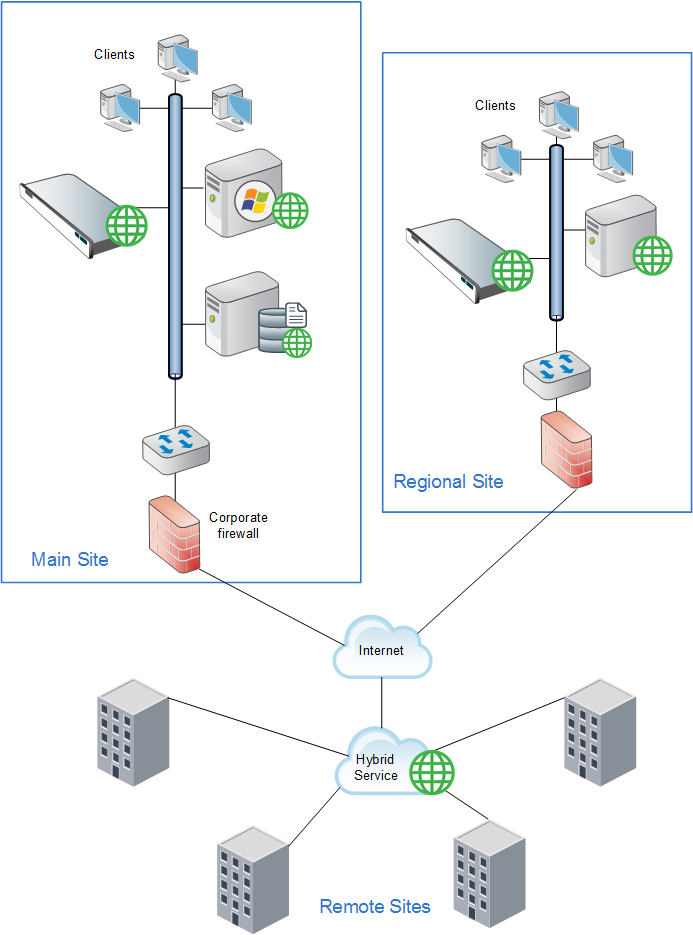
      <div class="B-Body"><a name="598179">Organizations with multiple large sites (such as main headquarters and regional headquarters) can deploy on-premises software at the larger sites while managing small, remote sites through the hybrid service. Though the illustration shows a V&nbsp;Series appliance deployment, this can also be accomplished with X&nbsp;Series and virtual appliances and software-only deployments.</a></div>
      <div class="F-Frame"><a name="996813"><img class="Default" src="images/distrib_wsga_regional.png" width="693" height="935" style="display: block; left: 0.0; top: 0.0" alt="" /></a></div>
    </div>
    <!--googleoff: all-->
    <div class="library_search">
      <form class="support_search" action="/content/kb-search.aspx" method="get">
        <label></label>
        <label></label>
        <input type="text" name="q" value=" Search eSupport" onfocus="if (this.value == ' Search eSupport') {this.value = '';}" onblur="if (this.value == '') {this.value = ' Search eSupport';}"></input>
        <input type="submit" value=" "></input>
      </form>
    </div>
    <br class="clear" />
    <!-- New Navigation DIV -->
    <div class="TL_nav" style="text-align: left;">
      <table cellspacing="0" class="toolBarTable" summary="">
        <!-- End New Navigation DIV -->
        <tr>
          <td>
            <!-- New Go To TOC -->
            <a href="toc.aspx"><img src="images/toc.png" alt="Go to the table of contents" border="0" /></a>
            <!-- End Go To TOC -->
          </td>
          <td>
            <!-- New Previous -->
            <a href="dic_ws_fltr_rem_sites.aspx"><img src="images/prev.png" alt="Go to the previous page" border="0" /></a>
            <!-- End New Previous -->
          </td>
          <td>
            <!-- New Next (Active) -->
            <a href="dic_ws_sec_vpn.aspx"><img src="images/next.png" alt="Go to the next page" border="0" /></a>
            <!-- End New Next (Active) -->
          </td>
          <!--Start JR breadcrumbs -->
          <td width="20px"></td>
          <td>
            <div class="WebWorks_Breadcrumbs" style="text-align: left;">
              <a class="WebWorks_Breadcrumb_Link" href="dic_ws_dist_ent.aspx">Web protection distributed deployments</a> &gt; Web protection distributed deployment models</div>
          </td>
          <!--End JR breadcrumbs -->
        </tr>
      </table>
    </div>
    <div class="extFooterContainer">
      <div class="extFooter">
        <div align="center">Copyright 2017 Forcepoint. All rights reserved.</div>
      </div>
    </div>
    <SCRIPT>
   function getFileName() {
      //this gets the full url
      var url = document.location.href;
      //this removes the anchor at the end, if there is one
      url = url.substring(0, (url.indexOf("#") == -1) ? url.length : url.indexOf("#"));
      //this removes the query after the file name, if there is one
      url = url.substring(0, (url.indexOf("?") == -1) ? url.length : url.indexOf("?"));
      //this removes everything before the last slash in the path
      url = url.substring(url.lastIndexOf("/") + 1, url.length);
      //return
      return url;
   }

   var url = document.URL;
   var Docname = getFileName()
   s.pageName = "enu:support:technical library:dic84:" + Docname;
   s.prop1 = "enu:support";
   s.prop2 = "enu:support:technical library";
   s.channel = "support";
   // <!--
   s.server = "<%= System.Environment.MachineName %>";
   //--></SCRIPT>
    <script language="javascript1.1" type="text/javascript">
   /********Do Not alter below this line ***********/
   var s_code = s.t(); if (s_code) document.write(s_code)
   //--&gt;</script>
  </body>
  <!--"GENERALQUARTERSALLHANDSMANYOURSTATIONS"-->
</html>