<?xml version="1.0" encoding="utf-8"?>
<!DOCTYPE html PUBLIC "-//W3C//DTD XHTML 1.0 Transitional//EN" "http://www.w3.org/TR/xhtml1/DTD/xhtml1-transitional.dtd">
<html xml:lang="en" lang="en" xmlns="http://www.w3.org/1999/xhtml">
  <head runat="server">
    <!-- PageID 382 - published by RedDot 7.5 - 7.5.1.69 - 22111 -->
    <META name="PublicArticle" content="True" />
    <META http-equiv="Content-Type" content="text/html; charset=utf-8" />
    <META name="keywords" />
    <META name="summary" />
    <META name="product" content="fp_dlp,fp_email,fp_web,fp_filter,V5K,V10K,V20K,X10G" />
    <META name="version" content="v85,v86,v87,v88,v89" />
    <META name="book" content="Deployment and Installation Center, v8.5.x-8.9.x" />
    <title>Deploying core web protection components</title>
    <!--Loading the 2016 fonts.-->
    <script type="text/javascript" src="//fast.fonts.net/jsapi/c504d579-e135-4f75-8335-4906f6c6ce67.js"></script>
    <!--Library content styles.-->
    <link rel="StyleSheet" href="https://help.forcepoint.com/docs/ni/assets/css/help2016.css" type="text/css" media="all" />
    <!--2016 font support -->
    <link type="text/css" rel="stylesheet" href="//fast.fonts.net/cssapi/c504d579-e135-4f75-8335-4906f6c6ce67.css" />
  </head>
  <body>
    <!--googleoff: all-->
    <a href="https://www.forcepoint.com">
      <img class="logo" alt="Forcepoint logo" src="https://help.forcepoint.com/docs/ni/assets/logo1.png" />
    </a>
    <div class="extLinksContainer">
      <a class="extLinks" href="//support.forcepoint.com/documentation">Documentation</a> | <a class="extLinks" href="//support.forcepoint.com">Support</a></div>
    <!--
		<wsApp:UserAccess ID="useraccess1" runat="server" IsSecure="False" />
		-->
    <div class="spacer1"></div>
    <br />
    <!-- New Navigation DIV -->
    <div class="TL_nav" style="text-align: left;">
      <table cellspacing="0" class="toolBarTable" summary="">
        <!-- End New Navigation DIV -->
        <tr>
          <td>
            <!-- New Go To TOC -->
            <a href="toc.aspx"><img src="images/toc.png" alt="Go to the table of contents" border="0" /></a>
            <!-- End Go To TOC -->
          </td>
          <td>
            <!-- New Previous -->
            <a href="dic_ws_diagrams.aspx"><img src="images/prev.png" alt="Go to the previous page" border="0" /></a>
            <!-- End New Previous -->
          </td>
          <td>
            <!-- New Next (Active) -->
            <a href="dic_wsdep_hybrid.aspx"><img src="images/next.png" alt="Go to the next page" border="0" /></a>
            <!-- End New Next (Active) -->
          </td>
          <!--Start JR breadcrumbs -->
          <td width="20px"></td>
          <td>
            <div class="WebWorks_Breadcrumbs" style="text-align: left;">
              <a class="WebWorks_Breadcrumb_Link" href="dic_dep_rec_ws.aspx">Deploying Web Protection Solutions</a> &gt; Deploying core web protection components</div>
          </td>
          <!--End JR breadcrumbs -->
        </tr>
      </table>
    </div>
    <!--googleon: all-->
    <div>
      <div class="N1HT-Heading1Top"><a name="703636">Deploying core web protection components</a></div>
      <div class="IN-TopicInfo"><a name="703670">Deployment and Installation Center&nbsp;| Web Protection Solutions</a></div>
      <table class="BodyTable" style="text-align: left" summary="">
        <caption></caption>
        <tr>
          <td style="border-bottom-color: #808080; border-bottom-style: solid; border-bottom-width: thin; border-left-color: #808080; border-left-style: solid; border-left-width: thin; border-right-color: #808080; border-right-style: solid; border-right-width: thin; border-top-color: #808080; border-top-style: solid; border-top-width: thin; padding-bottom: 3.5pt; padding-left: 6pt; padding-right: 6pt; padding-top: 4.5pt; vertical-align: top">
            <div class="CHD-CellHeadDark"><a name="703642">Applies&nbsp;to:&nbsp;&nbsp;&nbsp;&nbsp;&nbsp;&nbsp;&nbsp;&nbsp;&nbsp;&nbsp;&nbsp;&nbsp;&nbsp;&nbsp;&nbsp;&nbsp;&nbsp;&nbsp;&nbsp;&nbsp;&nbsp;&nbsp;&nbsp;&nbsp;&nbsp;&nbsp;&nbsp;&nbsp;&nbsp;&nbsp;&nbsp;&nbsp;&nbsp;&nbsp;&nbsp;&nbsp;&nbsp;&nbsp;&nbsp;&nbsp;&nbsp;</a></div>
          </td>
          <td style="border-bottom-color: #808080; border-bottom-style: solid; border-bottom-width: thin; border-left-color: #808080; border-left-style: solid; border-left-width: thin; border-right-color: #808080; border-right-style: solid; border-right-width: thin; border-top-color: #808080; border-top-style: solid; border-top-width: thin; padding-bottom: 3.5pt; padding-left: 6pt; padding-right: 6pt; padding-top: 4.5pt; vertical-align: top">
            <div class="CHD-CellHeadDark"><a name="703644">In&nbsp;this&nbsp;topic&nbsp;&nbsp;&nbsp;&nbsp;&nbsp;&nbsp;&nbsp;&nbsp;&nbsp;&nbsp;&nbsp;&nbsp;&nbsp;&nbsp;&nbsp;&nbsp;&nbsp;&nbsp;&nbsp;&nbsp;&nbsp;&nbsp;&nbsp;&nbsp;&nbsp;&nbsp;&nbsp;&nbsp;&nbsp;&nbsp;&nbsp;&nbsp;&nbsp;&nbsp;&nbsp;&nbsp;&nbsp;&nbsp;&nbsp;</a></div>
          </td>
        </tr>
        <tr>
          <td style="border-bottom-color: #808080; border-bottom-style: solid; border-bottom-width: thin; border-left-color: #808080; border-left-style: solid; border-left-width: thin; border-right-color: #808080; border-right-style: solid; border-right-width: thin; border-top-color: #808080; border-top-style: solid; border-top-width: thin; padding-bottom: 3.5pt; padding-left: 6pt; padding-right: 6pt; padding-top: 4.5pt; vertical-align: top">
            <div class="B1-Bullet1_outer" style="margin-left: 0pt">
              <table border="0" cellspacing="0" cellpadding="0" summary="" role="presentation">
                <tr style="vertical-align: baseline">
                  <td>
                    <div class="B1-Bullet1_inner" style="width: 18pt; white-space: nowrap">
                      <img src="b1.png" alt="*" border="0" width="8" height="8" />
                    </div>
                  </td>
                  <td width="100%">
                    <div class="B1-Bullet1_inner"><a name="703649">Forcepoint Web Security, v8.5.x </a></div>
                  </td>
                </tr>
              </table>
            </div>
            <div class="B1-Bullet1_outer" style="margin-left: 0pt">
              <table border="0" cellspacing="0" cellpadding="0" summary="" role="presentation">
                <tr style="vertical-align: baseline">
                  <td>
                    <div class="B1-Bullet1_inner" style="width: 18pt; white-space: nowrap">
                      <img src="b1.png" alt="*" border="0" width="8" height="8" />
                    </div>
                  </td>
                  <td width="100%">
                    <div class="B1-Bullet1_inner"><a name="703656">Forcepoint URL Filtering, v8.5.x</a></div>
                  </td>
                </tr>
              </table>
            </div>
          </td>
          <td style="border-bottom-color: #808080; border-bottom-style: solid; border-bottom-width: thin; border-left-color: #808080; border-left-style: solid; border-left-width: thin; border-right-color: #808080; border-right-style: solid; border-right-width: thin; border-top-color: #808080; border-top-style: solid; border-top-width: thin; padding-bottom: 3.5pt; padding-left: 6pt; padding-right: 6pt; padding-top: 4.5pt; vertical-align: top">
            <div class="B1-Bullet1_outer" style="margin-left: 0pt">
              <table border="0" cellspacing="0" cellpadding="0" summary="" role="presentation">
                <tr style="vertical-align: baseline">
                  <td>
                    <div class="B1-Bullet1_inner" style="width: 18pt; white-space: nowrap">
                      <img src="b1.png" alt="*" border="0" width="8" height="8" />
                    </div>
                  </td>
                  <td width="100%">
                    <div class="B1-Bullet1_inner"><span class="LEM-LinkEmphasis"><a href="#629073" title="Deploying core web protection components" name="703661">Core policy components</a></span></div>
                  </td>
                </tr>
              </table>
            </div>
            <div class="B1-Bullet1_outer" style="margin-left: 0pt">
              <table border="0" cellspacing="0" cellpadding="0" summary="" role="presentation">
                <tr style="vertical-align: baseline">
                  <td>
                    <div class="B1-Bullet1_inner" style="width: 18pt; white-space: nowrap">
                      <img src="b1.png" alt="*" border="0" width="8" height="8" />
                    </div>
                  </td>
                  <td width="100%">
                    <div class="B1-Bullet1_inner"><span class="LEM-LinkEmphasis"><a href="#617139" title="Deploying core web protection components" name="703665">Core management components</a></span></div>
                  </td>
                </tr>
              </table>
            </div>
            <div class="B1-Bullet1_outer" style="margin-left: 0pt">
              <table border="0" cellspacing="0" cellpadding="0" summary="" role="presentation">
                <tr style="vertical-align: baseline">
                  <td>
                    <div class="B1-Bullet1_inner" style="width: 18pt; white-space: nowrap">
                      <img src="b1.png" alt="*" border="0" width="8" height="8" />
                    </div>
                  </td>
                  <td width="100%">
                    <div class="B1-Bullet1_inner"><span class="LEM-LinkEmphasis"><a href="#617118" title="Deploying core web protection components" name="703669">Core reporting components</a></span></div>
                  </td>
                </tr>
              </table>
            </div>
          </td>
        </tr>
      </table>
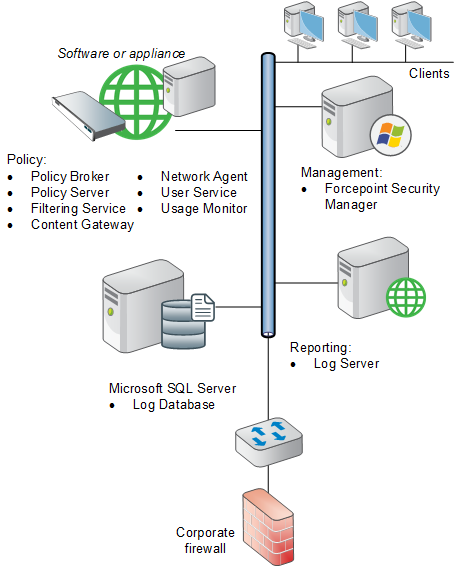
      <div class="B-Body"><a name="703671">On-premises web protection solutions include the core policy, management, and reporting components shown in the diagram below and described in detail in the sections that follow, with one exception: Content Gateway is available only for Forcepoint Web Security.</a></div>
      <div class="F-Frame"><a name="629071"><img class="Default" src="images/deploy_core_components.png" width="457" height="567" style="display: block; left: 0.0; top: 0.0" alt="" /></a></div>
      <div class="N2HN-HeadNoTopic2">
        <span class="Heading_Number"></span><a name="629073">Core policy components</a></div>
      <div class="F-Frame"><a name="629910"><img class="Default" src="images/deploy_core_policy.png" width="532" height="908" style="display: block; left: 0.0; top: 0.0" alt="" /></a></div>
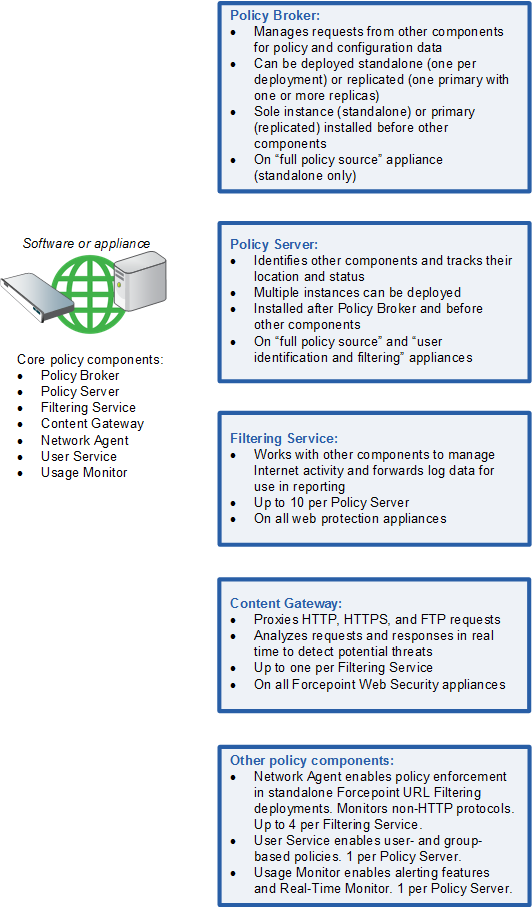
      <div class="B-Body"><a name="617584">To ensure effective policy enforcement, the core components must be installed so that:</a></div>
      <div class="B1-Bullet1_outer" style="margin-left: 0pt">
        <table border="0" cellspacing="0" cellpadding="0" summary="" role="presentation">
          <tr style="vertical-align: baseline">
            <td>
              <div class="B1-Bullet1_inner" style="width: 18pt; white-space: nowrap">
                <img src="b1.png" alt="*" border="0" width="8" height="8" />
              </div>
            </td>
            <td width="100%">
              <div class="B1-Bullet1_inner"><a name="616410">All components can communicate with an instance of Policy Broker.</a></div>
            </td>
          </tr>
        </table>
      </div>
      <div class="B2-Bullet2_outer" style="margin-left: 18pt">
        <table border="0" cellspacing="0" cellpadding="0" summary="" role="presentation">
          <tr style="vertical-align: baseline">
            <td>
              <div class="B2-Bullet2_inner" style="width: 18pt; white-space: nowrap">
                <img src="b2.png" alt="*" border="0" width="8" height="7" />
              </div>
            </td>
            <td width="100%">
              <div class="B2-Bullet2_inner"><a name="616478">In Policy Broker standalone mode (software or appliance), there is only one Policy Broker instance for the entire deployment.</a></div>
            </td>
          </tr>
        </table>
      </div>
      <div class="B2-Bullet2_outer" style="margin-left: 18pt">
        <table border="0" cellspacing="0" cellpadding="0" summary="" role="presentation">
          <tr style="vertical-align: baseline">
            <td>
              <div class="B2-Bullet2_inner" style="width: 18pt; white-space: nowrap">
                <img src="b2.png" alt="*" border="0" width="8" height="7" />
              </div>
            </td>
            <td width="100%">
              <div class="B2-Bullet2_inner"><a name="652683">In Policy Broker replicated mode (software only), there is one primary Policy Broker (to which configuration updates are written) and one or more Policy Broker replicas (with a read-only copy of the configuration data).</a></div>
            </td>
          </tr>
        </table>
      </div>
      <div class="B2-Bullet2_outer" style="margin-left: 18pt">
        <table border="0" cellspacing="0" cellpadding="0" summary="" role="presentation">
          <tr style="vertical-align: baseline">
            <td>
              <div class="B2-Bullet2_inner" style="width: 18pt; white-space: nowrap">
                <img src="b2.png" alt="*" border="0" width="8" height="7" />
              </div>
            </td>
            <td width="100%">
              <div class="B2-Bullet2_inner"><a name="691285">In software installations, Policy Broker can run on Windows or Linux.</a></div>
            </td>
          </tr>
        </table>
      </div>
      <div class="B2-Bullet2_outer" style="margin-left: 18pt">
        <table border="0" cellspacing="0" cellpadding="0" summary="" role="presentation">
          <tr style="vertical-align: baseline">
            <td>
              <div class="B2-Bullet2_inner" style="width: 18pt; white-space: nowrap">
                <img src="b2.png" alt="*" border="0" width="8" height="7" />
              </div>
            </td>
            <td width="100%">
              <div class="B2-Bullet2_inner"><a name="691286">With Forcepoint appliances, the standalone Policy Broker is present on the </a><span class="B-Bold">full policy source</span> appliance only.</div>
            </td>
          </tr>
        </table>
      </div>
      <div class="B2-Bullet2_outer" style="margin-left: 18pt">
        <table border="0" cellspacing="0" cellpadding="0" summary="" role="presentation">
          <tr style="vertical-align: baseline">
            <td>
              <div class="B2-Bullet2_inner" style="width: 18pt; white-space: nowrap">
                <img src="b2.png" alt="*" border="0" width="8" height="7" />
              </div>
            </td>
            <td width="100%">
              <div class="B2-Bullet2_inner"><a name="616552">Most components must be able to communicate with Policy Broker on port </a><span class="B-Bold">55880</span>. (The exceptions are all optional components: transparent identification agents, State Server, Linking Service, and Directory Agent.)</div>
            </td>
          </tr>
        </table>
      </div>
      <div class="B1-Bullet1_outer" style="margin-left: 0pt">
        <table border="0" cellspacing="0" cellpadding="0" summary="" role="presentation">
          <tr style="vertical-align: baseline">
            <td>
              <div class="B1-Bullet1_inner" style="width: 18pt; white-space: nowrap">
                <img src="b1.png" alt="*" border="0" width="8" height="8" />
              </div>
            </td>
            <td width="100%">
              <div class="B1-Bullet1_inner"><a name="616553">There is a central instance of Policy Server.</a></div>
            </td>
          </tr>
        </table>
      </div>
      <div class="B2-Bullet2_outer" style="margin-left: 18pt">
        <table border="0" cellspacing="0" cellpadding="0" summary="" role="presentation">
          <tr style="vertical-align: baseline">
            <td>
              <div class="B2-Bullet2_inner" style="width: 18pt; white-space: nowrap">
                <img src="b2.png" alt="*" border="0" width="8" height="7" />
              </div>
            </td>
            <td width="100%">
              <div class="B2-Bullet2_inner"><a name="616696">In software installations, the central Policy Server instance runs on the standalone or primary Policy Broker machine.</a></div>
            </td>
          </tr>
        </table>
      </div>
      <div class="B2-Bullet2_outer" style="margin-left: 18pt">
        <table border="0" cellspacing="0" cellpadding="0" summary="" role="presentation">
          <tr style="vertical-align: baseline">
            <td>
              <div class="B2-Bullet2_inner" style="width: 18pt; white-space: nowrap">
                <img src="b2.png" alt="*" border="0" width="8" height="7" />
              </div>
            </td>
            <td width="100%">
              <div class="B2-Bullet2_inner"><a name="616757">With Forcepoint appliances, Policy Server is present on the </a><span class="B-Bold">full policy source</span> appliance.</div>
            </td>
          </tr>
        </table>
      </div>
      <div class="B2-Bullet2_outer" style="margin-left: 18pt">
        <table border="0" cellspacing="0" cellpadding="0" summary="" role="presentation">
          <tr style="vertical-align: baseline">
            <td>
              <div class="B2-Bullet2_inner" style="width: 18pt; white-space: nowrap">
                <img src="b2.png" alt="*" border="0" width="8" height="7" />
              </div>
            </td>
            <td width="100%">
              <div class="B2-Bullet2_inner"><a name="616806">Additional instances of Policy Server can be deployed on Windows or Linux machines, or on </a><span class="B-Bold">user identification and filtering</span> appliances.</div>
            </td>
          </tr>
        </table>
      </div>
      <div class="B2-Bullet2_outer" style="margin-left: 18pt">
        <table border="0" cellspacing="0" cellpadding="0" summary="" role="presentation">
          <tr style="vertical-align: baseline">
            <td>
              <div class="B2-Bullet2_inner" style="width: 18pt; white-space: nowrap">
                <img src="b2.png" alt="*" border="0" width="8" height="7" />
              </div>
            </td>
            <td width="100%">
              <div class="B2-Bullet2_inner"><a name="616877">Most components must be able to communicate with Policy Server on ports </a><span class="B-Bold">55806</span> and <span class="B-Bold">40000</span>. (The exceptions are Remote Filtering Server and State Server.)</div>
            </td>
          </tr>
        </table>
      </div>
      <div class="B1-Bullet1_outer" style="margin-left: 0pt">
        <table border="0" cellspacing="0" cellpadding="0" summary="" role="presentation">
          <tr style="vertical-align: baseline">
            <td>
              <div class="B1-Bullet1_inner" style="width: 18pt; white-space: nowrap">
                <img src="b1.png" alt="*" border="0" width="8" height="8" />
              </div>
            </td>
            <td width="100%">
              <div class="B1-Bullet1_inner"><a name="616855">At least one instance of Filtering Service communicates with the central Policy Server.</a></div>
            </td>
          </tr>
        </table>
      </div>
      <div class="B2-Bullet2_outer" style="margin-left: 18pt">
        <table border="0" cellspacing="0" cellpadding="0" summary="" role="presentation">
          <tr style="vertical-align: baseline">
            <td>
              <div class="B2-Bullet2_inner" style="width: 18pt; white-space: nowrap">
                <img src="b2.png" alt="*" border="0" width="8" height="7" />
              </div>
            </td>
            <td width="100%">
              <div class="B2-Bullet2_inner"><a name="616909">In software installations, Filtering Service can run on the same machine as Policy Broker and Policy Server, or on a separate machine.</a></div>
            </td>
          </tr>
        </table>
      </div>
      <div class="B2-Bullet2_outer" style="margin-left: 18pt">
        <table border="0" cellspacing="0" cellpadding="0" summary="" role="presentation">
          <tr style="vertical-align: baseline">
            <td>
              <div class="B2-Bullet2_inner" style="width: 18pt; white-space: nowrap">
                <img src="b2.png" alt="*" border="0" width="8" height="7" />
              </div>
            </td>
            <td width="100%">
              <div class="B2-Bullet2_inner"><a name="616987">With Forcepoint appliances, a Filtering Service instance is present on the </a><span class="B-Bold">full policy source</span> appliance.</div>
            </td>
          </tr>
        </table>
      </div>
      <div class="B2-Bullet2_outer" style="margin-left: 18pt">
        <table border="0" cellspacing="0" cellpadding="0" summary="" role="presentation">
          <tr style="vertical-align: baseline">
            <td>
              <div class="B2-Bullet2_inner" style="width: 18pt; white-space: nowrap">
                <img src="b2.png" alt="*" border="0" width="8" height="7" />
              </div>
            </td>
            <td width="100%">
              <div class="B2-Bullet2_inner"><a name="681600">Additional instances of Filtering Service can be deployed on Windows or Linux machines, or on either </a><span class="B-Bold">user identification and filtering</span> (includes Policy Server) or <span class="B-Bold">filtering only</span> (must point to a remote Policy Server) appliances.</div>
            </td>
          </tr>
        </table>
      </div>
      <div class="B1-Bullet1_outer" style="margin-left: 0pt">
        <table border="0" cellspacing="0" cellpadding="0" summary="" role="presentation">
          <tr style="vertical-align: baseline">
            <td>
              <div class="B1-Bullet1_inner" style="width: 18pt; white-space: nowrap">
                <img src="b1.png" alt="*" border="0" width="8" height="8" />
              </div>
            </td>
            <td width="100%">
              <div class="B1-Bullet1_inner"><a name="681601">Filtering Service is configured to receive requests from one of the following (see </a><span class="LEM-LinkEmphasis"><a href="dic_ws_standalone-integrated.aspx" title="Understanding standalone and integrated modes for web protection solutions">Understanding standalone and integrated modes for web protection solutions</a></span>):</div>
            </td>
          </tr>
        </table>
      </div>
      <div class="B2-Bullet2_outer" style="margin-left: 18pt">
        <table border="0" cellspacing="0" cellpadding="0" summary="" role="presentation">
          <tr style="vertical-align: baseline">
            <td>
              <div class="B2-Bullet2_inner" style="width: 18pt; white-space: nowrap">
                <img src="b2.png" alt="*" border="0" width="8" height="7" />
              </div>
            </td>
            <td width="100%">
              <div class="B2-Bullet2_inner"><a name="617053">Content Gateway (Forcepoint Web Security)</a></div>
            </td>
          </tr>
        </table>
      </div>
      <div class="I2-IndentedText2"><a name="681981">For detailed information about deploying Content Gateway, see </a><span class="LEM-LinkEmphasis"><a href="dic_wcg_deploy.aspx" title="Content Gateway Deployment">Content Gateway Deployment</a></span>.</div>
      <div class="B2-Bullet2_outer" style="margin-left: 18pt">
        <table border="0" cellspacing="0" cellpadding="0" summary="" role="presentation">
          <tr style="vertical-align: baseline">
            <td>
              <div class="B2-Bullet2_inner" style="width: 18pt; white-space: nowrap">
                <img src="b2.png" alt="*" border="0" width="8" height="7" />
              </div>
            </td>
            <td width="100%">
              <div class="B2-Bullet2_inner"><a name="617193">Network Agent (Forcepoint URL Filtering standalone deployments)</a></div>
            </td>
          </tr>
        </table>
      </div>
      <div class="B2-Bullet2_outer" style="margin-left: 18pt">
        <table border="0" cellspacing="0" cellpadding="0" summary="" role="presentation">
          <tr style="vertical-align: baseline">
            <td>
              <div class="B2-Bullet2_inner" style="width: 18pt; white-space: nowrap">
                <img src="b2.png" alt="*" border="0" width="8" height="7" />
              </div>
            </td>
            <td width="100%">
              <div class="B2-Bullet2_inner"><a name="617073">An integrated third-party firewall, proxy server, or caching application (Forcepoint URL Filtering integrated deployments)</a></div>
            </td>
          </tr>
        </table>
      </div>
      <div class="N2HN-HeadNoTopic2">
        <span class="Heading_Number"></span><a name="617139">Core management components</a></div>
      <div class="F-Frame"><a name="631064"><img class="Default" src="images/deploy_core_mgmt.png" width="567" height="412" style="display: block; left: 0.0; top: 0.0" alt="" /></a></div>
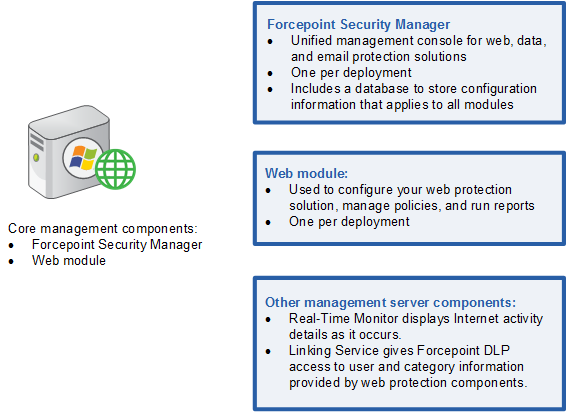
      <div class="B-Body"><a name="615371">The Forcepoint Security Manager is the centralized management console. It includes global administrator settings and appliance connection data, as well as 3 management modules: Web, Data, and Email.</a></div>
      <div class="B-Body"><a name="617361">The Web Security module of the Forcepoint Security Manager is used to perform product configuration, policy management, and reporting tasks for on-premises web protection solutions.</a></div>
      <div class="B1-Bullet1_outer" style="margin-left: 0pt">
        <table border="0" cellspacing="0" cellpadding="0" summary="" role="presentation">
          <tr style="vertical-align: baseline">
            <td>
              <div class="B1-Bullet1_inner" style="width: 18pt; white-space: nowrap">
                <img src="b1.png" alt="*" border="0" width="8" height="8" />
              </div>
            </td>
            <td width="100%">
              <div class="B1-Bullet1_inner"><a name="617104">Install all Forcepoint Security Manager components on a single Windows server (the management server).</a></div>
            </td>
          </tr>
        </table>
      </div>
      <div class="B1-Bullet1_outer" style="margin-left: 0pt">
        <table border="0" cellspacing="0" cellpadding="0" summary="" role="presentation">
          <tr style="vertical-align: baseline">
            <td>
              <div class="B1-Bullet1_inner" style="width: 18pt; white-space: nowrap">
                <img src="b1.png" alt="*" border="0" width="8" height="8" />
              </div>
            </td>
            <td width="100%">
              <div class="B1-Bullet1_inner"><a name="617111">The Web Security module of the Forcepoint Security Manager must be able to communicate with:</a></div>
            </td>
          </tr>
        </table>
      </div>
      <div class="B2-Bullet2_outer" style="margin-left: 18pt">
        <table border="0" cellspacing="0" cellpadding="0" summary="" role="presentation">
          <tr style="vertical-align: baseline">
            <td>
              <div class="B2-Bullet2_inner" style="width: 18pt; white-space: nowrap">
                <img src="b2.png" alt="*" border="0" width="8" height="7" />
              </div>
            </td>
            <td width="100%">
              <div class="B2-Bullet2_inner"><a name="617513">Policy Broker on port 55880</a></div>
            </td>
          </tr>
        </table>
      </div>
      <div class="B2-Bullet2_outer" style="margin-left: 18pt">
        <table border="0" cellspacing="0" cellpadding="0" summary="" role="presentation">
          <tr style="vertical-align: baseline">
            <td>
              <div class="B2-Bullet2_inner" style="width: 18pt; white-space: nowrap">
                <img src="b2.png" alt="*" border="0" width="8" height="7" />
              </div>
            </td>
            <td width="100%">
              <div class="B2-Bullet2_inner"><a name="617523">Policy Server on ports 40000, 55806, 55817, 55818, and 55824</a></div>
            </td>
          </tr>
        </table>
      </div>
      <div class="B2-Bullet2_outer" style="margin-left: 18pt">
        <table border="0" cellspacing="0" cellpadding="0" summary="" role="presentation">
          <tr style="vertical-align: baseline">
            <td>
              <div class="B2-Bullet2_inner" style="width: 18pt; white-space: nowrap">
                <img src="b2.png" alt="*" border="0" width="8" height="7" />
              </div>
            </td>
            <td width="100%">
              <div class="B2-Bullet2_inner"><a name="617575">Filtering Service on port 55807</a></div>
            </td>
          </tr>
        </table>
      </div>
      <div class="B2-Bullet2_outer" style="margin-left: 18pt">
        <table border="0" cellspacing="0" cellpadding="0" summary="" role="presentation">
          <tr style="vertical-align: baseline">
            <td>
              <div class="B2-Bullet2_inner" style="width: 18pt; white-space: nowrap">
                <img src="b2.png" alt="*" border="0" width="8" height="7" />
              </div>
            </td>
            <td width="100%">
              <div class="B2-Bullet2_inner"><a name="617534">Log Server on ports 55812 and 55805</a></div>
            </td>
          </tr>
        </table>
      </div>
      <div class="B2-Bullet2_outer" style="margin-left: 18pt">
        <table border="0" cellspacing="0" cellpadding="0" summary="" role="presentation">
          <tr style="vertical-align: baseline">
            <td>
              <div class="B2-Bullet2_inner" style="width: 18pt; white-space: nowrap">
                <img src="b2.png" alt="*" border="0" width="8" height="7" />
              </div>
            </td>
            <td width="100%">
              <div class="B2-Bullet2_inner"><a name="617541">User Service on port 55815</a></div>
            </td>
          </tr>
        </table>
      </div>
      <div class="N2HN-HeadNoTopic2">
        <span class="Heading_Number"></span><a name="617118">Core reporting components</a></div>
      <div class="F-Frame"><a name="631436"><img class="Default" src="images/deploy_core_rptg.png" width="540" height="340" style="display: block; left: 0.0; top: 0.0" alt="" /></a></div>
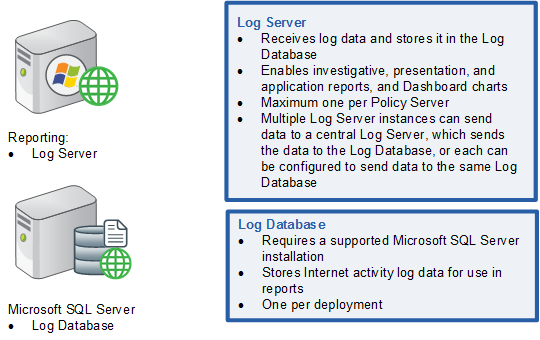
      <div class="B-Body"><a name="618113">Log Server receives information about Internet activity from and processes it into the Log Database.</a></div>
      <div class="B1-Bullet1_outer" style="margin-left: 0pt">
        <table border="0" cellspacing="0" cellpadding="0" summary="" role="presentation">
          <tr style="vertical-align: baseline">
            <td>
              <div class="B1-Bullet1_inner" style="width: 18pt; white-space: nowrap">
                <img src="b1.png" alt="*" border="0" width="8" height="8" />
              </div>
            </td>
            <td width="100%">
              <div class="B1-Bullet1_inner"><a name="618146">Install Log Server on a dedicated Windows server.</a></div>
            </td>
          </tr>
        </table>
      </div>
      <div class="B2-Bullet2_outer" style="margin-left: 18pt">
        <table border="0" cellspacing="0" cellpadding="0" summary="" role="presentation">
          <tr style="vertical-align: baseline">
            <td>
              <div class="B2-Bullet2_inner" style="width: 18pt; white-space: nowrap">
                <img src="b2.png" alt="*" border="0" width="8" height="7" />
              </div>
            </td>
            <td width="100%">
              <div class="B2-Bullet2_inner"><a name="618156">Log Server does not run on appliances.</a></div>
            </td>
          </tr>
        </table>
      </div>
      <div class="B2-Bullet2_outer" style="margin-left: 18pt">
        <table border="0" cellspacing="0" cellpadding="0" summary="" role="presentation">
          <tr style="vertical-align: baseline">
            <td>
              <div class="B2-Bullet2_inner" style="width: 18pt; white-space: nowrap">
                <img src="b2.png" alt="*" border="0" width="8" height="7" />
              </div>
            </td>
            <td width="100%">
              <div class="B2-Bullet2_inner"><a name="618168">Because collecting and processing log records is resource-intensive, Log Server should typically not run on the same machine other resource-sensitive components, like the Forcepoint Security Manager or Filtering Service.</a></div>
            </td>
          </tr>
        </table>
      </div>
      <div class="B2-Bullet2_outer" style="margin-left: 18pt">
        <table border="0" cellspacing="0" cellpadding="0" summary="" role="presentation">
          <tr style="vertical-align: baseline">
            <td>
              <div class="B2-Bullet2_inner" style="width: 18pt; white-space: nowrap">
                <img src="b2.png" alt="*" border="0" width="8" height="7" />
              </div>
            </td>
            <td width="100%">
              <div class="B2-Bullet2_inner"><a name="667879">You may have one Log Server instance for the entire deployment, or multiple Log Server instances (see </a><span class="LEM-LinkEmphasis"><a href="dic_wsdep_reporting.aspx" title="Additional reporting considerations">Additional reporting considerations</a></span>), but you can never have more than one Log Server per Policy Server.</div>
            </td>
          </tr>
        </table>
      </div>
      <div class="B1-Bullet1_outer" style="margin-left: 0pt">
        <table border="0" cellspacing="0" cellpadding="0" summary="" role="presentation">
          <tr style="vertical-align: baseline">
            <td>
              <div class="B1-Bullet1_inner" style="width: 18pt; white-space: nowrap">
                <img src="b1.png" alt="*" border="0" width="8" height="8" />
              </div>
            </td>
            <td width="100%">
              <div class="B1-Bullet1_inner"><a name="618299">The Log Database resides on a supported Microsoft SQL Server machine.</a></div>
            </td>
          </tr>
        </table>
      </div>
      <div class="B2-Bullet2_outer" style="margin-left: 18pt">
        <table border="0" cellspacing="0" cellpadding="0" summary="" role="presentation">
          <tr style="vertical-align: baseline">
            <td>
              <div class="B2-Bullet2_inner" style="width: 18pt; white-space: nowrap">
                <img src="b2.png" alt="*" border="0" width="8" height="7" />
              </div>
            </td>
            <td width="100%">
              <div class="B2-Bullet2_inner"><a name="618335">Do not run Log Server on the SQL Server machine.</a></div>
            </td>
          </tr>
        </table>
      </div>
      <div class="B2-Bullet2_outer" style="margin-left: 18pt">
        <table border="0" cellspacing="0" cellpadding="0" summary="" role="presentation">
          <tr style="vertical-align: baseline">
            <td>
              <div class="B2-Bullet2_inner" style="width: 18pt; white-space: nowrap">
                <img src="b2.png" alt="*" border="0" width="8" height="7" />
              </div>
            </td>
            <td width="100%">
              <div class="B2-Bullet2_inner"><a name="618345">By default, Log Server communicates with SQL Server on the default ODBC port (1433). A custom port can be specified during installation. See </a><span class="LEM-LinkEmphasis"><a href="dic_wsdep_reporting.aspx#640451" title="Additional reporting considerations">Using a custom port to connect to the Log Database</a></span>.</div>
            </td>
          </tr>
        </table>
      </div>
      <div class="B1-Bullet1_outer" style="margin-left: 0pt">
        <table border="0" cellspacing="0" cellpadding="0" summary="" role="presentation">
          <tr style="vertical-align: baseline">
            <td>
              <div class="B1-Bullet1_inner" style="width: 18pt; white-space: nowrap">
                <img src="b1.png" alt="*" border="0" width="8" height="8" />
              </div>
            </td>
            <td width="100%">
              <div class="B1-Bullet1_inner"><a name="627930">The management server machine must be able to communicate with Log Server and the Log Database.</a></div>
            </td>
          </tr>
        </table>
      </div>
    </div>
    <!--googleoff: all-->
    <div class="library_search">
      <form class="support_search" action="/content/kb-search.aspx" method="get">
        <label></label>
        <label></label>
        <input type="text" name="q" value=" Search eSupport" onfocus="if (this.value == ' Search eSupport') {this.value = '';}" onblur="if (this.value == '') {this.value = ' Search eSupport';}"></input>
        <input type="submit" value=" "></input>
      </form>
    </div>
    <br class="clear" />
    <!-- New Navigation DIV -->
    <div class="TL_nav" style="text-align: left;">
      <table cellspacing="0" class="toolBarTable" summary="">
        <!-- End New Navigation DIV -->
        <tr>
          <td>
            <!-- New Go To TOC -->
            <a href="toc.aspx"><img src="images/toc.png" alt="Go to the table of contents" border="0" /></a>
            <!-- End Go To TOC -->
          </td>
          <td>
            <!-- New Previous -->
            <a href="dic_ws_diagrams.aspx"><img src="images/prev.png" alt="Go to the previous page" border="0" /></a>
            <!-- End New Previous -->
          </td>
          <td>
            <!-- New Next (Active) -->
            <a href="dic_wsdep_hybrid.aspx"><img src="images/next.png" alt="Go to the next page" border="0" /></a>
            <!-- End New Next (Active) -->
          </td>
          <!--Start JR breadcrumbs -->
          <td width="20px"></td>
          <td>
            <div class="WebWorks_Breadcrumbs" style="text-align: left;">
              <a class="WebWorks_Breadcrumb_Link" href="dic_dep_rec_ws.aspx">Deploying Web Protection Solutions</a> &gt; Deploying core web protection components</div>
          </td>
          <!--End JR breadcrumbs -->
        </tr>
      </table>
    </div>
    <div class="extFooterContainer">
      <div class="extFooter">
        <div align="center">Copyright 2023 Forcepoint. All rights reserved.</div>
      </div>
    </div>
    <SCRIPT>
   function getFileName() {
      //this gets the full url
      var url = document.location.href;
      //this removes the anchor at the end, if there is one
      url = url.substring(0, (url.indexOf("#") == -1) ? url.length : url.indexOf("#"));
      //this removes the query after the file name, if there is one
      url = url.substring(0, (url.indexOf("?") == -1) ? url.length : url.indexOf("?"));
      //this removes everything before the last slash in the path
      url = url.substring(url.lastIndexOf("/") + 1, url.length);
      //return
      return url;
   }

   var url = document.URL;
   var Docname = getFileName()
   s.pageName = "enu:support:technical library:dic_2023:" + Docname;
   s.prop1 = "enu:support";
   s.prop2 = "enu:support:technical library";
   s.channel = "support";
   // <!--
   s.server = "<%= System.Environment.MachineName %>";
   //--></SCRIPT>
    <script language="javascript1.1" type="text/javascript">
   /********Do Not alter below this line ***********/
   var s_code = s.t(); if (s_code) document.write(s_code)
   //--&gt;</script>
  </body>
  <!--"GENERALQUARTERSALLHANDSMANYOURSTATIONS"-->
</html>