<?xml version="1.0" encoding="utf-8"?>
<!DOCTYPE html PUBLIC "-//W3C//DTD XHTML 1.0 Transitional//EN" "http://www.w3.org/TR/xhtml1/DTD/xhtml1-transitional.dtd">
<html xml:lang="en" lang="en" xmlns="http://www.w3.org/1999/xhtml">
  <head runat="server">
    <!-- PageID 382 - published by RedDot 7.5 - 7.5.1.69 - 22111 -->
    <META name="PublicArticle" content="True" />
    <META http-equiv="Content-Type" content="text/html; charset=utf-8" />
    <META name="keywords" />
    <META name="summary" />
    <META name="product" content="fp_dlp,fp_email,fp_web,fp_filter,V5K,V10K,V20K,X10G" />
    <META name="version" content="v85,v86,v87,v88,v89" />
    <META name="book" content="Deployment and Installation Center, v8.5.x-8.9.x" />
    <title>Upgrade instructions</title>
    <!--Loading the 2016 fonts.-->
    <script type="text/javascript" src="//fast.fonts.net/jsapi/c504d579-e135-4f75-8335-4906f6c6ce67.js"></script>
    <!--Library content styles.-->
    <link rel="StyleSheet" href="https://help.forcepoint.com/docs/ni/assets/css/help2016.css" type="text/css" media="all" />
    <!--2016 font support -->
    <link type="text/css" rel="stylesheet" href="//fast.fonts.net/cssapi/c504d579-e135-4f75-8335-4906f6c6ce67.css" />
  </head>
  <body>
    <!--googleoff: all-->
    <a href="https://www.forcepoint.com">
      <img class="logo" alt="Forcepoint logo" src="https://help.forcepoint.com/docs/ni/assets/logo1.png" />
    </a>
    <div class="extLinksContainer">
      <a class="extLinks" href="//support.forcepoint.com/documentation">Documentation</a> | <a class="extLinks" href="//support.forcepoint.com">Support</a></div>
    <!--
		<wsApp:UserAccess ID="useraccess1" runat="server" IsSecure="False" />
		-->
    <div class="spacer1"></div>
    <br />
    <!-- New Navigation DIV -->
    <div class="TL_nav" style="text-align: left;">
      <table cellspacing="0" class="toolBarTable" summary="">
        <!-- End New Navigation DIV -->
        <tr>
          <td>
            <!-- New Go To TOC -->
            <a href="toc.aspx"><img src="images/toc.png" alt="Go to the table of contents" border="0" /></a>
            <!-- End Go To TOC -->
          </td>
          <td>
            <!-- New Previous -->
            <a href="upgrade_recovery_procedures_esg.aspx"><img src="images/prev.png" alt="Go to the previous page" border="0" /></a>
            <!-- End New Previous -->
          </td>
          <td>
            <!-- New Next (Active) -->
            <a href="post_upgrade_activities_email.aspx"><img src="images/next.png" alt="Go to the next page" border="0" /></a>
            <!-- End New Next (Active) -->
          </td>
          <!--Start JR breadcrumbs -->
          <td width="20px"></td>
          <td>
            <div class="WebWorks_Breadcrumbs" style="text-align: left;">
              <a class="WebWorks_Breadcrumb_Link" href="dic_esg_upgrade.aspx">Upgrading Email Protection Solutions</a> &gt; Upgrade instructions</div>
          </td>
          <!--End JR breadcrumbs -->
        </tr>
      </table>
    </div>
    <!--googleon: all-->
    <div>
      <div class="N1H-Heading1"><a name="618888">Upgrade instructions</a></div>
      <div class="B-Body"><a name="618931">Once you have completed the activities outlined in </a><span class="LEM-LinkEmphasis"><a href="upgrade_prep.aspx" title="Upgrade preparation">Upgrade preparation</a></span>, you can proceed with the product upgrade. This section provides instructions for performing an upgrade of an email security system deployment.</div>
      <div class="F-Frame"><a name="618939">&nbsp;</a></div>
      <table class="ImpTable" style="text-align: left" border="0" cellpadding="1" cellspacing="0" summary="">
        <caption></caption>
        <tr>
          <td style="padding-bottom: 3.5pt; padding-left: 4pt; padding-right: 4pt; padding-top: 4.5pt; vertical-align: top; width: 36pt">
            <div class="II-ImpIcon">
              <img src="important.gif" alt="*" border="0" width="30" height="34" /><a name="618934">&nbsp;</a></div>
          </td>
          <td style="padding-bottom: 3.5pt; padding-left: 4pt; padding-right: 4pt; padding-top: 4.5pt; vertical-align: top; width: 266.4pt">
            <div class="IMP-Important">
              <span class="Bold">Important</span><a name="618936">&nbsp;</a></div>
            <div class="NT-NoteText"><a name="618937">If your network includes a Forcepoint web security solution, you must upgrade the Policy Broker/Policy Server machine first, whether or not these components reside on an appliance. Other Forcepoint services located on the Policy Broker/Policy Server machine should be upgraded at the same time. See </a><span class="URL-URL"><a href="https://help.forcepoint.com/docs/shared/v85/upgrade/full_upgrade.pdf" target="external_window">Upgrade Instructions for Forcepoint Web Security</a></span>.</div>
          </td>
        </tr>
      </table>
      <div class="B-Body"><a name="618940">This section provides a description of an email system upgrade to the following components:</a></div>
      <div class="S-Step_outer" style="margin-left: 0pt">
        <table border="0" cellspacing="0" cellpadding="0" summary="" role="presentation">
          <tr style="vertical-align: baseline">
            <td>
              <div class="S-Step_inner" style="width: 18pt; white-space: nowrap">1.	</div>
            </td>
            <td width="100%">
              <div class="S-Step_inner"><a name="618944">Email Log Server (</a><span class="LEM-LinkEmphasis"><a href="#618967" title="Upgrade instructions">Upgrade the Email Log Server</a></span>)</div>
            </td>
          </tr>
        </table>
      </div>
      <div class="S-Step_outer" style="margin-left: 0pt">
        <table border="0" cellspacing="0" cellpadding="0" summary="" role="presentation">
          <tr style="vertical-align: baseline">
            <td>
              <div class="S-Step_inner" style="width: 18pt; white-space: nowrap">2.	</div>
            </td>
            <td width="100%">
              <div class="S-Step_inner"><a name="618953">Forcepoint Security Manager Email Security Module (</a><span class="LEM-LinkEmphasis"><a href="#618993" title="Upgrade instructions">Upgrade the Forcepoint Security Manager Email Security Module</a></span>)</div>
            </td>
          </tr>
        </table>
      </div>
      <div class="S-Step_outer" style="margin-left: 0pt">
        <table border="0" cellspacing="0" cellpadding="0" summary="" role="presentation">
          <tr style="vertical-align: baseline">
            <td>
              <div class="S-Step_inner" style="width: 18pt; white-space: nowrap">3.	</div>
            </td>
            <td width="100%">
              <div class="S-Step_inner"><a name="618958">Forcepoint Appliances (</a><span class="LEM-LinkEmphasis"><a href="#619064" title="Upgrade instructions">Upgrade or migrate Forcepoint Appliances</a></span>)</div>
            </td>
          </tr>
        </table>
      </div>
      <div class="F-Frame"><a name="618965">&nbsp;</a></div>
      <table class="ImpTable" style="text-align: left" border="0" cellpadding="1" cellspacing="0" summary="">
        <caption></caption>
        <tr>
          <td style="padding-bottom: 3.5pt; padding-left: 4pt; padding-right: 4pt; padding-top: 4.5pt; vertical-align: top; width: 36pt">
            <div class="II-ImpIcon">
              <img src="important.gif" alt="*" border="0" width="30" height="34" /><a name="618961">&nbsp;</a></div>
          </td>
          <td style="padding-bottom: 3.5pt; padding-left: 4pt; padding-right: 4pt; padding-top: 4.5pt; vertical-align: top; width: 266.4pt">
            <div class="IMP-Important">
              <span class="Bold">Important</span><a name="618963">&nbsp;</a></div>
            <div class="NT-NoteText"><a name="618964">When the upgrade is applied, the original file system is preserved. Should the upgrade procedure encounter a fatal error, the original file system is restored. Off-appliance components may need to be restarted.</a></div>
          </td>
        </tr>
      </table>
      <div class="N2HN-HeadNoTopic2">
        <span class="Heading_Number"></span><a name="618967">Upgrade the Email Log Server</a></div>
      <div class="B-Body"><a name="618968">If the Email Log Server is installed on a separate machine from the Forcepoint Security Manager, upgrade the Email Log Server using the Forcepoint Security Installer from the Forcepoint </a><span class="URL-URL"><a href="http://support.forcepoint.com/Downloads" target="external_window">My Account</a></span> downloads page.</div>
      <div class="B-Body"><a name="618970">If the Email Log Server is installed on the same machine as the Forcepoint Security Manager, it is included in the upgrade process described in </a><span class="LEM-LinkEmphasis"><a href="#618993" title="Upgrade instructions">Upgrade the Forcepoint Security Manager Email Security Module</a></span>.</div>
      <div class="F-Frame"><a name="618980">&nbsp;</a></div>
      <table class="ImpTable" style="text-align: left" border="0" cellpadding="1" cellspacing="0" summary="">
        <caption></caption>
        <tr>
          <td style="padding-bottom: 3.5pt; padding-left: 4pt; padding-right: 4pt; padding-top: 4.5pt; vertical-align: top; width: 36pt">
            <div class="II-ImpIcon">
              <img src="important.gif" alt="*" border="0" width="30" height="34" /><a name="618976">&nbsp;</a></div>
          </td>
          <td style="padding-bottom: 3.5pt; padding-left: 4pt; padding-right: 4pt; padding-top: 4.5pt; vertical-align: top; width: 266.4pt">
            <div class="IMP-Important">
              <span class="Bold">Important</span><a name="618978">&nbsp;</a></div>
            <div class="NT-NoteText"><a name="618979">If you are upgrading multiple Log Servers, perform the upgrades one at a time to avoid possible upgrade process errors.</a></div>
          </td>
        </tr>
      </table>
      <div class="S-Step_outer" style="margin-left: 0pt">
        <table border="0" cellspacing="0" cellpadding="0" summary="" role="presentation">
          <tr style="vertical-align: baseline">
            <td>
              <div class="S-Step_inner" style="width: 18pt; white-space: nowrap">1.	</div>
            </td>
            <td width="100%">
              <div class="S-Step_inner"><a name="618982">Download the </a><span class="B-Bold">Forcepoint Security Installer</span> from the Forcepoint <span class="URL-URL"><a href="http://support.forcepoint.com/Downloads" target="external_window">My Account</a></span> downloads page.</div>
            </td>
          </tr>
        </table>
      </div>
      <div class="S-Step_outer" style="margin-left: 0pt">
        <table border="0" cellspacing="0" cellpadding="0" summary="" role="presentation">
          <tr style="vertical-align: baseline">
            <td>
              <div class="S-Step_inner" style="width: 18pt; white-space: nowrap">2.	</div>
            </td>
            <td width="100%">
              <div class="S-Step_inner"><a name="618983">Run the installer and follow the installation wizard instructions for Log Server.</a></div>
            </td>
          </tr>
        </table>
      </div>
      <div class="B2-Bullet2_outer" style="margin-left: 18pt">
        <table border="0" cellspacing="0" cellpadding="0" summary="" role="presentation">
          <tr style="vertical-align: baseline">
            <td>
              <div class="B2-Bullet2_inner" style="width: 18pt; white-space: nowrap">
                <img src="b2.png" alt="*" border="0" width="8" height="7" />
              </div>
            </td>
            <td width="100%">
              <div class="B2-Bullet2_inner"><a name="618984">The installer does not allow you to change existing configuration settings. Changes must be made after the upgrade.</a></div>
            </td>
          </tr>
        </table>
      </div>
      <div class="B2-Bullet2_outer" style="margin-left: 18pt">
        <table border="0" cellspacing="0" cellpadding="0" summary="" role="presentation">
          <tr style="vertical-align: baseline">
            <td>
              <div class="B2-Bullet2_inner" style="width: 18pt; white-space: nowrap">
                <img src="b2.png" alt="*" border="0" width="8" height="7" />
              </div>
            </td>
            <td width="100%">
              <div class="B2-Bullet2_inner"><a name="618985">The upgrade installer stops the Email Log Server service, updates the Email Log Server and the Email Log Database, and then restarts the Email Log Server service.</a></div>
            </td>
          </tr>
        </table>
      </div>
      <div class="N2HN-HeadNoTopic2">
        <span class="Heading_Number"></span><a name="618993">Upgrade the Forcepoint Security Manager Email Security Module </a></div>
      <div class="B-Body"><a name="618995">Use the Forcepoint Security Installer from the Forcepoint </a><span class="URL-URL"><a href="http://support.forcepoint.com/Downloads" target="external_window">My Account</a></span> downloads page. The upgrade process includes Forcepoint DLP and the Email Log Server if it is installed on the Security Manager machine.</div>
      <div class="B-Body"><a name="619007">If you are planning to deploy both Forcepoint Email Security and Forcepoint Security Manager in Azure, this procedure is necessary to first upgrade Forcepoint Security Manager to version 8.5.3.</a></div>
      <div class="S-Step_outer" style="margin-left: 0pt">
        <table border="0" cellspacing="0" cellpadding="0" summary="" role="presentation">
          <tr style="vertical-align: baseline">
            <td>
              <div class="S-Step_inner" style="width: 18pt; white-space: nowrap">1.	</div>
            </td>
            <td width="100%">
              <div class="S-Step_inner"><a name="619013">Download the </a><span class="B-Bold">Forcepoint Security Installer</span> from the Forcepoint <span class="URL-URL"><a href="http://support.forcepoint.com/Downloads" target="external_window">My Account</a></span> downloads page.</div>
            </td>
          </tr>
        </table>
      </div>
      <div class="S-Step_outer" style="margin-left: 0pt">
        <table border="0" cellspacing="0" cellpadding="0" summary="" role="presentation">
          <tr style="vertical-align: baseline">
            <td>
              <div class="S-Step_inner" style="width: 18pt; white-space: nowrap">2.	</div>
            </td>
            <td width="100%">
              <div class="S-Step_inner"><a name="619020">Run the installer and ensure that Forcepoint Email Security and Forcepoint DLP are selected for upgrade.</a></div>
            </td>
          </tr>
        </table>
      </div>
      <div class="I-IndentedText"><a name="619024">The upgrade process includes Forcepoint DLP and the Email Log Server if it is installed on the Security Manager machine.</a></div>
      <div class="S-Step_outer" style="margin-left: 0pt">
        <table border="0" cellspacing="0" cellpadding="0" summary="" role="presentation">
          <tr style="vertical-align: baseline">
            <td>
              <div class="S-Step_inner" style="width: 18pt; white-space: nowrap">3.	</div>
            </td>
            <td width="100%">
              <div class="S-Step_inner"><a name="619028">Follow the installation wizard instructions. </a></div>
            </td>
          </tr>
        </table>
      </div>
      <div class="I-IndentedText"><a name="619032">The Data Security module upgrade occurs after the Forcepoint Management Infrastructure upgrade. The Email Security module upgrade follows the Data Security module. </a></div>
      <div class="B2-Bullet2_outer" style="margin-left: 18pt">
        <table border="0" cellspacing="0" cellpadding="0" summary="" role="presentation">
          <tr style="vertical-align: baseline">
            <td>
              <div class="B2-Bullet2_inner" style="width: 18pt; white-space: nowrap">
                <img src="b2.png" alt="*" border="0" width="8" height="7" />
              </div>
            </td>
            <td width="100%">
              <div class="B2-Bullet2_inner"><a name="619039">The upgrade installer Configuration page shows the IP address of the database engine that manages the Email Log Database and logon type. If you have changed the database since your previous installation or upgrade, use this page to change these settings. </a></div>
            </td>
          </tr>
        </table>
      </div>
      <div class="B2-Bullet2_outer" style="margin-left: 18pt">
        <table border="0" cellspacing="0" cellpadding="0" summary="" role="presentation">
          <tr style="vertical-align: baseline">
            <td>
              <div class="B2-Bullet2_inner" style="width: 18pt; white-space: nowrap">
                <img src="b2.png" alt="*" border="0" width="8" height="7" />
              </div>
            </td>
            <td width="100%">
              <div class="B2-Bullet2_inner"><a name="619043">The upgrade script stops the Email Security module service, updates the Email SQL Server databases (and Log Server if found), and then restarts the Email Security module service. </a></div>
            </td>
          </tr>
        </table>
      </div>
      <div class="F-Frame"><a name="619062">&nbsp;</a></div>
      <table class="NoteTable" style="text-align: left" border="0" cellpadding="1" cellspacing="0" summary="">
        <caption></caption>
        <tr>
          <td style="padding-bottom: 3.5pt; padding-left: 4pt; padding-right: 4pt; padding-top: 4.5pt; vertical-align: top; width: 36pt">
            <div class="NI-NoteIcon">
              <img src="note.gif" alt="*" border="0" width="33" height="33" /><a name="619049">&nbsp;</a></div>
          </td>
          <td style="padding-bottom: 3.5pt; padding-left: 4pt; padding-right: 4pt; padding-top: 4.5pt; vertical-align: top; width: 266.4pt">
            <div class="N-Note">Note<a name="619051">&nbsp;</a></div>
            <div class="NT-NoteText"><a name="619058">The Security Manager Email Security module is not available until after the Security Manager upgrade completes.</a></div>
          </td>
        </tr>
      </table>
      <div class="N2HN-HeadNoTopic2">
        <span class="Heading_Number"></span><a name="619064">Upgrade or migrate Forcepoint Appliances </a></div>
      <div class="B-Body"><a name="619065">Appliance services are not available while the upgrade is being applied; email traffic should not be directed through appliances during the upgrade process. Disruption continues until the appliance completes its final restart. It is a best practice to perform the upgrade at a time when service demand is low.</a></div>
      <div class="F-Frame"><a name="619072">&nbsp;</a></div>
      <table class="ImpTable" style="text-align: left" border="0" cellpadding="1" cellspacing="0" summary="">
        <caption></caption>
        <tr>
          <td style="padding-bottom: 3.5pt; padding-left: 4pt; padding-right: 4pt; padding-top: 4.5pt; vertical-align: top; width: 36pt">
            <div class="II-ImpIcon">
              <img src="important.gif" alt="*" border="0" width="30" height="34" /><a name="619068">&nbsp;</a></div>
          </td>
          <td style="padding-bottom: 3.5pt; padding-left: 4pt; padding-right: 4pt; padding-top: 4.5pt; vertical-align: top; width: 266.4pt">
            <div class="IMP-Important">
              <span class="Bold">Important</span><a name="619070">&nbsp;</a></div>
            <div class="B-Body"><a name="619071">If you are running appliances in a cluster, you must release all appliances from the cluster before performing an upgrade or a migration. Upgrade or migrate each appliance as needed, and then rebuild your cluster after the process is complete.</a></div>
          </td>
        </tr>
      </table>
      <div class="N3HN-HeadNoTopic3"><a name="619073">X Series</a></div>
      <div class="B-Body"><a name="619075">For the X Series hardware appliance, see the </a><span class="URL-URL"><a href="https://help.forcepoint.com/docs/appliance/v85/upgrade_guide/x_series_upgrade_guide.pdf" target="external_window">Forcepoint X Series upgrade guide</a></span> for upgrade instructions and command options on this platform.</div>
      <div class="B-Body"><a name="619076">If you are running an X10G security blade version 8.0.x, you must upgrade to version 8.3 before you upgrade to version 8.5.x. You cannot upgrade directly to version 8.5.x from version 8.0.x.</a></div>
      <div class="N3HN-HeadNoTopic3"><a name="619077">V Series</a></div>
      <div class="B-Body"><a name="619079">For the V Series hardware appliance, see the </a><span class="URL-URL"><a href="https:https://help.forcepoint.com/docs/appliance/v85/upgrade_guide/v_series_upgrade_guide.pdf" target="external_window">Forcepoint V Series Appliance upgrade guide</a></span> for complete upgrade instructions and command options.</div>
      <div class="F-Frame"><a name="619090">&nbsp;</a></div>
      <table class="NoteTable" style="text-align: left" border="0" cellpadding="1" cellspacing="0" summary="">
        <caption></caption>
        <tr>
          <td style="padding-bottom: 3.5pt; padding-left: 4pt; padding-right: 4pt; padding-top: 4.5pt; vertical-align: top; width: 36pt">
            <div class="NI-NoteIcon">
              <img src="note.gif" alt="*" border="0" width="33" height="33" /><a name="619082">&nbsp;</a></div>
          </td>
          <td style="padding-bottom: 3.5pt; padding-left: 4pt; padding-right: 4pt; padding-top: 4.5pt; vertical-align: top; width: 266.4pt">
            <div class="N-Note">Note<a name="619084">&nbsp;</a></div>
            <div class="NT-NoteText"><a name="619085">Dual security mode V Series appliances are not supported in version 8.3 and later. If you are upgrading a V Series appliance from a version earlier than 8.3, we recommend that you migrate the Email Security module off the dual-mode appliance to a new version 8.5.x appliance. See </a><span class="URL-URL"><a href="https://help.forcepoint.com/docs/appliance/v85/upgrade_guide/dual_mode_upgrade_guide.pdf" target="external_window">V Series Dual-Mode Appliance Upgrade Guide</a></span> for details on upgrading a dual-mode (Web and Email) appliance.</div>
          </td>
        </tr>
      </table>
      <div class="B-Body"><a name="619091">The version 8.3 and later V Series appliance introduced a command-line interface (CLI) to replace the Appliance Manager. For an introduction to the CLI, see the </a><span class="URL-URL"><a href="https://help.forcepoint.com/docs/appliance/v85/cli_guide/first.aspx" target="external_window">Forcepoint Appliances CLI Guide</a></span>. </div>
      <div class="B-Body"><a name="619093">The V Series appliance upgrade process includes a check for: </a></div>
      <div class="B1-Bullet1_outer" style="margin-left: 0pt">
        <table border="0" cellspacing="0" cellpadding="0" summary="" role="presentation">
          <tr style="vertical-align: baseline">
            <td>
              <div class="B1-Bullet1_inner" style="width: 18pt; white-space: nowrap">
                <img src="b1.png" alt="*" border="0" width="8" height="8" />
              </div>
            </td>
            <td width="100%">
              <div class="B1-Bullet1_inner"><a name="619097">Adequate disk space for Forcepoint Email Security (at least 8 GB required)</a></div>
            </td>
          </tr>
        </table>
      </div>
      <div class="B1-Bullet1_outer" style="margin-left: 0pt">
        <table border="0" cellspacing="0" cellpadding="0" summary="" role="presentation">
          <tr style="vertical-align: baseline">
            <td>
              <div class="B1-Bullet1_inner" style="width: 18pt; white-space: nowrap">
                <img src="b1.png" alt="*" border="0" width="8" height="8" />
              </div>
            </td>
            <td width="100%">
              <div class="B1-Bullet1_inner"><a name="619098">Cached message log file size (cannot exceed 10 MB)</a></div>
            </td>
          </tr>
        </table>
      </div>
      <div class="B-Body"><a name="619099">A backup and restore function to save existing appliance configuration settings is also included. You are prompted to contact Technical Support if any configuration file is missing. </a></div>
      <div class="B-Body"><a name="619100">When upgrading V Series appliances configured in a cluster, you must upgrade the primary box first, followed by all its secondary machines, one at a time.</a></div>
      <div class="F-Frame"><a name="619107">&nbsp;</a></div>
      <table class="NoteTable" style="text-align: left" border="0" cellpadding="1" cellspacing="0" summary="">
        <caption></caption>
        <tr>
          <td style="padding-bottom: 3.5pt; padding-left: 4pt; padding-right: 4pt; padding-top: 4.5pt; vertical-align: top; width: 36pt">
            <div class="NI-NoteIcon">
              <img src="note.gif" alt="*" border="0" width="33" height="33" /><a name="619103">&nbsp;</a></div>
          </td>
          <td style="padding-bottom: 3.5pt; padding-left: 4pt; padding-right: 4pt; padding-top: 4.5pt; vertical-align: top; width: 266.4pt">
            <div class="N-Note">Note<a name="619105">&nbsp;</a></div>
            <div class="NT-NoteText"><a name="619106">You may need to restart the appliance if you cannot establish an </a><span class="B-Bold">ssh</span> connection after the upgrade is complete.</div>
          </td>
        </tr>
      </table>
      <div class="N3HN-HeadNoTopic3"><a name="619109">Virtual appliance</a></div>
      <div class="B-Body"><a name="619113">The Forcepoint Email Security virtual appliance platform was re-architected at version 8.3. As a result, email security system data and email messages that reside on a pre-version 8.3 virtual appliance must be migrated off that appliance when you upgrade to a new version. The migration is accomplished via a command-line interface (CLI) </a><span class="B-Bold">migrate</span> command performed on the version 8.5.x appliance.</div>
      <div class="B-Body"><a name="619117">Migration is necessary when upgrading any version of Forcepoint Email Security to Forcepoint Email Security in Azure. See </a><span class="LEM-LinkEmphasis"><a href="#619199" title="Upgrade instructions">Migrate to version 8.5.x</a></span>.</div>
      <div class="F-Frame"><a name="619130">&nbsp;</a></div>
      <table class="ImpTable" style="text-align: left" border="0" cellpadding="1" cellspacing="0" summary="">
        <caption></caption>
        <tr>
          <td style="padding-bottom: 3.5pt; padding-left: 4pt; padding-right: 4pt; padding-top: 4.5pt; vertical-align: top; width: 36pt">
            <div class="II-ImpIcon">
              <img src="important.gif" alt="*" border="0" width="30" height="34" /><a name="619126">&nbsp;</a></div>
          </td>
          <td style="padding-bottom: 3.5pt; padding-left: 4pt; padding-right: 4pt; padding-top: 4.5pt; vertical-align: top; width: 266.4pt">
            <div class="IMP-Important">
              <span class="Bold">Important</span><a name="619128">&nbsp;</a></div>
            <div class="NT-NoteText"><a name="619129">Direct upgrade from a version 8.3 appliance to version 8.5.x is available only if you deployed from the OVA file released on June 2, 2017. If you deployed from the OVA file released on December 19, 2016, you must use the migration process described in the following section to upgrade to version 8.5.x.</a></div>
          </td>
        </tr>
      </table>
      <div class="N3HN-HeadNoTopic3"><a name="619131">Upgrade to version 8.5.x</a></div>
      <div class="B-Body"><a name="619132">Use the following steps to upgrade directly to version 8.5.x.</a></div>
      <div class="S-Step_outer" style="margin-left: 0pt">
        <table border="0" cellspacing="0" cellpadding="0" summary="" role="presentation">
          <tr style="vertical-align: baseline">
            <td>
              <div class="S-Step_inner" style="width: 18pt; white-space: nowrap">1.	</div>
            </td>
            <td width="100%">
              <div class="S-Step_inner"><a name="619134">Download the v8.5.x </a><span class="B-Bold">Forcepoint Security Installer</span> from the Forcepoint <span class="URL-URL"><a href="http://support.forcepoint.com/Downloads" target="external_window">My Account</a></span> downloads page and save it to a location from which it is easy to copy it to Windows servers hosting Forcepoint web, email, and data components, such as Forcepoint Security Manager (formerly TRITON Manager) and Log Server.</div>
            </td>
          </tr>
        </table>
      </div>
      <div class="S-Step_outer" style="margin-left: 0pt">
        <table border="0" cellspacing="0" cellpadding="0" summary="" role="presentation">
          <tr style="vertical-align: baseline">
            <td>
              <div class="S-Step_inner" style="width: 18pt; white-space: nowrap">2.	</div>
            </td>
            <td width="100%">
              <div class="S-Step_inner"><a name="619138">Perform </a><span class="LEM-LinkEmphasis"><a href="upgrade_prep.aspx" title="Upgrade preparation">Upgrade preparation</a></span>.</div>
            </td>
          </tr>
        </table>
      </div>
      <div class="I-IndentedText" style="color: #000000; font-style: normal; font-variant: normal; font-weight: bold; text-transform: none; vertical-align: baseline"><span class="B-Bold"><a name="619145">Skip to </a></span><span class="L-Link"><a href="#619166" title="Upgrade instructions">Step 4</a></span><span class="B-Bold" style="font-style: normal"> if your deployment does not include Forcepoint Web Security.</span></div>
      <div class="S-Step_outer" style="margin-left: 0pt">
        <table border="0" cellspacing="0" cellpadding="0" summary="" role="presentation">
          <tr style="vertical-align: baseline">
            <td>
              <div class="S-Step_inner" style="width: 18pt; white-space: nowrap">3.	</div>
            </td>
            <td width="100%">
              <div class="S-Step_inner"><a name="619149">If your deployment includes Forcepoint Web Security, upgrade the policy source machine (Policy Broker/Policy Database) before upgrading web protection components on your security blades. If the </a><span class="EM-Emphasis">Full policy source</span> machine is an X10G, upgrade that blade first. After upgrading the policy source machine, confirm that Policy Broker and Policy Database services are running.</div>
            </td>
          </tr>
        </table>
      </div>
      <div class="I-IndentedText"><a name="619150">All Forcepoint components on the </a><span class="EM-Emphasis">Full policy source</span> machine are upgraded when Policy Broker/Policy Database are upgraded.</div>
      <div class="I-IndentedText"><a name="619154">In all instances, you must upgrade Forcepoint Web Security components in the following order:</a></div>
      <div class="SA-StepAlpha_outer" style="margin-left: 18pt; vertical-align: baseline">
        <table border="0" cellspacing="0" cellpadding="0" summary="" role="presentation">
          <tr style="vertical-align: baseline">
            <td>
              <div class="SA-StepAlpha_inner" style="width: 18pt; white-space: nowrap; color: #000000; font-style: italic; font-variant: normal; font-weight: normal; text-transform: none">a.	</div>
            </td>
            <td width="100%">
              <div class="SA-StepAlpha_inner" style="color: #000000; font-style: italic; font-variant: normal; font-weight: normal; text-transform: none"><span class="EM-Emphasis"><a name="619155">Full policy source</a></span></div>
            </td>
          </tr>
        </table>
      </div>
      <div class="I2-IndentedText2"><a name="619156">Upon completion, confirm that Policy Broker and Policy Database services are running. See </a><span class="URL-URL"><a href="https://help.forcepoint.com/docs/deployctr/v85/dic_ws_upgrade.aspx" target="external_window">Upgrading Web Protection Solutions</a></span>.</div>
      <div class="SA-StepAlpha_outer" style="margin-left: 18pt">
        <table border="0" cellspacing="0" cellpadding="0" summary="" role="presentation">
          <tr style="vertical-align: baseline">
            <td>
              <div class="SA-StepAlpha_inner" style="width: 18pt; white-space: nowrap">b.	</div>
            </td>
            <td width="100%">
              <div class="SA-StepAlpha_inner"><span class="EM-Emphasis"><a name="619158">User directory and filtering</a></span> (sometimes called <span class="EM-Emphasis">policy lite</span>) blades and non-appliance servers that host Policy Server</div>
            </td>
          </tr>
        </table>
      </div>
      <div class="SA-StepAlpha_outer" style="margin-left: 18pt">
        <table border="0" cellspacing="0" cellpadding="0" summary="" role="presentation">
          <tr style="vertical-align: baseline">
            <td>
              <div class="SA-StepAlpha_inner" style="width: 18pt; white-space: nowrap">c.	</div>
            </td>
            <td width="100%">
              <div class="SA-StepAlpha_inner"><span class="EM-Emphasis"><a name="619159">Filtering only</a></span> blades, and non-appliance servers that host Filtering Service</div>
            </td>
          </tr>
        </table>
      </div>
      <div class="SA-StepAlpha_outer" style="margin-left: 18pt">
        <table border="0" cellspacing="0" cellpadding="0" summary="" role="presentation">
          <tr style="vertical-align: baseline">
            <td>
              <div class="SA-StepAlpha_inner" style="width: 18pt; white-space: nowrap">d.	</div>
            </td>
            <td width="100%">
              <div class="SA-StepAlpha_inner"><a name="619160">Off-appliance servers hosting other web protection components (like Log Server or Logon Agent)</a></div>
            </td>
          </tr>
        </table>
      </div>
      <div class="I2-IndentedText2"><a name="619161">Successful upgrade of </a><span class="EM-Emphasis">User directory and filtering</span> and <span class="EM-Emphasis">Filtering only</span> appliances requires connectivity with the Policy Broker and Policy Database services.</div>
      <div class="S-Step_outer" style="margin-left: 0pt">
        <table border="0" cellspacing="0" cellpadding="0" summary="" role="presentation">
          <tr style="vertical-align: baseline">
            <td>
              <div class="S-Step_inner" style="width: 18pt; white-space: nowrap">4.	</div>
            </td>
            <td width="100%">
              <div class="S-Step_inner"><a name="619166">If the appliance is registered in Forcepoint Security Manager, navigate to </a><span class="B-Bold">Appliances&nbsp;&gt; Manage Appliance</span> and unregister the appliance.</div>
            </td>
          </tr>
        </table>
      </div>
      <div class="I-IndentedText"><a name="619167">Re-registration is a post-upgrade activity.</a></div>
      <div class="I-IndentedText"><a name="619168">If the appliance is a </a><span class="EM-Emphasis">User directory and filtering</span> appliance, unregister the appliance. In the Web module of Forcepoint Security Manager, navigate to <span class="B-Bold">Settings&nbsp;&gt; General&nbsp;&gt; Policy Servers</span> and unregister the appliance.</div>
      <div class="S-Step_outer" style="margin-left: 0pt">
        <table border="0" cellspacing="0" cellpadding="0" summary="" role="presentation">
          <tr style="vertical-align: baseline">
            <td>
              <div class="S-Step_inner" style="width: 18pt; white-space: nowrap">5.	</div>
            </td>
            <td width="100%">
              <div class="S-Step_inner"><a name="619173">Using the CLI, download and apply the v8.5.x upgrade:</a></div>
            </td>
          </tr>
        </table>
      </div>
      <div class="SA-StepAlpha_outer" style="margin-left: 18pt">
        <table border="0" cellspacing="0" cellpadding="0" summary="" role="presentation">
          <tr style="vertical-align: baseline">
            <td>
              <div class="SA-StepAlpha_inner" style="width: 18pt; white-space: nowrap">a.	</div>
            </td>
            <td width="100%">
              <div class="SA-StepAlpha_inner"><a name="619174">Download the upgrade file.</a></div>
            </td>
          </tr>
        </table>
      </div>
      <div class="CO1-CodeIndent1"><a name="619175">load upgrade</a></div>
      <div class="SA-StepAlpha_outer" style="margin-left: 18pt">
        <table border="0" cellspacing="0" cellpadding="0" summary="" role="presentation">
          <tr style="vertical-align: baseline">
            <td>
              <div class="SA-StepAlpha_inner" style="width: 18pt; white-space: nowrap">b.	</div>
            </td>
            <td width="100%">
              <div class="SA-StepAlpha_inner"><a name="619176">Install the upgrade.</a></div>
            </td>
          </tr>
        </table>
      </div>
      <div class="CO1-CodeIndent1"><a name="619177">install upgrade</a></div>
      <div class="I2-IndentedText2"><a name="619178">Select the v8.5.x upgrade file from the list. </a></div>
      <div class="I2-IndentedText2"><a name="619179">When prompted, confirm to continue, then accept the subscription agreement.</a></div>
      <div class="I2-IndentedText2"><a name="619180">The upgrade performs several system checks. The checks may take several minutes.</a></div>
      <div class="I2-IndentedText2"><a name="619181">When installation is complete, the appliance automatically restarts. </a></div>
      <div class="I2-IndentedText2"><a name="619182">If the upgrade fails, the blade server automatically rolls back to the prior version. If the source of the failure is not obvious or cannot be easily address, contact </a><span class="URL-URL"><a href="http://support.forcepoint.com/ContactSupport" target="external_window">Forcepoint Technical Support</a></span>.</div>
      <div class="I2-IndentedText2"><a name="619184">If an error message displays indicating that ISO verification has failed, repeat the command with the following parameter added:</a></div>
      <div class="CO1-CodeIndent1"><a name="619185">--force &lt;iso_file_name&gt;</a></div>
      <div class="I2-IndentedText2"><a name="619186">If installation seems to stop, allow the process to run for at least 90 minutes. If installation has not completed in that time, contact </a><span class="URL-URL"><a href="http://support.forcepoint.com/ContactSupport" target="external_window">Forcepoint Technical Support</a></span>.</div>
      <div class="S-Step_outer" style="margin-left: 0pt">
        <table border="0" cellspacing="0" cellpadding="0" summary="" role="presentation">
          <tr style="vertical-align: baseline">
            <td>
              <div class="S-Step_inner" style="width: 18pt; white-space: nowrap">6.	</div>
            </td>
            <td width="100%">
              <div class="S-Step_inner"><a name="619191">Perform </a><span class="LEM-LinkEmphasis"><a href="post_upgrade_activities_email.aspx" title="Post-upgrade activities">Post-upgrade activities</a></span>.</div>
            </td>
          </tr>
        </table>
      </div>
      <div class="S-Step_outer" style="margin-left: 0pt">
        <table border="0" cellspacing="0" cellpadding="0" summary="" role="presentation">
          <tr style="vertical-align: baseline">
            <td>
              <div class="S-Step_inner" style="width: 18pt; white-space: nowrap">7.	</div>
            </td>
            <td width="100%">
              <div class="S-Step_inner"><a name="619195">Return to </a><span class="L-Link"><a href="#619173" title="Upgrade instructions">Step 5</a></span> and upgrade remaining appliances.</div>
            </td>
          </tr>
        </table>
      </div>
      <div class="S-Step_outer" style="margin-left: 0pt">
        <table border="0" cellspacing="0" cellpadding="0" summary="" role="presentation">
          <tr style="vertical-align: baseline">
            <td>
              <div class="S-Step_inner" style="width: 18pt; white-space: nowrap">8.	</div>
            </td>
            <td width="100%">
              <div class="S-Step_inner"><a name="619196">Upgrade the management server (if not upgraded when Policy Broker/Policy Database were upgraded), and other servers that host Forcepoint components. See </a><span class="URL-URL"><a href="https://help.forcepoint.com/docs/shared/v85/upgrade/full_upgrade.pdf" target="external_window">Upgrading Forcepoint Security Solutions to v8.5.x</a></span>.</div>
            </td>
          </tr>
        </table>
      </div>
      <div class="N3HN-HeadNoTopic3"><a name="619199">Migrate to version 8.5.x</a></div>
      <div class="B-Body"><a name="619200">Consider the following issues before you initiate your virtual or Azure appliance migration process:</a></div>
      <div class="B1-Bullet1_outer" style="margin-left: 0pt">
        <table border="0" cellspacing="0" cellpadding="0" summary="" role="presentation">
          <tr style="vertical-align: baseline">
            <td>
              <div class="B1-Bullet1_inner" style="width: 18pt; white-space: nowrap">
                <img src="b1.png" alt="*" border="0" width="8" height="8" />
              </div>
            </td>
            <td width="100%">
              <div class="B1-Bullet1_inner"><a name="619201">Ensure that your source and destination appliances in the migration are configured in the same subnet. If they are not, the migration process may complete, but the new appliance interfaces are not correctly updated.</a></div>
            </td>
          </tr>
        </table>
      </div>
      <div class="B1-Bullet1_outer" style="margin-left: 0pt">
        <table border="0" cellspacing="0" cellpadding="0" summary="" role="presentation">
          <tr style="vertical-align: baseline">
            <td>
              <div class="B1-Bullet1_inner" style="width: 18pt; white-space: nowrap">
                <img src="b1.png" alt="*" border="0" width="8" height="8" />
              </div>
            </td>
            <td width="100%">
              <div class="B1-Bullet1_inner"><a name="619202">You may need to reconfigure some network settings for the migration process. The version 8.3 and later virtual appliance supports three network interfaces: C, P1, and P2. In the migration, the C interface retains the setting you assigned it during firstboot. The P1 and P2 interfaces (eth0 and eth1) inherit the settings of P1 and P2 when migrating from a V5000, or the E1 and E2 settings when migrating from a V10000. </a></div>
            </td>
          </tr>
        </table>
      </div>
      <div class="B2-Bullet2_outer" style="margin-left: 18pt">
        <table border="0" cellspacing="0" cellpadding="0" summary="" role="presentation">
          <tr style="vertical-align: baseline">
            <td>
              <div class="B2-Bullet2_inner" style="width: 18pt; white-space: nowrap">
                <img src="b2.png" alt="*" border="0" width="8" height="7" />
              </div>
            </td>
            <td width="100%">
              <div class="B2-Bullet2_inner"><a name="619206">Forcepoint Email Security in Azure supports only the C interface.</a></div>
            </td>
          </tr>
        </table>
      </div>
      <div class="B1-Bullet1_outer" style="margin-left: 0pt">
        <table border="0" cellspacing="0" cellpadding="0" summary="" role="presentation">
          <tr style="vertical-align: baseline">
            <td>
              <div class="B1-Bullet1_inner" style="width: 18pt; white-space: nowrap">
                <img src="b1.png" alt="*" border="0" width="8" height="8" />
              </div>
            </td>
            <td width="100%">
              <div class="B1-Bullet1_inner"><a name="619207">Dynamic Host Configuration Protocol (DHCP) is not supported in version 8.3 and later. If your existing appliance has DHCP enabled, those network settings are not migrated. You must configure static network interface IP addresses for your appliance. </a></div>
            </td>
          </tr>
        </table>
      </div>
      <div class="B1-Bullet1_outer" style="margin-left: 0pt">
        <table border="0" cellspacing="0" cellpadding="0" summary="" role="presentation">
          <tr style="vertical-align: baseline">
            <td>
              <div class="B1-Bullet1_inner" style="width: 18pt; white-space: nowrap">
                <img src="b1.png" alt="*" border="0" width="8" height="8" />
              </div>
            </td>
            <td width="100%">
              <div class="B1-Bullet1_inner"><a name="619208">Calculate the disk space used on your existing appliance and ensure that the new appliance has adequate disk space for all data you wish to migrate. </a></div>
            </td>
          </tr>
        </table>
      </div>
      <div class="B-Body"><a name="619209">Use the following steps to migrate data and email messages to a version 8.5.x appliance.</a></div>
      <div class="S-Step_outer" style="margin-left: 0pt">
        <table border="0" cellspacing="0" cellpadding="0" summary="" role="presentation">
          <tr style="vertical-align: baseline">
            <td>
              <div class="S-Step_inner" style="width: 18pt; white-space: nowrap">1.	</div>
            </td>
            <td width="100%">
              <div class="S-Step_inner"><a name="619210">Install a new version 8.5.x appliance.</a></div>
            </td>
          </tr>
        </table>
      </div>
      <div class="I-IndentedText"><a name="619211">The VMware virtual machine requires ESXi version 6.0 or later. See the topic titled </a><span class="EM-Emphasis">Virtual Appliance Setup</span> in the <span class="URL-URL"><a href="https://help.forcepoint.com/docs/appliance/v85/getting_started/getting_started.pdf" target="external_window">Forcepoint Appliances Getting Started Guide</a></span> for detailed instructions for downloading and creating a virtual machine.</div>
      <div class="I-IndentedText"><a name="619217">If you are migrating to an Azure deployment, skip to </a><span class="L-Link"><a href="#619235" title="Upgrade instructions">Step 4</a></span>. See <span class="URL-URL"><a href="https://help.forcepoint.com/docs/email/v85/azure_install/first.aspx" target="external_window">Installing Forcepoint Email Security in Microsoft Azure</a></span>. </div>
      <div class="S-Step_outer" style="margin-left: 0pt">
        <table border="0" cellspacing="0" cellpadding="0" summary="" role="presentation">
          <tr style="vertical-align: baseline">
            <td>
              <div class="S-Step_inner" style="width: 18pt; white-space: nowrap">2.	</div>
            </td>
            <td width="100%">
              <div class="S-Step_inner"><a name="619221">On the source appliance, open a default port for your installation:</a></div>
            </td>
          </tr>
        </table>
      </div>
      <div class="B2-Bullet2_outer" style="margin-left: 18pt">
        <table border="0" cellspacing="0" cellpadding="0" summary="" role="presentation">
          <tr style="vertical-align: baseline">
            <td>
              <div class="B2-Bullet2_inner" style="width: 18pt; white-space: nowrap">
                <img src="b2.png" alt="*" border="0" width="8" height="7" />
              </div>
            </td>
            <td width="100%">
              <div class="B2-Bullet2_inner"><a name="619222">On-premises: port 22</a></div>
            </td>
          </tr>
        </table>
      </div>
      <div class="B2-Bullet2_outer" style="margin-left: 18pt">
        <table border="0" cellspacing="0" cellpadding="0" summary="" role="presentation">
          <tr style="vertical-align: baseline">
            <td>
              <div class="B2-Bullet2_inner" style="width: 18pt; white-space: nowrap">
                <img src="b2.png" alt="*" border="0" width="8" height="7" />
              </div>
            </td>
            <td width="100%">
              <div class="B2-Bullet2_inner"><a name="619223">Azure: port 22222</a></div>
            </td>
          </tr>
        </table>
      </div>
      <div class="S-Step_outer" style="margin-left: 0pt">
        <table border="0" cellspacing="0" cellpadding="0" summary="" role="presentation">
          <tr style="vertical-align: baseline">
            <td>
              <div class="S-Step_inner" style="width: 18pt; white-space: nowrap">3.	</div>
            </td>
            <td width="100%">
              <div class="S-Step_inner"><a name="619224">On the new appliance (version 8.5.x), run the firstboot wizard to select appliance security mode (email), enter appliance management settings (e.g., C interface IP address, hostname, DNS server IP addresses), and define some basic configuration settings (e.g., hostname, administrator password, system time zone). This step is not applicable in Azure.</a></div>
            </td>
          </tr>
        </table>
      </div>
      <div class="I-IndentedText"><a name="619226">See the topic titled </a><span class="EM-Emphasis">Firstboot Wizard</span> in the  <span class="URL-URL"><a href="https://help.forcepoint.com/docs/appliance/v85/getting_started/getting_started.pdf" target="external_window">Forcepoint Appliances Getting Started Guide</a></span> for detailed firstboot instructions.</div>
      <div class="F-Frame"><a name="619233">&nbsp;</a></div>
      <table class="NoteTable" style="text-align: left" border="0" cellpadding="1" cellspacing="0" summary="">
        <caption></caption>
        <tr>
          <td style="padding-bottom: 3.5pt; padding-left: 4pt; padding-right: 4pt; padding-top: 4.5pt; vertical-align: top; width: 36pt">
            <div class="NI-NoteIcon">
              <img src="note.gif" alt="*" border="0" width="33" height="33" /><a name="619229">&nbsp;</a></div>
          </td>
          <td style="padding-bottom: 3.5pt; padding-left: 4pt; padding-right: 4pt; padding-top: 4.5pt; vertical-align: top; width: 266.4pt">
            <div class="N-Note">Note<a name="619231">&nbsp;</a></div>
            <div class="NT-NoteText"><a name="619232">The source appliance hostname is not migrated to the destination appliance. The destination appliance uses the hostname set during firstboot, and then the upgrade process adds "-esg" to the end of the name.</a></div>
          </td>
        </tr>
      </table>
      <div class="S-Step_outer" style="margin-left: 0pt">
        <table border="0" cellspacing="0" cellpadding="0" summary="" role="presentation">
          <tr style="vertical-align: baseline">
            <td>
              <div class="S-Step_inner" style="width: 18pt; white-space: nowrap">4.	</div>
            </td>
            <td width="100%">
              <div class="S-Step_inner"><a name="619235">Log on to the new version 8.5.x appliance CLI and elevate to </a><span class="B-Bold">config</span> mode.</div>
            </td>
          </tr>
        </table>
      </div>
      <div class="I-IndentedText"><a name="619239">If you are migrating to an Azure deployment, skip to </a><span class="L-Link"><a href="#619256" title="Upgrade instructions">Step 6</a></span>.</div>
      <div class="S-Step_outer" style="margin-left: 0pt">
        <table border="0" cellspacing="0" cellpadding="0" summary="" role="presentation">
          <tr style="vertical-align: baseline">
            <td>
              <div class="S-Step_inner" style="width: 18pt; white-space: nowrap">5.	</div>
            </td>
            <td width="100%">
              <div class="S-Step_inner"><a name="619240">Set the appliance P1 interface using the </a><span class="B-Bold">set interface ipv4</span> command with the following syntax: </div>
            </td>
          </tr>
        </table>
      </div>
      <div class="CO-Code"><a name="619241">set interface ipv4 --interface p1 --ip &lt;ipv4_address&gt; [--mask &lt;ipv4_netmask&gt;] --gateway &lt;ipv4_address&gt;</a></div>
      <div class="I-IndentedText"><a name="619242">Setting this interface now can facilitate the migration process in the event that your current P1 interface is a virtual IP address, which will not be migrated. </a></div>
      <div class="I-IndentedText"><a name="619245">The P1 interface you configure in the CLI is displayed as "E1" in the Forcepoint Security Manager. This step is not applicable in Azure.</a></div>
      <div class="F-Frame"><a name="619254">&nbsp;</a></div>
      <table class="NoteTable" style="text-align: left" border="0" cellpadding="1" cellspacing="0" summary="">
        <caption></caption>
        <tr>
          <td style="padding-bottom: 3.5pt; padding-left: 4pt; padding-right: 4pt; padding-top: 4.5pt; vertical-align: top; width: 36pt">
            <div class="NI-NoteIcon">
              <img src="note.gif" alt="*" border="0" width="33" height="33" /><a name="619249">&nbsp;</a></div>
          </td>
          <td style="padding-bottom: 3.5pt; padding-left: 4pt; padding-right: 4pt; padding-top: 4.5pt; vertical-align: top; width: 266.4pt">
            <div class="N-Note">Note<a name="619251">&nbsp;</a></div>
            <div class="NT-NoteText"><a name="619252">If you use a client interface like PuTTY to connect to the appliance, configure a longer connection session to accommodate a slightly lengthy migration process.</a></div>
            <div class="NT-NoteText"><a name="619253">For example, in the PuTTY configuration interface, select the </a><span class="B-Bold">Connection</span> category. Enter <span class="B-Bold">30</span> in the <span class="B-Bold">Seconds between keepalives (0 to turn off)</span> entry field. </div>
          </td>
        </tr>
      </table>
      <div class="S-Step_outer" style="margin-left: 0pt">
        <table border="0" cellspacing="0" cellpadding="0" summary="" role="presentation">
          <tr style="vertical-align: baseline">
            <td>
              <div class="S-Step_inner" style="width: 18pt; white-space: nowrap">6.	</div>
            </td>
            <td width="100%">
              <div class="S-Step_inner"><a name="619256">Download the appropriate hotfix for your source virtual appliance version from the </a><span class="URL-URL"><a href="https://support.forcepoint.com/Downloads" target="external_window">Forcepoint My Account Downloads</a></span> page.</div>
            </td>
          </tr>
        </table>
      </div>
      <div class="B2-Bullet2_outer" style="margin-left: 18pt">
        <table border="0" cellspacing="0" cellpadding="0" summary="" role="presentation">
          <tr style="vertical-align: baseline">
            <td>
              <div class="B2-Bullet2_inner" style="width: 18pt; white-space: nowrap">
                <img src="b2.png" alt="*" border="0" width="8" height="7" />
              </div>
            </td>
            <td width="100%">
              <div class="B2-Bullet2_inner"><a name="619258">Version 8.1.0, 8.2.0, 8.3.0, 8.4.0, 8.5.0, or 8.5.3 on-premises: Hotfix 300</a></div>
            </td>
          </tr>
        </table>
      </div>
      <div class="B2-Bullet2_outer" style="margin-left: 18pt">
        <table border="0" cellspacing="0" cellpadding="0" summary="" role="presentation">
          <tr style="vertical-align: baseline">
            <td>
              <div class="B2-Bullet2_inner" style="width: 18pt; white-space: nowrap">
                <img src="b2.png" alt="*" border="0" width="8" height="7" />
              </div>
            </td>
            <td width="100%">
              <div class="B2-Bullet2_inner"><a name="619259">Version 8.3, 8.5.0, or 8.5.3 in Azure: Hotfix 301</a></div>
            </td>
          </tr>
        </table>
      </div>
      <div class="S-Step_outer" style="margin-left: 0pt">
        <table border="0" cellspacing="0" cellpadding="0" summary="" role="presentation">
          <tr style="vertical-align: baseline">
            <td>
              <div class="S-Step_inner" style="width: 18pt; white-space: nowrap">7.	</div>
            </td>
            <td width="100%">
              <div class="S-Step_inner"><a name="619261">Contact </a><span class="URL-URL"><a href="http://support.forcepoint.com/ContactSupport" target="external_window">Forcepoint Technical Support</a></span> for assistance to apply the hotfix to your previous version appliance.</div>
            </td>
          </tr>
        </table>
      </div>
      <div class="I-IndentedText"><a name="619262">See the ReadMe file packaged with the hotfix for more information about hotfix contents.</a></div>
      <div class="S-Step_outer" style="margin-left: 0pt">
        <table border="0" cellspacing="0" cellpadding="0" summary="" role="presentation">
          <tr style="vertical-align: baseline">
            <td>
              <div class="S-Step_inner" style="width: 18pt; white-space: nowrap">8.	</div>
            </td>
            <td width="100%">
              <div class="S-Step_inner"><a name="619263">In the version 8.5.x appliance CLI, ensure you are still in </a><span class="B-Bold">config</span> mode and then log in to the email module:</div>
            </td>
          </tr>
        </table>
      </div>
      <div class="CO-Code"><a name="619264">login email</a></div>
      <div class="S-Step_outer" style="margin-left: 0pt">
        <table border="0" cellspacing="0" cellpadding="0" summary="" role="presentation">
          <tr style="vertical-align: baseline">
            <td>
              <div class="S-Step_inner" style="width: 18pt; white-space: nowrap">9.	</div>
            </td>
            <td width="100%">
              <div class="S-Step_inner"><a name="619265">You may perform the migration using the </a><span class="B-Bold">migrate</span> CLI command on the version 8.5.x appliance with one of two options: interactive or silent.</div>
            </td>
          </tr>
        </table>
      </div>
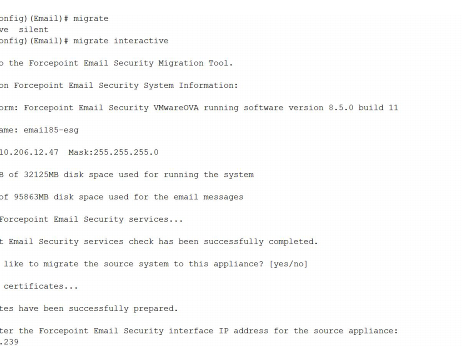
      <div class="I-IndentedText"><span class="B-Bold"><a name="619266">Interactive mode</a></span> is a step-by-step process that requires user input during the process.</div>
      <div class="I-IndentedText"><a name="619267">The following displays an example of the interactive mode command:</a></div>
      <div class="F-Frame"><a name="619271"><img class="Default" src="images/es_upgrade.27.5.1.png" width="462" height="359" style="display: block; left: 0.0; top: 0.0" alt="" /></a></div>
      <div class="I-IndentedText"><span class="B-Bold"><a name="619272">Interactive mode</a></span> requires the following information to be entered:</div>
      <div class="B2-Bullet2_outer" style="margin-left: 18pt">
        <table border="0" cellspacing="0" cellpadding="0" summary="" role="presentation">
          <tr style="vertical-align: baseline">
            <td>
              <div class="B2-Bullet2_inner" style="width: 18pt; white-space: nowrap">
                <img src="b2.png" alt="*" border="0" width="8" height="7" />
              </div>
            </td>
            <td width="100%">
              <div class="B2-Bullet2_inner"><a name="619273">Source appliance (pre-version 8.5.x) IP address.</a></div>
            </td>
          </tr>
        </table>
      </div>
      <div class="B2-Bullet2_outer" style="margin-left: 18pt">
        <table border="0" cellspacing="0" cellpadding="0" summary="" role="presentation">
          <tr style="vertical-align: baseline">
            <td>
              <div class="B2-Bullet2_inner" style="width: 18pt; white-space: nowrap">
                <img src="b2.png" alt="*" border="0" width="8" height="7" />
              </div>
            </td>
            <td width="100%">
              <div class="B2-Bullet2_inner"><a name="619274">Confirmation for the start of the migration.</a></div>
            </td>
          </tr>
        </table>
      </div>
      <div class="B2-Bullet2_outer" style="margin-left: 18pt">
        <table border="0" cellspacing="0" cellpadding="0" summary="" role="presentation">
          <tr style="vertical-align: baseline">
            <td>
              <div class="B2-Bullet2_inner" style="width: 18pt; white-space: nowrap">
                <img src="b2.png" alt="*" border="0" width="8" height="7" />
              </div>
            </td>
            <td width="100%">
              <div class="B2-Bullet2_inner"><a name="619275">Selection of a mode option; </a><span class="B-Bold">Azure</span> or <span class="B-Bold">On-Premises</span>.</div>
            </td>
          </tr>
        </table>
      </div>
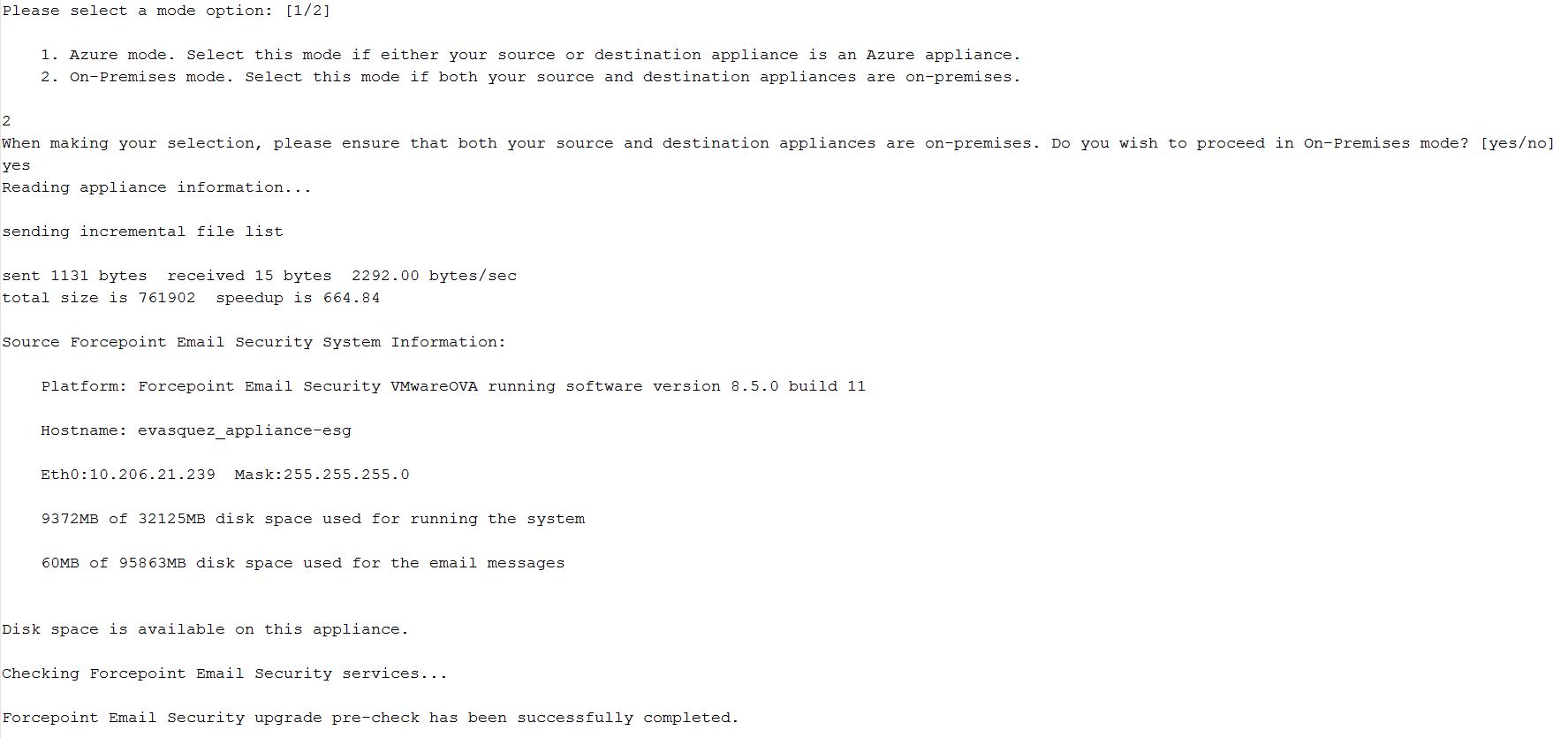
      <div class="I2-IndentedText2"><a name="619276">Select </a><span class="B-Bold">Azure</span> if you are migrating to a version 8.5.x Azure appliance. </div>
      <div class="I2-IndentedText2"><a name="619277">Select </a><span class="B-Bold">On-Premises</span> if you are migrating to a version 8.5.x on-premises appliance.</div>
      <div class="I2-IndentedText2"><a name="619278">The following displays the selection of </a><span style="font-weight: bold">On-Premises</span> to migrate to an 8.5.x on-premises appliance: </div>
      <div class="F-Frame"><a name="619282"><img class="Default" src="images/migrationDoc-mode-option.JPG" width="1775" height="835" style="display: block; left: 0.0; top: 0.0" alt="" /></a></div>
      <div class="B2-Bullet2_outer" style="margin-left: 18pt">
        <table border="0" cellspacing="0" cellpadding="0" summary="" role="presentation">
          <tr style="vertical-align: baseline">
            <td>
              <div class="B2-Bullet2_inner" style="width: 18pt; white-space: nowrap">
                <img src="b2.png" alt="*" border="0" width="8" height="7" />
              </div>
            </td>
            <td width="100%">
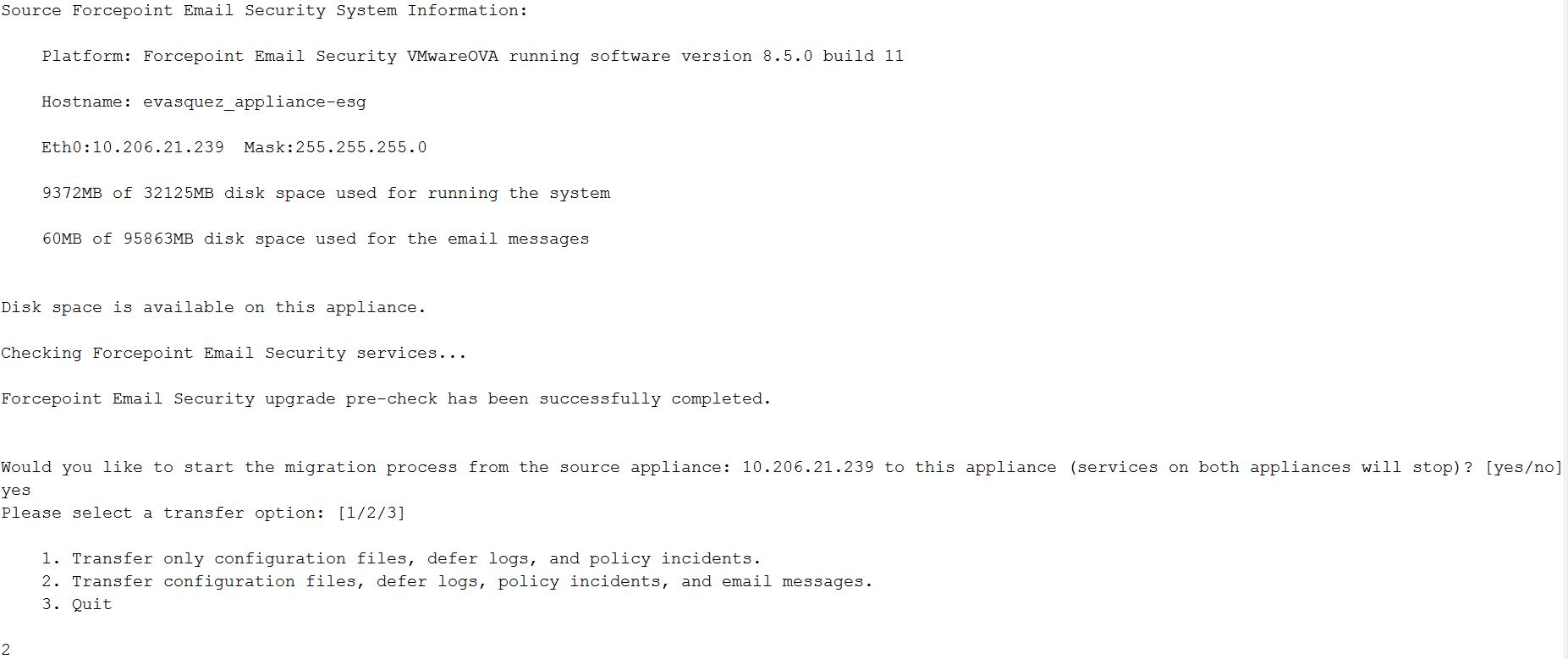
              <div class="B2-Bullet2_inner"><a name="619283">Selection of a transfer option.</a></div>
            </td>
          </tr>
        </table>
      </div>
      <div class="I2-IndentedText2"><a name="619284">If you migrate email message queues in addition to configuration settings, be aware that the transfer of large-volume queues may take a few hours to complete. The following image displays an example of the CLI for this section: </a></div>
      <div class="F-Frame"><a name="619288"><img class="Default" src="images/migrationDoc-screenshot3.JPG" width="1853" height="779" style="display: block; left: 0.0; top: 0.0" alt="" /></a></div>
      <div class="I-IndentedText"><span class="B-Bold"><a name="619289">Silent mode</a></span> requires the following information to be entered:</div>
      <div class="B2-Bullet2_outer" style="margin-left: 18pt">
        <table border="0" cellspacing="0" cellpadding="0" summary="" role="presentation">
          <tr style="vertical-align: baseline">
            <td>
              <div class="B2-Bullet2_inner" style="width: 18pt; white-space: nowrap">
                <img src="b2.png" alt="*" border="0" width="8" height="7" />
              </div>
            </td>
            <td width="100%">
              <div class="B2-Bullet2_inner"><a name="619290">Source appliance (pre-version 8.5.x) IP address.</a></div>
            </td>
          </tr>
        </table>
      </div>
      <div class="B2-Bullet2_outer" style="margin-left: 18pt">
        <table border="0" cellspacing="0" cellpadding="0" summary="" role="presentation">
          <tr style="vertical-align: baseline">
            <td>
              <div class="B2-Bullet2_inner" style="width: 18pt; white-space: nowrap">
                <img src="b2.png" alt="*" border="0" width="8" height="7" />
              </div>
            </td>
            <td width="100%">
              <div class="B2-Bullet2_inner"><a name="619291">Migration mode; </a><span class="B-Bold">Azure</span> or <span class="B-Bold">On-Premises</span>.</div>
            </td>
          </tr>
        </table>
      </div>
      <div class="B2-Bullet2_outer" style="margin-left: 18pt">
        <table border="0" cellspacing="0" cellpadding="0" summary="" role="presentation">
          <tr style="vertical-align: baseline">
            <td>
              <div class="B2-Bullet2_inner" style="width: 18pt; white-space: nowrap">
                <img src="b2.png" alt="*" border="0" width="8" height="7" />
              </div>
            </td>
            <td width="100%">
              <div class="B2-Bullet2_inner"><a name="619292">Subscription key.</a></div>
            </td>
          </tr>
        </table>
      </div>
      <div class="I2-IndentedText2"><a name="619293">The subscription key is only required when the migration mode is Azure.</a></div>
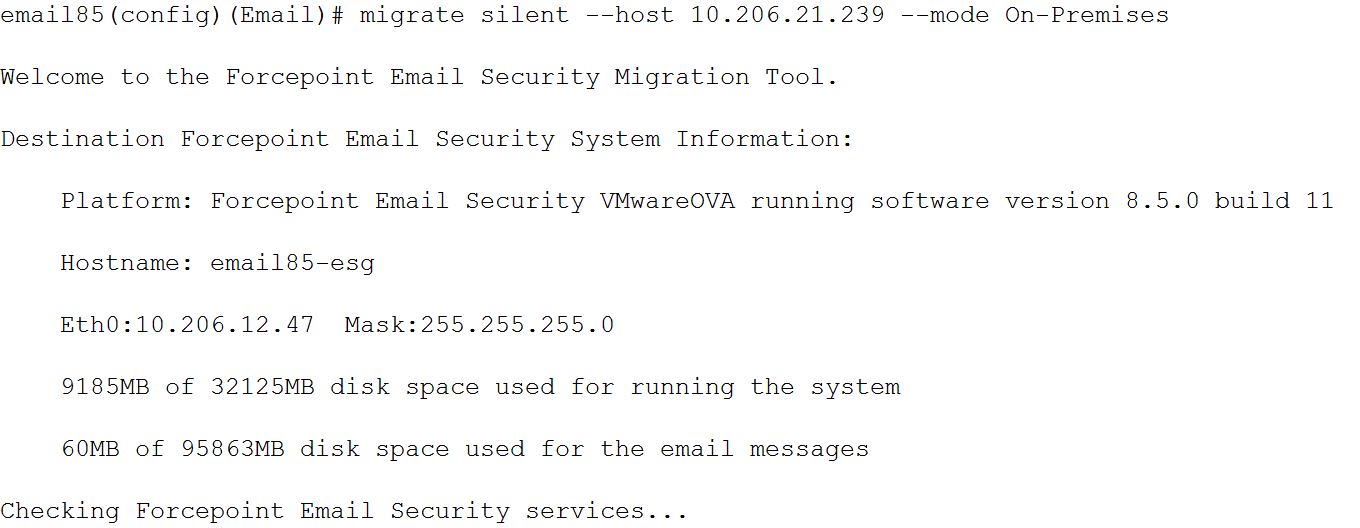
      <div class="I-IndentedText"><a name="619294">The second transfer option is automatically selected for silent mode, and the migration runs without the need for subsequent user input.</a></div>
      <div class="I2-IndentedText2"><a name="619295">The following image displays an example of the CLI for silent mode:</a></div>
      <div class="F-Frame"><a name="619299"> <img class="Default" src="images/migrationDoc-screenshot4.JPG" width="1360" height="528" style="display: block; left: 0.0; top: 0.0" alt="" /></a></div>
      <div class="F-Frame"><a name="619312">&nbsp;</a></div>
      <table class="ImpTable" style="text-align: left" border="0" cellpadding="1" cellspacing="0" summary="">
        <caption></caption>
        <tr>
          <td style="padding-bottom: 3.5pt; padding-left: 4pt; padding-right: 4pt; padding-top: 4.5pt; vertical-align: top; width: 36pt">
            <div class="II-ImpIcon">
              <img src="important.gif" alt="*" border="0" width="30" height="34" /><a name="619302">&nbsp;</a></div>
          </td>
          <td style="padding-bottom: 3.5pt; padding-left: 4pt; padding-right: 4pt; padding-top: 4.5pt; vertical-align: top; width: 266.4pt">
            <div class="IMP-Important">
              <span class="Bold">Important</span><a name="619304">&nbsp;</a></div>
            <div class="NT-NoteText"><a name="619305">You must use your existing TRITON Manager or Forcepoint Security Manager Windows machine. Use of a newly installed TRITON Manager or Forcepoint Security Manager for an upgrade is not currently supported. </a></div>
          </td>
        </tr>
      </table>
      <div class="B-Body"><a name="619313">Consider the following after you perform your virtual appliance migration process:</a></div>
      <div class="B1-Bullet1_outer" style="margin-left: 0pt">
        <table border="0" cellspacing="0" cellpadding="0" summary="" role="presentation">
          <tr style="vertical-align: baseline">
            <td>
              <div class="B1-Bullet1_inner" style="width: 18pt; white-space: nowrap">
                <img src="b1.png" alt="*" border="0" width="8" height="8" />
              </div>
            </td>
            <td width="100%">
              <div class="B1-Bullet1_inner"><a name="619314">If you have an email DLP policy configured to use a TRITON AP-DATA or Forcepoint DLP quarantine action, and the Release Gateway on the page </a><span class="B-Bold">Settings&nbsp;&gt; General&nbsp;&gt; Remediation</span> is set to <span class="B-Bold">Use the gateway that detected the incident</span>, you should change the Release Gateway to the IP address of your new appliance. Otherwise, when a Data Security module administrator releases a pre-migration quarantined message, an "Unable to release incident" error is generated. </div>
            </td>
          </tr>
        </table>
      </div>
      <div class="B1-Bullet1_outer" style="margin-left: 0pt">
        <table border="0" cellspacing="0" cellpadding="0" summary="" role="presentation">
          <tr style="vertical-align: baseline">
            <td>
              <div class="B1-Bullet1_inner" style="width: 18pt; white-space: nowrap">
                <img src="b1.png" alt="*" border="0" width="8" height="8" />
              </div>
            </td>
            <td width="100%">
              <div class="B1-Bullet1_inner"><a name="619321">Virtual IP address settings in filter actions are not retained after an appliance migration. You need to reconfigure virtual IP address settings manually.</a></div>
            </td>
          </tr>
        </table>
      </div>
      <div class="F-Frame"><a name="619328">&nbsp;</a></div>
      <table class="ImpTable" style="text-align: left" border="0" cellpadding="1" cellspacing="0" summary="">
        <caption></caption>
        <tr>
          <td style="padding-bottom: 3.5pt; padding-left: 4pt; padding-right: 4pt; padding-top: 4.5pt; vertical-align: top; width: 36pt">
            <div class="II-ImpIcon">
              <img src="important.gif" alt="*" border="0" width="30" height="34" /><a name="619324">&nbsp;</a></div>
          </td>
          <td style="padding-bottom: 3.5pt; padding-left: 4pt; padding-right: 4pt; padding-top: 4.5pt; vertical-align: top; width: 266.4pt">
            <div class="IMP-Important">
              <span class="Bold">Important</span><a name="619326">&nbsp;</a></div>
            <div class="NT-NoteText"><a name="619327">Please contact Technical Support if Forcepoint personnel have customized your appliance iptables settings. These customizations are not preserved by the migration process.</a></div>
          </td>
        </tr>
      </table>
    </div>
    <!--googleoff: all-->
    <div class="library_search">
      <form class="support_search" action="/content/kb-search.aspx" method="get">
        <label></label>
        <label></label>
        <input type="text" name="q" value=" Search eSupport" onfocus="if (this.value == ' Search eSupport') {this.value = '';}" onblur="if (this.value == '') {this.value = ' Search eSupport';}"></input>
        <input type="submit" value=" "></input>
      </form>
    </div>
    <br class="clear" />
    <!-- New Navigation DIV -->
    <div class="TL_nav" style="text-align: left;">
      <table cellspacing="0" class="toolBarTable" summary="">
        <!-- End New Navigation DIV -->
        <tr>
          <td>
            <!-- New Go To TOC -->
            <a href="toc.aspx"><img src="images/toc.png" alt="Go to the table of contents" border="0" /></a>
            <!-- End Go To TOC -->
          </td>
          <td>
            <!-- New Previous -->
            <a href="upgrade_recovery_procedures_esg.aspx"><img src="images/prev.png" alt="Go to the previous page" border="0" /></a>
            <!-- End New Previous -->
          </td>
          <td>
            <!-- New Next (Active) -->
            <a href="post_upgrade_activities_email.aspx"><img src="images/next.png" alt="Go to the next page" border="0" /></a>
            <!-- End New Next (Active) -->
          </td>
          <!--Start JR breadcrumbs -->
          <td width="20px"></td>
          <td>
            <div class="WebWorks_Breadcrumbs" style="text-align: left;">
              <a class="WebWorks_Breadcrumb_Link" href="dic_esg_upgrade.aspx">Upgrading Email Protection Solutions</a> &gt; Upgrade instructions</div>
          </td>
          <!--End JR breadcrumbs -->
        </tr>
      </table>
    </div>
    <div class="extFooterContainer">
      <div class="extFooter">
        <div align="center">Copyright 2023 Forcepoint. All rights reserved.</div>
      </div>
    </div>
    <SCRIPT>
   function getFileName() {
      //this gets the full url
      var url = document.location.href;
      //this removes the anchor at the end, if there is one
      url = url.substring(0, (url.indexOf("#") == -1) ? url.length : url.indexOf("#"));
      //this removes the query after the file name, if there is one
      url = url.substring(0, (url.indexOf("?") == -1) ? url.length : url.indexOf("?"));
      //this removes everything before the last slash in the path
      url = url.substring(url.lastIndexOf("/") + 1, url.length);
      //return
      return url;
   }

   var url = document.URL;
   var Docname = getFileName()
   s.pageName = "enu:support:technical library:dic_2023:" + Docname;
   s.prop1 = "enu:support";
   s.prop2 = "enu:support:technical library";
   s.channel = "support";
   // <!--
   s.server = "<%= System.Environment.MachineName %>";
   //--></SCRIPT>
    <script language="javascript1.1" type="text/javascript">
   /********Do Not alter below this line ***********/
   var s_code = s.t(); if (s_code) document.write(s_code)
   //--&gt;</script>
  </body>
  <!--"GENERALQUARTERSALLHANDSMANYOURSTATIONS"-->
</html>