<?xml version="1.0" encoding="utf-8"?>
<!DOCTYPE html PUBLIC "-//W3C//DTD XHTML 1.0 Transitional//EN" "http://www.w3.org/TR/xhtml1/DTD/xhtml1-transitional.dtd">
<html xml:lang="en" lang="en" xmlns="http://www.w3.org/1999/xhtml">
  <head runat="server">
    <!-- PageID 382 - published by RedDot 7.5 - 7.5.1.69 - 22111 -->
    <META name="PublicArticle" content="True" />
    <META http-equiv="Content-Type" content="text/html; charset=utf-8" />
    <META name="keywords" />
    <META name="summary" />
    <META name="product" content="fp_web,fp_filter" />
    <META name="version" content="v85" />
    <META name="book" content="Administrator Help for Forcepoint Web Security" />
    <title>Navigating the Forcepoint Security Manager</title>
    <!--Loading the 2016 fonts.-->
    <script type="text/javascript" src="//fast.fonts.net/jsapi/c504d579-e135-4f75-8335-4906f6c6ce67.js"></script>
    <!--Library content styles.-->
    <link rel="StyleSheet" href="https://help.forcepoint.com/docs/ni/assets/css/help2016.css" type="text/css" media="all" />
    <!--2016 font support -->
    <link type="text/css" rel="stylesheet" href="//fast.fonts.net/cssapi/c504d579-e135-4f75-8335-4906f6c6ce67.css" />
  </head>
  <body>
    <!--googleoff: all-->
    <a href="https://www.forcepoint.com">
      <img class="logo" alt="Forcepoint logo" src="https://help.forcepoint.com/docs/ni/assets/logo1.png" />
    </a>
    <div class="extLinksContainer">
      <a class="extLinks" href="//support.forcepoint.com/documentation">Documentation</a> | <a class="extLinks" href="//support.forcepoint.com">Support</a></div>
    <!--
		<wsApp:UserAccess ID="useraccess1" runat="server" IsSecure="False" />
		-->
    <div class="spacer1"></div>
    <br />
    <!-- New Navigation DIV -->
    <div class="TL_nav" style="text-align: left;">
      <table cellspacing="0" class="toolBarTable" summary="">
        <!-- End New Navigation DIV -->
        <tr>
          <td>
            <!-- New Go To TOC -->
            <a href="toc.aspx"><img src="images/toc.png" alt="Go to the table of contents" border="0" /></a>
            <!-- End Go To TOC -->
          </td>
          <td>
            <!-- New Previous -->
            <a href="manager_intro.aspx"><img src="images/prev.png" alt="Go to the previous page" border="0" /></a>
            <!-- End New Previous -->
          </td>
          <td>
            <!-- New Next (Active) -->
            <a href="pending_changes_explain.aspx"><img src="images/next.png" alt="Go to the next page" border="0" /></a>
            <!-- End New Next (Active) -->
          </td>
          <td>
            <!-- New PDF -->
            <a href="web_help.pdf"><img src="images/pdf.png" alt="View or print as PDF" border="0" /></a>
            <!-- End New PDF -->
          </td>
          <!--Start JR breadcrumbs -->
          <td width="20px"></td>
          <td>
            <div class="WebWorks_Breadcrumbs" style="text-align: left;">
              <a class="WebWorks_Breadcrumb_Link" href="first.aspx">Getting Started</a> &gt; <a class="WebWorks_Breadcrumb_Link" href="manager_intro.aspx">Working in the Forcepoint Security Manager</a> &gt; Navigating the Forcepoint Security Manager </div>
          </td>
          <!--End JR breadcrumbs -->
        </tr>
      </table>
    </div>
    <!--googleon: all-->
    <div>
      <div class="N2HT-Heading2Top">
        <span class="Heading_Number"></span><a name="705707">Navigating the Forcepoint Security Manager </a></div>
      <div class="IN-TopicInfo"><a name="725373">Administrator Help&nbsp;| Forcepoint Web Security and Forcepoint URL Filtering&nbsp;| v8.5.x</a></div>
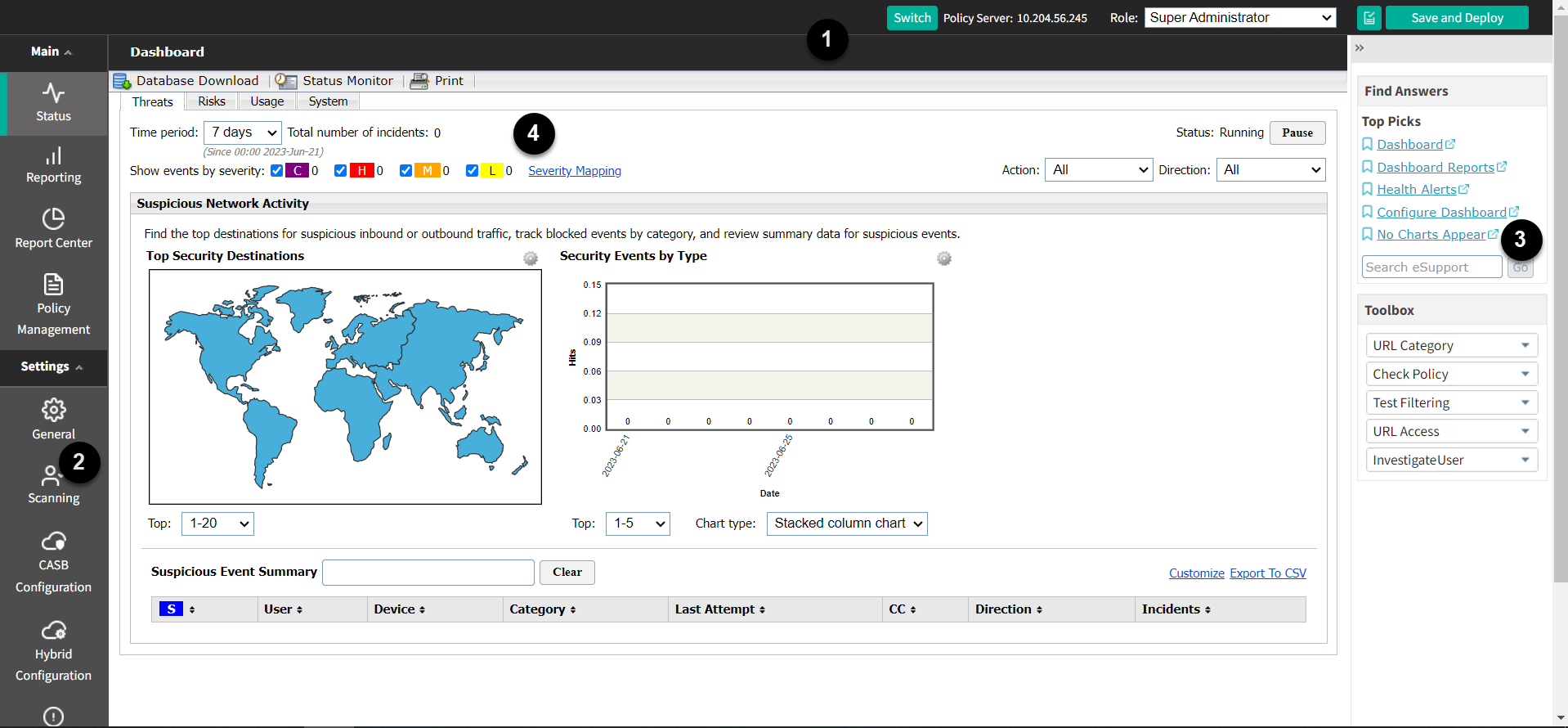
      <div class="B-Body"><a name="740070">The Web Security module of the Security Manager can be divided into 4 main areas:</a></div>
      <div class="F-Frame"><a name="740074"><img class="Default" src="images/Dashboard.png" width="1918" height="890" style="display: block; left: 0.0; top: 0.0" alt="" /></a></div>
      <div class="S-Step_outer" style="margin-left: 0pt">
        <table border="0" cellspacing="0" cellpadding="0" summary="" role="presentation">
          <tr style="vertical-align: baseline">
            <td>
              <div class="S-Step_inner" style="width: 18pt; white-space: nowrap">1.	</div>
            </td>
            <td width="100%">
              <div class="S-Step_inner"><a name="658373">Web Security toolbar</a></div>
            </td>
          </tr>
        </table>
      </div>
      <div class="S-Step_outer" style="margin-left: 0pt">
        <table border="0" cellspacing="0" cellpadding="0" summary="" role="presentation">
          <tr style="vertical-align: baseline">
            <td>
              <div class="S-Step_inner" style="width: 18pt; white-space: nowrap">2.	</div>
            </td>
            <td width="100%">
              <div class="S-Step_inner"><a name="596250">Left navigation pane</a></div>
            </td>
          </tr>
        </table>
      </div>
      <div class="S-Step_outer" style="margin-left: 0pt">
        <table border="0" cellspacing="0" cellpadding="0" summary="" role="presentation">
          <tr style="vertical-align: baseline">
            <td>
              <div class="S-Step_inner" style="width: 18pt; white-space: nowrap">3.	</div>
            </td>
            <td width="100%">
              <div class="S-Step_inner"><a name="596251">Right shortcut pane</a></div>
            </td>
          </tr>
        </table>
      </div>
      <div class="S-Step_outer" style="margin-left: 0pt">
        <table border="0" cellspacing="0" cellpadding="0" summary="" role="presentation">
          <tr style="vertical-align: baseline">
            <td>
              <div class="S-Step_inner" style="width: 18pt; white-space: nowrap">4.	</div>
            </td>
            <td width="100%">
              <div class="S-Step_inner"><a name="596252">Content pane</a></div>
            </td>
          </tr>
        </table>
      </div>
      <div class="B-Body"><a name="670818">This guide describes the options available to the </a><span class="B-Bold">admin</span> account. Delegated administrators may see a subset of the features described. See <span class="LEM-LinkEmphasis"><a href="delegated_admin.aspx" title="Delegated Administration and Reporting">Delegated Administration and Reporting</a></span> for more information.</div>
      <div class="N3HN-HeadNoTopic3"><a name="662474">The Security Manager toolbar (banner)</a></div>
      <div class="B-Body"><a name="739349">Located at the top of the page, above the Web Security toolbar, is the Forcepoint Security Manager toolbar. Use options on this toolbar to manage software configuration and settings for all Forcepoint software modules.</a></div>
      <div class="F-Frame"><a name="739518"><img class="Default" src="images/FSM%20toolbar.png" width="948" height="115" style="display: block; left: 0.0; top: 0.0" alt="" /></a></div>
      <div class="B-Body"><a name="739352">The Forcepoint Security Manager toolbar shows:</a></div>
      <div class="B1-Bullet1_outer" style="margin-left: 0pt">
        <table border="0" cellspacing="0" cellpadding="0" summary="" role="presentation">
          <tr style="vertical-align: baseline">
            <td>
              <div class="B1-Bullet1_inner" style="width: 18pt; white-space: nowrap">
                <img src="b1.png" alt="*" border="0" width="8" height="8" />
              </div>
            </td>
            <td width="100%">
              <div class="B1-Bullet1_inner"><a name="739326">The </a><span style="font-weight: bold">user name</span> associated with your administrative logon account</div>
            </td>
          </tr>
        </table>
      </div>
      <div class="B1-Bullet1_outer" style="margin-left: 0pt">
        <table border="0" cellspacing="0" cellpadding="0" summary="" role="presentation">
          <tr style="vertical-align: baseline">
            <td>
              <div class="B1-Bullet1_inner" style="width: 18pt; white-space: nowrap">
                <img src="b1.png" alt="*" border="0" width="8" height="8" />
              </div>
            </td>
            <td width="100%">
              <div class="B1-Bullet1_inner"><a name="738773">A </a><span style="font-weight: bold">Log Off</span> button, for when you're ready to end your administrative session</div>
            </td>
          </tr>
        </table>
      </div>
      <div class="B-Body"><a name="738849">It also allows you to:</a></div>
      <div class="B1-Bullet1_outer" style="margin-left: 0pt">
        <table border="0" cellspacing="0" cellpadding="0" summary="" role="presentation">
          <tr style="vertical-align: baseline">
            <td>
              <div class="B1-Bullet1_inner" style="width: 18pt; white-space: nowrap">
                <img src="b1.png" alt="*" border="0" width="8" height="8" />
              </div>
            </td>
            <td width="100%">
              <div class="B1-Bullet1_inner"><a name="738877">Move between Security Manager modules.</a></div>
            </td>
          </tr>
        </table>
      </div>
      <div class="B1-Bullet1_outer" style="margin-left: 0pt">
        <table border="0" cellspacing="0" cellpadding="0" summary="" role="presentation">
          <tr style="vertical-align: baseline">
            <td>
              <div class="B1-Bullet1_inner" style="width: 18pt; white-space: nowrap">
                <img src="b1.png" alt="*" border="0" width="8" height="8" />
              </div>
            </td>
            <td width="100%">
              <div class="B1-Bullet1_inner"><a name="738917">View a list of </a><span style="font-weight: bold">Appliances</span> deployed in your network.</div>
            </td>
          </tr>
        </table>
      </div>
      <div class="B1-Bullet1_outer" style="margin-left: 0pt">
        <table border="0" cellspacing="0" cellpadding="0" summary="" role="presentation">
          <tr style="vertical-align: baseline">
            <td>
              <div class="B1-Bullet1_inner" style="width: 18pt; white-space: nowrap">
                <img src="b1.png" alt="*" border="0" width="8" height="8" />
              </div>
            </td>
            <td width="100%">
              <div class="B1-Bullet1_inner"><a name="738976">Configure </a><span style="font-weight: bold">Global Settings</span> that affect all installed modules.</div>
            </td>
          </tr>
        </table>
      </div>
      <div class="B1-Bullet1_outer" style="margin-left: 0pt">
        <table border="0" cellspacing="0" cellpadding="0" summary="" role="presentation">
          <tr style="vertical-align: baseline">
            <td>
              <div class="B1-Bullet1_inner" style="width: 18pt; white-space: nowrap">
                <img src="b1.png" alt="*" border="0" width="8" height="8" />
              </div>
            </td>
            <td width="100%">
              <div class="B1-Bullet1_inner"><a name="739041">Access </a><span style="font-weight: bold">Help</span>, tutorials, product information, and Technical Support resources.</div>
            </td>
          </tr>
        </table>
      </div>
      <div class="F-Frame"><a name="735633"><img class="Default" src="images/Web%20toolbar.png" width="548" height="41" style="display: block; left: 0.0; top: 0.0" alt="" /></a></div>
      <div class="B-Body"><a name="740548">The Forcepoint Security Manager toolbar shows:</a></div>
      <div class="B1-Bullet1_outer" style="margin-left: 0pt">
        <table border="0" cellspacing="0" cellpadding="0" summary="" role="presentation">
          <tr style="vertical-align: baseline">
            <td>
              <div class="B1-Bullet1_inner" style="width: 18pt; white-space: nowrap">
                <img src="b1.png" alt="*" border="0" width="8" height="8" />
              </div>
            </td>
            <td width="100%">
              <div class="B1-Bullet1_inner"><a name="731121">A module drop-down menu that allows you to move between Security Manager modules.</a></div>
            </td>
          </tr>
        </table>
      </div>
      <div class="B1-Bullet1_outer" style="margin-left: 0pt">
        <table border="0" cellspacing="0" cellpadding="0" summary="" role="presentation">
          <tr style="vertical-align: baseline">
            <td>
              <div class="B1-Bullet1_inner" style="width: 18pt; white-space: nowrap">
                <img src="b1.png" alt="*" border="0" width="8" height="8" />
              </div>
            </td>
            <td width="100%">
              <div class="B1-Bullet1_inner"><a name="731241">A User Details option that provides:</a></div>
            </td>
          </tr>
        </table>
      </div>
      <div class="B2-Bullet2_outer" style="margin-left: 18pt">
        <table border="0" cellspacing="0" cellpadding="0" summary="" role="presentation">
          <tr style="vertical-align: baseline">
            <td>
              <div class="B2-Bullet2_inner" style="width: 18pt; white-space: nowrap">
                <img src="b2.png" alt="*" border="0" width="8" height="7" />
              </div>
            </td>
            <td width="100%">
              <div class="B2-Bullet2_inner"><a name="731208">The </a><span class="B-Bold">user name</span> associated with your administrative logon account</div>
            </td>
          </tr>
        </table>
      </div>
      <div class="B2-Bullet2_outer" style="margin-left: 18pt">
        <table border="0" cellspacing="0" cellpadding="0" summary="" role="presentation">
          <tr style="vertical-align: baseline">
            <td>
              <div class="B2-Bullet2_inner" style="width: 18pt; white-space: nowrap">
                <img src="b2.png" alt="*" border="0" width="8" height="7" />
              </div>
            </td>
            <td width="100%">
              <div class="B2-Bullet2_inner"><a name="731122">A </a><span class="B-Bold">Log Off</span> button, for when you're ready to end your administrative session</div>
            </td>
          </tr>
        </table>
      </div>
      <div class="B-Body"><a name="731123">It also allows you to:</a></div>
      <div class="B1-Bullet1_outer" style="margin-left: 0pt">
        <table border="0" cellspacing="0" cellpadding="0" summary="" role="presentation">
          <tr style="vertical-align: baseline">
            <td>
              <div class="B1-Bullet1_inner" style="width: 18pt; white-space: nowrap">
                <img src="b1.png" alt="*" border="0" width="8" height="8" />
              </div>
            </td>
            <td width="100%">
              <div class="B1-Bullet1_inner"><a name="731128">View a list of </a><span class="B-Bold">Appliances</span> deployed in your network.</div>
            </td>
          </tr>
        </table>
      </div>
      <div class="B1-Bullet1_outer" style="margin-left: 0pt">
        <table border="0" cellspacing="0" cellpadding="0" summary="" role="presentation">
          <tr style="vertical-align: baseline">
            <td>
              <div class="B1-Bullet1_inner" style="width: 18pt; white-space: nowrap">
                <img src="b1.png" alt="*" border="0" width="8" height="8" />
              </div>
            </td>
            <td width="100%">
              <div class="B1-Bullet1_inner"><a name="731132">Configure </a><span class="B-Bold">Global Settings</span> that affect all installed modules.</div>
            </td>
          </tr>
        </table>
      </div>
      <div class="B1-Bullet1_outer" style="margin-left: 0pt">
        <table border="0" cellspacing="0" cellpadding="0" summary="" role="presentation">
          <tr style="vertical-align: baseline">
            <td>
              <div class="B1-Bullet1_inner" style="width: 18pt; white-space: nowrap">
                <img src="b1.png" alt="*" border="0" width="8" height="8" />
              </div>
            </td>
            <td width="100%">
              <div class="B1-Bullet1_inner"><a name="731133">Access </a><span class="B-Bold">Help</span>, tutorials, product information, and Technical Support resources.</div>
            </td>
          </tr>
        </table>
      </div>
      <div class="N3HN-HeadNoTopic3"><a name="658389">The Web Security toolbar</a></div>
      <div class="F-Frame"><a name="735753"><img class="Default" src="images/Policy%20server.png" width="896" height="44" style="display: block; left: 0.0; top: 0.0" alt="" /></a></div>
      <div class="B-Body"><a name="740868">The Web Security toolbar, located under the Security Manager toolbar, is used to:</a></div>
      <div class="B1-Bullet1_outer" style="margin-left: 0pt">
        <table border="0" cellspacing="0" cellpadding="0" summary="" role="presentation">
          <tr style="vertical-align: baseline">
            <td>
              <div class="B1-Bullet1_inner" style="width: 18pt; white-space: nowrap">
                <img src="b1.png" alt="*" border="0" width="8" height="8" />
              </div>
            </td>
            <td width="100%">
              <div class="B1-Bullet1_inner"><a name="675252">See which Policy Server you are currently connected to, and switch between Policy Server instances, if applicable (see </a><span class="LEM-LinkEmphasis"><a href="policy_server.aspx" title="Working with Policy Server">Working with Policy Server</a></span>).</div>
            </td>
          </tr>
        </table>
      </div>
      <div class="B1-Bullet1_outer" style="margin-left: 0pt">
        <table border="0" cellspacing="0" cellpadding="0" summary="" role="presentation">
          <tr style="vertical-align: baseline">
            <td>
              <div class="B1-Bullet1_inner" style="width: 18pt; white-space: nowrap">
                <img src="b1.png" alt="*" border="0" width="8" height="8" />
              </div>
            </td>
            <td width="100%">
              <div class="B1-Bullet1_inner"><a name="675240">View your administrative </a><span class="B-Bold">Role</span>, switch between roles, or release policy permissions for the current role.</div>
            </td>
          </tr>
        </table>
      </div>
      <div class="F-Frame"><a name="677925">&nbsp;</a></div>
      <table class="TipTable" style="text-align: left" border="0" cellpadding="1" cellspacing="0" summary="">
        <caption></caption>
        <tr>
          <td style="padding-bottom: 3.5pt; padding-left: 4pt; padding-right: 4pt; padding-top: 4.5pt; vertical-align: top; width: 36pt">
            <div class="TI-TipIcon">
              <img src="tip-bulb.gif" alt="*" border="0" width="34" height="34" /><a name="670707">&nbsp;</a></div>
          </td>
          <td style="padding-bottom: 3.5pt; padding-left: 4pt; padding-right: 4pt; padding-top: 4.5pt; vertical-align: top; width: 266.4pt">
            <div class="T-Tip">Tip<a name="670709">&nbsp;</a></div>
            <div class="NT-NoteText"><a name="670710">If you have policy management and reporting permissions, but only reporting features are displayed, another administrator may be logged on to the role. Only one administrator at a time can access policy management features for each role.</a></div>
          </td>
        </tr>
      </table>
      <div class="B1-Bullet1_outer" style="margin-left: 0pt">
        <table border="0" cellspacing="0" cellpadding="0" summary="" role="presentation">
          <tr style="vertical-align: baseline">
            <td>
              <div class="B1-Bullet1_inner" style="width: 18pt; white-space: nowrap">
                <img src="b1.png" alt="*" border="0" width="8" height="8" />
              </div>
            </td>
            <td width="100%">
              <div class="B1-Bullet1_inner"><span class="B-Bold"><a name="662362">View Pending Changes</a></span> (via the small icon) and <span class="B-Bold">Save and Deploy</span> pending changes. If there are no cached changes waiting to be saved, these buttons are disabled.</div>
            </td>
          </tr>
        </table>
      </div>
      <div class="I-IndentedText"><a name="658459">See </a><span class="LEM-LinkEmphasis"><a href="pending_changes_explain.aspx" title="Reviewing, saving, and discarding changes">Reviewing, saving, and discarding changes</a></span> for more information.</div>
      <div class="N3HN-HeadNoTopic3"><a name="601279">The left and right navigation panes</a></div>
      <div class="F-Frame"><a name="670872"><img class="Default" src="images/left%20and%20right%20navigation%20panes.png" width="700" height="1230" style="display: block; left: 0.0; top: 0.0" alt="" /></a></div>
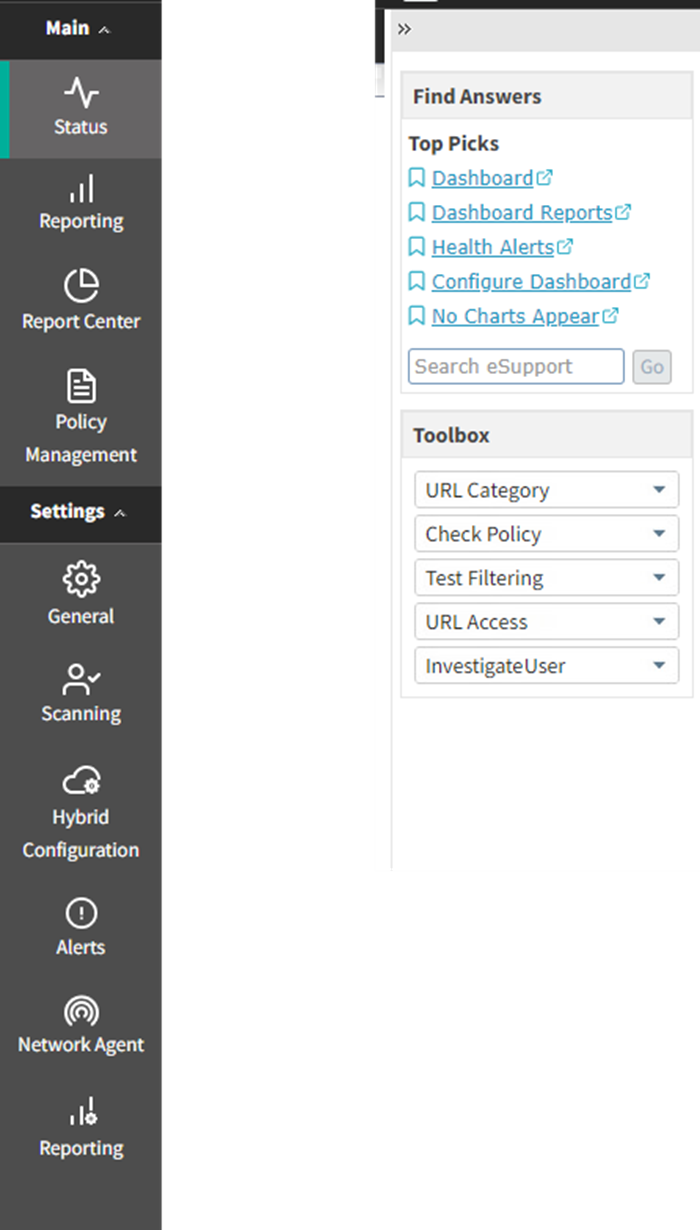
      <div class="B-Body"><a name="735852">The left navigation pane has two groupings: </a><span class="B-Bold">Main</span> and <span class="B-Bold">Settings</span>. Use the <span class="B-Bold">Main</span> option to access status, reporting, and policy management features and functions. Use the <span class="B-Bold">Settings</span> option to manage your Forcepoint account and perform global system administration tasks. (Note that Settings displays different options depending on your subscription level.)</div>
      <div class="B-Body"><a name="596261">The right shortcut pane contains links to useful tools and information.</a></div>
      <div class="B1-Bullet1_outer" style="margin-left: 0pt">
        <table border="0" cellspacing="0" cellpadding="0" summary="" role="presentation">
          <tr style="vertical-align: baseline">
            <td>
              <div class="B1-Bullet1_inner" style="width: 18pt; white-space: nowrap">
                <img src="b1.png" alt="*" border="0" width="8" height="8" />
              </div>
            </td>
            <td width="100%">
              <div class="B1-Bullet1_inner"><span class="B-Bold"><a name="601287">Find Answers</a></span> provides links to articles, webinars, videos, worksheets, and tutorials to help you complete your tasks. Use the Search box to find more information in the Forcepoint eSupport Knowledge Base.</div>
            </td>
          </tr>
        </table>
      </div>
      <div class="B1-Bullet1_outer" style="margin-left: 0pt">
        <table border="0" cellspacing="0" cellpadding="0" summary="" role="presentation">
          <tr style="vertical-align: baseline">
            <td>
              <div class="B1-Bullet1_inner" style="width: 18pt; white-space: nowrap">
                <img src="b1.png" alt="*" border="0" width="8" height="8" />
              </div>
            </td>
            <td width="100%">
              <div class="B1-Bullet1_inner"><a name="601262">The </a><span class="B-Bold">Toolbox</span> contains quick lookup tools that you can use to verify your configuration. See <span class="LEM-LinkEmphasis"><a href="toolbox.aspx" title="Using the Toolbox to verify policy enforcement behavior">Using the Toolbox to verify policy enforcement behavior</a></span> for more information.</div>
            </td>
          </tr>
        </table>
      </div>
      <div class="B-Body"><a name="658460">Both the right navigation pane can be minimized by clicking the double arrow (&gt;&gt;) icon at the top of the pane. Click the reverse icon (&lt;&lt;) to view the pane.</a></div>
      <div class="B-Body"><a name="720552">Mouse over an icon or option in the left navigation pane to display a menu of features in that group.</a></div>
    </div>
    <!--googleoff: all-->
    <div class="library_search">
      <form class="support_search" action="/content/kb-search.aspx" method="get">
        <label></label>
        <label></label>
        <input type="text" name="q" value=" Search eSupport" onfocus="if (this.value == ' Search eSupport') {this.value = '';}" onblur="if (this.value == '') {this.value = ' Search eSupport';}"></input>
        <input type="submit" value=" "></input>
      </form>
    </div>
    <br class="clear" />
    <!-- New Navigation DIV -->
    <div class="TL_nav" style="text-align: left;">
      <table cellspacing="0" class="toolBarTable" summary="">
        <!-- End New Navigation DIV -->
        <tr>
          <td>
            <!-- New Go To TOC -->
            <a href="toc.aspx"><img src="images/toc.png" alt="Go to the table of contents" border="0" /></a>
            <!-- End Go To TOC -->
          </td>
          <td>
            <!-- New Previous -->
            <a href="manager_intro.aspx"><img src="images/prev.png" alt="Go to the previous page" border="0" /></a>
            <!-- End New Previous -->
          </td>
          <td>
            <!-- New Next (Active) -->
            <a href="pending_changes_explain.aspx"><img src="images/next.png" alt="Go to the next page" border="0" /></a>
            <!-- End New Next (Active) -->
          </td>
          <td>
            <!-- New PDF -->
            <a href="web_help.pdf"><img src="images/pdf.png" alt="View or print as PDF" border="0" /></a>
            <!-- End New PDF -->
          </td>
          <!--Start JR breadcrumbs -->
          <td width="20px"></td>
          <td>
            <div class="WebWorks_Breadcrumbs" style="text-align: left;">
              <a class="WebWorks_Breadcrumb_Link" href="first.aspx">Getting Started</a> &gt; <a class="WebWorks_Breadcrumb_Link" href="manager_intro.aspx">Working in the Forcepoint Security Manager</a> &gt; Navigating the Forcepoint Security Manager </div>
          </td>
          <!--End JR breadcrumbs -->
        </tr>
      </table>
    </div>
    <div class="extFooterContainer">
      <div class="extFooter">
        <div align="center">Copyright 2023 Forcepoint. All rights reserved.</div>
      </div>
    </div>
    <SCRIPT>
   function getFileName() {
      //this gets the full url
      var url = document.location.href;
      //this removes the anchor at the end, if there is one
      url = url.substring(0, (url.indexOf("#") == -1) ? url.length : url.indexOf("#"));
      //this removes the query after the file name, if there is one
      url = url.substring(0, (url.indexOf("?") == -1) ? url.length : url.indexOf("?"));
      //this removes everything before the last slash in the path
      url = url.substring(url.lastIndexOf("/") + 1, url.length);
      //return
      return url;
   }

   var url = document.URL;
   var Docname = getFileName()
   s.pageName = "enu:support:technical library:webhelp_v85x:" + Docname;
   s.prop1 = "enu:support";
   s.prop2 = "enu:support:technical library";
   s.channel = "support";
   // <!--
   s.server = "<%= System.Environment.MachineName %>";
   //--></SCRIPT>
    <script language="javascript1.1" type="text/javascript">
   /********Do Not alter below this line ***********/
   var s_code = s.t(); if (s_code) document.write(s_code)
   //--&gt;</script>
  </body>
  <!--"GENERALQUARTERSALLHANDSMANYOURSTATIONS"-->
</html>