
Understanding the Agent Groups Tab
The Agent Groups tab lets you organise your registered agents into groups, so that a policy can refer to the group instead of naming each agent.
An access policy has to know which agents it applies to. You can name agents one at a time, or you can name a group and let the group hold the membership.
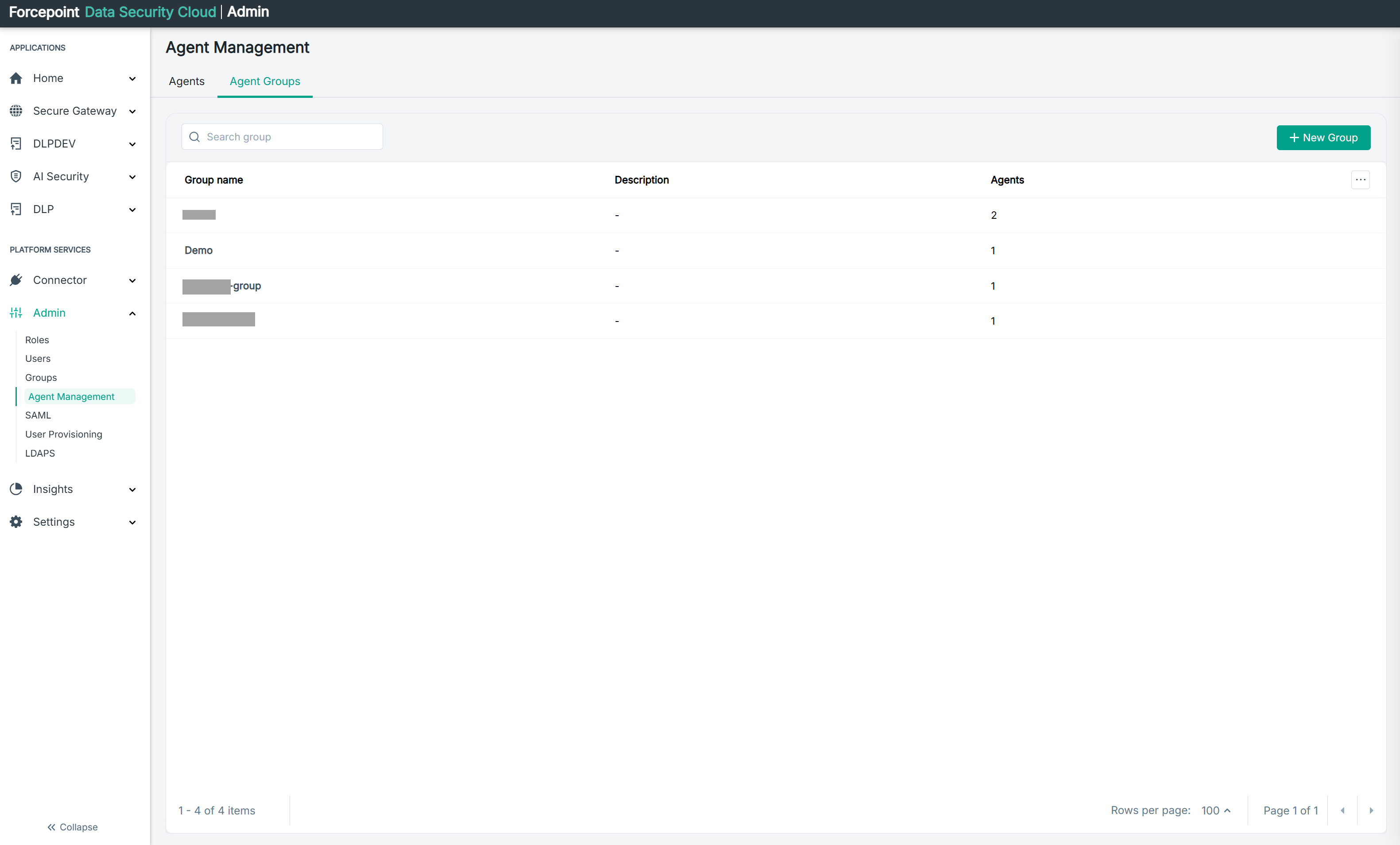
To open the tab, go to Admin › Agent Management, then click Agent Groups.
Why group agents
Grouping is worth the effort for three reasons, and they grow more important as the number of agents in your environment grows.
A policy stays correct as agents change. This is the main reason. If a policy names individual agents, every new agent has to be added to every policy that should cover it, and every retired agent has to be removed. If the policy names a group, adding the agent to that group is enough, and the policy applies to it immediately. Nobody has to remember which policies existed.
One change instead of many. A restriction that should apply to a dozen agents is written once against the group. Without grouping, the same intent is spread across a dozen entries, and a change means finding all of them.
The configuration says what it means. A policy that denies edits to a group named for a team or a purpose explains itself. A policy listing a dozen agent names explains nothing about why those agents were chosen, which makes it hard for a colleague to review, and hard for anyone to know whether an agent was left out deliberately or by mistake.
The cost of not grouping is not visible at first. With three agents, naming them individually is quicker. The gap opens up later, when an agent is added and the policies that should have covered it silently do not.
What the tab contains
| Area | What it shows |
|---|---|
| Search group | Filters the list by group name |
| New Group | Opens the panel for creating a group |
| Group table | One row per group |
| Paging controls | The item count, Rows per page, and the page arrows |
What the table columns mean
| Column | What it shows |
|---|---|
| Group name | The name you gave the group |
| Description | What the group is for. A dash (-) means no description was entered |
| Agents | How many agents belong to the group |
Naming and describing a group
The group name and description are what a colleague reads when they are trying to understand a policy months later, so they carry more weight than they appear to.
Name a group for the purpose it serves rather than for who created it or when. A name that describes the team, the system, or the level of trust involved tells a reviewer what the group is for. A name like a person or a test label does not.
The Description field is optional, and a dash in that column means it was left empty. It is worth completing. The description is the only place to record why the group exists, which is exactly what someone reviewing an unfamiliar policy needs to know.
What you can do from here
- Find a group by name
- See how many agents each group contains
- Read what each group is for
- Create a new group