
Understanding the Difference Between Access Control Policies and Data Security Policies
AI Security uses two kinds of policy. One decides whether an operation is allowed to happen at all. The other decides whether the content involved is acceptable.
Both appear under AI Security › Policy, on two tabs, which makes them look like variations of the same thing. They are not. They protect against different risks, are created in different places, and are applied at different points.
What each one does
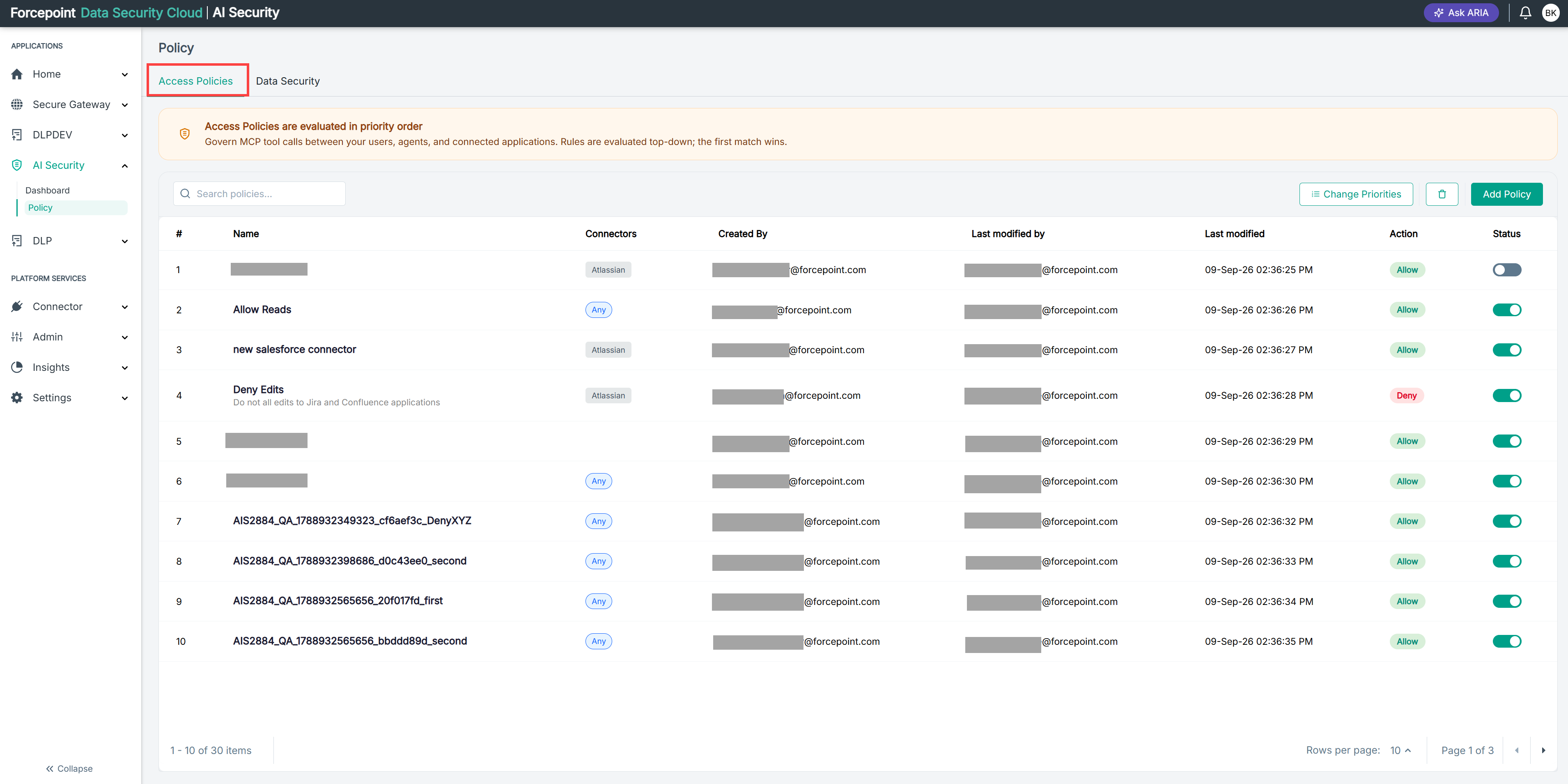
An access control policy governs actions. When an AI agent tries to call a tool in one of your business applications through the MCP Gateway, the access policy decides whether that call is permitted. It never looks at what the call contains. An agent editing a Jira issue is either allowed to edit Jira issues or it is not.
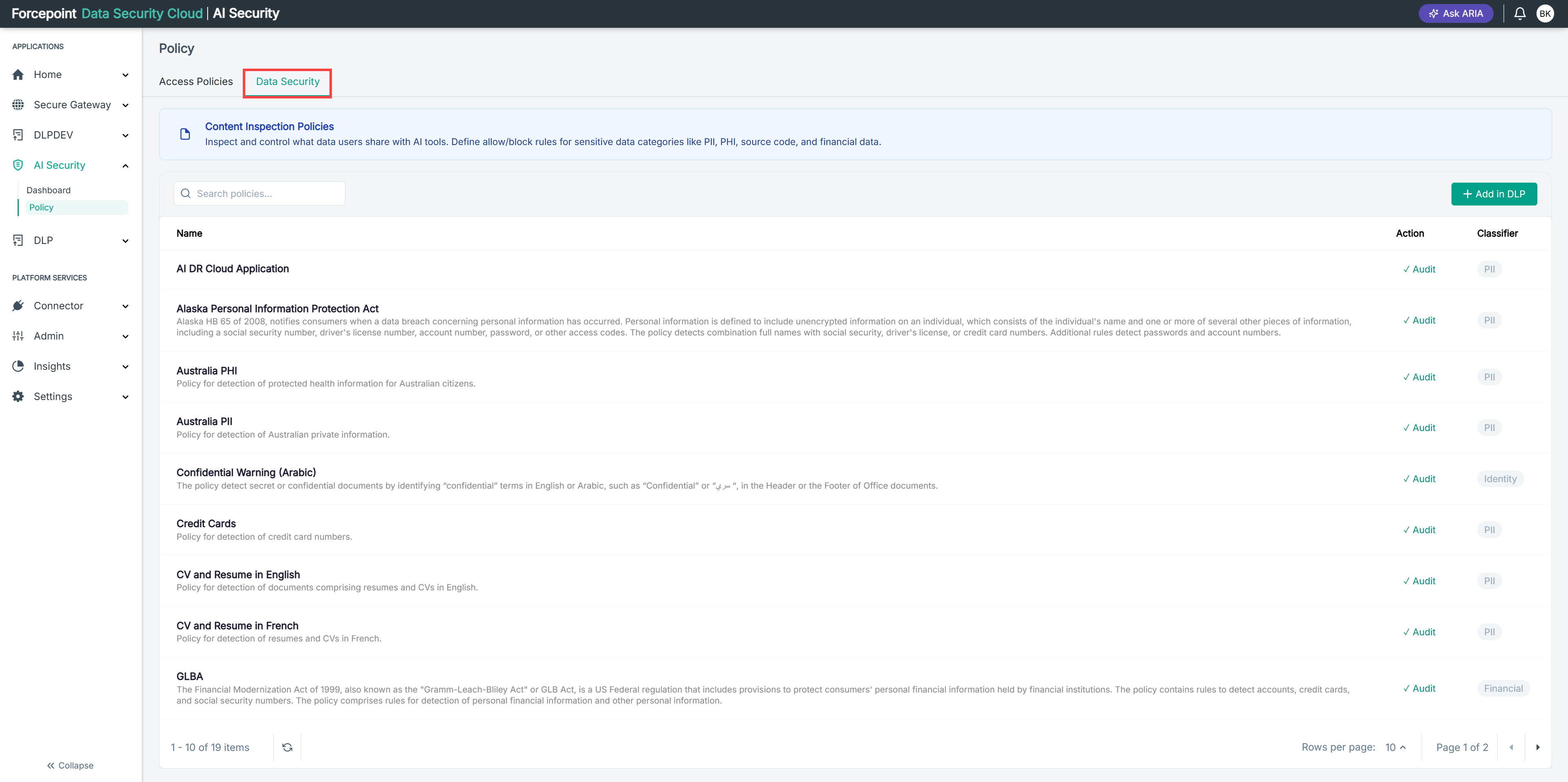
A data security policy governs content. When data moves through a connected application, the data security policy inspects it and looks for sensitive categories such as personal information, health information, financial data, or source code. It does not care which operation was being performed, only what was inside it.
The distinction is easiest to hold on to as two separate questions. Access control asks should this be happening? Data security asks what just went through?
Which one applies first
When a single gateway call involves both, they are applied in order:
- The access control policy is evaluated first. It decides whether the call is permitted at all.
- The data security policy is applied second, to the content of a call that was permitted.
That order has two practical consequences.
A denied call produces no data security event. If an access policy blocks a call, nothing moves, so there is no content to inspect. A policy showing no data security violations is not necessarily unused; the calls it would have inspected may be being blocked before they get that far.
A data security policy can act on a call an access policy permitted. Allowing an operation is not the same as accepting whatever it carries. This is what lets you permit a broad set of operations and still control the data within them.
Use this when deciding which policy you need. If an operation should never happen, block it with an access control policy. If the operation is legitimate but its content needs watching, allow it and let a data security policy handle what passes through.
What each one covers
Access control applies to gateway traffic only. Data security applies to both.
| Access control policies | Data security policies | |
|---|---|---|
| App connectors, such as your AI applications | Not applied | Applied |
| Gateway connectors, such as your business applications | Applied | Applied |
Gateway traffic is therefore governed twice: once on whether the call is permitted, and once on what it carried. This is why an MCP Gateway connector reports data security violations of its own, alongside the tool calls it handled.
How they compare
| Access control policies | Data security policies | |
|---|---|---|
| Question answered | Should this operation be permitted? | Is the content acceptable? |
| What is governed | MCP tool calls between your users, agents, and connected business applications | Content moving through your connected applications, whether an AI application or a gateway connector |
| Applied | First | Second, to calls that were permitted |
| Where it is created | In AI Security, on the Access Policies tab | In the Data Security portal, reached through Add in DLP |
| Where it is managed | In AI Security | In the Data Security portal. AI Security displays them for review only |
| How it is scoped | By identity, source IP address, gateway connector, and individual tools | By classifier, such as personal or health information |
| How it is evaluated | Top-down in a numbered priority order. The first match wins and no policy below it is considered | No priority order is shown in AI Security. A policy holds rules, and each rule detects independently |
| Available actions | Allow or Deny, with an optional notification | Set in the Data Security portal, and can differ per rule |
| Can be switched off in AI Security | Yes, using the Status toggle on the policy row | No |
Which one you need
Work back from the risk you are trying to reduce.
- An agent could change something it should not. You need an access control policy. Deny the write operations, or restrict them to a group of agents you trust.
- Someone could paste customer records into an AI tool. You need a data security policy. Detect the classification and decide what happens when it is found.
- An agent could read a document it should not, and send the contents to an AI tool. You need both. The access policy governs whether the agent can read the document at all; the data security policy governs what happens to the contents if it can.
Most organisations need both, because the two cover different halves of the same journey. An access control policy alone permits or blocks operations without knowing what data they carried. A data security policy alone sees the data but cannot stop the operation that exposed it.
Where they meet
The two kinds of policy report side by side on the Policy Effectiveness tab of the AI Governance Dashboard, in the Access Control Policies and DLP Policies charts. That is the one place where you can see both at once and judge whether your coverage is balanced.
A programme with heavy access policy activity and almost no data security activity is controlling what agents do but not watching what they carry. The reverse means you can see exposure but are not preventing the operations causing it.