
Understanding the Register Agent Panel
The Register Agent panel is where you give an AI agent an identity on the MCP Gateway, decide which connectors it may reach, and set how long its token lasts.
The same panel is used to register a new agent and to change one that already exists, so what you see depends on which you are doing.
To register a new agent, go to Admin › Agent Management and click Register Agent. To change an existing agent, click the agent in the list.
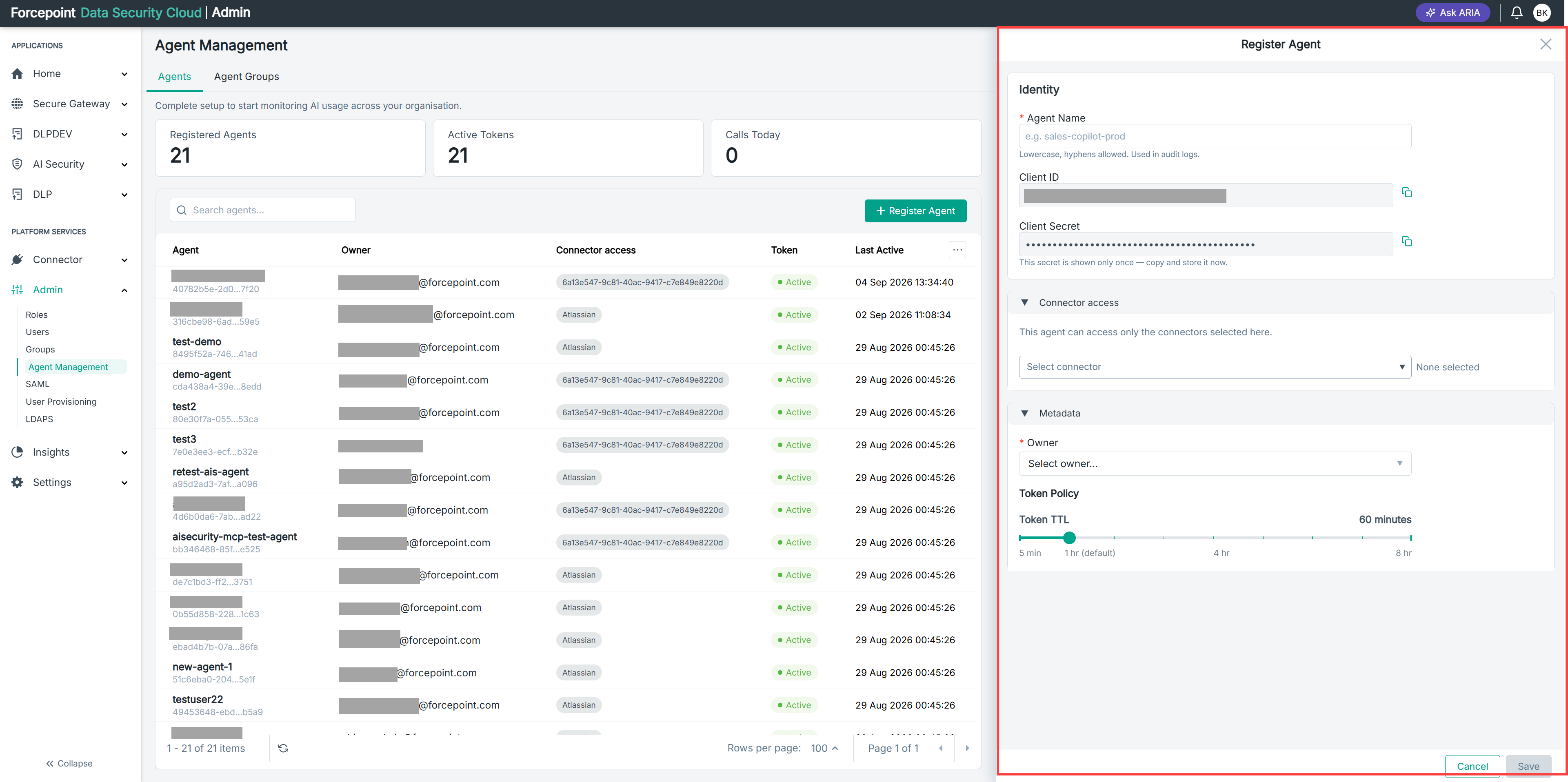
What the panel contains
| Area | What it holds |
|---|---|
| Identity | The agent name, and the client ID the platform generates for it |
| Connector access | Which gateway connectors the agent is allowed to reach |
| Metadata | Who owns the agent, and how long its token lasts |
| Deregister | Removes the agent permanently. Shown only when you open an existing agent |
| Cancel | Closes the panel without saving |
| Update | Saves your changes |
Identity
| Field | What it is for |
|---|---|
| Agent Name | The name the agent is known by. Lowercase with hyphens. Required |
| Client ID | The identifier the platform generates for the agent. Use the copy icon to copy it into the agent configuration |
The helper text under Agent Name notes that the name is used in audit logs. That is worth taking seriously. When you are investigating why a call was made, the agent name is what you will be reading, so a name that describes what the agent does will save time later. A name like a test label will not.
Client ID is generated for you and cannot be edited.
The client secret
An agent also has a client secret, which is issued when the agent is first registered. It is shown once, at that point only, and is not displayed again when you reopen the agent.
This is why the panel shows a client ID but no secret when you open an existing agent. Copy the secret when it is offered.
Connector access
The text in this section states the rule plainly: the agent can reach only the connectors selected here. Nothing is available by default, so an agent with no connectors selected cannot call anything.
Selected connectors appear as chips, each with a remove icon, and the count beside the Select connector list tells you how many are in scope.
A chip showing a long identifier rather than a connector name means the connector instance has been deleted since the agent was registered. The agent keeps the reference, but there is no connector left for it to name.
Metadata
| Field | What it is for |
|---|---|
| Owner | The person accountable for the agent. Required |
| Token TTL | How long the token the agent uses remains valid |
Owner matters more than it looks, because an agent acts on its own without anyone watching. When an agent behaves unexpectedly, the owner is who gets asked, so the field should name a person who actually knows what the agent is for.
Choosing a token time to live
The Token TTL slider runs from five minutes to eight hours, and defaults to one hour.
The setting is a trade-off with no universally right answer:
- A shorter time to live limits the damage if a token is ever exposed, because it stops working sooner. It also means the agent re-authenticates more often.
- A longer time to live means fewer interruptions for a long-running agent, but a leaked token stays usable for longer.
The default of one hour suits most agents. Move towards the short end for agents that touch sensitive systems, and towards the long end only for agents whose work genuinely runs for hours without a break.
What you can do from here
- Name an agent, or rename an existing one
- Copy the client ID into the agent configuration
- Choose which gateway connectors the agent may reach
- Record who owns the agent
- Set how long the token of the agent lasts
- Remove the agent permanently