
Understanding the Data Security Tab
The Data Security tab shows the content inspection policies that control what data your people are allowed to share with AI tools.
Where an access policy decides whether a call is permitted at all, a data security policy looks inside the content. It detects sensitive data categories such as personal information, health information, financial data, and source code, and applies a rule to what it finds.
To open it, go to AI Security › Policy, then click Data Security.
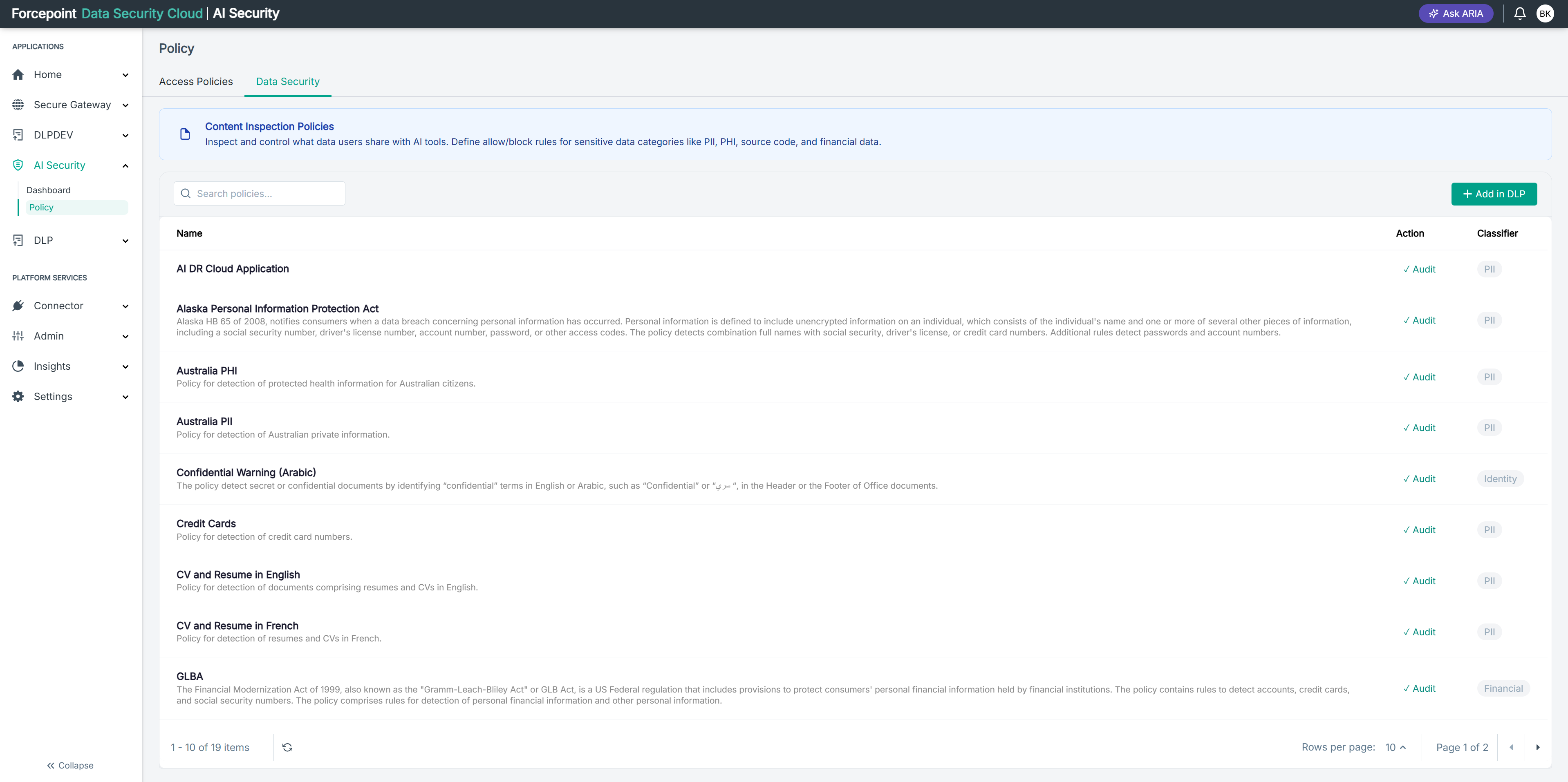
What the tab contains
| Area | What it shows |
|---|---|
| Banner | A short explanation of what content inspection policies do |
| Search policies | Filters the list by policy name |
| Add in DLP | Takes you to the Data Security portal, where policies are created |
| Policy list | One row per policy, showing its name, description, action, and classifier |
| Refresh icon | Reloads the list, at the foot of the page beside the item count |
| Paging controls | The item count, Rows per page, and the page arrows |
What the columns mean
| Column | What it shows |
|---|---|
| Name | The policy name, with a description beneath it explaining what the policy detects |
| Action | What happens when the policy matches, for example Audit |
| Classifier | The type of sensitive data the policy detects, shown as a badge, for example PII or Identity |
Where these policies come from
The policies listed here are not created in AI Security. They come from your Data Security configuration, and AI Security displays them so you can see which content rules apply to AI traffic.
Add in DLP takes you across to the Data Security portal to create a new one. After you create it there, return to this tab and use the refresh icon to bring the list up to date.
Because the policies are managed elsewhere, this tab is for review rather than editing: you can see what is in force, but you change it in the Data Security portal.
What you can do from here
- Find a content inspection policy by name
- Read what each policy detects and which classifier it uses
- Check what action a policy takes when it matches
- Create a new policy in the Data Security portal
- Refresh the list after making changes there