While creating SWG and CASB policies, if you select Forcepoint DLP as the data pattern in any of the Actions dialog for Secure App Access, then:
-
The FSM Enforced option gets populated in Action field as the action is configured on the FSM. The FSM Enforced is the only option available for selection.
If an action other than Allow that is not supported by the application is returned when using Forcepoint DLP data pattern, Forcepoint ONE SSE translates it as a Deny.
To send notifications when the Forcepoint DLP returns an action other than Allow, click Notify.
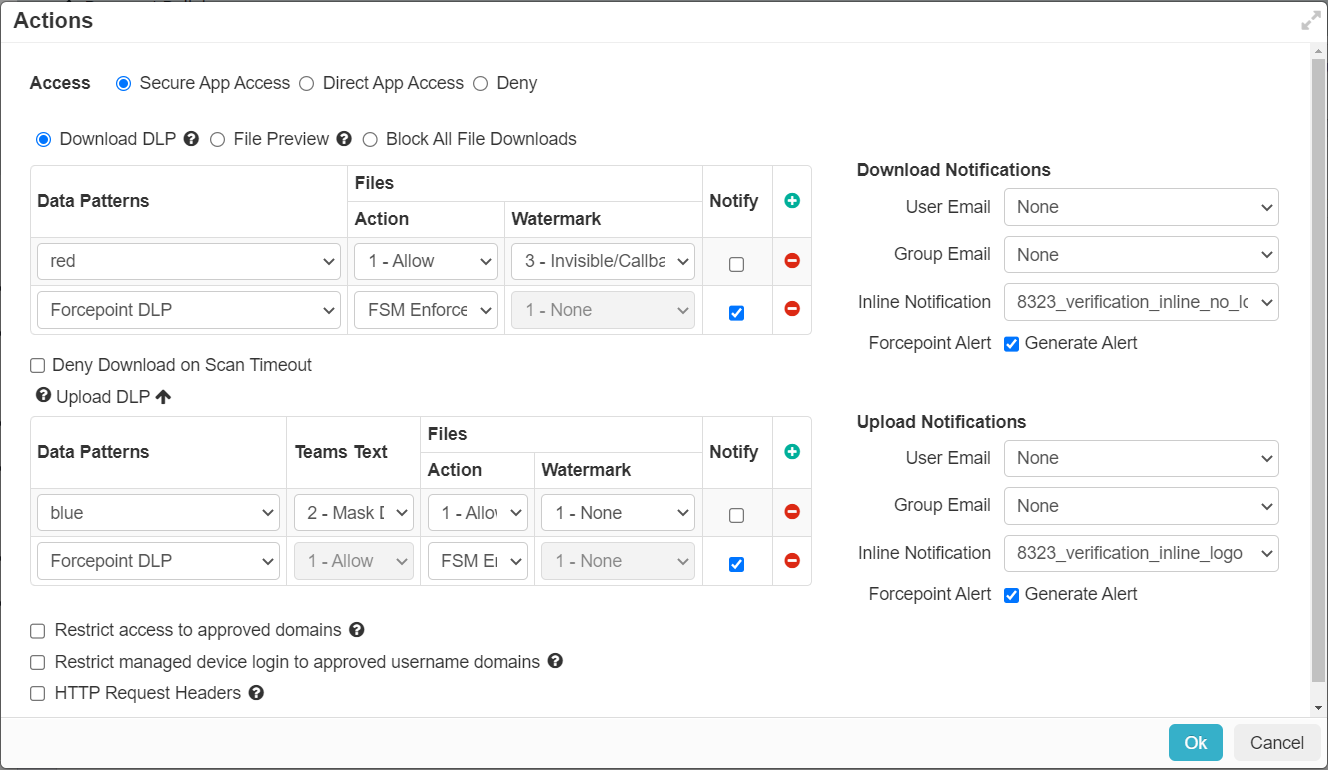
- All other fields in the upload or download DLP table are set to their default value and grayed out and are not supported with Forcepoint DLP.
While configuring the CASB Inline policy or SWG Content policy, you can select only Anti-malware data patterns that you have purchased as part of Forcepoint ONE SSE subscription along with the Forcepoint DLP data pattern. None of the other Forcepoint ONE SSE data patterns available in the page are supported with the Forcepoint DLP data pattern.
For all the FSM-based policies, Forcepoint ONE SSE executes the action returned by Forcepoint DLP.
If an action is returned by both the FSM-based policy (with Forcepoint DLP data pattern) and another CASB Inline or SWG Content policy (with Anti-malware data pattern) in Forcepoint ONE SSE, the most severe action is enforced. The Deny action is the most severe and the Allow action is the least severe.
- For CASB related incidents, refer to Reviewing Proxy logs.
- For SWG related incidents, refer to Reviewing Web DLP logs.