Forcepoint ONE SSE's SmartEdge agent supports the ability to exclude or bypass specific sites or networks from being proxied through Forcepoint ONE SSE. This can be applied globally based on the traffic, private networks, or specific domain URLs.
Refer to Setting bypass domains, host IPs or subnets section to bypass domains and host IPs or subnets.
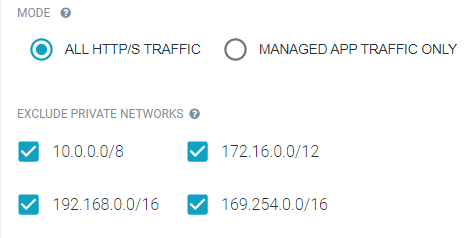
Mode Option
The Mode option allows admins to decide if the SmartEdge agent will be forward proxying all HTTP traffic or just traffic for managed applications that are being protected by Forcepoint ONE SSE.
- All HTTP Traffic: This will proxy all web traffic on the device.
- Managed App traffic only: This option will only proxy traffic to applications that have been added to the page that you are directly controlling.
Exclude Private Networks
This section allows admins to exclude their private networks from being proxied. Select the IP range for your internal network that you wish to exclude (Private Networks are included and will be proxied by default unless you select them here for exclusion). These options only apply when you have set the All HTTP traffic option as Mode. If you have selected Managed App traffic only, then Forcepoint ONE SSE is only proxying traffic to the applications you are controlling.