Classification Model for DSPMLight Users
This topic guides you how Forcepoint DSPM classifies your data. Classification rules work together through the pipeline to assign each file a clear, accurate tag.
The Classification Model page displays differently depending on your product configuration. Use the sections below to find the view that matches your environment.
Note
The Classification Model view varies by product configuration. Some features shown on this page are available as limited availability only. To understand which features are included in your configuration, see Understanding Your On-Prem License and Feature Access.
DSPM Light - DLP Policies only (Limited Availability)
Note
This version of the Classification Model is available as limited availability only. It is shown to users on the dspmLight configuration. For details on which configurations include this view, see Understanding Your On-Prem License and Feature Access.
If the top-right corner of your Classification Model page shows DLP-Only Mesh: 4.0.x, your configuration uses DLP policies as the primary classification method. This is a simplified pipeline that uses DLP Policy Groups to classify content, without the Detector Groups and AI Classifiers present in the standard view.
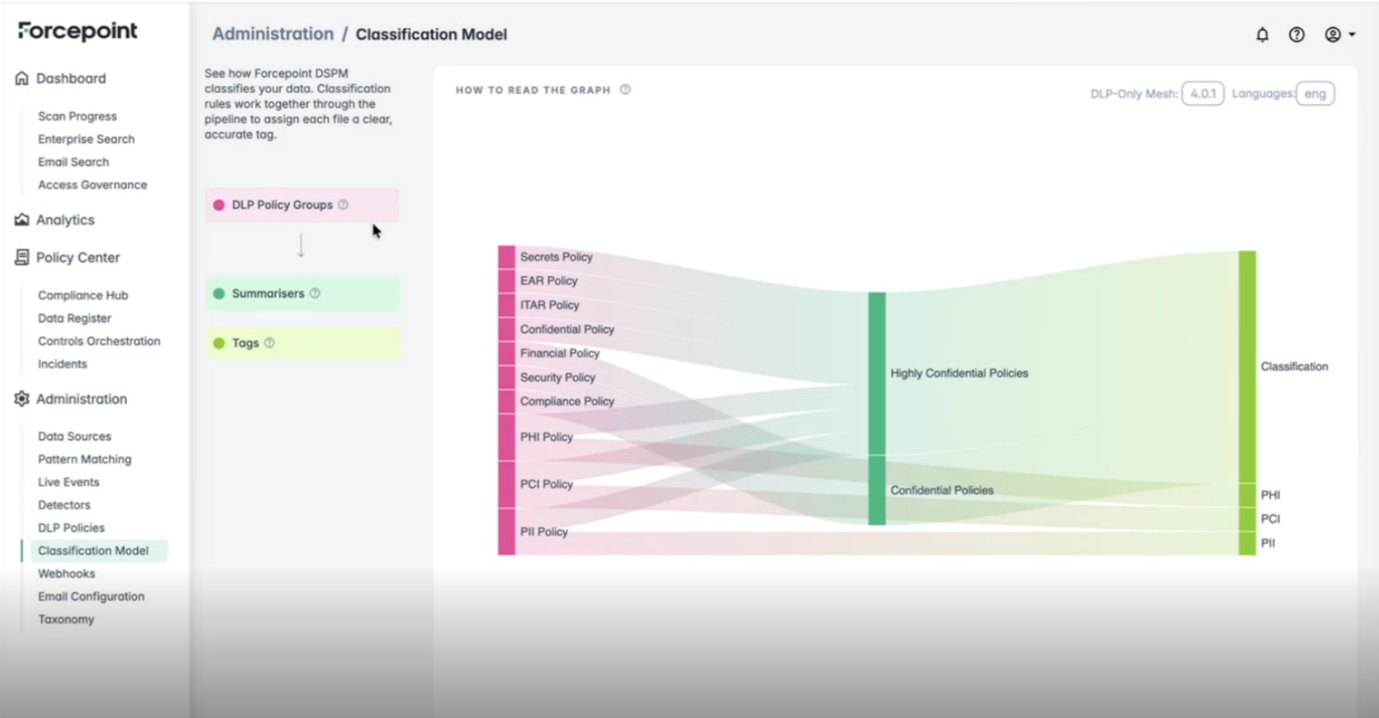
The DLP-Only pipeline uses three components. Each DLP Policy Group takes file text as input, scans it against a set of rules, and produces hits when a match is found. Those hits are passed to the Summarisers, which group them into intermediate classification categories. The Summarisers then convert those categories into Tags - the final labels applied to your files.
| Component | Colour | Role |
|---|---|---|
| DLP Policy Groups | Pink | Active DLP policies configured for your environment. Each policy takes file text as input and produces rule hits as output when content matches the policy rules. Policies visible in the example graph include: Secrets Policy, EAR Policy, ITAR Policy, Confidential Policy, Financial Policy, Security Policy, Compliance Policy, PHI Policy, PCI Policy, PII Policy. |
| Summarisers | Teal | Aggregates the hits from DLP Policy Groups into intermediate classification categories. Examples: Highly Confidential Policies, Confidential Policies. |
| Tags | Green | The final classification labels assigned to your files. Examples: PHI, PCI, PII. |
The width of each flow band indicates the proportion of content classified through that path.
Click any DLP Policy Group in the graph to enter focused view. Only that policy and its downstream path remain visible; all others are dimmed. This lets you trace exactly which Summariser and final Tag a specific policy contributes to. Click elsewhere to return to the full view.
Hover over any component to see a tooltip description.
The following controls are available on this page:
- Languages selector (top-right) - filters the graph by language.
- EXPORTS FOR TAILORING button (bottom-left) - downloads the configuration for customisation.
- HOW TO READ THE GRAPH link (top of graph area) - opens an in-product guide.
- Mesh version badge (top-right, labelled DLP-Only Mesh: 4.0.x) - shows the version of the DLP-Only mesh applied to your environment.
Note
There is no Unstructured / Structured toggle in the DLP-Only Mesh view.