Content migration in progress, completing by midnight IST on 17 November 2026.
Introduction
Forcepoint Data Security Cloud | App Security provide data security and access management for SaaS applications, ensuring safe
and compliant cloud usage. Security teams rely on CASB to perform the following
types of functions:
Product updates
Explore the details of newly introduced and updated features here, along with an overview
of resolved and known issues.
Getting started
This page helps the admins in setting up and configuring the Forcepoint Data Security Cloud | App Security for the first time and also explains the layout of Forcepoint Data Security Cloud | App Security .
User management
This section explains how administrators manage users, roles, and access permissions.
Home
The Home page provides a visually intuitive, data-driven dashboard that consolidates critical
SaaS data discovery metrics, including Summary and Activity Log, along with quick
access to key product updates.
Analyze
The Analyze section contains all of your log reports and alerts for visibility into user's activity
and suspicious behavior.
Protect
The Protect section is the primary area for adding and managing your applications you wish to
protect.
Add Applications Configure applications
Forcepoint Data Security Cloud | App Security supports various cloud applications so that Admins can monitor data which is in transit,
in motion and at rest.
Microsoft
Forcepoint Data Security Cloud | App Security supports the ability to control access to Microsoft 365 via SSO and API. Forcepoint Data Security Cloud | App Security also supports CSPM audit scanning for Azure.
Google Workspace
Forcepoint Data Security Cloud | App Security supports the ability to control access to Google Workspace and Google Cloud Platform
(GCP) via SSO and API. Forcepoint Data Security Cloud | App Security also supports CSPM audit scanning for GCP.
Dropbox
Forcepoint Data Security Cloud | App Security supports the ability to control access to Dropbox via SSO and API.
Box
Forcepoint Data Security Cloud | App Security supports the ability to control access to Box via SSO and API.
AWS
Forcepoint Data Security Cloud | App Security supports the ability to control access to AWS via SSO and API. Forcepoint Data Security Cloud | App Security also supports CSPM audit scanning.
Slack
Forcepoint Data Security Cloud | App Security supports the ability to control access to Slack via SSO and API.
Salesforce
Forcepoint Data Security Cloud | App Security supports the ability to control access to Salesforce via SSO and API.
ServiceNow
Forcepoint Data Security Cloud | App Security supports the ability to control access to ServiceNow via SSO and API. Also, Forcepoint Data Security Cloud | App Security supports SSPM scanning feature.
Atlassian (Confluence and JIRA)
Forcepoint Data Security Cloud | App Security supports the ability to control access to Atlassian via SSO and API.
GitHub
Forcepoint Data Security Cloud | App Security provides SSO and API integrations with GitHub in order to scan and surface sensitive
data at rest.
Egnyte: Configuring API access
This guide page will walk you through how to setup Egnyte for API scanning with Forcepoint Data Security Cloud | App Security . It is important to note that Egnyte enforces API rate limits on all tenants
which will not be suitable enough for Forcepoint Data Security Cloud | App Security API scanning.
Configure Forcepoint Security Manager
Forcepoint Security Manager (FSM) is an Any HTTP/S ZTNA App/Service application which can be used for adding multiple FSM ZTNA internal applications
while onboarding a large customer.
Cisco WebEx Teams (Formerly Spark): Configuring API access
Forcepoint Data Security Cloud | App Security can provide visibility into data at rest inside of Cisco WebEx Teams (Spark) and
quarantine sensitive files.
Mobile Mail Cutoff (M365, Google, Exchange)
Mobile Mail cutoff features enable you to enforce that all ActiveSync traffic goes
through Forcepoint Data Security Cloud | App Security .
Application Controls Configuring notifications
Admins can create custom notification objects that can be applied to policies and
reports. This will determine which admins or users are notified when a policy is violated
and what the custom message says.
Setup traffic steering
Forcepoint Data Security Cloud | App Security supports SmartEdge Agent and Cloud SWG traffic steering methods . This chapter describes steps to deploy each of those so that traffic can be
forwarded to Forcepoint Data Security Cloud | App Security .
Configuring SWG policies
You can configure SWG Connection Policy, Cloud SWG Authentication Policy and SWG Content
Policy to manage traffic through Cloud SWG and SmartEdge agent.
Configuring Advanced Threat Protection
Forcepoint Data Security Cloud | App Security provides Advanced Threat Protection (ATP) via partnerships with an antimalware provider.
Integration
Settings
The Settings section contains the majority of your setting configurations to be used in policies
or integrations.
Appendices
Configuring Salesforce connected app - Classic view
Steps Login to Salesforce using an administrator account.
On the top right hand corner, click Setup .
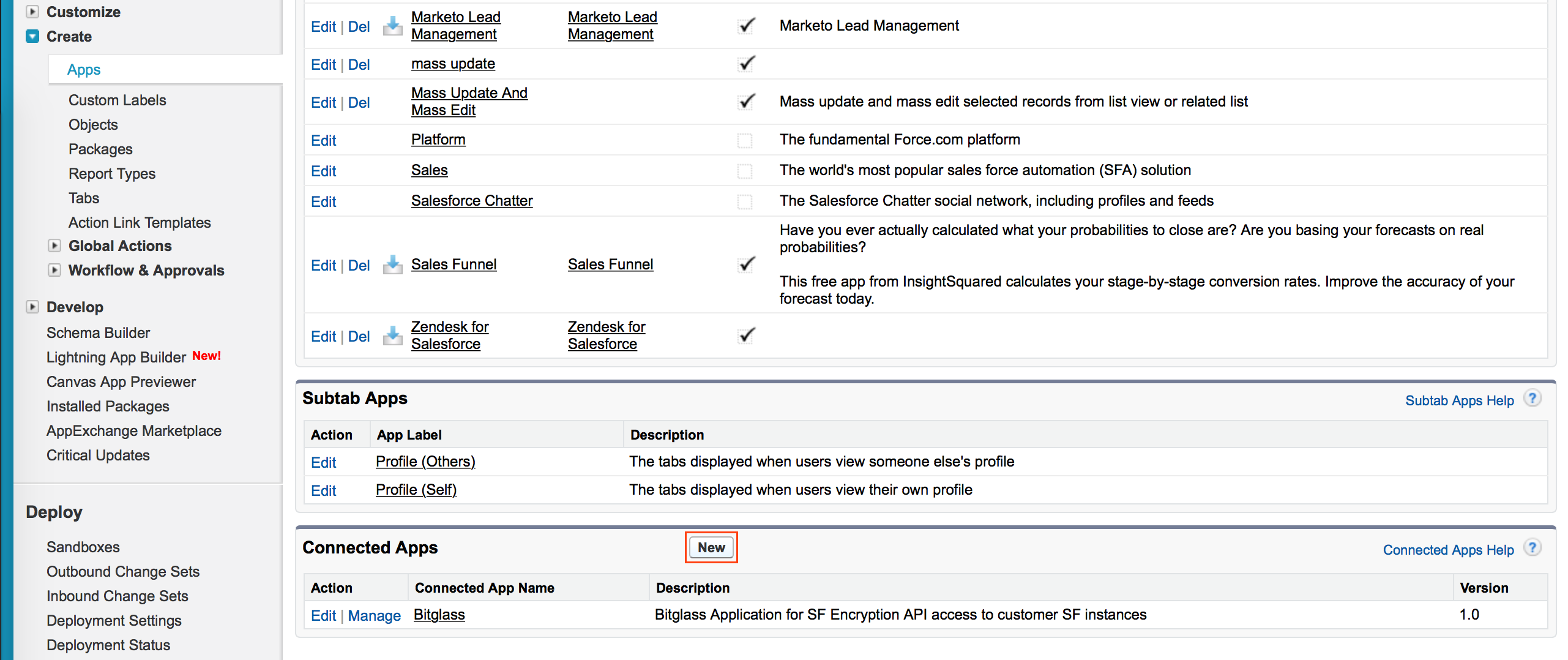
On the left navigation pane, navigate to the Apps page by following path. Click the New button in the Connected Apps section.
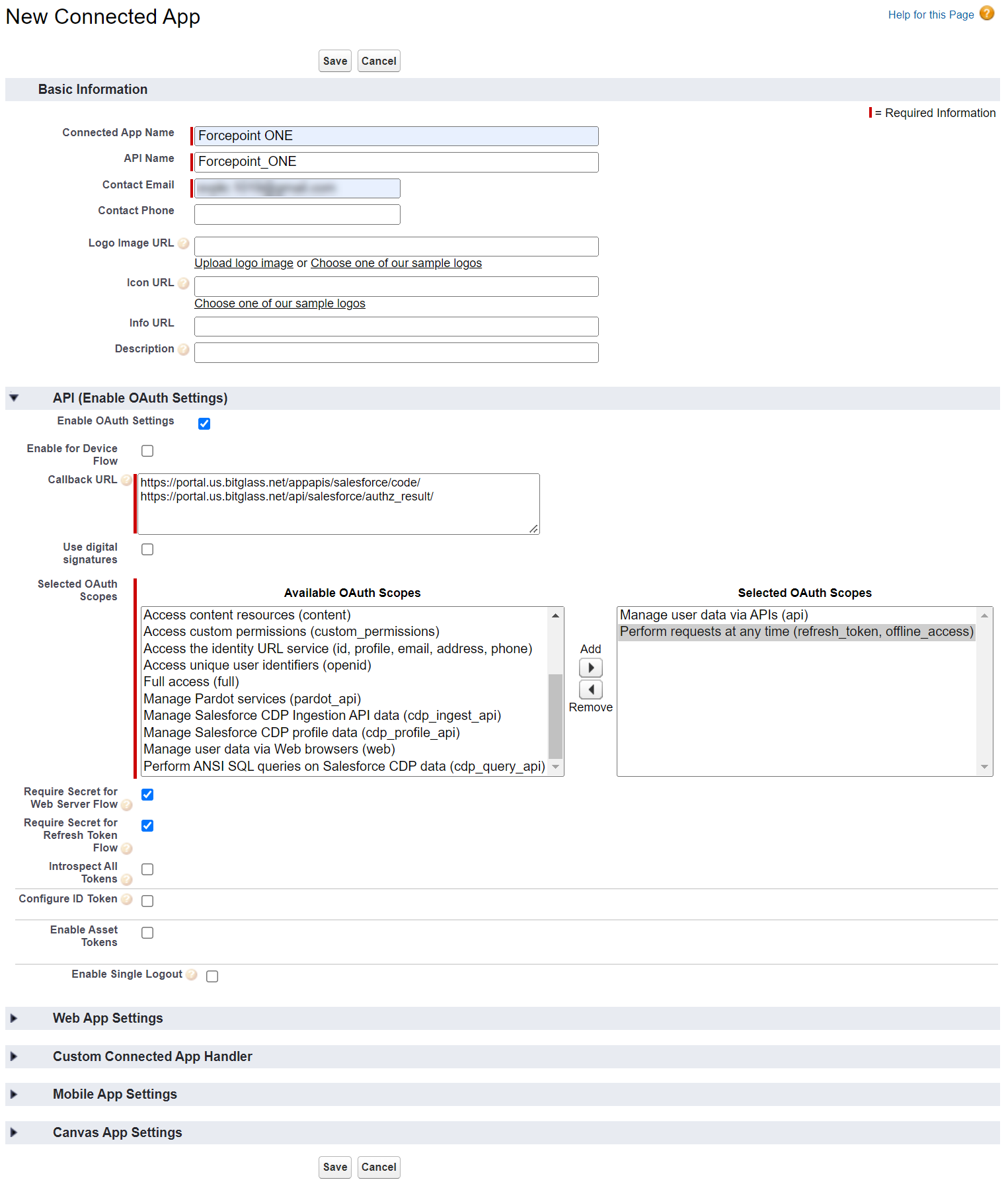
Configure the following required fields and any optional fields as desired (for example, Logo Image) and click Save .
Connected App Name : Forcepoint Data Security Cloud | App Security
API Name : Forcepoint Data Security Cloud | App Security
Contact Email : <Salesforce Admins Email>
Enable OAuth Settings : Checked
Callback URL :
https://portal.eu.bitglass.net/appapis/salesforce/code/https://portal.eu.bitglass.net/api/salesforce/authz_result/
Note:
On-prem deployments will have different URLs:
Important: The ending / must be present for the callback to work correctly.
Selected OAuth Scopes:
Manage user data via APIs (api)
Perform requests at any time (refresh_token, offline_access)
As an alternative, the Full Access (full) OAuth scope can be used. However, this may introduce additional security gaps and may not be acceptable depending
on a client's risk tolerance.
For a full list of Salesforce OAuth Scopes and their descriptions, see Salesforce OAuth
Tokens and Scopes .
When you are done, click Save at the bottom of the page to create the new Forcepoint Data Security Cloud | App Security app.
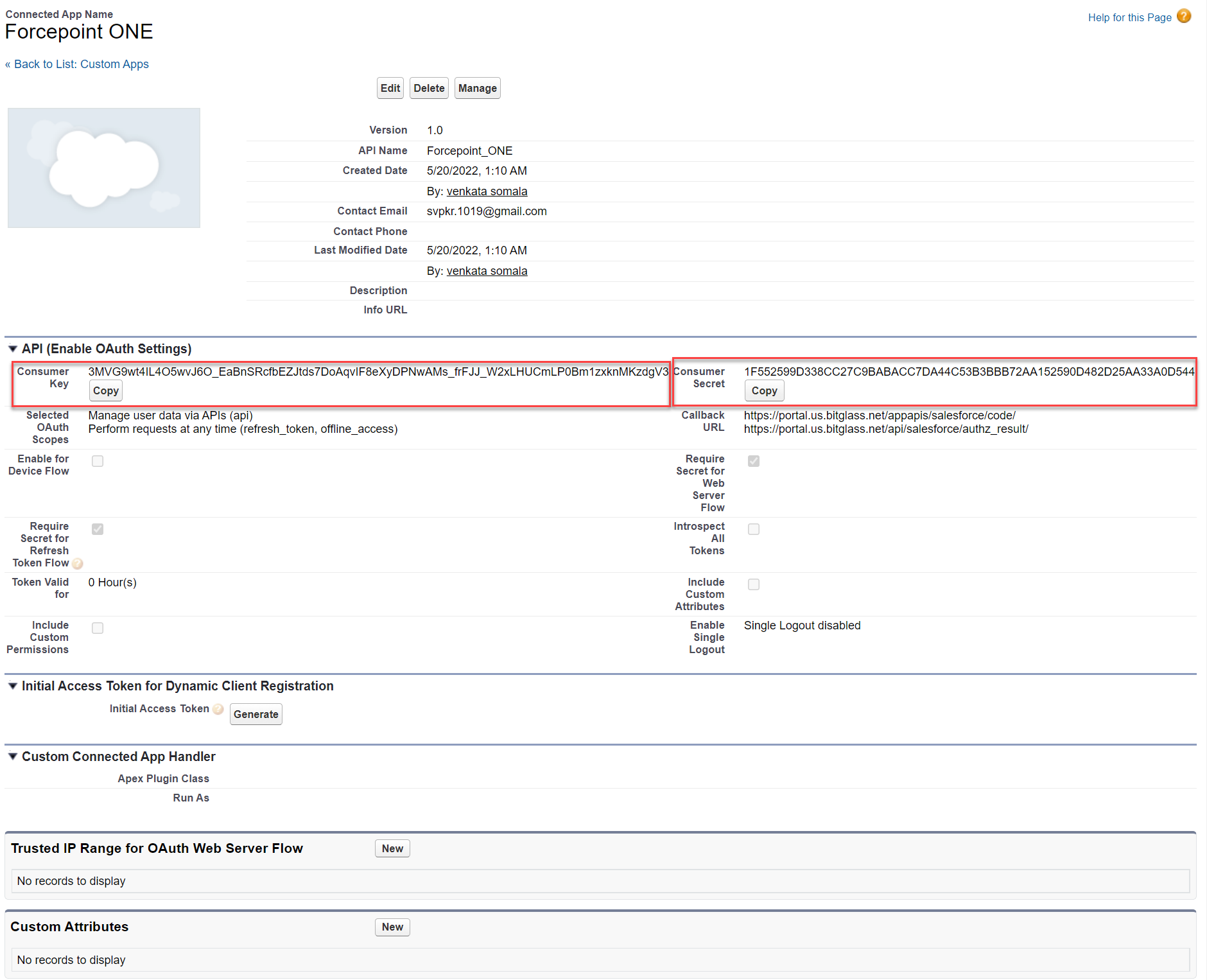
Click on the newly created Forcepoint Data Security Cloud | App Security app in the Connected Apps table. Keep this page open for the next section as
you will need the consumer key and secret for authorizing the API in Forcepoint Data Security Cloud .
Advanced (OAuth Token Timeouts)
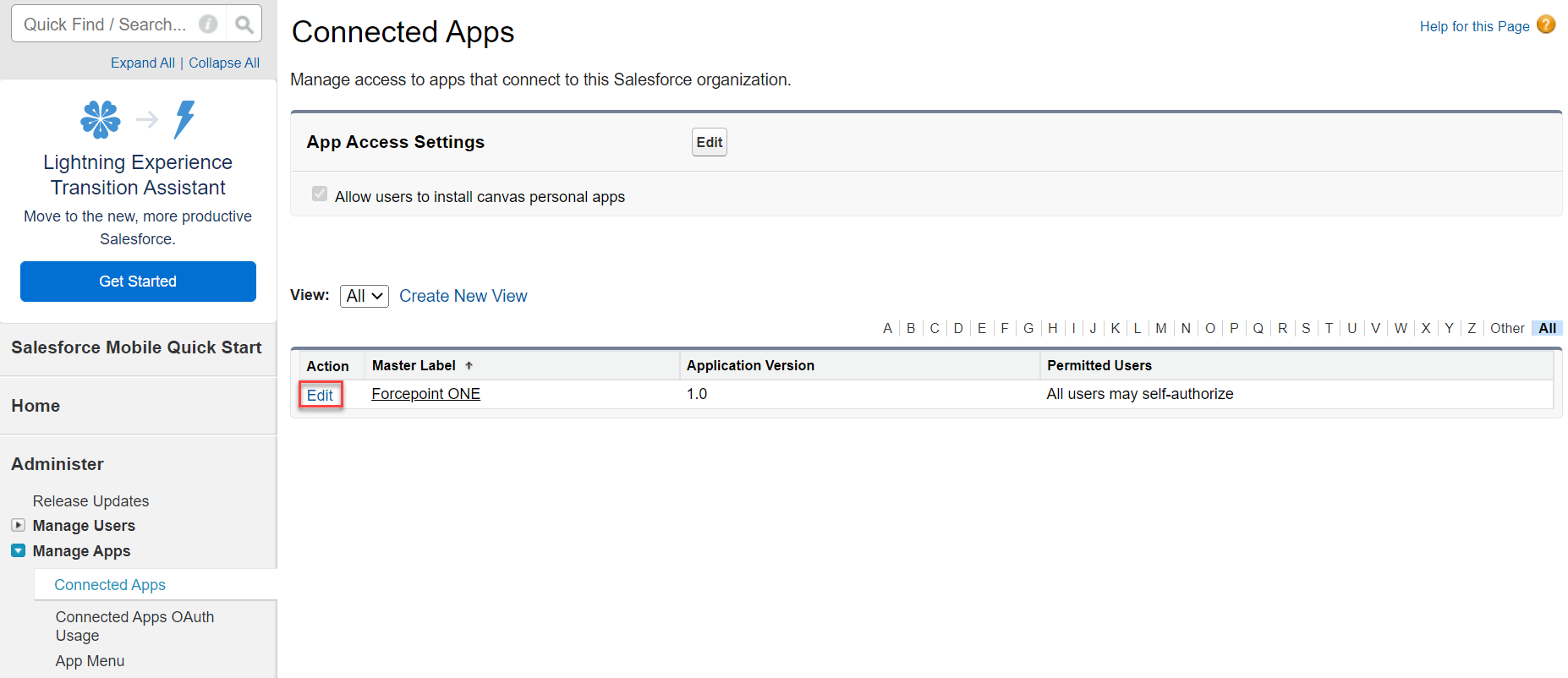
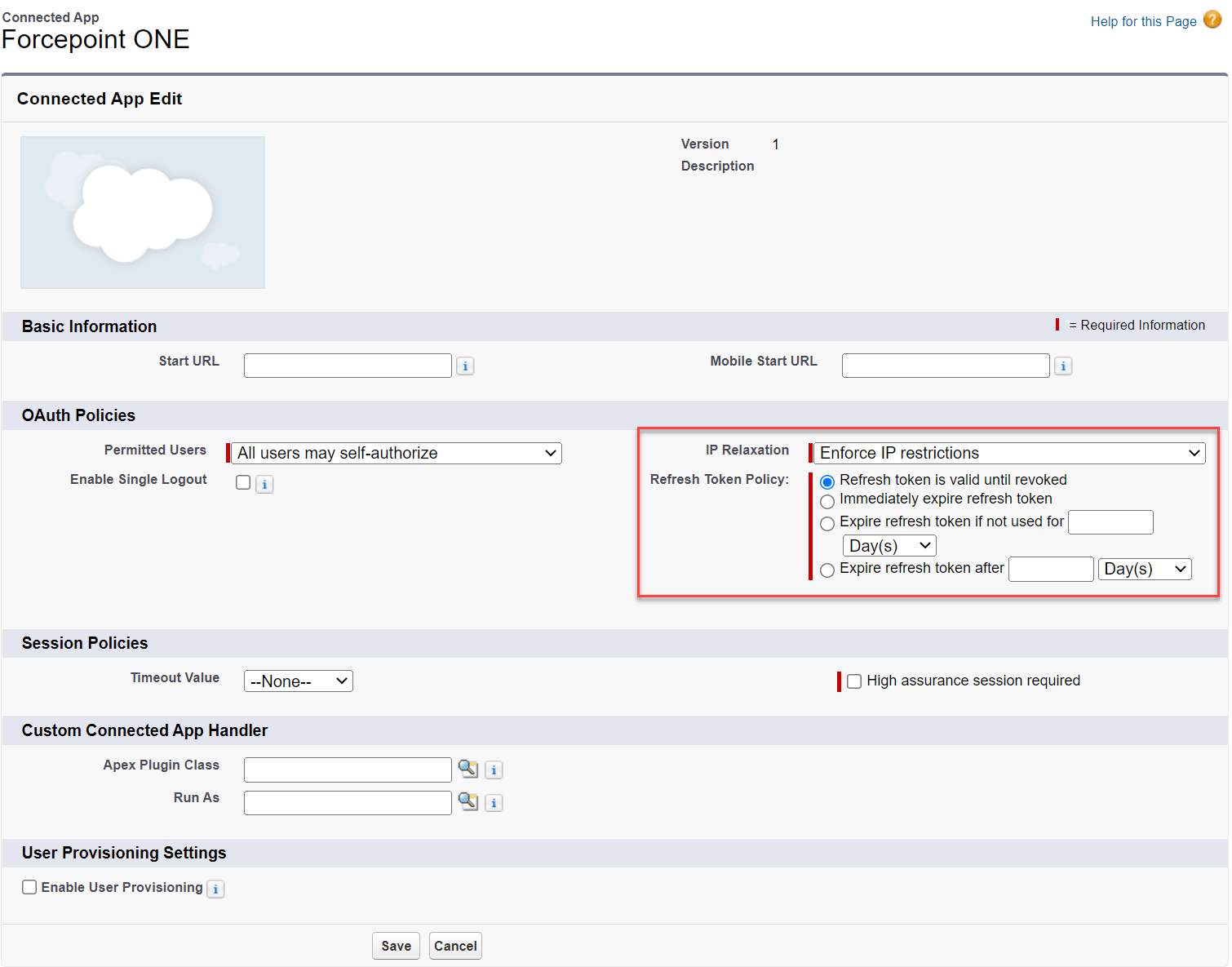
OAuth token timeouts and refresh settings can also be adjusted by editing the Connected App.
Click the Edit button on the page.
Adjust timeouts and refresh token policies as desired and click Save .