Configure SAML authentication
SAML authentication enables user authentication through an external Identity Provider (IdP). It provides a secure, standardized, and seamless way to authenticate users across different domains and applications.
By integrating with an IdP, Forcepoint Network Security Platform supports Single Sign-On (SSO) and centralized management of user identities and groups. This allows users to sign in once and access multiple services without re-authenticating, enhancing user experience.
Typical Workflow
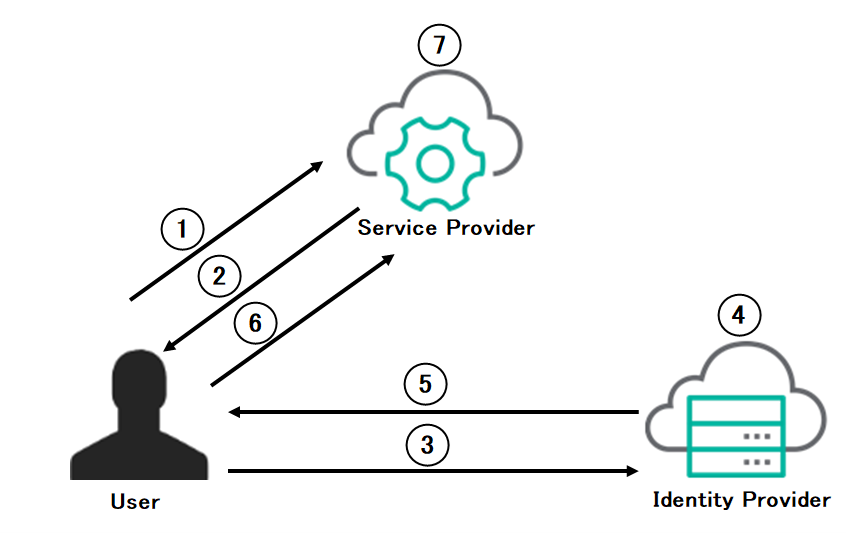
- 1
- User requests access: The user attempts to access an application or service.
- 2
- Service provider (SP) generates a SAML authentication request: Service Provider responds to user by generating a SAML authentication request.
- 3
- User is redirected to the Identity Provider (IdP): After the SAML authentication request is generated, the Service provider redirects the user along with the SAML authentication request to the IdP.
- 4
- User authenticates with the IdP: The IdP prompts the user to sign in using their credentials.
- 5
- IdP generates a SAML response: After successful authentication, the IdP responds to user by generating a SAML assertion.
- 6
- User is redirected to the Service Provider (SP): The user is redirected back to the SP along with the signed SAML assertion.
- 7
- SP validates the assertion: The SP verifies the authenticity of the SAML assertion by checking the digital signature and associated metadata.
- 8
- Access granted: Once validated, the SP establishes a session for the user and grants access to the requested application.
You can use SAML authentication to authenticate users for the following services:
- Application Access portal.
- Browser-based authentication.
- Web Access.
Before you begin
Before configuring SAML authentication, you will need the following:
- A SAML IdP is configured. Please contact your SAML IdP support team for details.
- The identity provider metadata URL or the metadata details.
- The Service Provider Entity ID.Note: The Service Provider Entity ID can be configured to be an unique value and this value must be configured in both the IdP and the Engine.
To configure SAML authentication, do the following:
- Create a SAML authentication method element. For details, refer to the Create a SAML authentication method element topic.
- Enable SAML authentication for one or more of the following services:
- Enable SAML authentication for browser-based authentication. For details, refer to the Enable SAML authentication for browser-based authentication topic.
- Enable SAML authentication for Application Access Portal. For details, refer to the Enable SAML authentication for Application Access Portal topic.
- Enable SAML authentication for Web Access. For details, refer to the Enable SAML authentication for Web Access topic.