Create local filters
You can create local filters in various views in the SMCaaS Application.
Steps
-
(Optional) Edit the local filter:
- To negate a filter row, click the corresponding checkbox. This option filters out entries that match the filter.
- If a row contains more than one item, click the operator cell to toggle between the AND and OR operators.
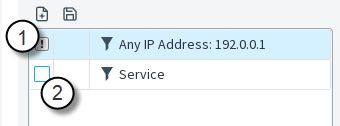
- 1
- Negate a filter.
- 2
- Toggle between operators.
-
(Optional) To save a local filter as a permanent Filter element, click Save. In a Monitoring view, click
 Save.
You can use Filter elements in any view.
Save.
You can use Filter elements in any view.
Local Filter Properties dialog box
Use this dialog box to change the properties of a local filter.
| Option | Definition |
|---|---|
| Name | Specifies the name of the filter. |
| Filters table |
|
| Add | Select from the menu to add.
|
| Remove | Removes the selected filter. |
| Save | Opens the Filter Properties dialog box. |
Filter Properties dialog box (local filter)
Use this dialog box to create a local filter.
| Option | Definition |
|---|---|
| Field | Shows the selected field. |
| Select | Opens the Select Element dialog box. |
| Comparison | The available Comparison selection depends on the selected field and whether the field already contains one or more values. |
| Add | Adds the entered value to the value list. |
| Apply | Retains your changes and closes the window. |