Edit Expression elements
The criteria in an expression combine network elements (IP addresses) with logical operators.
Steps
-
Select
 Network Elements.
Examples
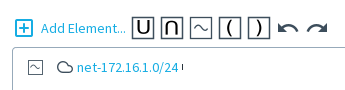
- Expression that selects any network other than one internal network (172.16.1.0/24):
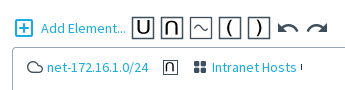
- Expression for selecting Hosts in the Network 172.16.1.0/24 from a Group element that contains Hosts from many different networks:
Expression Properties dialog box
Use this dialog box to create expressions. Expression elements combine other network elements (IP addresses) with logical operands.
| Option | Definition |
|---|---|
| Name | The name of the element. |
| Comment (Optional) |
A comment for your own reference. |
| Category (Optional) |
Includes the element in predefined categories. Click Select to select a category. |
| Option | Definition |
|---|---|
| Expression Composer | |
| Add Element | Select this option to select the elements to use in the Expression. |
 Union
Union
|
Includes all IP addresses defined in both elements that the union combines. |
 Intersection Intersection
|
Includes only those IP addresses that the two elements that the intersection combines have in common. |
 Negation Negation
|
Includes all IP addresses except those that are defined in the element that follows the negation. |
 Open Parenthesis Open Parenthesis
|
Parentheses group parts of the expression together. Items inside parenthesis are evaluated before they are compared to items outside the parenthesis. |
 Close Parenthesis Close Parenthesis
|
Parentheses group parts of the expression together. Items inside parenthesis are evaluated before they are compared to items outside the parenthesis. |
 Undo
Undo
|
Click to undo the last action you did. |
 Redo
Redo |
Click to redo the last action you did. |