Defining Multi-Link routes
When you use Multi-Link routing, traffic can use multiple network connections to reach its destination.
You can define Multi-Link routes for Engines and Virtual Engines and for both IPv4 and IPv6 traffic.
NetLink elements represent the network connections for Multi-Link. Usually, a NetLink element represents an ISP connection. However, NetLinks can also represent a leased line, xDSL, or any other type of network connection mediated by your Engine.
- Static NetLinks are supported in the routing configuration for both IPv4 and IPv6 traffic.
- Dynamic NetLinks are supported only with Single Engines. Dynamic IP addresses are not supported for Engine Clusters.
A Router or NetLink element represents a next-hop gateway that forwards packets to networks not directly connected to the Engine. Tunnel interfaces for route-based VPNs do not use Router or NetLink elements. Instead, you add remote networks reachable through the VPN tunnel directly to the tunnel interface as directly connected networks.
Figure: NetLinks in the Routing tree view
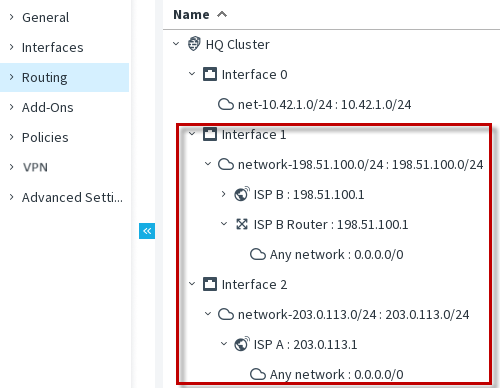
This illustration shows a Multi-Link default route to the Internet using the Any network element through the ISP A and ISP B NetLinks. We recommend using separate network interfaces for each NetLink.
For each NetLink, a range of IP addresses is defined for applying NAT to the source IP address of an outbound connection that goes through the NetLink. Element-based NAT or a NAT rule in the Engine Policy defines the Outbound Multi-Link element that is used for outbound Multi-Link connections.
Defining Multi-Link routes consists of these general steps:
- Create a NetLink for each alternative route.
- Add Networks under the NetLinks in the Routing tree to define a route.
- (Optional) Configure route metrics or ECMP.