Classification Icon Colors – How It Works
This page explains how the classification ribbon icon color is determined in Word, Excel, PowerPoint, and Outlook, and is intended for customers and support teams troubleshooting or explaining icon behavior.
Overview
Color Tiers
| Number of Labels | Colors Used |
|---|---|
| 2 | Green, Red |
| 3 | Green, Yellow, Red |
| 4 | Green, Yellow, Orange, Red |
| 5 or more | Green, Blue, Yellow, Orange, Red |
-
2 labels: label 1 → Green, label 2 → Red.
-
7 labels (5-tier): labels 1–2 → Green, 3–4 → Blue, 5–6 → Yellow, 7 → Orange.
-
10 labels (5-tier): labels 1–2 → Green, 3–4 → Blue, 5–6 → Yellow, 7–8 → Orange, 9–10 → Red.
Icon Reference
Classification Label Sensitivity Color Guide:
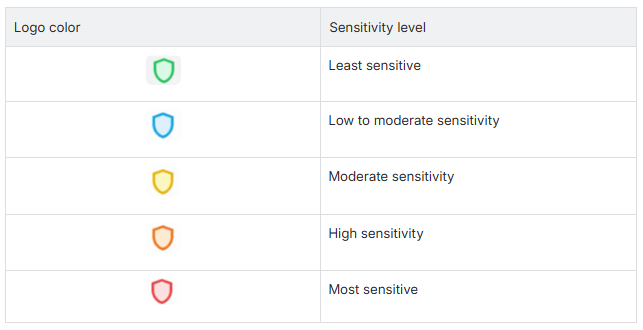
-
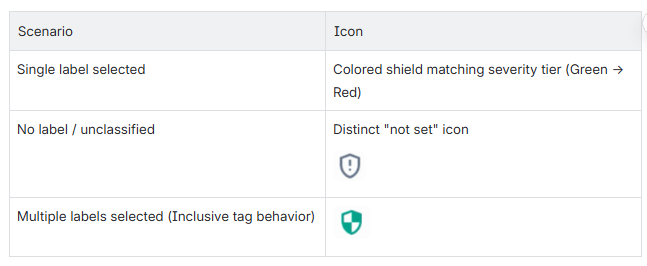
Unclassified document: shows a distinct "not set" icon — no severity color.
-
Multiple labels selected with "Inclusive" tag behavior: shows the default icon instead of a severity color, since no single position applies.
-
Label order matters: the taxonomy must be configured from least → most confidential (or the reverse, if using descending severity order) for the colors to display correctly. If the order is set up incorrectly, the icon colors will not reflect true severity.
Where This Applies
Word, Excel, PowerPoint, and Outlook add-ins — the same underlying logic is shared across all four Office hosts.
Released in FDC Agent 5.3.1 Hotfix. Reference: DEL-2627.
For the reference video, click here.