(MDM) Removing the agent

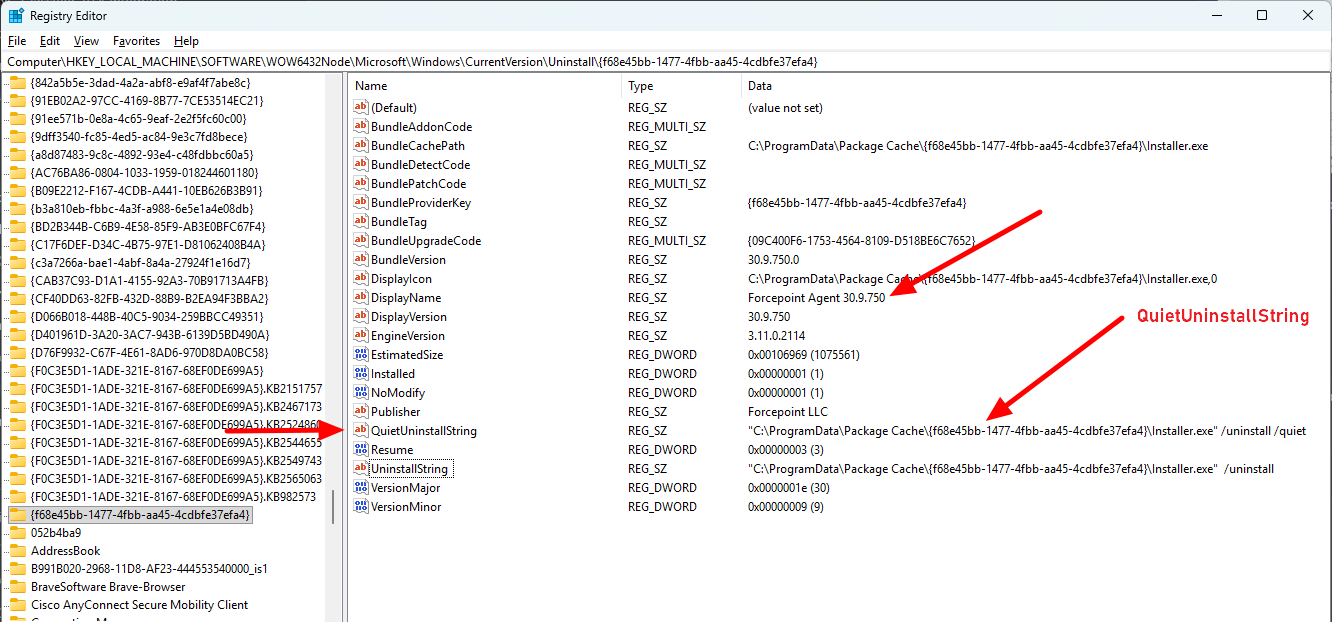
Follow the steps below to build the uninstall string that you can use with the MDM tool of your choice:
Note:
  • Uninstalling as a system user does not require a release code.
  • The GUID will change on each release so you need to follow the steps below to get the version specific GUID.

Steps

  1. Go to the Uninstall path: HKLM\Software\WOW6432Node\Microsoft\Windows\CurrentVersion\Uninstall
  2. Search for Forcepoint Agent.
  3. To uninstall silently, run the path found in the QuietUninstallString: C:\ProgramData\Package Cache\{f68e45bb-1477-4fbb-aa45-4cdbfe37efa4}\Installer.exe" /uninstall /quiet.

    The /quiet flag suppresses the UI so the release code prompt does not appear.

    The /norestart flag ensures the device will not restart without user prompt.

    The RELEASECODE=<your-release-code> flag allows the release code to be supplied silently so the uninstall can proceed (replace <your-release-code> with the release code for your environment), this is required when the uninstall is run with the /quiet flag and not run as a system user as would be the case when doing this via MDM.