When you purchase a Forcepoint AI Security license, the following resources become available for you to configure on the Forcepoint Data Security Cloud Platform:
-
For AI Security (AI Detection & Response) - AI applications.
-
For MCP Gateway (AI Agent Gateway) - AI agents, AI agent groups, and MCP Gateway connectors.
Once you have configured the resources for the solution you want (for more information, see Connect AI Applications and Set Up MCP Gateway Connectors), connect the
Forcepoint Security Manager to Data Protection Service, then to the Forcepoint Data Security Cloud Platform, then check the license and enable the resources as follows.
Steps
-
Connect the Forcepoint Security Manager to Data Protection Service.
AI Security (AI Detection & Response) and MCP Gateway traffic is both analyzed by Data Protection Service, so this connection must be in place before anything else in this
chapter applies. Incidents raised by either solution are reported as Analyzed by Data Protection Service.
If your Security Manager is already connected to Data Protection Service, no further action is needed.
To check the connection status, go to the page.
For the connection procedure, including the Data Protection Service JSON file that was provided to you as part of the fulfillment email, see Configuring the Data Protection
Service in the Forcepoint DLP Administrator Help.
-
Connect the Forcepoint Security Manager to the Forcepoint Data Security Cloud Platform.
-
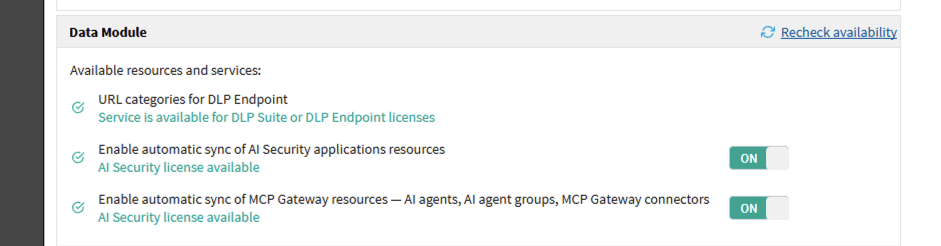
Go to the page and locate the Data Module section.
-
Review the status shown beneath each resource and service.
Each entry shows whether the corresponding license is available. If a license is missing, the license required for that resource is named and the toggle is not shown.
-
Set Enable automatic sync of AI Security applications resources to ON.
-
Set Enable automatic sync of MCP Gateway resources — AI agents, AI agent groups, MCP Gateway connectors to ON.
Both toggles are OFF by default. Enable only the ones you intend to use.
-
If a resource shows as unavailable, click Recheck availability to query the Forcepoint Data Security Cloud Platform again.
Resources can be unavailable because of a temporary connection problem between the Security Manager and the Forcepoint Data Security Cloud Platform, because the resource type
has not been configured there, or because the required license is not present.
Result
Synchronized resources appear on the corresponding pages under and can be selected in policy rules and action plans.