
Understanding the Columns in the Events Table
What each column in the Recent High Severity Events list tells you, and where to go for more detail.
Each row in the list is one violation. The columns answer six questions about it: who, where, what, how, how serious, and what was done.
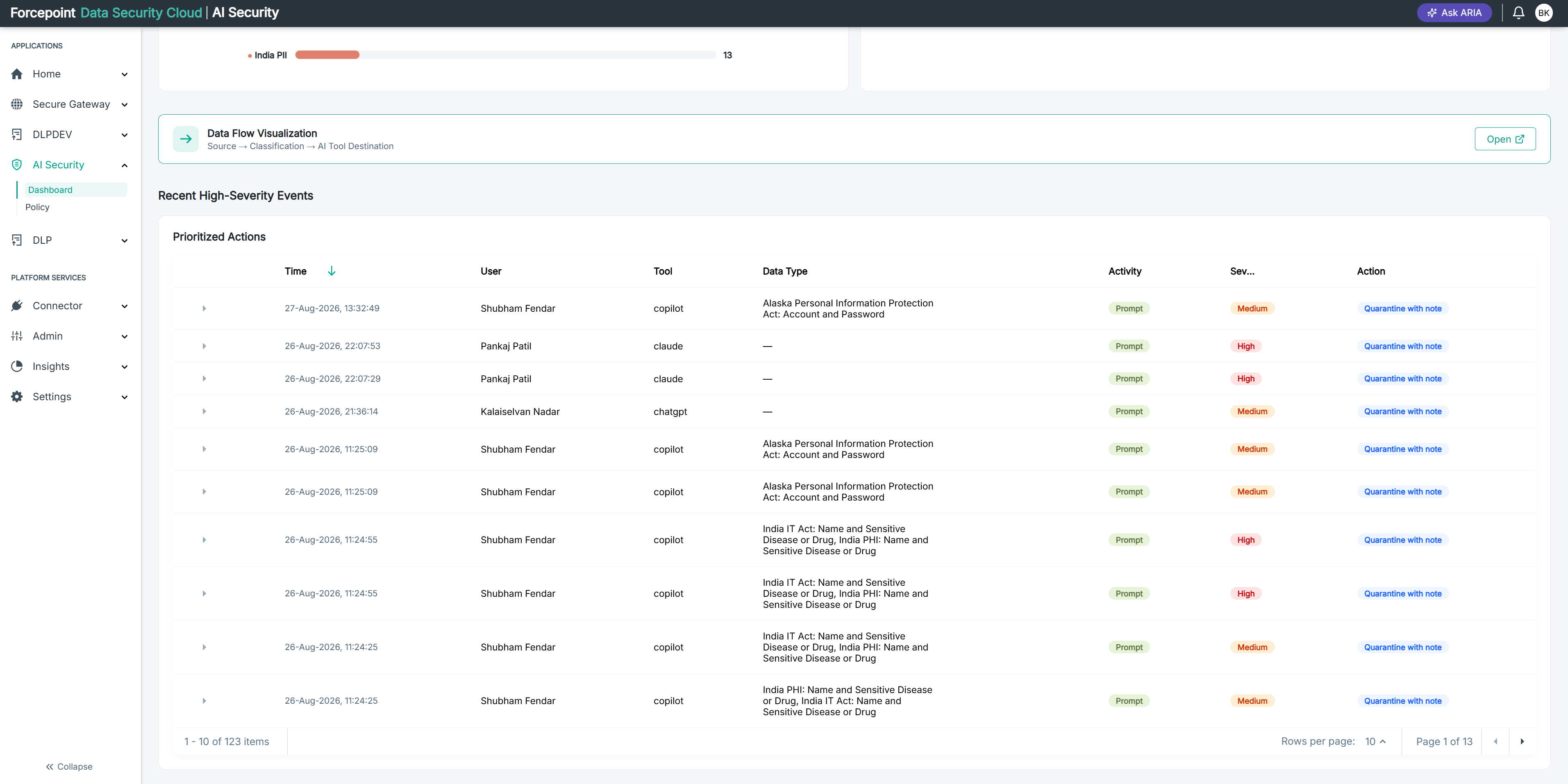
Table 1. Columns in the Recent High Severity Events list
| Column | What it tells you |
|---|---|
| User | The person whose activity produced the violation. A user appearing repeatedly is usually worth a conversation before a policy change. See Identifying the User Involved in an Event. |
| AI application | The connected application the user was sending data to. |
| Data type detected | The classification that matched, such as a credit card number or protected health information. See Understanding What Each Classification Covers. |
| Activity | What the user was doing when the violation occurred. |
| Severity | How sensitive the detected data was. Severity and action are set independently, so a high severity event may only have been recorded. |
| Action taken | What AI Security did when the policy matched. The action comes from the data security policy, set on the Forcepoint Data Security Cloud portal rather than in AI Security. See Interpreting the Action Taken on an Event. |
Select a row to expand it and see which policy and rule produced the match. See Expanding an Event to See Which Policy and Rule Matched.