
How AI Security Works
Read this topic to understand what happens when a user sends a prompt to an AI application, and what happens when an AI agent calls one of your business applications.
Two kinds of traffic
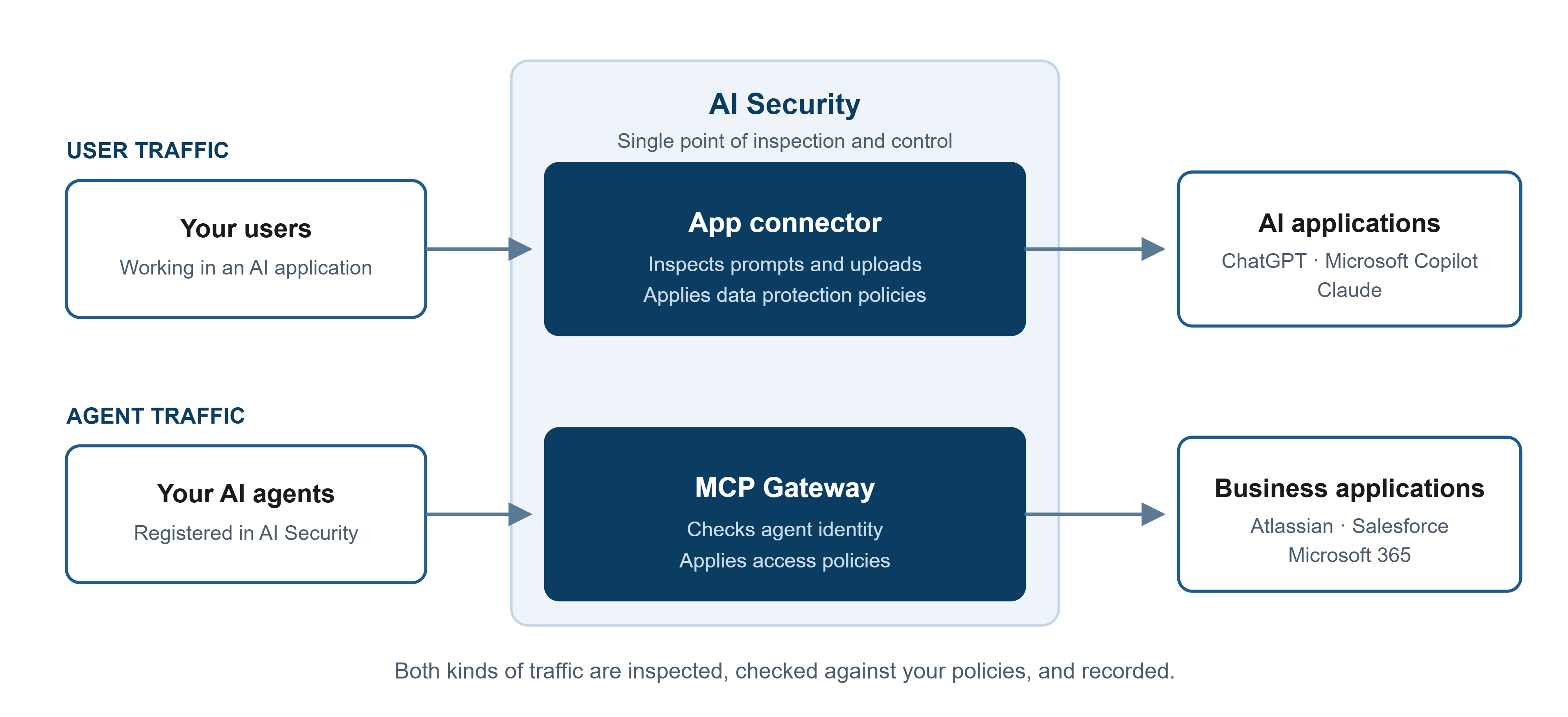
AI Security protects two different kinds of traffic, and it protects them in two different ways.
User traffic is what your people send when they open an AI application such as ChatGPT, Microsoft Copilot, or Claude and work in it directly. The risk here is sensitive data leaving your organization inside a prompt or an upload.
Agent traffic is what an AI agent sends when it calls one of your business applications, such as Atlassian, Salesforce, or Microsoft 365, to read or change data. The risk here is an agent doing more than you intended.
You control user traffic with an app connector. You control agent traffic with a gateway connector. See Understanding the Difference Between an App Connector and a Gateway Connector.
What happens when a user sends a prompt
When a user works in a connected AI application:
- The app connector inspects the interaction through the AI application's API.
- Your data loss prevention policies are evaluated against the content.
- The interaction is recorded, along with any policy violation it triggered.
- The activity appears on the AI Governance Dashboard.
Because inspection happens through the API, your users do not need to change how they work, and nothing is installed on their machines for this to function.
What happens when an agent calls a tool
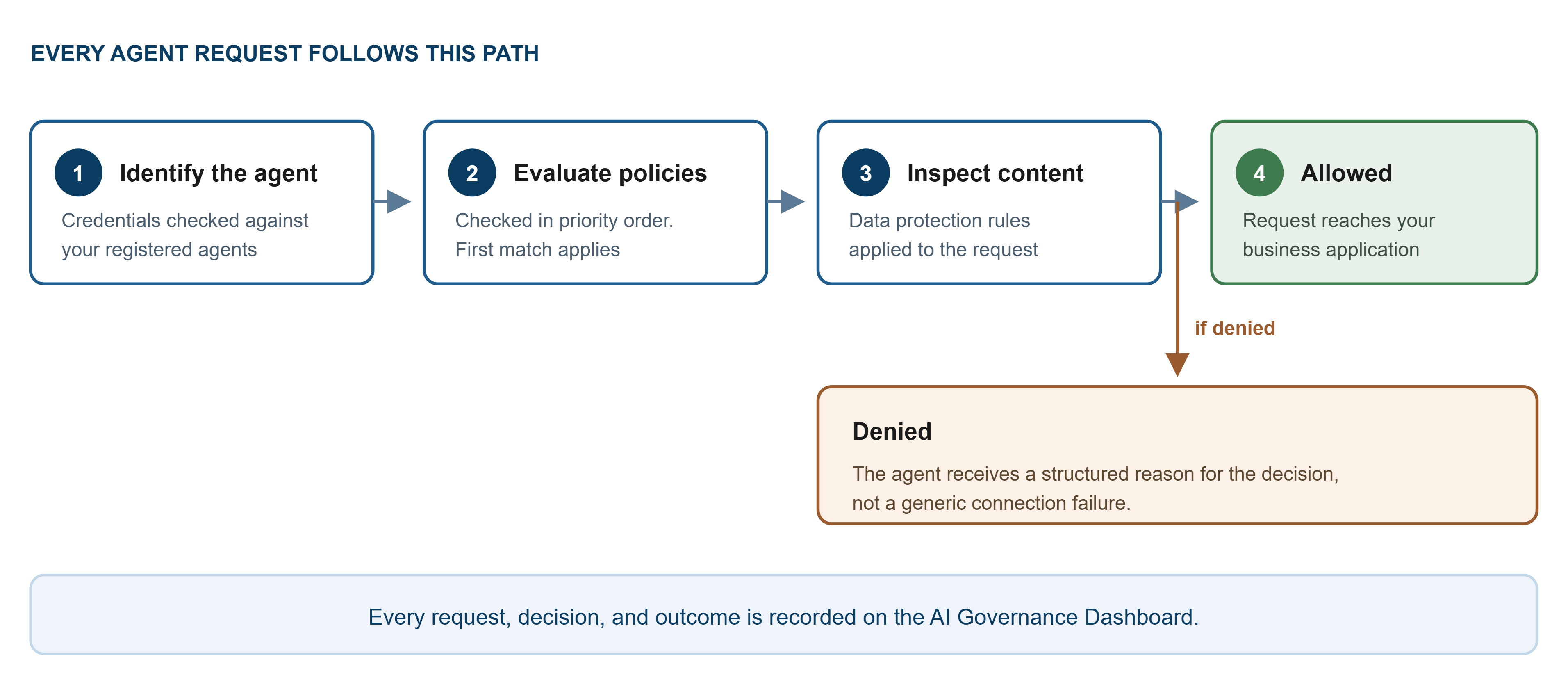
Every request from an AI agent passes through a single control point before it reaches your business application. Nothing goes around it.
- The agent presents its credentials. AI Security confirms the agent is one you have registered.
- Your access policies are evaluated. Policies are checked in priority order, and the first policy that matches is the one that applies.
- The content of the request is inspected against your data protection rules.
- If the request is permitted, it is passed to the business application and the response returns to the agent.
- The request, the decision, and the outcome are recorded.
What happens when a request is denied
When a policy denies an agent's request, the agent does not receive a generic connection failure. It receives a structured response that states the reason for the decision.
This matters for two reasons:
- The agent can act on the reason rather than retrying blindly, which prevents an agent from repeating a request it will never be allowed to make.
- Your developers can see why a call was refused without having to reproduce the problem.
The same denial is recorded for you on the dashboard, so you can see which policy applied.
Where Shadow AI data comes from
Shadow AI is the use of AI applications your organization has not approved.
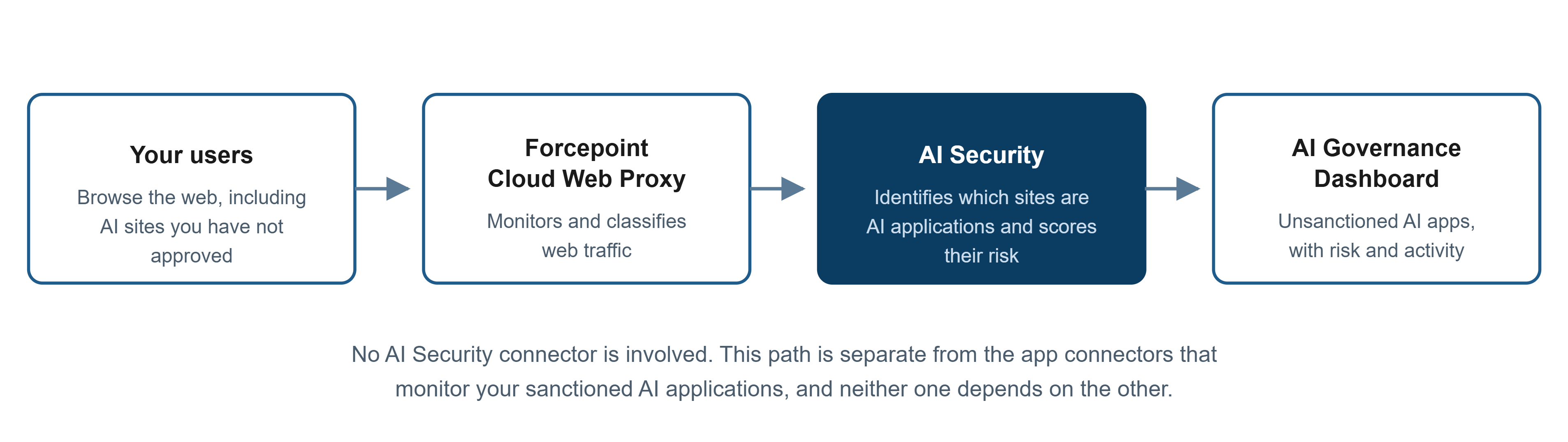
You do not create a connector for shadow AI. The data comes from web traffic your organization is already monitoring through Forcepoint Cloud Web Proxy. AI Security reads that traffic, identifies which of the sites visited are AI applications, scores their risk, and reports them on the dashboard.
This is a separate path from the app connectors that monitor your sanctioned AI applications. Connecting an AI application does not affect shadow AI reporting, and shadow AI reporting does not require any application to be connected.
Because the data comes from Cloud Web Proxy, shadow AI reporting works only if your organization has it. See What You Need Before You Begin.
For each unsanctioned application found, the dashboard shows a risk score and a breakdown of the activity involved, including visits and file uploads and downloads.
Your AI Security journey
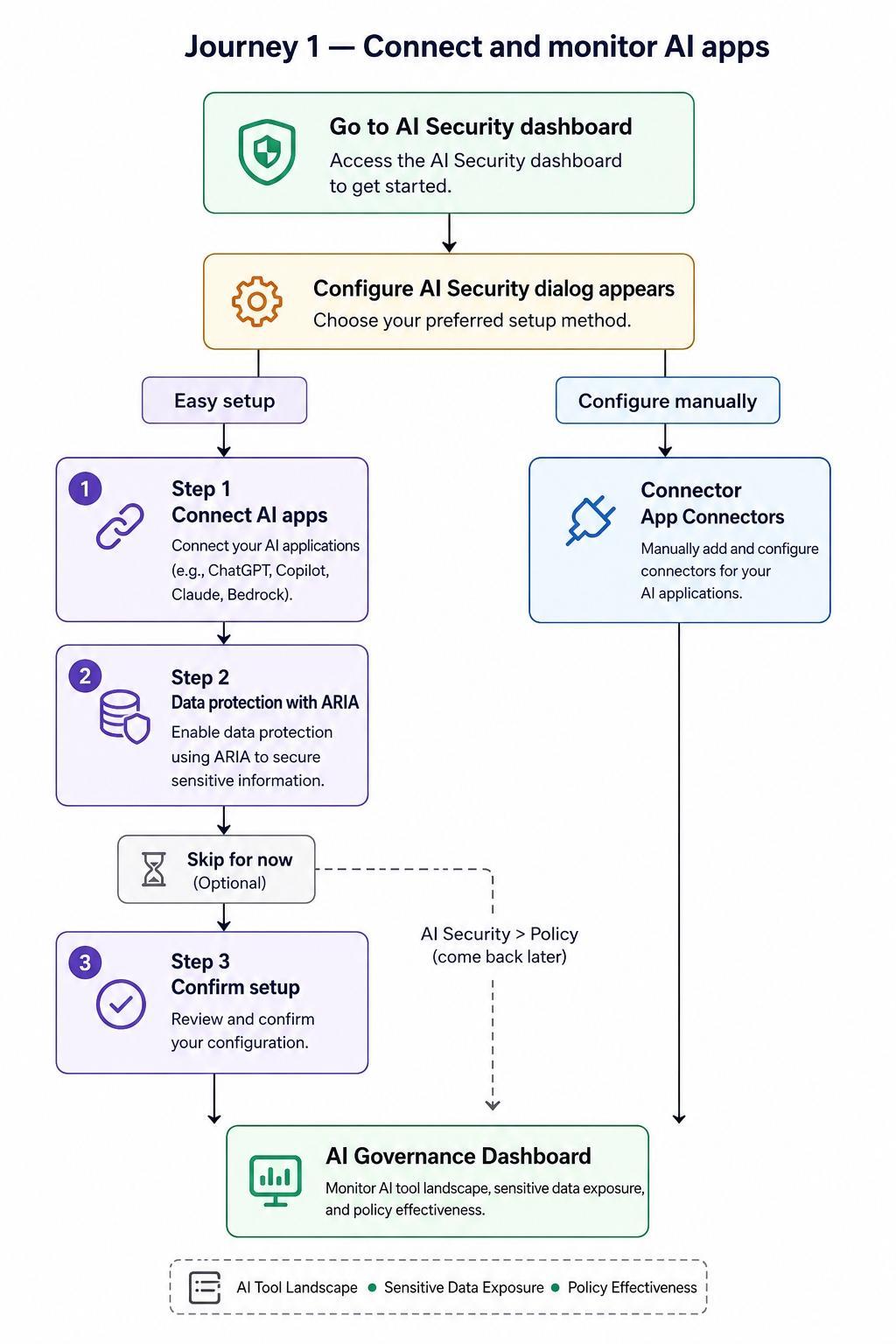
Most organizations set up AI Security in two stages.
Stage 1 — Connect and monitor your AI applications
Connect the AI applications your people already use, then watch the dashboard to see who is using what and what data is involved. This gives you visibility quickly, without changing anything for your users.
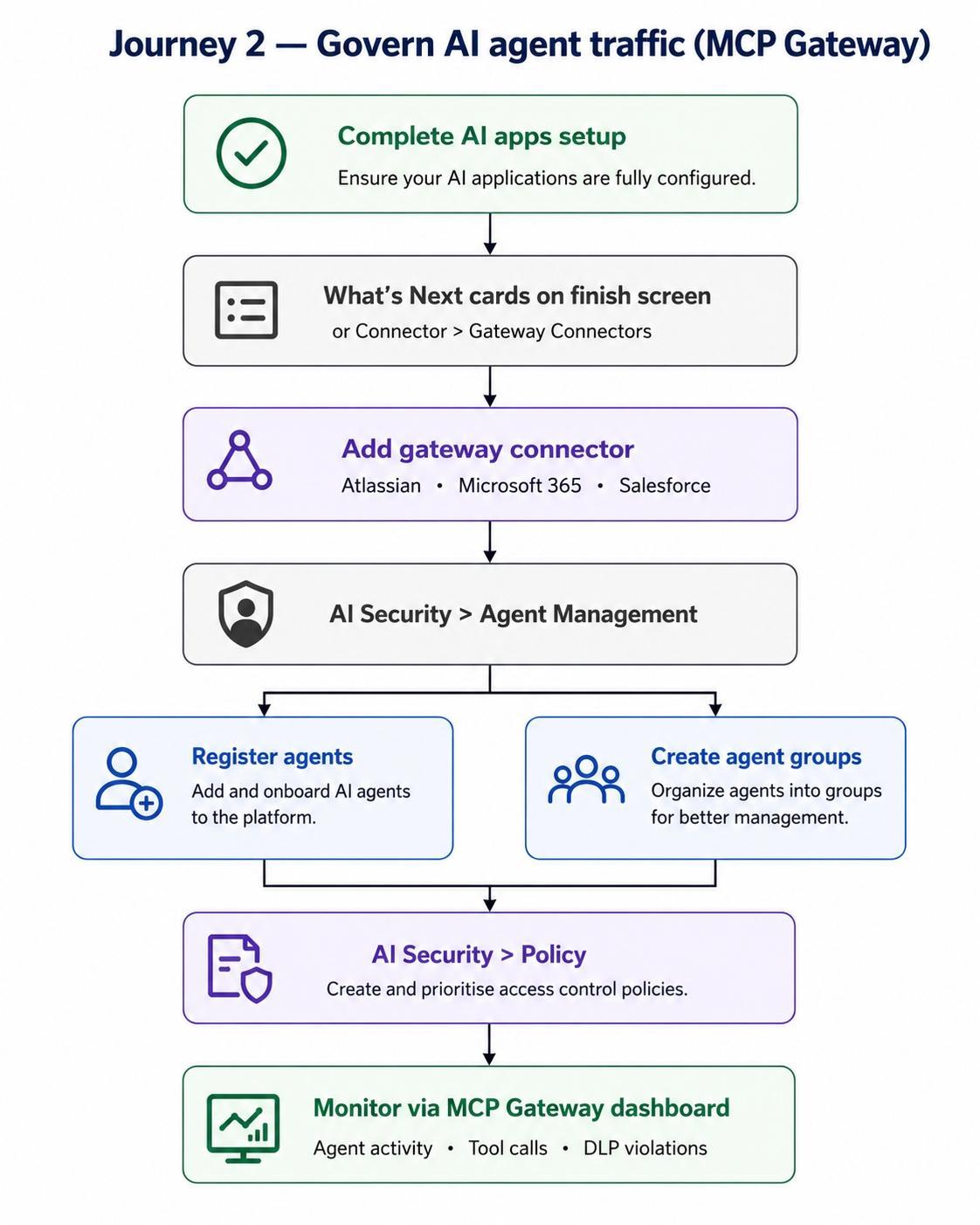
Stage 2 — Govern your AI agents
Connect your business applications to the MCP Gateway, register the agents allowed to reach them, and write access policies that say which agents can call which tools.
You do not have to complete stage 1 before starting stage 2, but doing so is usually easier. It gives you a working dashboard to check against while you configure the gateway.
What to read next
- What You Need Before You Begin — the licences and permissions each connector requires
- Understanding the Difference Between an App Connector and a Gateway Connector — choosing the right connector type
- Starting AI Security for the First Time — getting to the setup screen