Configuring policy
This section explains how the Forcepoint Mobile Endpoint Agent applies to web access policies configured in the Secure Gateway to manage and secure device traffic.
Policy configuration for the Mobile Endpoint Agent follows the same core structure as Secure Gateway policies. The Mobile Endpoint Agent enforces the web access rules that administrators define in the Secure Gateway application, ensuring consistent protection across endpoints.
The Secure Gateway provides multiple layers of protection, including URL filtering, SSL inspection, DLP and content scanning. Once a user is assigned a policy, the Mobile Endpoint Agent retrieves that policy from the cloud and applies the corresponding rules to the device’s network traffic.
As a result, mobile devices receive the same visibility and control as other protected endpoints, regardless of network or location. For instructions on creating and managing Secure Gateway policies, see Defining Web Policies.
Default Policy
- If the user is mapped to a specific web policy, that policy is applied.
- If the user is not mapped to any policy, the system falls back to the Default policy configured in the mobile services.
- If a user was previously mapped but later removed, the system again applies to the Default policy defined in the Mobile Services configuration.
- Open the Secure Gateway application in the Forcepoint Data Security Cloud.
- Navigate to .
- Select the mobile service entry and click the Edit icon.
This opens the Assign Forcepoint Mobile App Policy page.
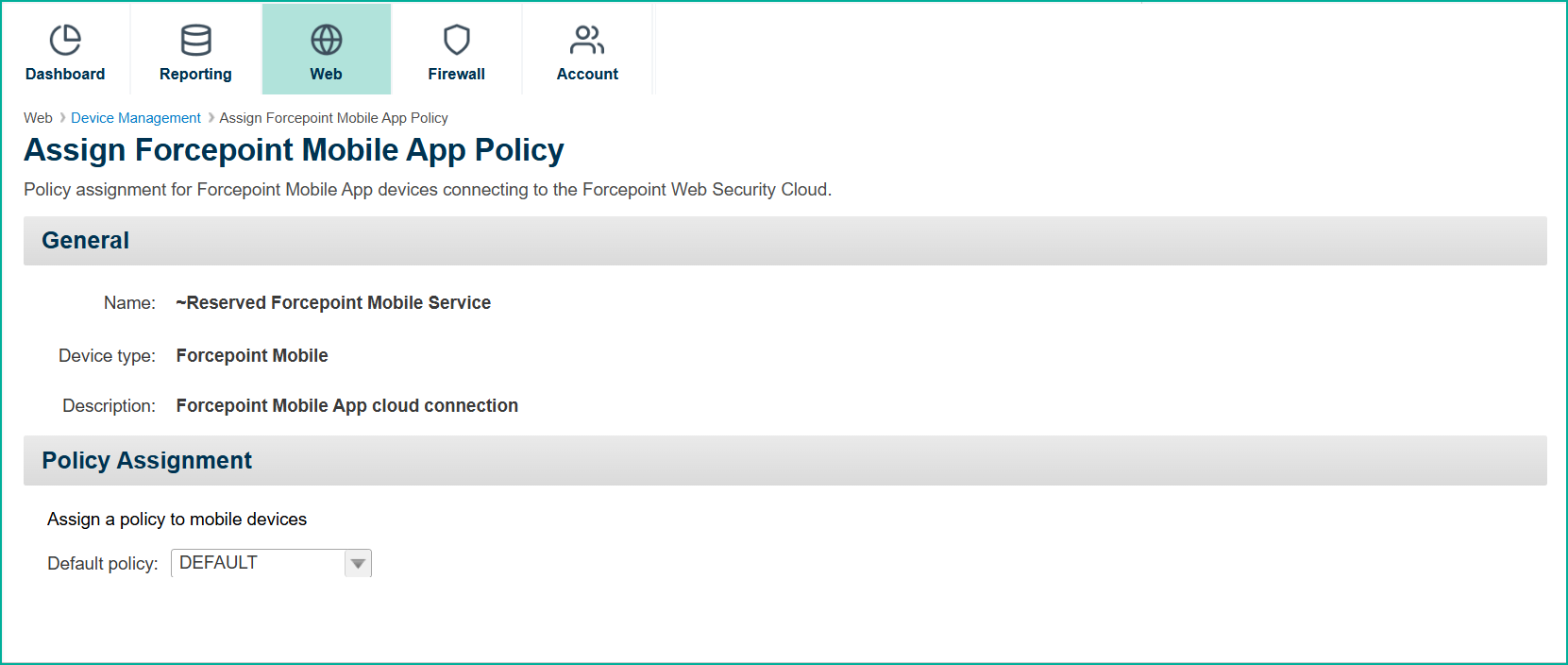
- Under Policy Assignment, the only configurable option is the Default policy, which you select from the drop‑down list.