Global Settings
This section provides the essential configuration values required to deploy, authenticate, and connect to the Mobile Endpoint Agent through your MDM solution.
These settings include deployment identifiers, authentication parameters, and certificate information needed for secure communication with the Forcepoint Cloud.
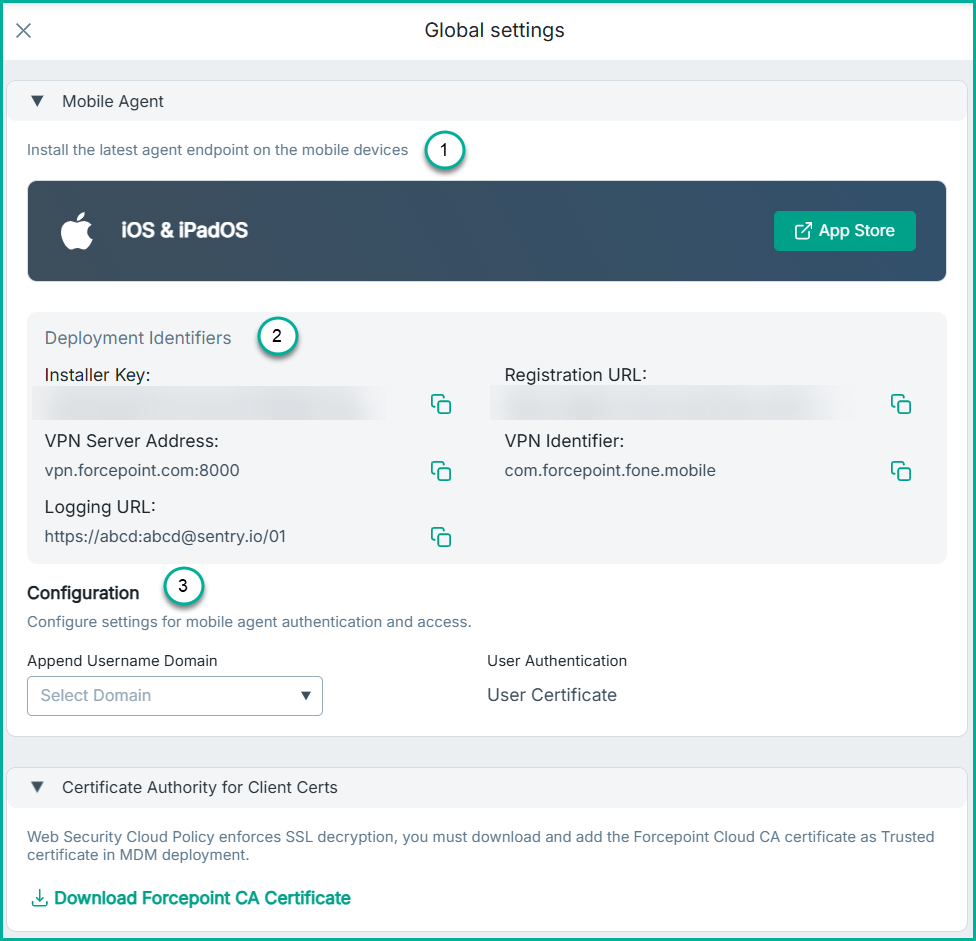
Mobile Agent
- App Store Link: Link to download the Forcepoint Mobile application from the App Store.
- Deployment Identifiers: These identifiers are used by the Mobile Agent to register, authenticate, and connect to the Forcepoint service. Administrators must use
these values during MDM configuration.
- Installer Key: A unique key required by the Mobile Agent during installation. It validates the deployment and ensures the device connects to the correct customer environment.
- VPN Server Address: This server addresses and port that the Mobile Agent uses when establishing the VPN connection for traffic inspection.
- Logging URL: This is the URL through which the application sends logs, including errors, crashes, and other diagnostic information.
- Registration URL: Used by the Mobile Agent to register the device with the Forcepoint backend during initial activation.
- VPN Identifier: The unique VPN bundle identifier required for MDM configurations.
- Configuration: This section defines how user authentication and identity parameters are handled for mobile agent access.
- User Authentication: When the User Certificate authentication is selected, the application sends the MDM‑installed user certificate to the
system. The system then extracts the identifier (the value after CN=) from the certificate and uses it to identify the user during login. For successful user identification, the certificate must include either:
- The full User Principal Name (UPN) after the Common Name (CN) field.Example: When the user certificate has a CN with a complete UPN.
- Issuer: C=US, ST=CA, O=FPONE, OU=FPONE, CN=user3@completeupn.com
- The full UPN is "user3@completeupn.com".
- A username string that allows the system to append the configured username domain to form a complete email address.Example: When the user certificate has a CN with no domain.
- Issuer: C=US, ST=CA, O=FPONE, OU=FPONE, CN=user2
- User ID is "user2", then the full UPN is a combination of the User ID and the domain. Given the domain of XYZ.com.
- The UPN is "user2@xyz.com".Note: The CN does not have to be limited to just 6 characters.
- An emailAddress field containing the full email address. Example: When the user certificate has a CN with an emailAddress field.
- Issuer: C=US, ST=California, L=Campbell, O=Bitglass, OU=SSE, CN=user1, emailAddress=user1@mobileagent.com
- The UPN is "user1@mobileagent.com"
- The full User Principal Name (UPN) after the Common Name (CN) field.
- Append Username Domain: This section is used for User Certificate authentication and requires a user certificate containing a Common Name field. The domain selected here will be appended to the common name field from the certificate to obtain the UPN used to identify the user for login purposes. If the common name field in the user certificate contains the full UPN, select None. If automatic login is not desired, select None.
- User Authentication: When the User Certificate authentication is selected, the application sends the MDM‑installed user certificate to the
system. The system then extracts the identifier (the value after CN=) from the certificate and uses it to identify the user during login.
Certificate Authority for Client Certs
The certificate is required to support SSL decryption and trusted communication between the device and Forcepoint Cloud. Admins must upload this certificate into their MDM solution as a trusted certificate, so devices can properly validate SSL interception and secure communications initiated by the Mobile Endpoint Agent.