My Endpoints
The My Endpoints tab displays a list of all devices enrolled with the Forcepoint Mobile Endpoint Agent in the Forcepoint Data Security Cloud.
This view allows administrators to monitor and manage individual endpoints across the organization. Endpoint appears automatically once the agent is installed and starts communicating with the Forcepoint cloud service successfully.
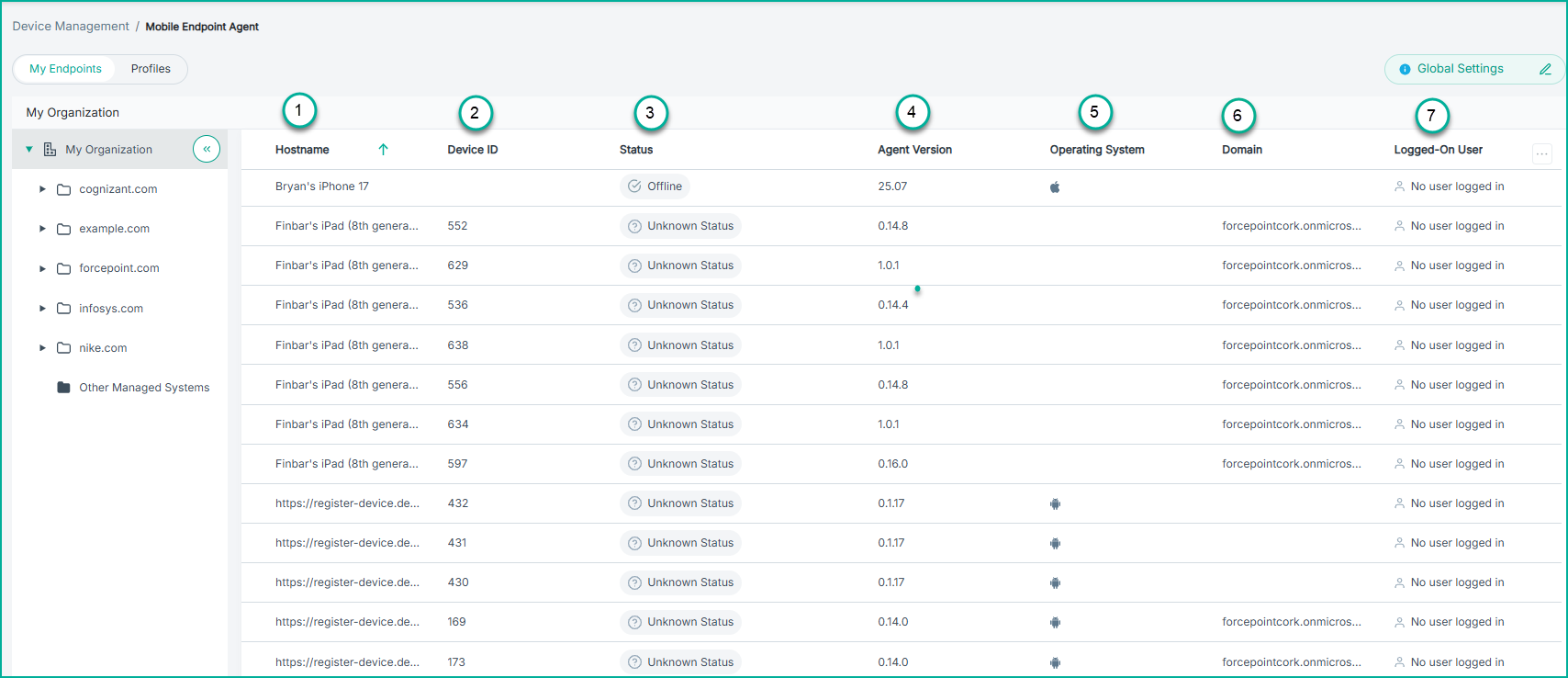
- 1
- Hostname: The device name assigned by MDM.
- 2
- Device ID: A unique identifier per enrolled device.
- 3
- Status: Indicates whether the Mobile Endpoint Agent is currently active, connected, and functioning correctly on the device.
- 4
- Agent Version: Indicates the version number of the Mobile Endpoint Agent installed on the device.
- 5
- Operating System: Displays the OS installed on the device (such as iOS, iPadOS, or Android).
- 6
- Domain: Displays the network domain to which the device belongs.
- 7
- Logged-On User: The user account currently logged in to the device. This information is retrieved from the Microsoft Intune profile configured for the device.