In MDM uninstallation method, open a command prompt as a system user and do the following:
Steps
Run the following command: msiexec /X {5bb6ce16-c242-4ee8-a7a1-2abdc1084b06}/q/n.
Note: Uninstalling as a system user does not require a release code.
Remove the wrapper application by invoking the installer.exe.
Note: GUID will change on each release.
Do the following:
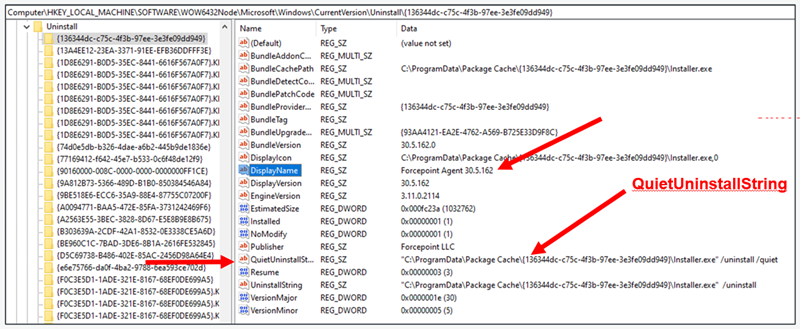
Go to the Uninstall path: HKLM\Software\WOW6432Node\Microsoft\Windows\CurrentVersion\Uninstall
Search for Forcepoint Agent.
To uninstall silently, run the path found in the QuietUninstallString: C:\ProgramData\Package
Cache\{136344dc-c75c-4f3b-97ee-3e3fe09dd949}\Installer.exe" /uninstall /quiet