How to Connect Forcepoint MCP Server to Claude
- Log in to your Claude account.
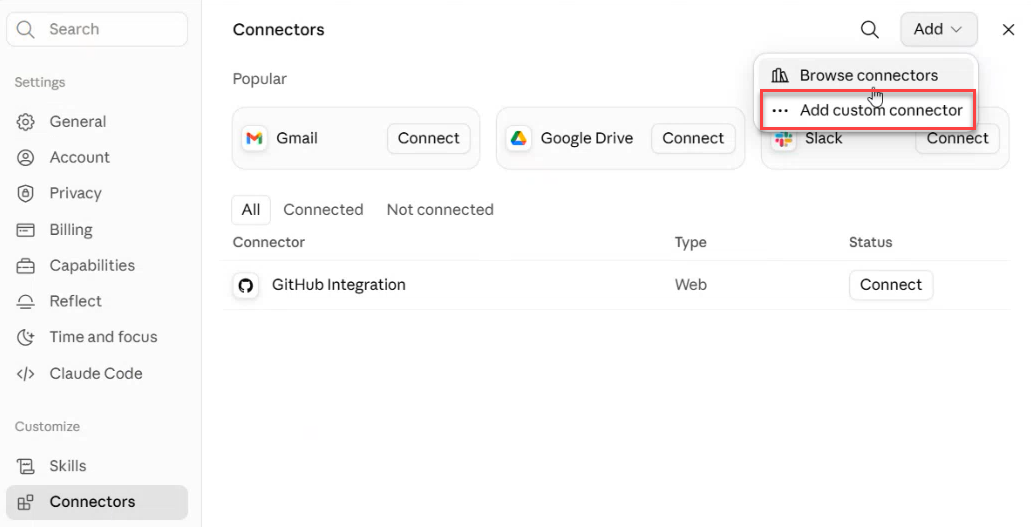
- Navigate to Settings > Connectors.
- Click Add Custom Connector.
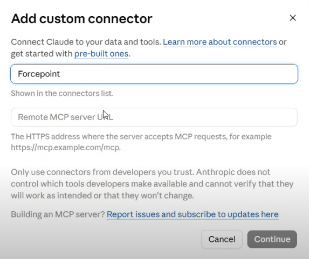
- Paste the MCP Server URL (copied from AI Assistant settings).
- Click Connect.
- Claude will open the Forcepoint login page to login with your Forcepoint credentials.
- Once connected, you'll see a list of tools available for your specific user.
- You can now interact with Forcepoint in Claude (e.g., "List 10 of my Forcepoint users").
- When Claude invokes a Forcepoint tool, it will prompt you to allow the action (click Allow once or Allow).