Classification Model
Classification Model
This view was previously labeled as AI Mesh. It has been renamed to Classification Model to make its purpose clearer.
The Classification Model view shows how Forcepoint DSPM classifies your data. Detection signals from keyword lists, regex patterns, machine learning models, and topic classifiers combine through a pipeline to assign each file with a clear, accurate tag — for example, Confidential, Internal, or Public.
The view is rendered as a Sankey diagram that flows left to right, from raw detection signals on the left through to the final Classification on the right. Every node in the model is visible on one page, so you can see the complete logic and trace how any signal contributes to an outcome.
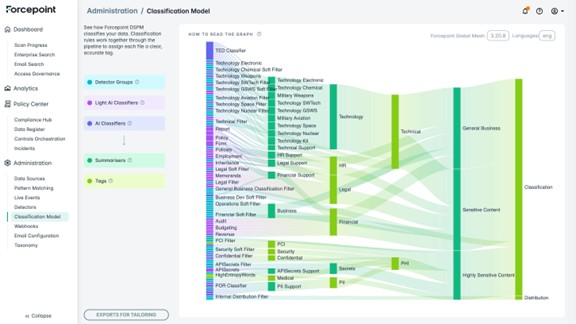
How to read the graph
The graph is organized into columns, with each column representing a stage in the classification pipeline.
The legend on the left of the screen names the five node types:
- Detector Groups assess both the file path and its contents using rule-based logic, such as regular expressions and keywords. They return a match when content fits the defined patterns.
- Light AI Classifiers analyze a document's semantic content using lightweight AI methods such as CBOW (Continuous Bag of Words) and topic modeling. These techniques identify themes like Finance, HR, or Legal even when sensitive terms are not explicitly mentioned, adding contextual understanding beyond simple keyword matching.
- AI Classifiers use machine learning models trained on public datasets to detect content or categorize files. They move beyond keyword matching by evaluating context, patterns, and subtle signals, helping identify complex or high-risk data that rule-based methods may overlook.
- Summarizers do not analyze raw content directly. Instead, they combine and consolidate signals from upstream detectors and classifiers to produce a unified, higher-level insight.
- Tags represent the final classification output of the model, along with compliance and data attributes. Tags are the right-most column in the graph and represent the end of the pipeline.
Exploring the model
Hover over any node to highlight all related nodes and the links connecting them. Upstream nodes show which signals feed into the node you are hovering on, and downstream nodes show how that node's output contributes to later stages and the final Classification.
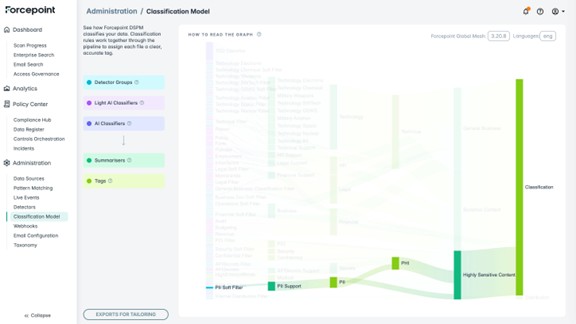
This makes it easy to:
- Trace the full chain of reasoning behind any classification outcome.
- Identify which detectors or classifiers contribute to a specific tag.
- Audit and validate the model's logic and spot candidates for tailoring.
Model version and language
The current model version is shown at the top right of the page. Forcepoint Global Mesh is the display name of the default, out-of-the-box model that ships with DSPM. The language the model is currently configured for is shown next to it.
Exports for tailoring
You can export telemetry from the Classification Model to support tailoring the model to your environment.
- On the Classification Model page, click the Exports for tailoring button.
- Enter the number of records you want to export (default is 10,000) and the From and To dates. Click CREATE FILE AND EXPORT.
For more information on the Classification Model or any required tailoring, contact support.forcepoint.com.