Previous release updates
Agent 5.3.2 Hotfix
Posted on Sep 17, 2026
FDC Agent 5.3.2 focuses on stability and reliability across both the Agent and its Outlook integrations. Key fixes address duplicate AgentEngine processes, a vanishing tray icon that prevented emails from being sent, and recurring classification prompts in Classic Outlook.
The release also closes out several customer-reported issues covering attachment handling and fail-open behavior in web Outlook.
Beyond the fixes, this version adds feature flag support for the Agent Engine, allows classic plugins to inherit autosave settings, and strengthens language validation.
Resolved issues
| DEL-10698 | Validate the selected language against the list of supported languages. |
| DEL-10697 | Classic FDC plugins now inherit the autosave setting. |
| DEL-9364 | Fixed a repeating classification prompt in Classic Outlook. |
| DEL-9289 | Fixed a duplicate AgentEngine.Windows.exe process running after an update. |
| DEL-9177 | Content that is empty or consists only of special characters is no longer sent to the backend. |
| DEL-9352 | Improved fail-open handling in Outlook on the web; inline attachments are now excluded. |
| DEL-11463 | Fixed an issue where the FDC Agent disappeared from the system tray, leaving users unable to send email. |
| DEL-11000 | Added feature flag support to the Agent Engine. |
| DEL-11850 | Fixed an empty attachment error when replying to email with images embedded in a signature. |
| DEL-11001 | Added a prepend-on-send workaround for Office add-ins. |
| DEL-9067 | Fixed an issue in the web client where email was not sent after selecting "Skip and Send" in the recommended classification prompt. |
| DEL-2663 | Added an Outlook soft block for unmanaged devices with no Agent installed. |
-
This release supports both Windows and macOS.
- For optimal performance of Agent v5.3.2 features, the following minimum version is required:
Platform: DSPM 4.1
Agent 5.3.1 Hotfix
Posted on July 29, 2026
Forcepoint Data Classification 5.3.1 fixes several customer-reported Outlook issues, including emails getting stuck mid-send and significant delays with long threads, along with a mail merge bug that fired duplicate alert popups per recipient. It also corrects a classification accuracy issue where empty documents were incorrectly flagged as "Highly Confidential" due to visual tags being included in the text sent for analysis, and introduces a new order-based approach for mapping classification levels to icons in classic apps.
To know more on bug fixes, click here.
Resolved issues
Posted on July 29, 2026
| DEL-2685 | Outlook email send fails; message remains stuck at "Forcepoint Classification is working on your request." |
| DEL-2626 | Strip classification tags from text before generating suggestions. |
| DEL-2619 | Noticeable delay when sending emails from the new Outlook client. |
| DEL-2622 | Duplicate/redundant popups appear when a Custom Alert is configured. |
| DEL-2627 | Replace existing GV icons with the updated icon set. |
- This release supports both Windows and macOS.
- For more details on Classification icons, click here.
- For optimal performance of Agent v5.3.1 features, the following minimum version is required:
Platform: DSPM 4.1
Agent 5.3.0
Posted on July 07, 2026
Forcepoint Data Classification (FDC) 5.3.0 introduces a long-awaited feature for enterprise administrators: fully customizable messages for end-user policy dialogs, giving organizations control over how data classification policies are conveyed to their users. The release also broadens Microsoft Purview (MIP) integration, enabling encryption and rights management policies to be enforced directly on endpoint files. In addition to these enhancements, 5.3.0 ships a substantial round of bug fixes that strengthen classification reliability across Outlook, Excel, Word, PowerPoint, and macOS - resolving both internally discovered issues and open customer escalations.
New Features and Enhancements
Custom Agent Messages (DEL-2052)
Custom Agent Messages is one of the most impactful admin-facing features in FDC 5.3.0, giving administrators complete control over the messaging end users encounter whenever a data classification policy is triggered. Until now, every dialog message - whether a block notification, justification prompt, print warning, or recipient limit alert- was hardcoded, leaving organizations no way to tailor them to their own context.
Administrators can now view, edit, and manage the entire library of agent messages straight from the FDC dashboard under . Updates apply without reinstalling the agent or restarting the system, the platform reverts to built-in defaults whenever no override is defined, and configurations from earlier versions are migrated automatically.
To watch the demo video, click here.
Microsoft Purview (MIP) Policy Integration (DEL-2049)
FDC Agent 5.3.0 builds on existing Microsoft Purview sensitivity label support to enforce Purview policies - including encryption and RMS-based protection- directly on endpoint files. Administrators set up MIP credentials and label mappings through the Endpoint module in the FDC dashboard, and any previously applied MIP label is properly removed when switching to a tag that has no mapping.
FDC - MIP Feature Guide is available here.
To watch the demo video, click here.
Mail Merge Support with Microsoft Word (DEL-2578)
FDC Agent 5.3.0 adds improved compatibility with Microsoft Word's Mail Merge feature, ensuring bulk email campaigns sent via Outlook are delivered reliably while the FDC Agent is active. This extends consistent classification behaviour to one more common enterprise workflow.
To watch the demo video, click here.
Signed PDF Classification Handling (DEL-2596)
FDC now correctly excludes digitally signed PDFs from classification. Attempting to classify a signed PDF now surfaces a popup informing the user that classification isn't available for that file, consistent with the existing experience for empty or protected files, preventing signature invalidation.
To watch the demo video, click here.
Resolved and known issues
Posted on July 07, 2026
Bug Fixes:
Desktop
| DEL-2563 | [Classic Outlook] Lowering classification to a Distribution level fails to trigger the justification text box. |
| DEL-2549 | [PPT/Excel/Word] Whitelisted tagset shows as greyed out for whitelisted users. |
| DEL-2547 | [Excel] Classification applies to the whole workbook rather than the selected range. |
| DEL-2473 | Auto-classification is lost when replying to or forwarding emails. |
| DEL-2462 | Inconsistent UI appearance caused by application theme issues. |
| DEL-2399 | macOS throws an exception on "Action Forcepoint Classification" click instead of showing suggestions. |
| DEL-2393 | Empty classification ribbon button appears after CLI classification. |
| DEL-2384 | [Excel] ML/Pattern Matching suggestions fail to load. |
| DEL-2372 | Justification action missing from Endpoint/Overview/Activity. |
| DEL-2356 | Force/Warn popups fail to display. |
| DEL-2355 | Whitelist has no effect when an email or domain is configured. |
| DEL-2342 | Agent UI fails to load when the whitelist contains a deleted Taxonomy tag. |
| DEL-2313 | [Excel] First-page-only FDC header/footer overwrites existing third-party header/footer. |
| DEL-2305 | [Outlook] Manual classify popup appears on print instead of applying auto-classification. |
| DEL-2286 | [macOS] Right-click menu incorrectly shows "Classify with Synergy" option. |
| DEL-2087 | Configuration popup: Save/Dismiss buttons are misaligned and partially cut off. |
| DEL-2559 | [Agent][macOS 26+] AgentEngine fails to start due to deprecated commands. |
| DEL-2466 | [Mac - Outlook] Agent UI is non-functional. |
| DEL-2145 | Diagnostics > Read file metadata returns a null metadata context. |
| DEL-2491 | Custom Messages search returns incorrect results. |
| DEL-2484 | [Word] Tooltips missing from the Visual Label Options dialog. |
| DEL-2483 | [PowerPoint] Threshold tooltip missing from the Visual Label Options dialog. |
| DEL-2476 | [Outlook] Placeholder "{0}" shown on the maximum-recipients popup. |
| DEL-2470 | Pagination fails on the Custom Message Dashboard. |
| DEL-2458 | Remove unused Outlook messages and correct default wording in Outlook_HelpSuggestionsInfo. |
| DEL-2447 | Custom Message changes take ~12 minutes to apply instead of updating immediately. |
| DEL-2433 | "Other tag" section heading custom message fails to update on the manual classification panel. |
| DEL-2424 | Custom Message dialog button text truncated by the 16-character limit. |
| DEL-2422 | [Dashboard] Whitespace-only custom message accepted for the Server Address field. |
| DEL-2427 | [MIP] MIP label not removed when switching to an unmapped tag (new tagging logic). |
| DEL-2402 | [Outlook] MIP label not removed when switching to an unmapped tag (old logic). |
| DEL-2285 | [MIP] Right-click classification fails on empty Word/Excel/PPT files. |
| DEL-2558 | [Outlook] Printing a saved message triggers an exception when Outlook is not running. |
| DEL-2382 | The "Other tags" section should be hidden in the Agent UI when the Ungrouped Tags section contains no tags. |
| DEL-2331 | A confirmation pop-up wrongly displays when reclassifying in the Excel desktop app without any header/footer changes. |
| DEL-2323 | [Outlook/Web] After reclassifying, user can apply tags other than the suggested ones with no popup. |
| DEL-2321 | [Outlook/Web] Whitelist fails to work correctly for a specific email. |
Customer Issues:
All tickets with an EI escalation reference linked to this release.
| DEL-2450 | [EI-42523] [Agent 5.2] Email attachments not classified automatically. |
| DEL-2586 | [EI-42859] Right-click classification ignores the Agent language setting. |
| DEL-2580 | [EI-42740] Uploaded logo shows in DSPM Dashboard but not in Agent. |
| DEL-2540 | [EI-42559][EI-42556] Feature request: ability to disable Outlook print. |
| DEL-2492 | [EI-42683] [Agent 5.1.2] Classification stops working after uninstall and reinstall. |
| DEL-2573 | [EI-42834] Missing FDC Classification Button in Microsoft Excel Ribbon. |
| DEL-2490 | [EI-42641] Auto Classify feature not working in expected manner. |
| DEL-2578 | [EI-42806] Mail Merge feature not working. |
| DEL-2588 | When the Agent is offline (VPN/network disconnected) but has already synced taxonomy, policies, and configuration, users cannot apply a classification to an Excel file on macOS. The expected behavior is that classification should work using the cached taxonomy, with metadata and visual labels applied. Instead, nothing gets applied. |
| DEL-2539 | On the macOS Agent, when a Word document already has a header and the user classifies it, the expected confirmation popup does not appear. The classification is still applied and the relevant log entry shows up in the taskpane, but the popup that should prompt/confirm never displays. The same flow works correctly on the web version. |
| DEL-1965 | In the Endpoint dashboard (Overview → Activity → Event details), the File size field shows 0 bytes for the operation "CLASSIFIED DIFFERENT THAN SUGGESTION AFTER WARNING." |
| DEL-2585 | Setting Maximum number of recipients = 1 in the Outlook plugin (Endpoint → Plugins → Outlook → General Settings) incorrectly triggers a warning that blocks meeting creation when a single attendee is added.Expected: the meeting is created without a warning. Actual: a warning dialog appears and blocks creation. |
-
This release supports both Windows and macOS.
- For optimal performance of Agent v5.3.0 features, the following minimum versions are required:
-
Platform: DSPM 4.1
-
-
Make sure a valid SSL certificate is installed. SSL is mandatory for public network deployments and optional for private ones. If you do not have a certificate, follow the deployment procedure outlined below.
Agent 5.2.2 Hotfix
Posted on Jun 18, 2026
- Fixed critical Outlook (New Outlook/Web) issues blocking email send and meeting/event dispatch.
- Resolved MacOS agent uninstallation error and improved macOS stability.
- Fixed hard tagging failures on supported file formats (DOCX/XLSX).
- Agent UI logo display corrected - logo no longer shown when not configured.
- Resolved Office application compatibility issues on Desktop.
- Endpoint Discovery scan results now correctly published to the dashboard.
Resolved and known issues
Posted on Jun 18, 2026
Bug Fixes
| DEL-2475 | [Web/New Outlook] Meetings and events fail to send. |
| DEL-2472 | [New Outlook] Forcepoint Classification add-in blocks email delivery after content classification. |
| DEL-2457 | [AgentUI] macOS uninstallation process encounters errors. |
| DEL-2334 | [Desktop] Agent v5.1.2 causes compatibility issues in Office applications. |
| DEL-2303 | [AgentUI] Logo image displays incorrectly when no logo is configured. |
| DEL-2299 | [Endpoint Discovery] Scan results are not being published to the dashboard. |
| DEL-2165 | [Tagging] Hard tagging fails for supported file formats (DOCX/XLSX). |
Known Issues
No known issues.
- For optimal performance of Agent v5.2.2 features, the following minimum versions are required: (Same as v5.2).
-
Agent Edge: 2.348.6 | Platform: 4.0.28 | Dashboard: v3.634.1 |
-
Agent 5.2.1 Hotfix
Posted on May 12, 2026
Summary
- Fully refactored VSTO plugin architecture and rebuilt document caching system for Word, Excel, and PowerPoint to resolve longstanding OLE conflicts.
- Removed static DI container; migrated from
grpcwebproxyto built-in .NET gRPC-Web. - Performance and logging improvements — faster plugin startup, reduced log noise, removed unnecessary null checks.
- Build/CI hardening — refactored build process, resolved NuGet conflicts, improved CI/CD pre-checks.
Resolved and known issues
Bug Fixes
| DEL-2008 | [GvClient] GetConfiguration request works slowly (especially Outlook) |
| DEL-2186 | [AgentEngine] RND OLE vs VSTO object release solution |
| DEL-2321 | [Outlook/Web] Whitelist isn't working correctly for a specific email |
| DEL-2348 | [Bug] MacOS agent fails to start — IMipService DI resolution error |
| DEL-2393 | Empty classification ribbon button after CLI classification |
| DEL-2293 | [CI/CD] Update build pipeline to re-sign VSTO manifests and include signing of GVClient.AgentUI.exe |
| DEL-2351 | Classification is not present when re-open the doc |
| DEL-2355 | White list is not working when email/domain is set |
| DEL-2372 | Justification action is not present on Endpoint/Overview/Activity |
Known Issues
|
DEL-2356 |
Force/Warn popups are not showing. |
- For optimal performance of Agent v5.2.1 features, the following minimum versions are required: (Same as v5.2).
-
Agent Edge: 2.348.6 | Platform: 4.0.28 | Dashboard: v3.634.1 |
-
Agent 5.2.0
Forcepoint Data Classification (FDC) 5.2.0 focuses on stability, branding consistency, and improved administrator experience. Organizations can now display their own logo across all platforms including Web, agent diagnostics have been enhanced with AV checks, and log visibility has been consolidated into a single view for faster troubleshooting. This release also confirms full compatibility with Microsoft Office 2019, 2021, and 2024, and includes a wide range of bug fixes across Outlook, Word, PowerPoint, Excel plugins for both Desktop and Web experience.
-
Logging Improvements (DEL-2177, DEL-2148): Two enhancements have been made to improve log visibility and diagnostics across the FDC platform. GRPC logging is now enabled for Office Add-ins (Word, Excel, PowerPoint, Outlook on Web), giving support and engineering teams deeper visibility into classification issues in browser-based environments. Additionally, the Agent UI now consolidates all log sources into a single, searchable table, making it faster to investigate and troubleshoot agent behavior. For more details, see the demo video.
-
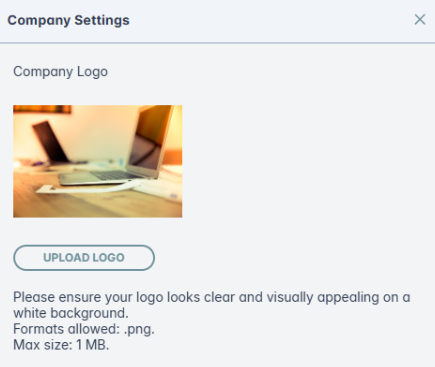
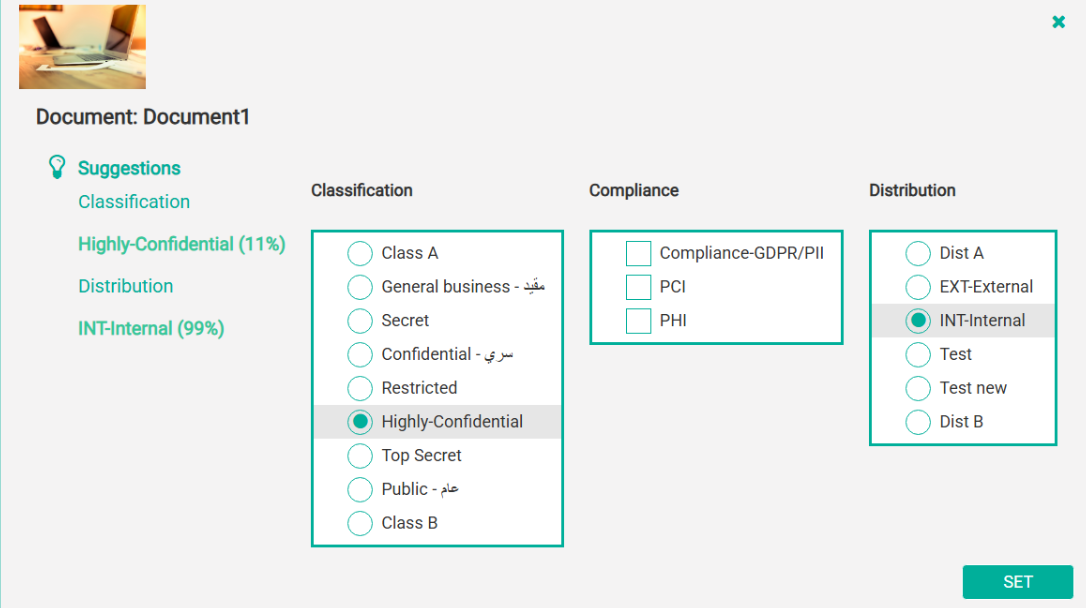
Custom Logo Upload (DEL-2074, DEL-2048):Note: Ensure a valid SSL certificate is installed on the server before using the custom logo feature.Administrators can now upload their organization’s logo from the Company Settings option, which will appear in the agent UI, giving users a familiar, branded experience. Available on both Windows desktop and Web.Logo can be uploaded from both pages:
-
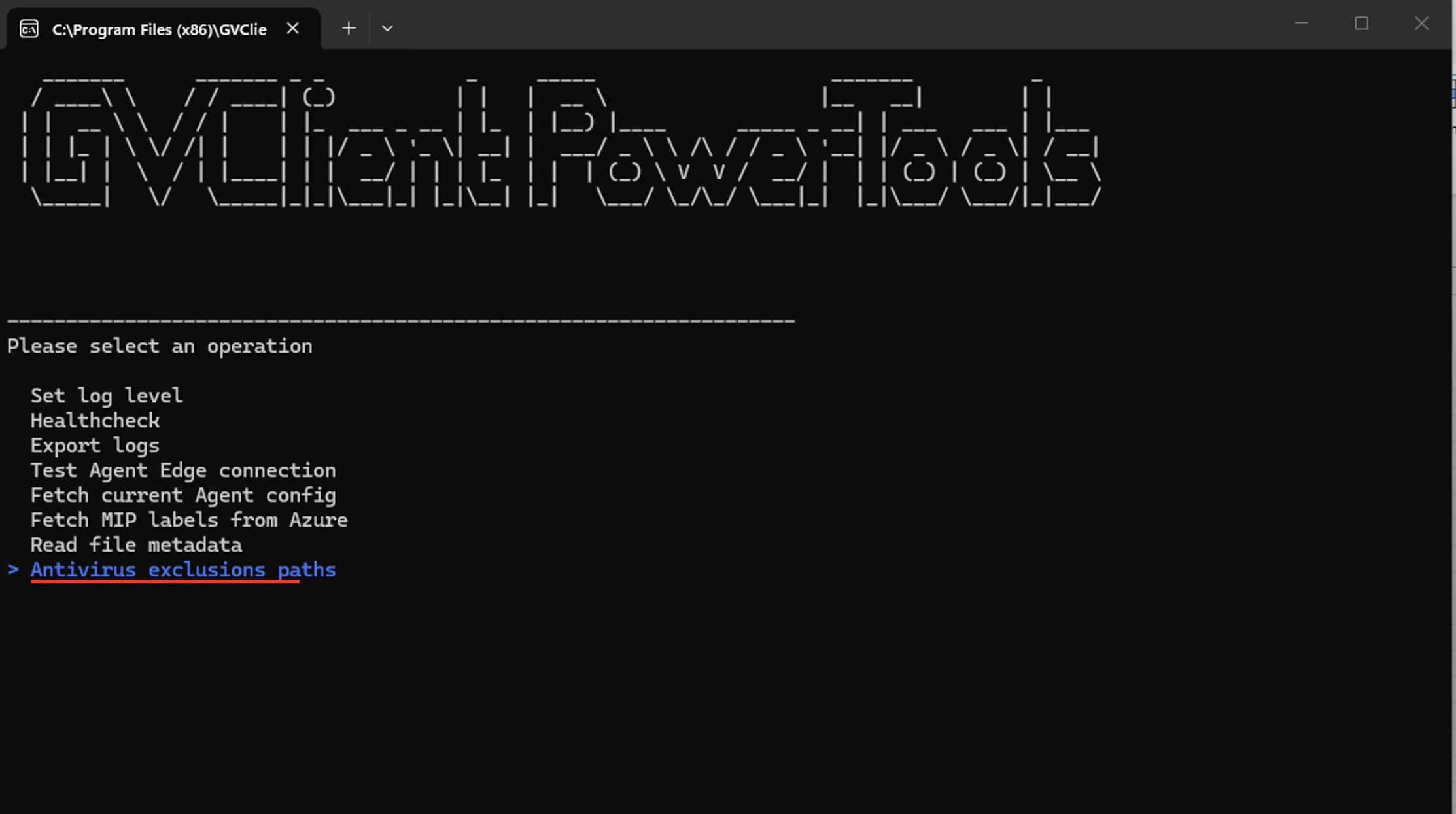
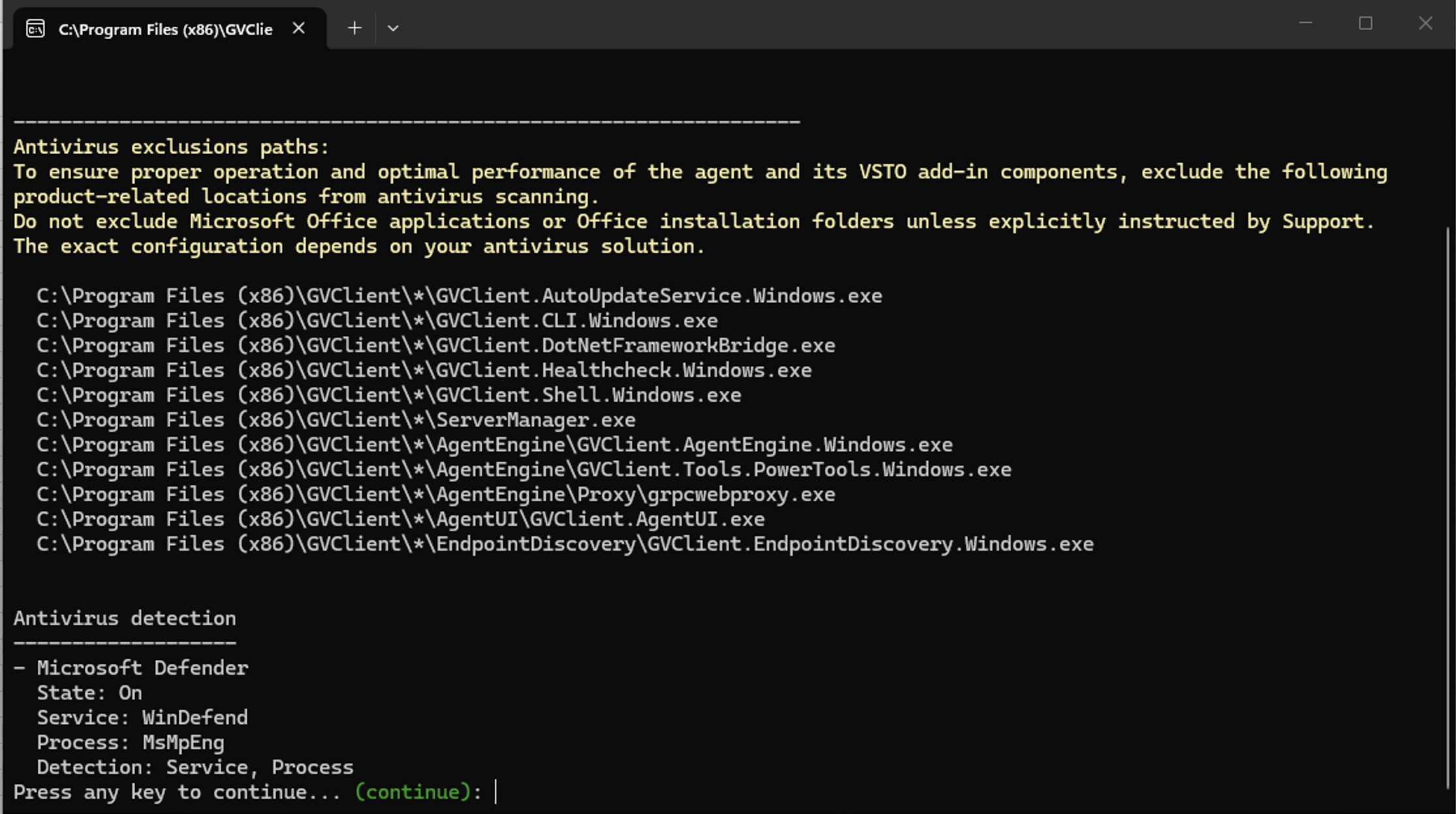
AV Diagnostics Enhancement (DEL-1632): Administrators can now verify Antivirus (AV) exclusion paths and check AV service status directly from the FDC Agent Diagnostics panel, reducing time spent on configuration troubleshooting and support escalations.
Compatibility and Platform Support
Microsoft Office 2019, 2021, and 2024(DEL-2127, DEL-2251, DEL-2189)
FDC Agent 5.2.0 has been validated for full compatibility with Microsoft Office 2019, 2021, and 2024 across Word, Excel, PowerPoint, and Outlook. All classification workflows, visual labels, and agent interactions have been verified to work as expected.
Bug Fixes
Desktop:
| DEL-2301 | [Outlook] Popup to classify an email before sending is shown twice and requires multiple clicks to send. |
| DEL-2281 | [Endpoint > System] Failed to update registry for UninstallationPassword. |
| DEL-2280 | [Word/PPT] Headers/Footers are duplicated after reclassifying a document with a specific theme. |
| DEL-2270 | "Apply to First Page" applies tag to odd pages instead of first page. |
| DEL-2267 | PPT - Footer visual tag is not applied to specific PPT file. |
| DEL-2265 | GVClient.AgentUI folder should be removed after uninstalling the agent. |
| DEL-2250 | Visual tags - Changing type from floating to fixed is not working properly. |
| DEL-2239 | Justification Prompt Not Triggered for Certain Classification Changes. |
| DEL-2235 | [AgentUI] Agent Logs opens slowly if there are lots of logs stored. |
| DEL-2233 | [Desktop] Agent crashes when user clicks ribbon twice. |
| DEL-2227 | Wrong activities displayed on dashboard after right-click classification. |
| DEL-2225 | [PowerPoint Windows] Visual labels not shown correctly after reclassifying labels. |
| DEL-2181 | [Office 2024 MS Outlook] Email send is blocked even though no user email or domain matches the policy. |
| DEL-2167 | Server address is not prefilled after restarting AgentEngine. |
| DEL-2157 | Agent UI is showing with delay. |
| DEL-2118 | [Outlook Windows] Visual labels are not shown correctly after reclassifying labels. |
| DEL-2116 | [Outlook Windows] The subject is removed if it is added after clicking the ribbon. |
| DEL-2038 | Microsoft Word repeatedly switches to the classification screen when users interact with certain elements. |
| DEL-2026 | Outlook - Lower Justification do not work for Outlook meetings. |
| DEL-2015 | Outlook Classic - Inconsistent classification when formatting email from plain text. |
| DEL-2009 | Fonts not updated in all text elements within popup windows. |
| DEL-1996 | [PPT] Web styles are not applied after classification. |
| DEL-1994 | Unable to classify Excel document when a distribution other than Test A is selected. |
| DEL-1961 | [Justification] Incorrect Justification field behavior with Force/Warn enabled. |
| DEL-1960 | Justification field appears when the tag is added to Whitelist. |
| DEL-1952 | PowerPoint Windows - Manual Classification Force - Document Save Stuck in Loop. |
| DEL-1942 | Outlook Classic - Attachment more sensitive than email not working. |
| DEL-1929 | Outlook email classification added in header instead of footer. |
| DEL-1922 | [Agent] Meetings - Outlook 'You have changed important details' appears unexpectedly. |
| DEL-2234 | [Web] Agent UI popup appears multiple times after repeated ribbon clicks. |
| DEL-2141 | Web - Agent UI popup is displayed instead of the Suggested popup. |
| DEL-1499 | [Office Addins - PPT] Suggestion not working on web browser. |
Known Issues
|
DEL-2324 |
[Outlook/Web] Alignment is not applied in visual tags and classifying removes some body styles. |
|
DEL-2323 |
[Outlook/Web] User is able to apply different tags from suggested ones without any popup after reclassifying. |
|
DEL-2322 |
[Outlook/Web & Desktop] Popup blocks sending even when default email policy is set to Ignore. |
|
DEL-2321 |
[Outlook/Web] Whitelist isn't working correctly for a specific email. |
|
DEL-2313 |
[Excel] GV header/footer overwrites third-party header/footer when 'Apply to First Page' is used with 'Different Odd & Even Pages' enabled. |
|
DEL-2307 |
[Excel] Third-party header/footer is removed after reclassifying the document (Append mode). |
|
DEL-2305 |
[Outlook] Auto classification is not applied in Outlook while printing — manual classify popup shown instead. |
|
DEL-2166 |
[WEB] PPT - Classification tag is set but then resets after a short delay |
|
DEL-2331 |
Confirmation pop‑up incorrectly appears when reclassifying Excel desktop application without header/footer edits. |
|
DEL-2332 |
Classification tag not visible when using right‑click classification option also 'Set Suggested' button is disabled. |
- We will fix all the known issues in the upcoming release.
- This is a Windows-only release.
- For optimal performance of Agent v5.2.0 features, the following minimum versions are required:
-
Agent Edge: 2.347.0 | Platform: 3.4.1068 | Dashboard: v3.633.0 |
-
- Allow with Justification — Agent Version Dependency: The "Allow with Justification" option for lowering classification is only supported on FDC Agent v5.1 and above. Agents on v5.0 and earlier will not be able to lower classification when this option is enabled — they must use the "Allow" option instead. Customers running a mixed fleet of agent versions should ensure all agents are upgraded to v5.1+ before enabling "Allow with Justification".
- DEL-1952 — PowerPoint Save Loop (Manual Classification Force): An additional popup has been introduced when closing an unclassified PowerPoint document under force classification policies. This separates the close and save events to prevent data loss or a repeated 'Do you want to save your changes' loop.
- DEL-2094 — Classification Character Limit Alignment: The agent-side character limit for suggested classifications has been aligned with the classifier service limit of 180,000 characters. This change reduces wasted resources on large files.
- When the administrator updates the logo on the platform, it will not be updated on agent pop-ups without manual action/triggering. To display the new logo, you need to update any settings or just click on the Submit button on the Endpoint page.
Agent 5.1.2 Hotfix
The list of issues resolved in this hotfix are:
- Agent Unresponsive After 5 Days: Implemented fixes for concurrent cache write operations, enhanced Electron stability safeguards, and resolved a recovery mechanism conflict that led to repeated restart loops under certain failure conditions.
- Agent Performance Improvement: Optimized agent performance by correcting the default state of an internal endpoint discovery service. The service is now disabled by default, ensuring no impact on system responsiveness.
- PDF Compression After Classification: Fixed issue where PDF files were getting compressed after classification.
- Log event and remove Unexpected Error popup: Removed blocking error pop-up; issues are now logged silently without user interruption.
- Hidden AgentUI Pop-up issue 1: Fixed focus of AgentUI pop-up so the Agent window is not hidden when user have multiple Application windows are open.
- Hidden AgentUI Pop-up issue 2: Fixed a problem where the Agent UI would not stay visible on top of other windows while sharing your screen.
Agent 5.1.0
Agent 5.1 brings important usability improvements, stronger administrative controls, and better stability across Windows, macOS, Outlook, and PDF classification. This release adds password-protected uninstallation on both Windows and macOS, new audit events for tracking uninstall actions, and more control for administrators with configurable PDF rules and custom fonts. It also improves classification workflows with justification de-escalation, enhanced CLI logging for easier troubleshooting, and several updates to the new Outlook experience.
Agent 5.1 also resolves a large number of customer-reported defects across email, meetings, attachments, PDF handling, classification UI, and Office integrations, significantly improving reliability, performance, and consistency of labeling and metadata enforcement.
New Features
-
Custom PDF: Administrators can now define custom classification rules for PDF documents. When a classification is applied, labels are assigned based on these rules, with behaviour consistent with other supported plugins. Note: Either use pdf classification from Explorer or plugins, cannot use both together.
- Justification De-escalation: Administrators can now require users to provide a justification when lowering a classification or distribution level. Audit logs capture the original and updated values along with the justification in the activity notes. Refer to the document below for scenarios and use cases. For more information click here.
-
New Outlook: The agent now supports the new Outlook experience, with features and functionality aligned with Outlook on the web. Refer to the documentation below for deployment steps and supported capabilities. For more information on:
- Enhanced CLI Logging: Additional logging has been added for CLI classification to improve troubleshooting and clearly indicate where failures occur. Refer to this document for detailed logging information.
- Password Protected Uninstall: Administrators can now require a password to uninstall the agent, preventing unauthorized removal by end users. This feature also introduces two new audit events — AgentUninstallationSucceeded and AgentUninstallationFailed — for improved visibility. You may click the link and navigate to row number 11 of the table to learn more, and you can also watch the accompanying video for additional details.
- Custom Font Change: Users can now change the font across all agent dialog boxes. Administrators may select from default system fonts or upload a custom font to match their organization’s branding. You may click the link and navigate to row number 8 of the table to learn more, and you can also watch the accompanying video for additional details.
Resolved Issues in Agent 5.1.0
- Arabic text reversed when labelling using PDF plugin.
- Configuration popup displays disabled items.
- Outlook- No visual labels or metadata added when Resending the message.
- Auto classification of zip email attachments fails.
- Classification window rapidly flashing/moving.
- New email automatically moved to the "Drafts" folder.
- Agent not working when cmd.exe disabled.
- Classification pop up does not appear- Remote Session.
- Re-classification tags not inherited on AgentUI when opening or cancelling meeting.
- Unexpected error when updating file received in Excel.
- Meeting - Two pop-ups showing when sending.
- The “Slide range” radio button is selected by default, but the slide range options are hidden instead of being visible.
- Hide sheet/slide range option when 'All sheets'/'All slides' is selected.
- Not inheriting default classification on auto-reply.
- Header and footer aren’t appended correctly to 1 as third-party text.
- The footer isn't removed correctly when overwriting a third-party footer.
- Title/subtitle isn't removed if it was disabled on the dashboard.
- Footer is duplicated after sending a meeting.
- PDF file is not classified when reclassifying.
- Draft emails close after approx. 2.5 minutes.
- "permission to send" field only works with email domains.
- Opening eml file copies email to Inbox.
- Popup to classify email appears even for already classified email.
- New-Outlook/Web - Unable to send emails with large attachments (>=7MB).
- Agent Crashes if Windows machine is not re-started periodically.
Known issues in Agent 5.1.0
Following are the known issues in this version:
- Microsoft Word repeatedly switches to the classification screen whenever users interact with other Office applications.
- Outlook - Lower Justification do not work for Outlook meetings.
- Fonts not updated in all text elements within popup windows.
- Incorrect Justification field behavior with Force/Warn enabled for “user from selecting a lower Classification”.
- Justification field appears when the tag is added to the Whitelist.
- Updated Manifest Upload Process: The manifest upload process has been updated for Web, macOS, and New Outlook. Manifests are no longer version-dependent, so no changes are required when upgrading agent versions. Refer to this section for the updated steps.
- For optimal performance of Agent v5.1.0 features, the following minimum versions are required:
- Agent Edge: 2.305.3 | Platform: 3.1.443 | Dashboard: 3.597.1 | DataGuard: 8.7.0
- When you print calendar, the default printer can not be changed, its an outlook limitation. It works fine for email.
- Sending an unclassified reply or forward from the Outlook inline reply pane requires clicking Send twice - the first click applies the classification. This is an Outlook limitation for inline response mail items and cannot be resolved in the product. Open the reply or forward in a separate window, or apply the Outlook settings. A permanent change would require Microsoft to add the necessary Outlook functionality.
- For email corruption issue in Outook, use the below setting:
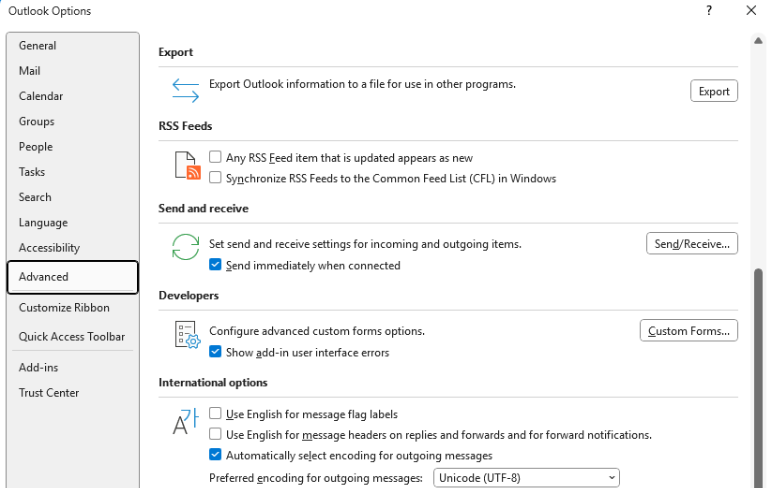
-
When you reply to or forward an unclassified email, Outlook may require you to click Send twice. To avoid this, either:
- Open the message in a new window before replying or forwarding, or
- Apply the settings below as a permanent fix.
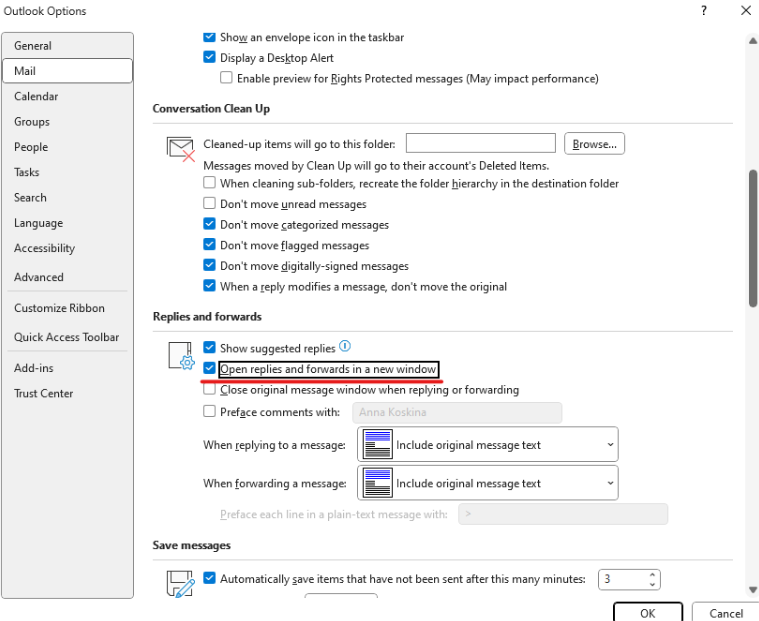
You can enforce this using the GPO setting "Disable Reading Pane Compose in Outlook."
- Get the Office ADMX/ADML template files from the Microsoft Download Center and place them in your PolicyDefinitions folder (or your Central Store).
- Open Group Policy Editor and navigate to .
- Select Disable Reading Pane Compose and set the policy to Enabled.
- Force a policy refresh (e.g.
gpupdate /force), then close and reopen Outlook for the change to take effect.
Agent 5.0.0
We are pleased to announce the release of Forcepoint Data Classification (FDC) Agent v5. This version offers a smoother, faster, and more reliable experience for both users and administrators. This release introduces major improvements in offline activity handling, ensuring events are securely stored. You will notice a simpler experience with email classification in Outlook now requiring only two clicks instead of four, along with clearer notifications when working with empty or protected files. The agent has been upgraded to .NET 8 for improved performance and long-term support, while log management and diagnostic tools have also been enhanced. In addition to these updates, we have resolved a large number of bugs, further improving product stability and reliability.
Major Highlights
- Email Classification (Outlook): Reduced clicks required to classify emails from 4 down to 2 clicks, this will simplify the user workflows.
- File Classification Notifications: Clear user messages are now provided when:
- Right-clicking an empty file.
- Attaching an empty file.
- Using the CLI with an empty file.
- Attempting to classify a protected file.
- Offline Activity Handling: Activities are now stored in-memory and, once capacity (1,000 items) is reached, automatically written to file (up to 50,000 items). This ensures no data loss when agents are offline.
- Failed activity exports are retried after 1 minute, with incremental intervals up to a maximum retry window of 1 hour.
- .NET 8 Upgrade: The Agent has been upgraded to the latest .NET 8 framework, improving performance and long-term supportability.
- GVClient PowerTools Healthcheck: Updated logic for handling registry keys for more accurate diagnostics.
Points to note
Following are some important points to note:
- For Mac - Upgrade to .NET 8 manually before installing the agent. For windows it is part of the installer.
- Minimum required Agent Edge version is 2.259.0.
- When you print calendar the default printer cannot be changed. This is an outlook limitation. It works fine for email.
- When replying or forwarding an email that is not classified, make sure to open it in a new window else you will have to click send twice, or you can apply the below settings.
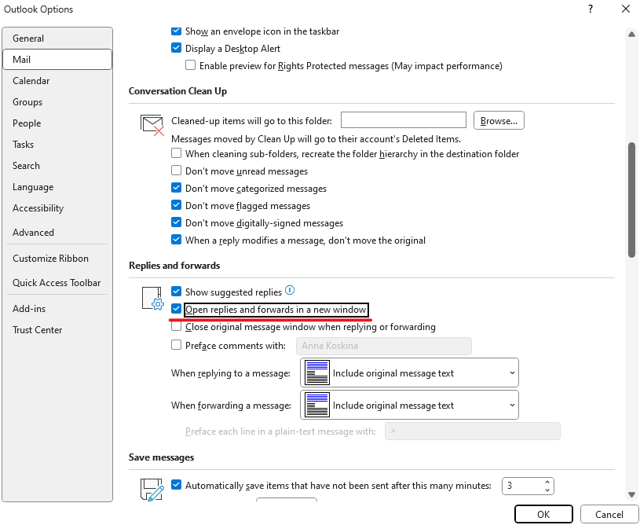
Resolved Issues in Agent 5.0.0
Following issues have been fixed in this version:
- [Agent - PPT] Visual labels were not updated when re-classification was done for duplicated the title page.
- [Agent] Suggestion cache is persisting on existing unclassified files.
- [Agent - Outlook] AI Suggestion mismatch warning message does not pop up on print.
- [Agent] Getvisibility agent was displayed on Forcepoint flavor build.
- [Outlook plugin - print] 4.7.5 - Print option was missing with Ignore setting on Print
- [Agent - UI] Fixed a bug where suggestions were note updated on tagging values when tagging popup was opened.
- [Empty Files] UI enhancements were done to follow same design as other warning messages.
- [Outlook] Classification of attachment same as the email was not working as expected.
- Right-click classification was not working as expected
- [Agent - Outlook] Wrong classification of warning messages with wrong distribution tag.
- [Agent - Word] H/F width changes in dashboard were not applied to previously tagged files.
- [Agent - PPT] Save prompt was getting triggered despite no changes after recent save.
- [Agent - Excel] 3rd-party labels were overwritten when enforce overwrite option was appended.
- Auto-update was not working as expected.
- [Outlook] Pop up with the message 'The following attachments are empty' appeared when sending an email with a signature as an image.
- [Outlook - Meetings] When accepting or proposing new time, meeting did not inherit the classification.
- [Outlook - Meetings] When reply or forward was classified for recurring meetings, classification was not inherited.
- MIP metadata was not written when tags are exclusive.
- Print Outlook calendar prints email instead.
- Office plug ins causing slow performance and hanging.
Known issues in Agent 5.0.0
Following are the known issues in this version:
Windows
- [AgentUI] It is possible to bypass lowering level of classification or distribution when not allowed.
- [Agent - Visual Options] Hide sheet or slide range option when 'All sheets' or 'All slides' is selected.
- [Agent - Excel] Visual Label Options pop up appears when saving or printing a classified file with a long h/f or using Moog config.
- [Agent - PPT] Visual Options pop up appears when
alwaysShowPopupis false andslideLayoutOptionsis set to other thanAllSlides. - [Agent - PPT] The footer is not removed correctly when overwriting a third-party footer and reclassifying using another title option.
- [Outlook - Meetings] Re-classification tags are not inherited on AgentUI when opening or canceling meeting.
- [Endpoint Discovery] Errors are preventing scan completion.
- [Agent - PPT] Title or subtitle is not removed if it was disabled on the dashboard.
- Suggestions are displayed in read mode on outlook, when you click on the set suggested button. It shows a dialog box that email is protected.
- No visual labels or metadata is added when Resending the message.
- Unknown Error is displayed when forwarding meeting invite with cache mode disabled.
- Classifying PDF by right-clicking in Windows Explorer hangs or fails.
- New email is automatically moved to the "Drafts" folder.
- Users are unable to save the shared Excel file from OneDrive, and an error message appears.
Mac
- File Name is not displayed on new document.
- PPT/Excel Sliderange/Sheet range is not working as expected.
- PPT: Visual labels behavior is inconsistent, it will be updated. But it seems PPT has only issues with showing the proper formatting (after refreshing it is displayed correctly. This is an issue with PPT). Sometimes it does not show H/F on slide.
- [Office Addins - PPT] Refreshing the PPT presentation causes the file to lose its classification on task pane.
- [Office Addins - PPT] Suggestions not working on web browser.
- [Office Addins - Outlook] Unexpected error is displayed when triggering suggestions.
- [Office Addins - Outlook] Classifying emails same as attachments does not work as expected.
- [Office Addins] Inconsistent behavior is observed when clicking on the ribbon.