Log Export Script-version 1.2.0
The Log Export Script fetches logs from the Log Export API and saves them locally. Administrators must install and use Python 3.6 or above in a Linux environment to run the script.
Prerequisites
- Tenant must be registered on the platform and have access to the tenant portal.
- Tenant must have an API Key generated on the Platform UI.
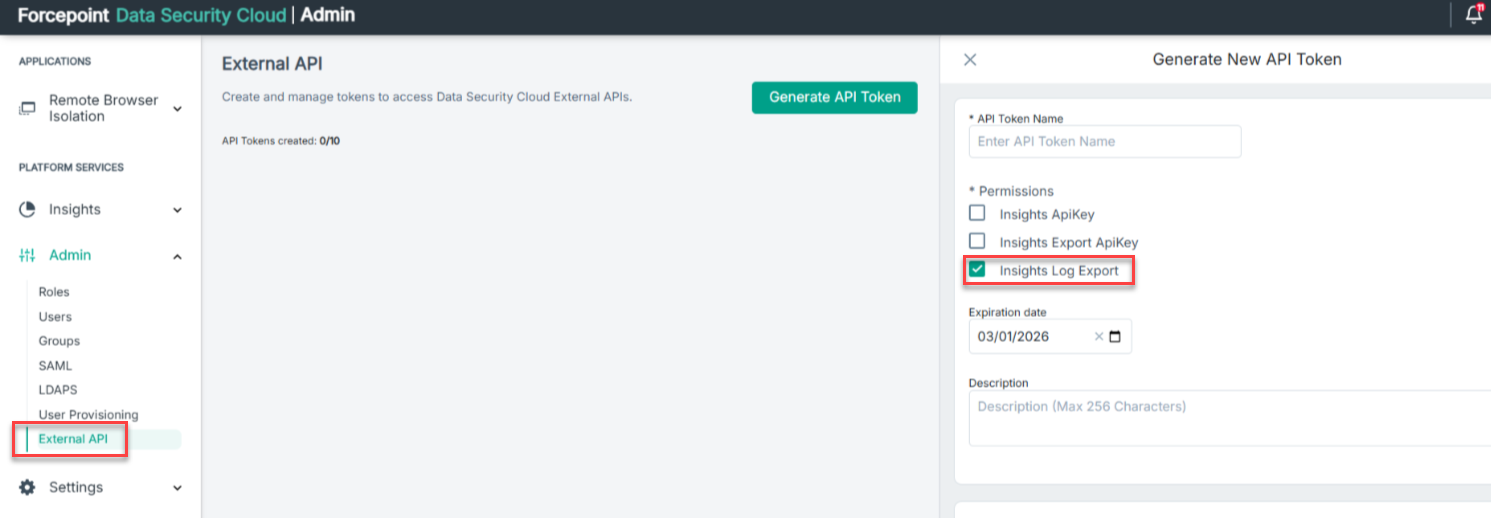
For more details refer to this link
Setup
- Download the Log Export Script zip package and unzip its contents in a folder of choice.
- Ensure Python 3.6+ is installed.
- Create a virtual environment if required.
apt-get install python3-venv python3 -m venv venv source venv/bin/activate - Install the script's additional requirements as specified in the requirements.txt file.
pip install -r requirements.txt - Script execution logs are saved in
insapilogs_{ppcode}_{collection}.log. Check the log to ensure logs are being collected correctly. - The
config.inifile in the root folder specifies custom fields and filters. Use the INI format as shown below, where each section applies to a specific collection. More information on fields and filters can be found at Exporting logs using Export API. Refer to Collection options for the exportable collections.- Fields: Define a section named
[{ppcode}_{collection}_fields]and list the fields as a comma-separated string under thefieldskey. The field names listed must exactly match those defined in the collection. You can find the mapping between display names and actual field names here.Optionally, add an
includeFieldskey in the same section to export the default field set or all available fields without listing each one. Accepted values aredefaultorall(case-sensitive;ALL,Default, etc. are not accepted). - Filters: Define a section named
[{ppcode}_{collection}_filter_{field}]and specify filter operations (e.g., eq, ne) as the keys with their values as comma-separated strings.
- Fields: Define a section named
If a config file is not supplied, or it has no [{ppcode}_{collection}_fields] section for a collection, only the default fields (as specified here) are exported for that collection. For the SSE product
code and SWG collection, the default filter act != Allowed is also applied when no config file is supplied. The filters defined in the config file override the default
ones.
If the [{ppcode}_{collection}_fields] section is present, the values are used as follows:
- If
fieldsis specified, only the listed fields are exported (includeFieldsis ignored). - If only
includeFieldsis specified, the corresponding field set (defaultorall) is exported.
# Fields
[SSE_SWG_fields]
fields = eventTime,crc,cry

[SSE_Admin_fields]
includeFields = all

[WS_Telemetry_fields]
includeFields = default

# Filters
[SSE_Admin_filter_crc]
eq = US

[SSE_SWG_filter_act]
ne = Allowed- The script needs to be started/restarted/stopped separately for each log collection. Do not attempt to perform these actions for multiple collections in a single command.
- Logs will be saved in the
logsfolder with nested year, month, date sub-folders based oneventinsertedtime. - The script can be started and stopped at any time. Its state is saved and execution can be resumed from where it left off (using the
-d, --dateoption in the start command overrides the stored state and starts collecting from the date specified). - The script version (currently 1.2.0) can be viewed using the
-h,--helpoption.
Startup validation
Each time the script is started or restarted, it checks that the requested product code and collection are licensed and exportable for the tenant. If not, the script stops with an error
message, which is also recorded in insapilogs_{ppcode}_{collection}.log.
Usage
python3 insights_log_exporter.py [-h] -a {start,stop,restart} -pp PPCODE -c COLLECTION [options]| Options | Description | Requirement |
|---|---|---|
-h, --help |
Show help message and exit | Optional |
-a, --action {start,stop,restart} |
Start, stop, restart the log export daemon | Required |
-pp, --ppcode |
Licensed product code, e.g. SSE | Required |
-c, --collection |
Name of an exportable collection for the given product code, e.g. SWG | Required |
-d, --date |
ISO-formatted start date (UTC) | Required on first run |
-k, --api-key |
Prompt for API key | Required on first run |
-p, --portal-host |
Portal hostname, e.g. portal.forcepointone.com | Required on first run |
-i, --insights-host |
Insights hostname, e.g. <tenant>.insights.forcepointone.com | Required on first run |
-df, --data-format {csv,json} |
Log data format (default: csv) | Optional |
-f, --config |
Config file name (placed in root folder) for custom fields and filters | Optional |
- Start collecting logs from a specific
date.
python3 insights_log_exporter.py -a start -d '2025-01-01 00:00:00' -k -pp SSE -c SWG -p portal.forcepointone.com -i tenant.insights.forcepointone.com -df csv -f config.ini - Restart collection with previous credentials and state.
python3 insights_log_exporter.py -a restart -pp SSE -c SWG - Stop collecting logs.
python3 insights_log_exporter.py -a stop -pp SSE -c SWG