What the Pending Changes pane shows
The Pending Changes pane shows configuration and policy changes that have not yet been transferred to the Security Engines. What the pane shows depends on whether an Engine's Dashboard page or the Dashboard view showing all Engines is open.
Figure: Pending Changes pane on the Dashboard page for all Engines
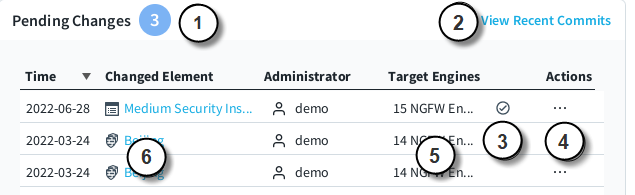
- 1
- The total number of pending changes for all Engines.
- 2
- Opens the Recent Commits pane.
- 3
- The approval status of the pending change.
- 4
- A menu with options to view audit data and to find out where the element is used.
- 5
- The Engines affected by the pending change.
- 6
- The element where the change was made.
Figure: Pending Changes pane on the Dashboard page for an Engine
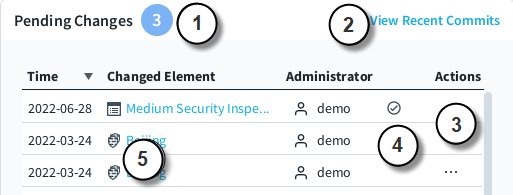
- 1
- The number of pending changes for the Engine.
- 2
- Opens the Recent Commits pane.
- 3
- A menu with options to view audit data and to find out where the element is used.
- 4
- The approval status of the pending change.
- 5
- The element where the change was made.