Previous Release Updates
Posted on Aug 31, 2026
Improved handling of datasource rate limiting for cloud connectors
The Generic Connector now detects HTTP 429 (Too Many Requests) responses from OneDrive, SharePoint Online, and Google Drive and automatically pauses requests to the affected connector and
credential. The pause honors the datasource's Retry-After guidance where provided, falling back to a configured per-connector interval otherwise. During the pause, DSPM
returns a 429 with Retry-After to callers rather than forwarding traffic to the datasource. This reduces failed scans and avoids compounding throttling during periods of heavy
datasource load.
Posted on July 07, 2026
Release SummaryForcepoint DSPM is undergoing a focused evolution across the past few releases — from a foundational scanning architecture toward a fully unified, self-service-driven data security platform. DSPM 4.0 delivered high-throughput classification out of the box by combining DLP classifiers with the AI Mesh engine.
DSPM 4.1 takes the next meaningful step toward operational self-sufficiency, introducing self-service taxonomy label customization — giving organizations direct control over how their data is classified — alongside key reliability improvements: proactive disk back-pressure notifications, Admin Audit Logging for compliance-driven governance visibility, and Scan Status enhancements. The below sections describe the new features and enhancements delivered in DSPM 4.1.
Cloud DSPM now available in APAC Region (Singapore)
Cloud DSPM is expanding its geographic footprint to better serve customers in APAC region. A dedicated Cloud DSPM cluster is now available in Singapore, enabling faster deployments and simplified customer onboarding for the APAC customers.
Key Benefits
-
Improved Performance: Reduced latency and faster query response times for APAC customers.
-
Local Data Residency: Meet compliance and regulatory requirements by maintaining data within the APAC region.
-
Faster Onboarding: Dedicated cluster support enables faster time-to-value.
Admin Audit Logging Enhancement
DSPM 4.1 now includes comprehensive Admin Audit Logging capabilities, a critical feature for organizations implementing DSPM with strict compliance and governance requirements. This enhancement addresses the audit trail and forensic investigation needs identified by enterprise customers across banking, financial services, and government sectors.
Administrators can now track all configuration changes and user actions across the DSPM console with full visibility into:- Who performed the action (user email/ID).
- What was changed (module, functionality, and specific values).
- When the change occurred (date and timestamp).
- How the value changed (before/after state with complete change lineage).
For more information, refer to the Admin Audit Logging Enhancement section.
Tag Alias SupportDSPM 4.1 now supports tag aliases for data source taxonomy definitions. This feature enables administrators to display user-friendly alternative names for out-of-the-box (OOTB) taxonomy tags, reducing confusion and improving the user experience.
Key Features
File Classification- Files classified after feature release display defined tag aliases in relevant fields.
- Files classified before this release continue to display tag names.
- Administrators see tag aliases in pattern creation and manual classification dropdowns.
- Tag name is shown as fallback when alias is not defined.
- Field names and columns remain unchanged.
- GQL queries and basic filtering continue to work by tag name.
- Fully backward compatible - existing integrations and APIs unaffected.
Enhanced scan status tracking provides real-time visibility into classification stage progress. Users now have accurate, up-to-date information about scan classification status across scan configurations, preventing confusion and accidental duplicate scans.
Key Features- Classification Stage Status Visibility.
- Improved Status Display: Scan configuration status now accurately reflects classification stage progress.
- Duplicate Scan Prevention.
- Smart Alerting: Users receive a clear alert when attempting to start a new scan for a configuration that has associated scans still in classification progress.
For more information, refer to the Scanning Data Sources section.
Teradata Structured Data ConnectorDSPM 4.1 now includes native support for Teradata, a widely used enterprise data warehouse platform. This new structured data connector enables organizations to discover, catalog, and classify sensitive data stored in Teradata databases as part of their comprehensive data security and compliance programs.
Key Capabilities- Seamless Teradata Integration
- Comprehensive Metadata Discovery
- Data Classification and Governance
- Minimal Database Permissions
- Reliability and Performance
For more information, refer to the Teradata section.
Oracle Exadata Support for Structured Data DiscoveryThe Oracle structured data connector now works with Oracle Exadata environments. Rather than introducing a separate connector, Exadata support is built into the existing Oracle connector, so there's no new setup process to learn. To accommodate the Wallet-based (mTLS) authentication typically used in Exadata deployments, a new Oracle Wallet authentication toggle has been added to the credentials configuration.
For more information, refer to the Oracle section.
Smarter Disk Space Protection with Monitoring, Alerts, and Automatic SafeguardsDisk Space Monitoring and Alerts
Forcepoint DSPM keeps a constant watch on available disk space. Whenever free space falls below a set threshold, administrators get an in-product notification urging them to act right away. Should disk space run out entirely, select product features are paused temporarily until enough space becomes available again.
Disk-Pressure Circuit Breaker
DSPM now guards against disk-exhaustion failures through a platform-wide disk-pressure circuit breaker. Once storage usage exceeds a configurable threshold, the system automatically halts new and deferrable tasks to keep the platform stable, observable, and recoverable — rather than continuing to take on work until the disk fills up and the cluster fails.
Customer Benefits- Eliminate surprise outages — the platform self-protects instead of crashing when the disk is full and stays responsive and readable.
- Self-service recovery — cancel scans or delete old configurations to free space without contacting support.
- Less downtime and disruption — proactive protection means fewer incidents, faster mean-time-to-recovery, and a lighter support burden.
- Scan much larger databases: DSPM can now scan databases with up to 4 million columns, 200,000 tables, and 10,000 users in a single pass — handling enterprise-scale data sources that previously couldn't be processed, with no additional infrastructure required.
- Faster, more reliable scans: Improved data streaming and processing deliver more stable, memory-efficient scans, so large scans complete reliably without interruption.
- Broader connector improvements: Faster column scanning and improved error recovery for Databricks and Snowflake, so a single timeout no longer interrupts an entire scan.
- Greater accuracy: More accurate user and permission reporting, including fixes for missing table permissions on Oracle, DB2, and Microsoft SQL Server, and more consistent results across connectors.
Connecting SharePoint Online and OneDrive as data sources is now simpler with the introduction of the Connect using SSO option. When adding new credentials under Administration > Data Sources, you can now choose between connecting via SSO or manually providing pre-configured access keys — eliminating the need to register an Azure app and enter the Directory (tenant) ID, Application (client) ID, and Client Secret Value separately.
For more information, refer to:
Configuring OneDrive connector in Dashboard
Configuring SharePoint Online connector in Dashboard.
Snowflake SupportAdded a new Data Security Posture Management (DSPM) connector for Snowflake, enabling automated discovery, scanning, classification, and risk assessment of structured data stored in Snowflake data warehouses.
For detailed information, refer to Snowflake section.
Multi-proxy SupportMulti proxy support enables each connector to operate with its own dedicated proxy configuration instead of relying on a single global proxy. This allows every connector to meet its individual requirements, security policies, and network routing preferences. For example, the Azure AD connector can use one proxy while the OneDrive connector uses another.
For detailed information, refer to Global Settings section.
Introducing Database Size ReportingWe have introduced enhanced reporting and visibility into database size metrics to support improved monitoring and capacity planning.
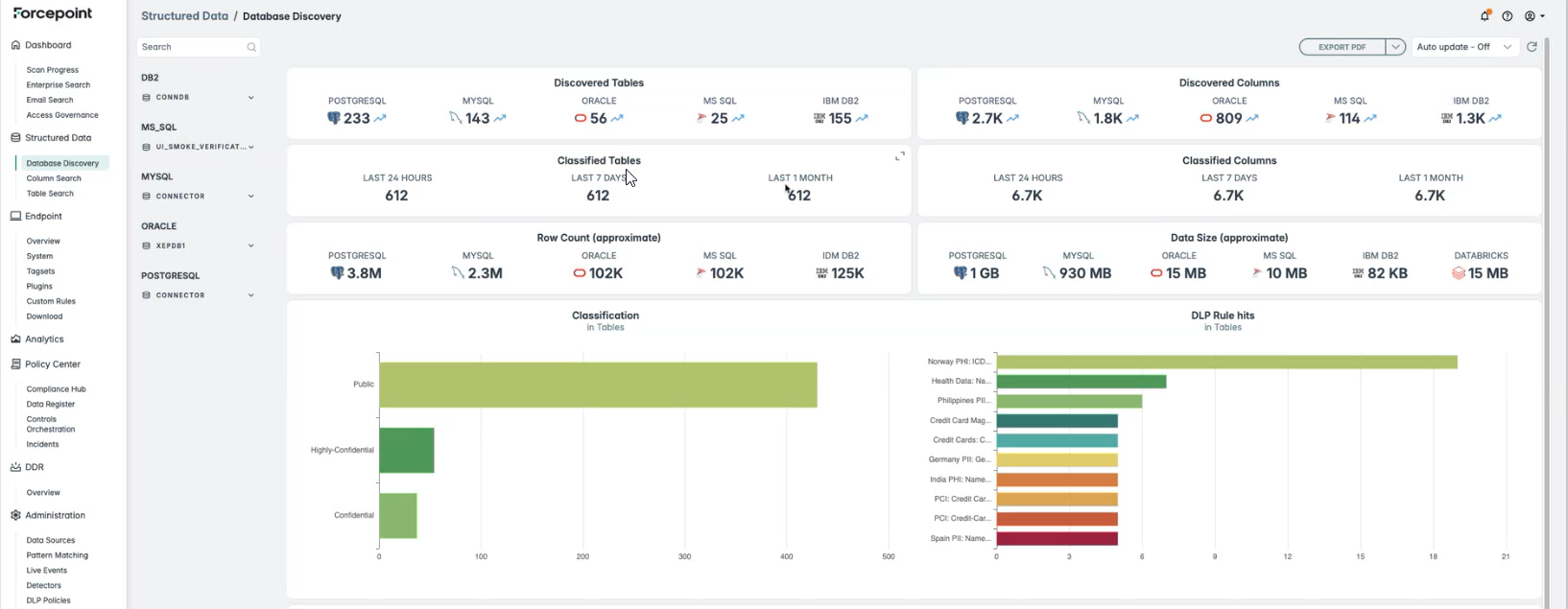
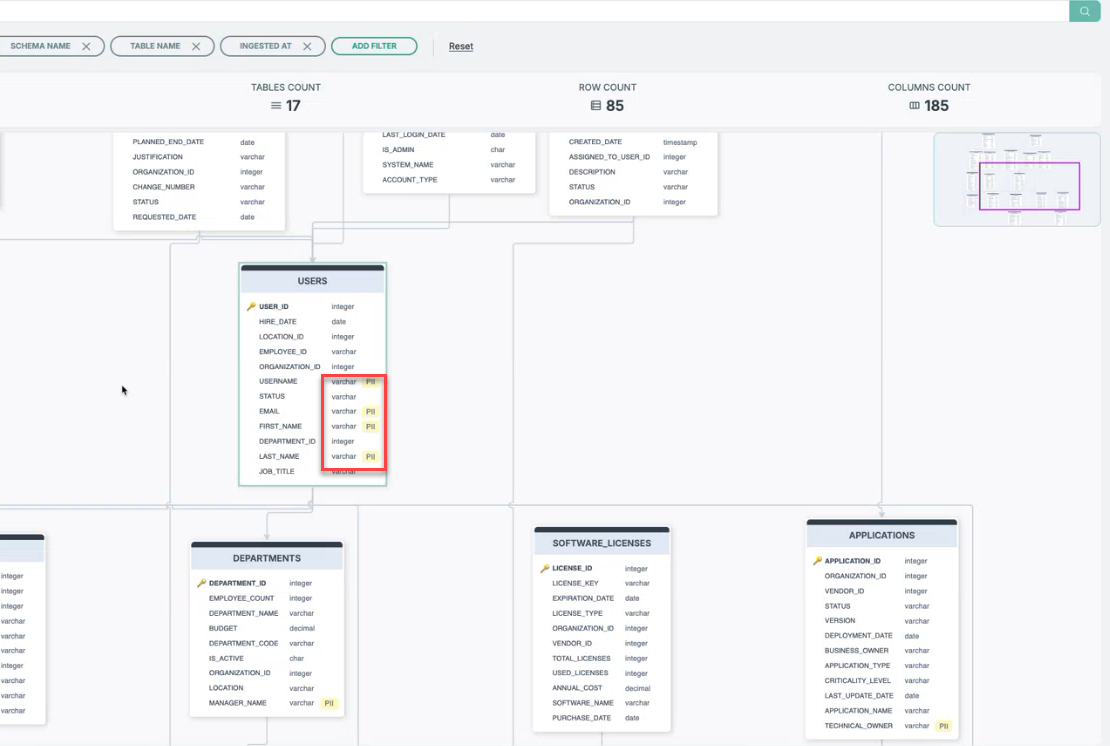
We have added classification overlays and indicators directly to the ER diagram to enhance data discovery and support compliance workflows.
- Redesigned default AI Mesh (platform 3.3.x, mesh v3.20.0+) for simpler setup and fewer false positives.
- English only detectors with reduced default sensitivity for a cleaner OOTB experience.
- Expanded DLP policy support and a streamlined AI Mesh UI with improved visibility and navigation.
For detailed information, refer to the AI Mesh section.
Enhancements to the DLP Policies Page- DLP policies are now disabled by default, with simple toggles for selective enablement.
- Improved policy management with bulk enable/disable actions and additional filters such as Country and Industry.
- Expanded policy coverage, increasing available DLP policies from 81 to 97, with new policies mapped to additional AI Mesh nodes.
For detailed information, refer to the DLP Policies section.
Improved Credential Validation During Scan Execution
This update enhances the reliability of scan execution by improving how credential issues are detected and communicated.
Previously, credential validation occurred only during initial setup and when a scan configuration was created or started. If credentials became invalid during an active scan, the system did not detect the issue, leaving the scan in an In Progress state without notifying the user.
With this release:
- The system now detects invalid credentials during active scans.
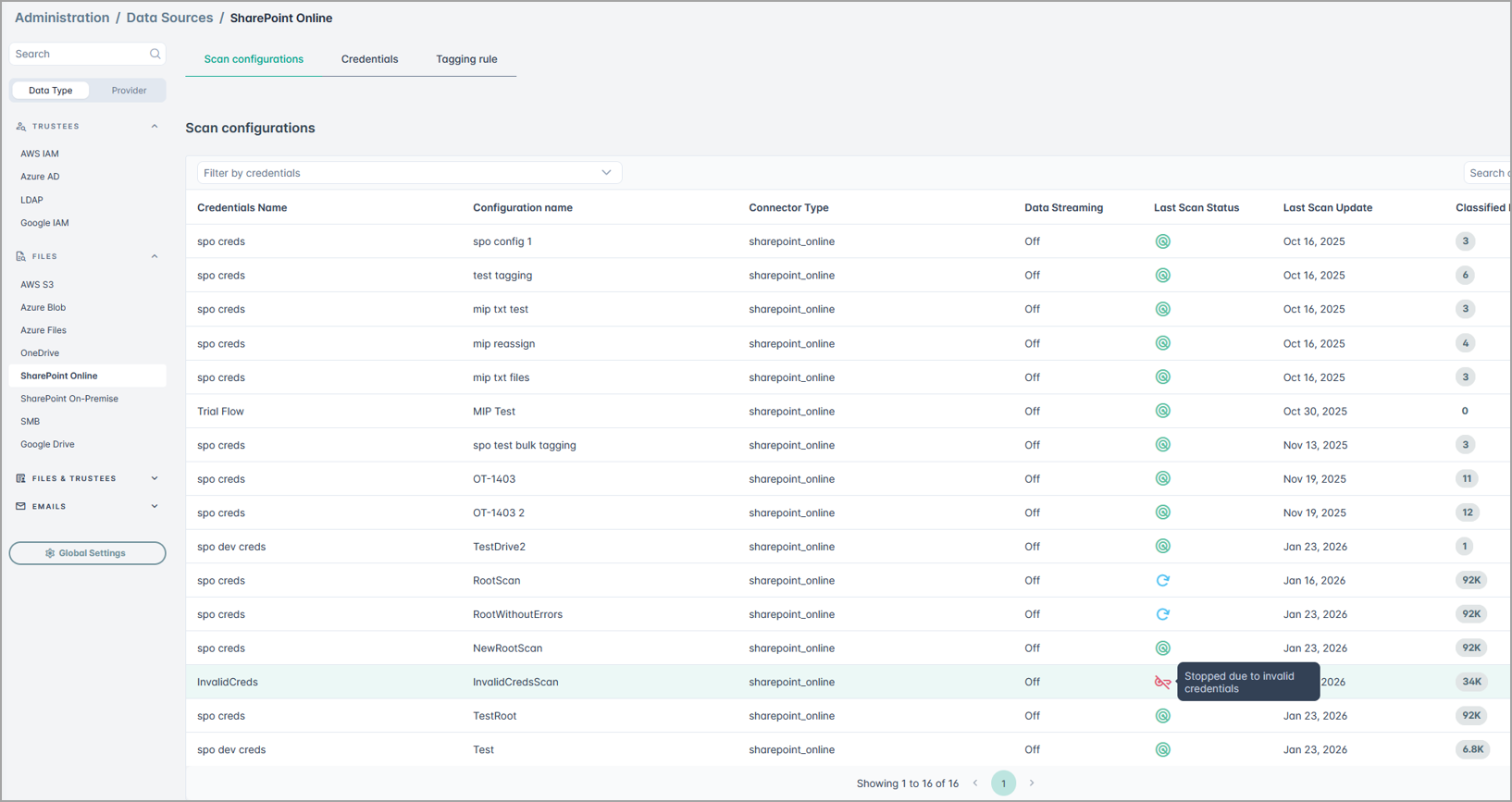
- Scans will no longer remain indefinitely in the In Progress state.
- Users are notified with clear error messages when credential failures occur.
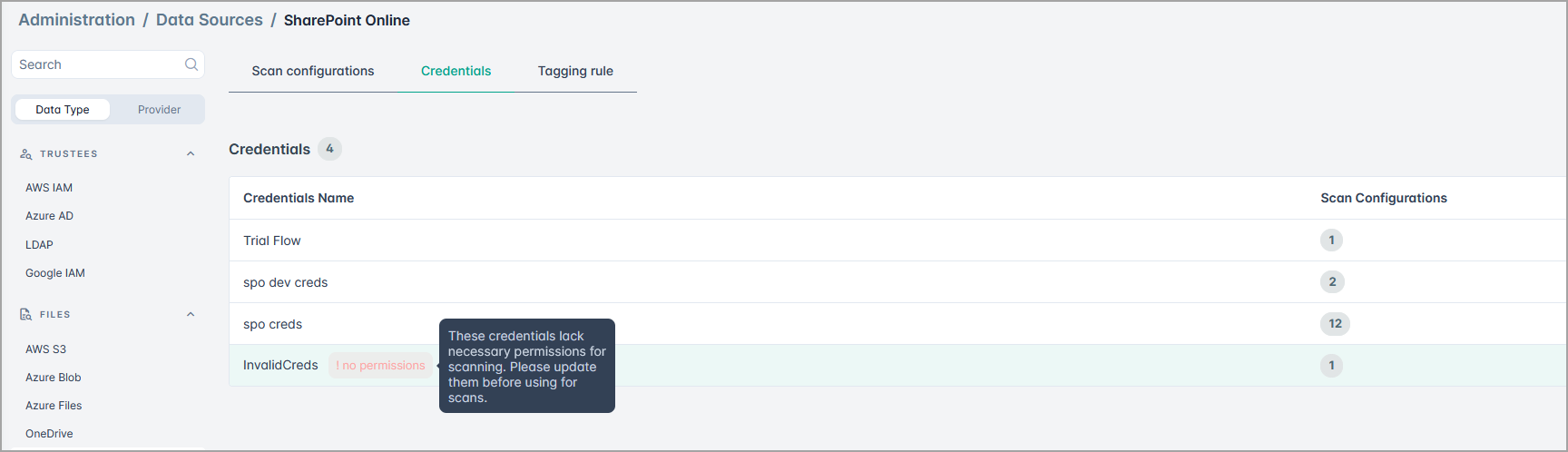
- Additionally, the system now restores the status and resumes the scan when the credentials become valid again.
These enhancements prevent unnecessary resource consumption, reduce stalled scans, and improve overall user experience and troubleshooting efficiency.
Extraction of user and permission details from structured data sources
We are introducing access governance for structured data, giving administrators a clear picture of which users and what type of permissions they have on a database. Administrators can easily view how many users have access, which schemas those users can reach, and which sensitive tables or columns are exposed.
When paired with data discovery and classification, this becomes even more powerful. If certain database accounts have access to sensitive information, administrators can quickly identify and investigate them. We also provide detailed insights into the specific permissions each user holds for every table. This makes it simpler to detect excessive privileges and take corrective action to maintain a least-privilege access model.
While creating a New Scan Configuration for structured data, you can now enable Fetch Permissions to collect access permission details for schemas, tables, and any shared settings before initiating the database scan or trustee scan either for the entire data source or for a specific path.
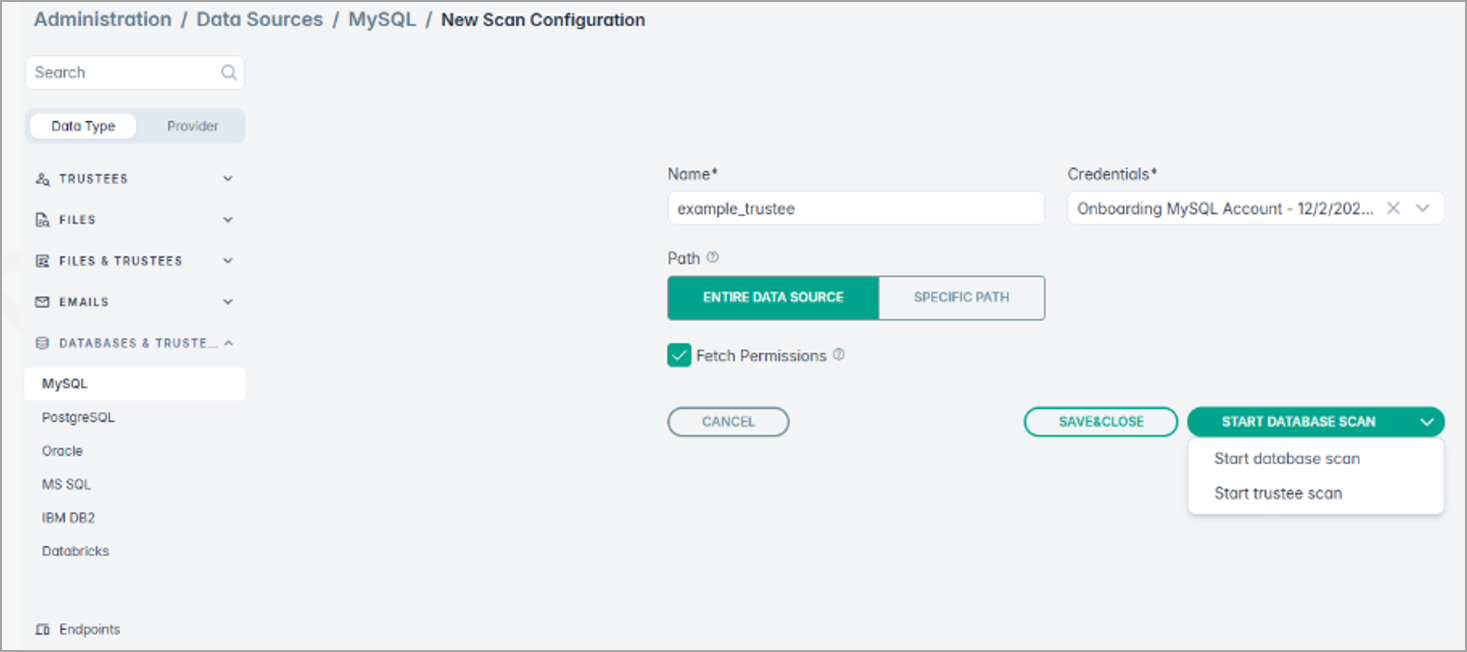
For detailed information, refer to Creating and Starting MySQL Scan Configuration section.
Confluence Server & Data Center Support
We now support scanning Confluence Server and Confluence Data Center instances, enabling customers to securely connect to their self-hosted environments.
This ensures sensitive data stored in Confluence can be discovered, classified, and protected — no matter where it's hosted. For details, see Confluence On-Premise.
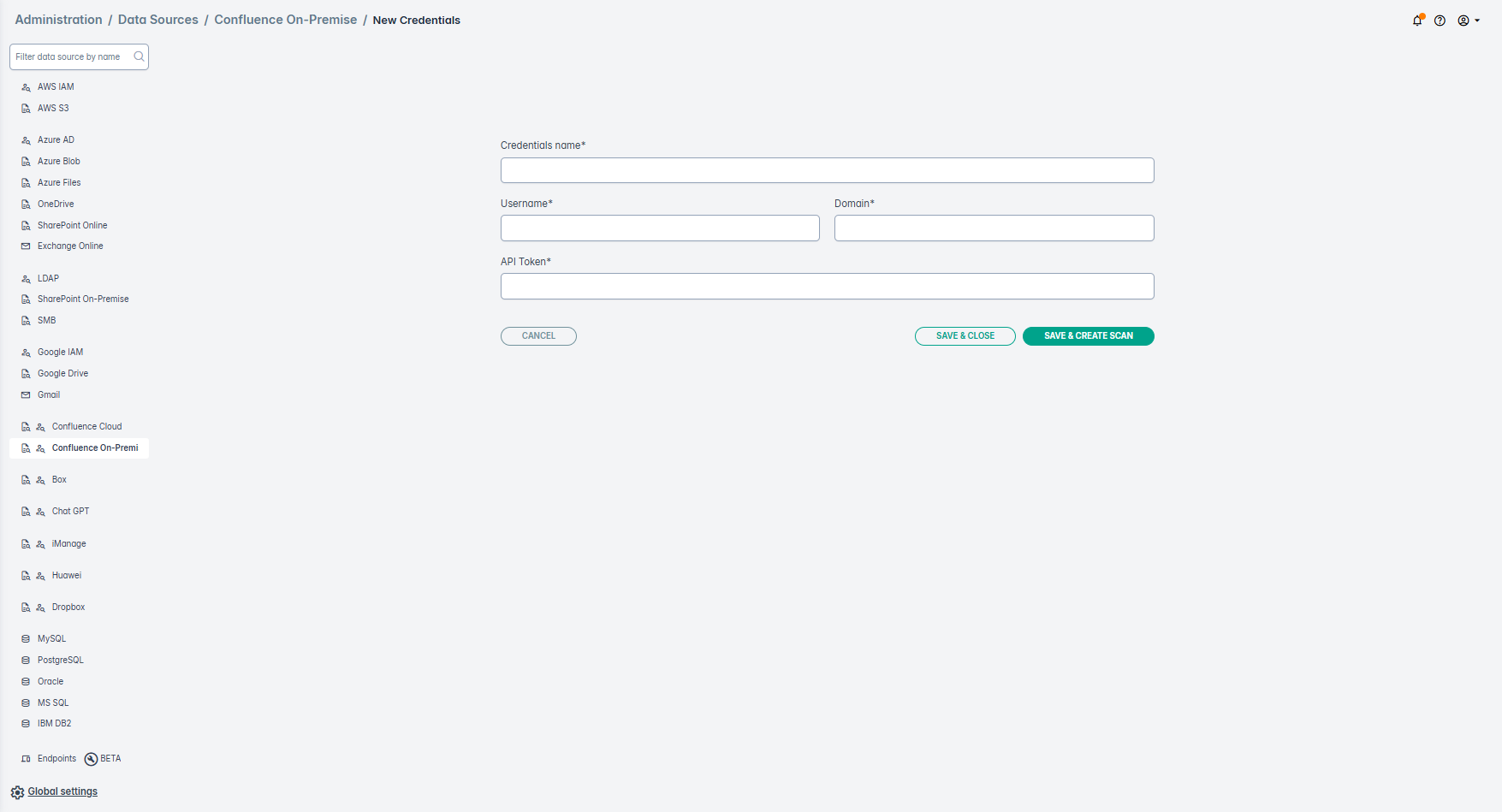
Navigation Redesign
We’ve completely redesigned the main navigation to make it faster, more intuitive, and consistent across all Forcepoint products. The new layout offers a modern interface and enhanced usability, making it faster to access key features and information.
Highlights
- New sidebar layout: The main menu has moved from the top bar to a left-hand sidebar for better visibility and consistency.
- Unified experience: The navigation design now matches our other products, ensuring a seamless transition for users who work across multiple tools.
- Persistent navigation: The sidebar stays visible as you move between pages, improving usability.
- Collapsible left panel: The sidebar can now collapse into a minimalistic view with icons only, giving you more screen space while keeping navigation accessible.
- Breadcrumbs in header: Easily see where you are in the app with new breadcrumbs in the header section.
- Help icon relocation: The Help button has moved from “My Profile” to the header for easier access.
- Updated documentation links: All help links now point to Forcepoint-branded documentation pages.
- “What’s New” alert icon: The previous text link has been replaced with an alarm icon featuring an orange notification mark, so you never miss updates.
New Quick Start Guide
A newly designed Quick Start Guide is now available to help streamline the initial setup of DSPM. This wizard simplifies the process with fewer required options, an updated console, and the ability to select a connector and launch your first scan in just a few clicks. Once you complete the first few steps, it automatically navigates you to the data risk assessment report.
This feature provides the fastest path to value. The entire experience is designed to take you from initial setup to actionable risk reports in minutes. By guiding you seamlessly from connection to results, it eliminates complex configuration and empowers you to start exploring insights on your own data immediately.
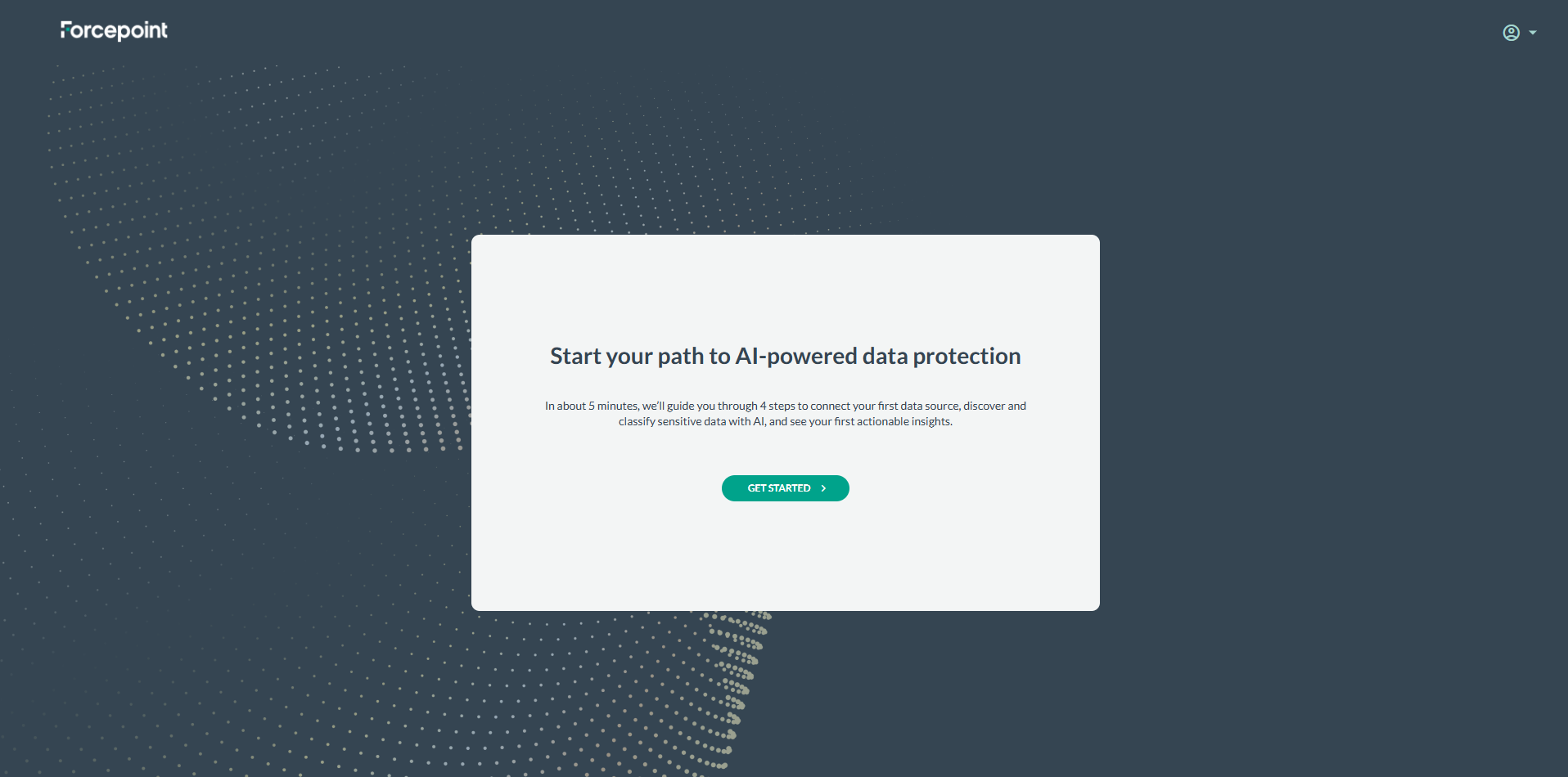
For details, see Quick start.
Structured Data Support
Structured data support in Forcepoint DSPM extends data security posture management beyond unstructured environments, enabling organizations to discover, classify, and protect sensitive data residing in structured repositories such as databases, data warehouses, and cloud-native storage services.
We’ve extended DSPM support to structured databases using ODBC connectors. The initial release includes Oracle, MySQL, Microsoft SQL Server, PostgreSQL, and IBM DB2. Customers can now gain visibility and classification of sensitive data across tables, columns, and views, with the ability to override classifications as needed.
Structured data often holds an organization’s most sensitive assets—customer records, financial data, and IP—but has lacked unified visibility and controls. By extending AI Mesh Data Classification to structured sources, Forcepoint enables consistent discovery, classification, and policy enforcement across both structured and unstructured data.
For details, see Structured Data.
Note:
For customers requesting structured data support, field teams should email gv-ds@forcepoint.com with the following details so the Data Science team can enable tailored classifiers:
- Customer Name:
- Country:
- Customer Segment / Industry:
- Primary Use Case:
- Business Value / Expected Outcome:
- Structured Data Sources:
- Sample Volume:
- Classification labels:
- Classification taxonomy rules:
- Data Sensitivity / Compliance Requirements: Are there PII elements or special handling requirements (GDPR, HIPAA, etc.)?
This process will soon be replaced with a customer self-service quick start guide that enables relevant out-of-the-box classifiers for structured data.
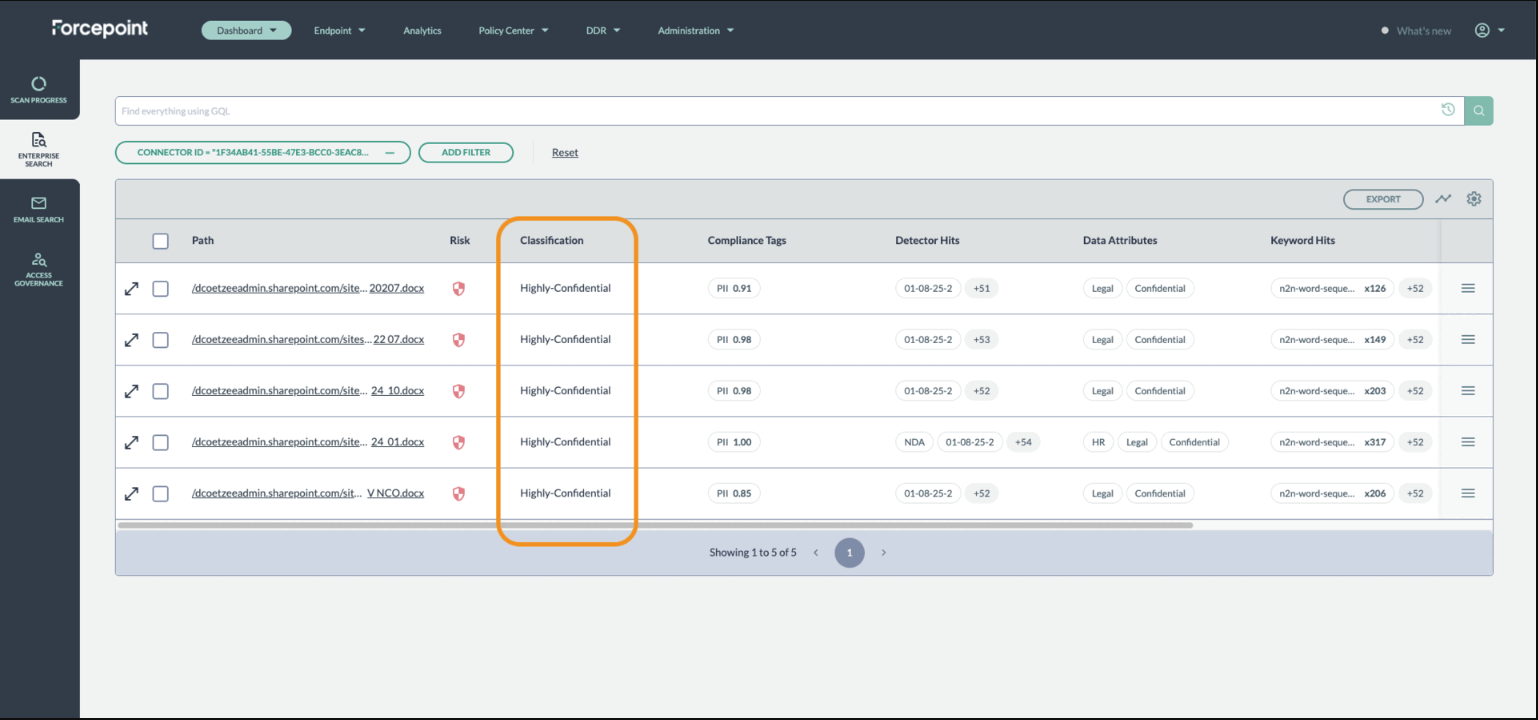
Data Protection with Microsoft Purview Labels by writing classification tags as MIP labels to files stored on OneDrive and SharePoint Online
An option has been added that will apply classification results as MIP labels while tagging files stored in OneDrive or SharePoint Online.
This is a game-changer for data security. It directly connects our powerful data discovery and classification engine with Microsoft's native security enforcement tools. When DSPM classifies a file, it can now apply the corresponding Microsoft Purview MIP (sensitivity) label. This seamlessly triggers powerful, built-in security policies like file encryption and access restrictions (RMS), ensuring your most critical data in OneDrive and SharePoint is protected from the moment it is found and classified by the powerful AI-mesh.
Click the image below to view details:
Centralized Taxonomy Page
Centralized Taxonomy page within the Administration section. This new page serves as a single console for managing tags across both FDC and DSPM, making tag management consistent and efficient.
Appropriate redirection and icons have been added from the FDC Tagset and Policy Center pages to this new Taxonomy page.
With this update, all tag creation, editing, and deletion tasks are now consolidated in the new Taxonomy page. The legacy pages in DSPM and FDC have been updated with redirect links to guide users to the new location.
Key changes:
- Single console management – Tags for both FDC and DSPM can now be managed from one console.
- Streamlined actions – Create, edit, and delete tags exclusively from the new Taxonomy page.
- Updated legacy pages – The Taxonomy page in DSPM Policy Center has been deprecated, and tag modification options have been removed from the FDC Tagset page. Other Tagset functions in FDC remain available.
- Redirect support – Redirect links have been added in DSPM and FDC to help users move to the new page.
- No impact on existing tags – All current tags remain intact and accessible in the centralized page.
- Improved user experience – The new interface standardizes work flows, reduces duplication, and enhances governance.
For details, see Taxonomy.
Taxonomy label mapping
We’ve enhanced the way labels are handled during file scans and labeling processes. Previously, our system relied on hardcoded logic to define which labels to read and write, along with fixed mappings between our values and those in the data source.
With this update, customers gain greater visibility and control:
- Align AI Mesh taxonomy with the unique taxonomies used in your data sources. This ensures consistency and accuracy when applying classifications across different environments.
This improvement empowers organizations to bridge the gap between AI Mesh and their existing data source taxonomies, making classification more intuitive and adaptable. See Taxonomy.
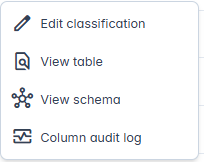
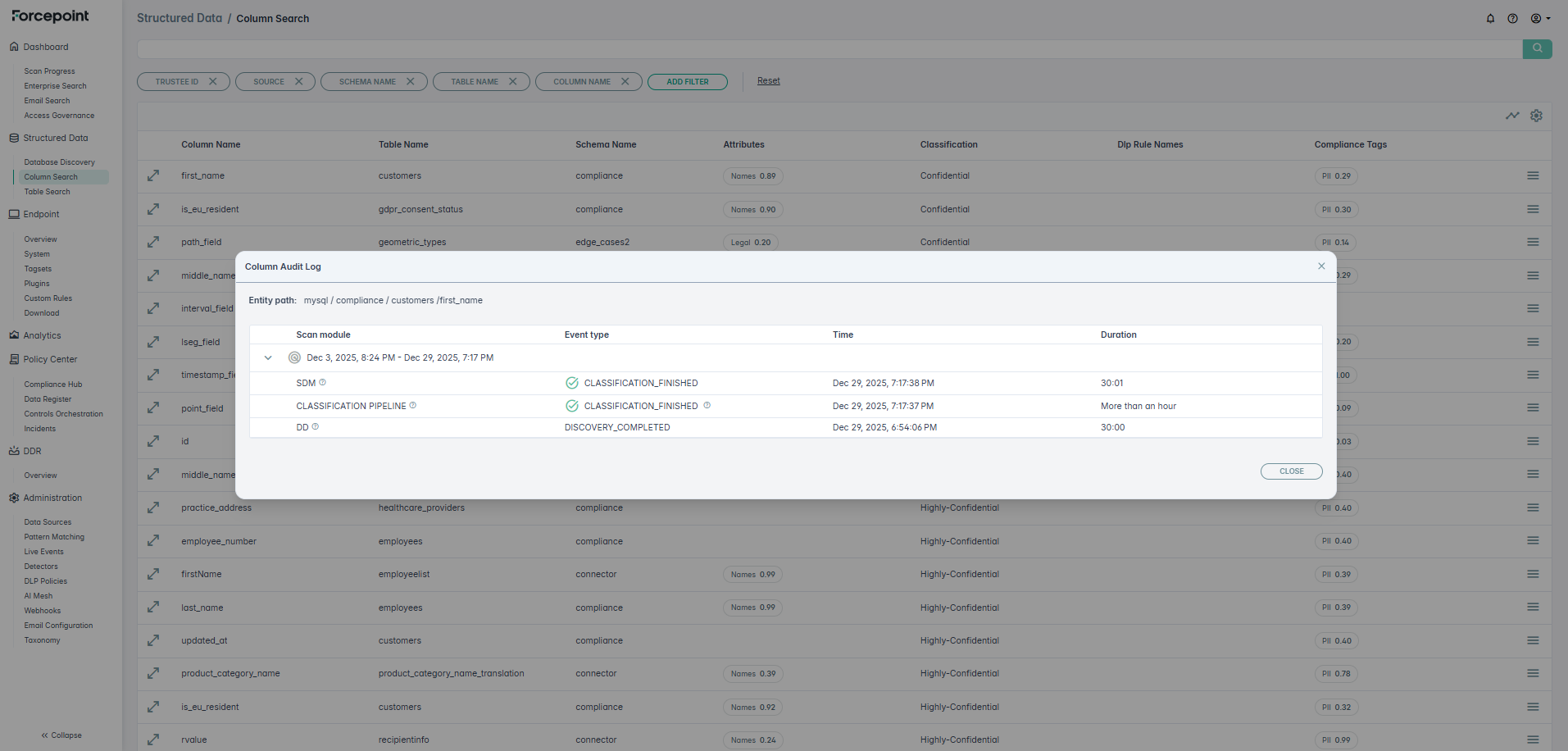
Column audit log for structured data
With the Column Log Audit feature, you can now view the details for each column after a database scan has been completed, by navigating to the Column Search section in the Structured Data section. You can view what stages of the classification pipeline completed and if there was any error that happened. See Column Search.
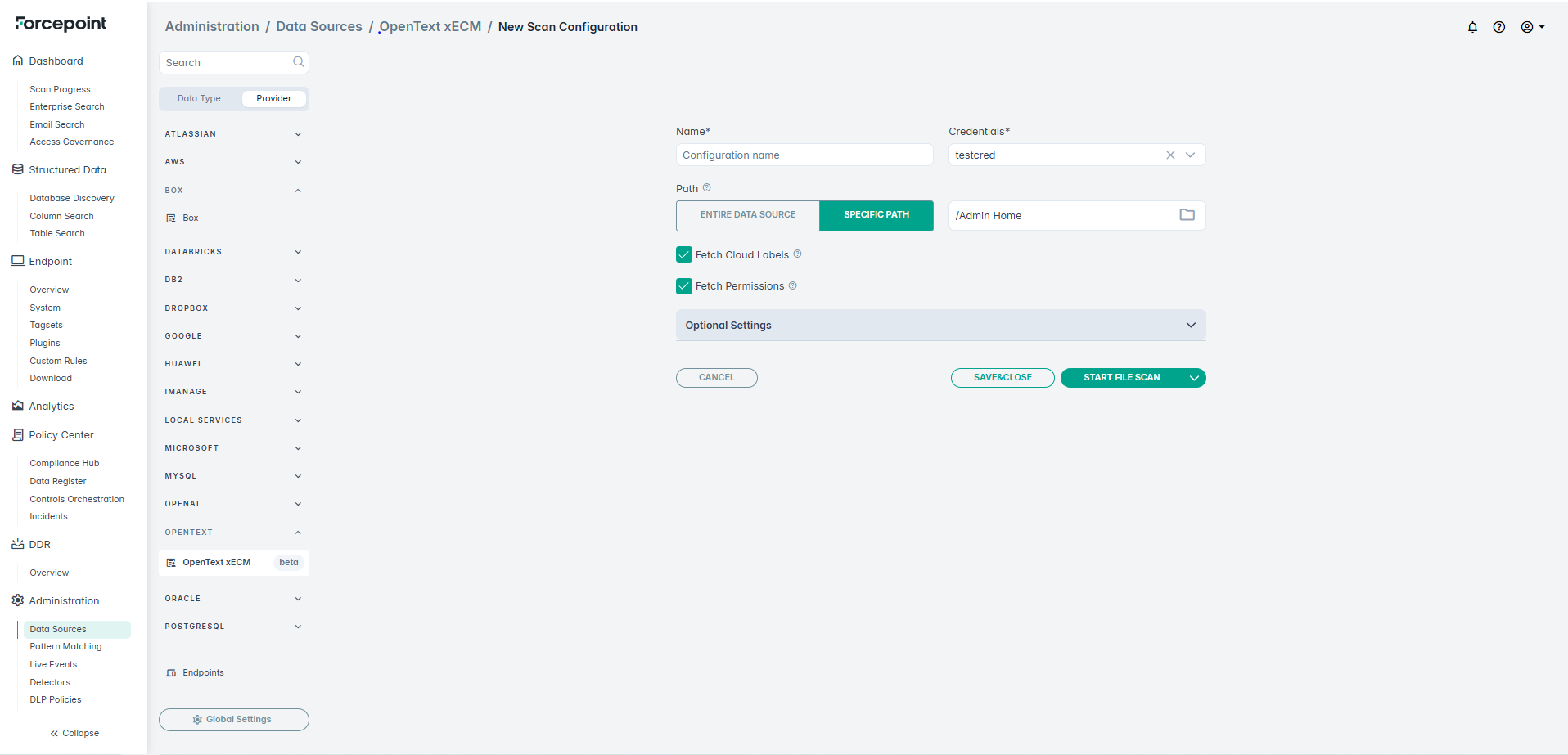
OpenText extended ECM connector beta
New data source connector is now supported for scanning OpenText data sources. See OpenText ECM section in the online help for details.
Granular Schema and Table Selection for Structured Data Scanning
Customers can now exercise greater control over structured data scans by either selecting schema only or specific tables within the schema for inclusion. This enhancement allows for more targeted and efficient data discovery.
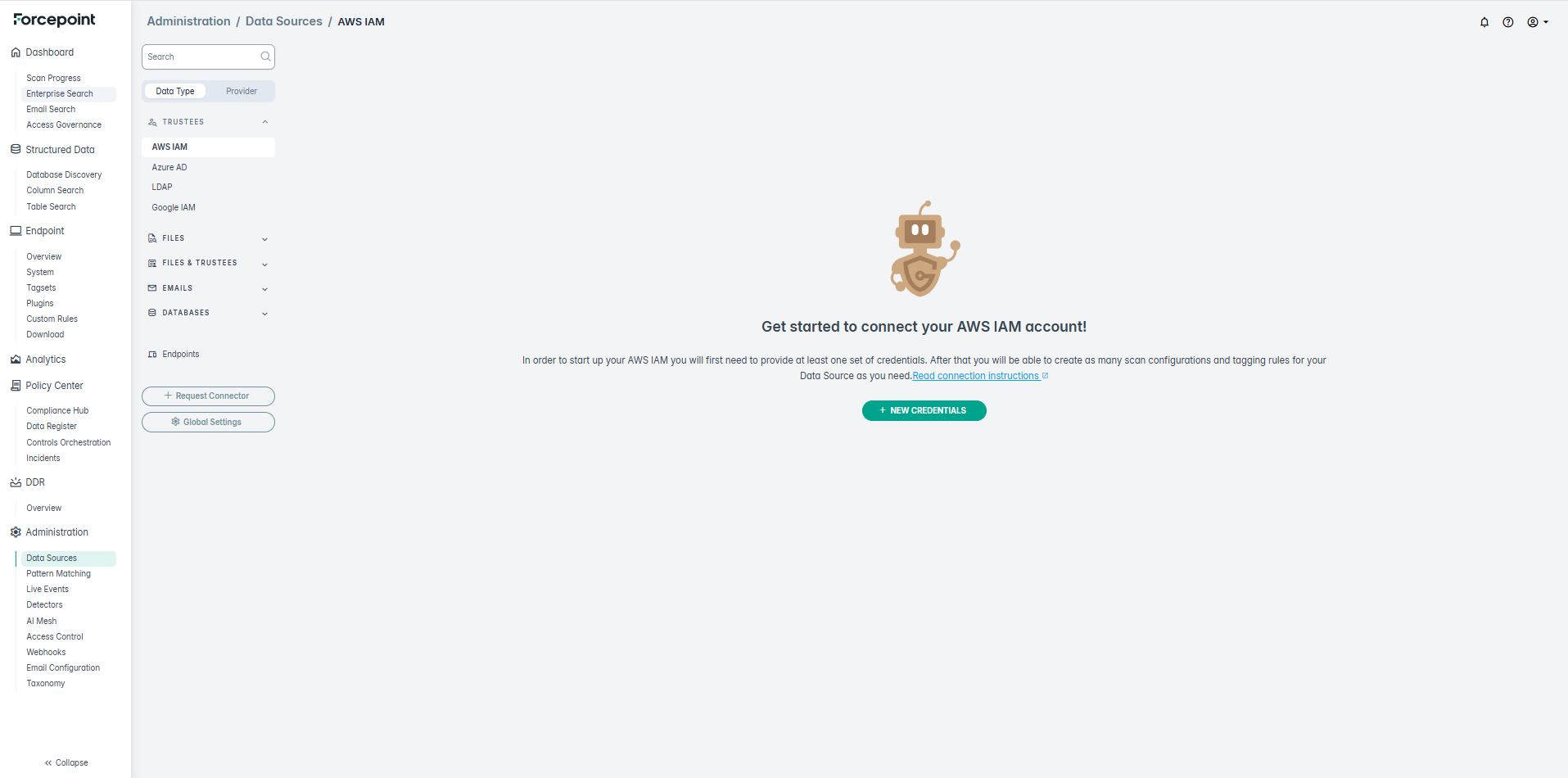
Redesign of additional layer of side menu
Redesign of additional layer of the side menu that helps you organize related items under broader categories.
- Modernized layout: A cleaner, more space-efficient design that improves readability and aligns with the new platform visual language. Quickly find the right data category without scrolling through a long list.
- Provider filtering: Quickly switch between Data Type and Provider views to find the data source you need.
- Simplified icons: Icons now represent data types rather than repeating for each item, reducing cognitive load.
The drag & drop feature for rearranging analytics boards is now clearly represented with a new handle icon, making it easier to discover and use.
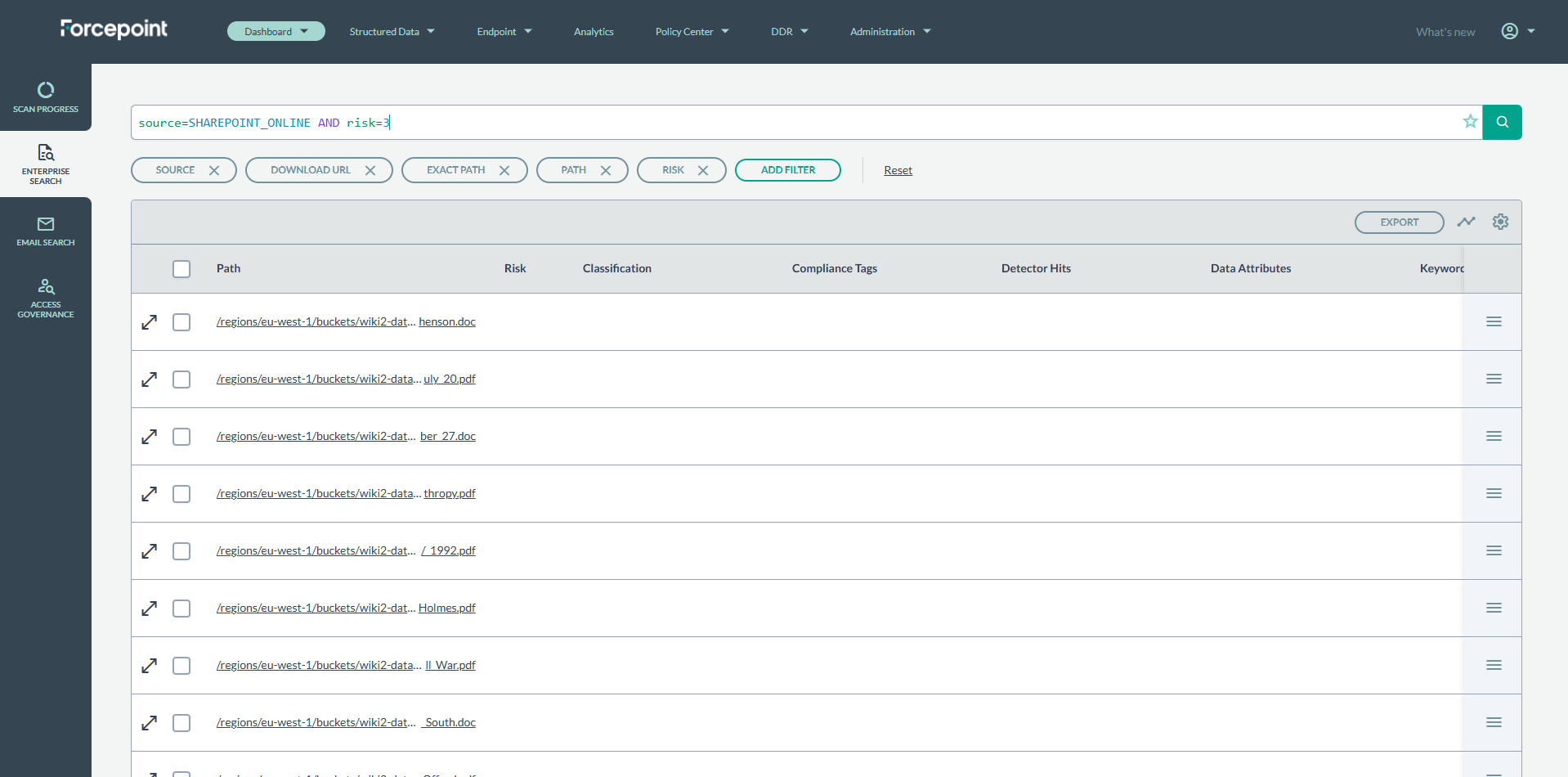
We have introduced full syntax highlighting to the GQL search bar. Different parts of the query - such as keys (e.g., source), values (e.g., GOOGLE_DRIVE), and operators (e.g., AND) are now automatically displayed in distinct colors and fonts.
GQL Syntax Highlighting
This makes your queries significantly easier to read, write, and debug. You can now instantly distinguish between the components of your query, which helps you to build and read queries faster.
Release Summary
DSPM 4.0 ships several features across two themes: a comprehensive classification stack updates to include Forcepoint DLP Classifiers and a set of independent capabilities spanning infrastructure resilience, enterprise secrets management, a new data-source connector, and platform identity consolidation.
Customers get faster classification by default, can connect DLP classifiers to drive outcomes, and can trace every classification verdict back to the specific rule that produced it.
Additionally, there are independent features that extend DSPM into Databricks environments, bring enterprise credential vaulting through CyberArk, and consolidate Cloud DSPM identity onto the Forcepoint Platform IdP - which in turn enables role-based access control for the first time in Cloud DSPM.
Cloud DSPM RBAC Enablement
What it does
DSPM 4.0 introduces role-based access control for Cloud DSPM, delivered through integration with the DSC Platform identity layer. Five entitlements— Super Administrator, System Administrator, Policy Manager, Incident Manager, and Auditor — are registered with the DSC IdP and managed centrally in the Forcepoint Platform. Role assignments made in Platform are reflected in DSPM at the user's next log in. All role creation, assignment, and update events are captured in DSC Platform logs.
Customer benefits
-
Administrators can enforce least-privilege access in DSPM, assigning users only the permissions their role requires.
-
Centralized role management in the Forcepoint Platform means one place to manage user access across all Forcepoint cloud products.
Upgrading to 4.0
Existing customers: RBAC is enabled for all Cloud tenants with the 4.0 upgrade. The new DSPM entitlements are available in the Forcepoint Platform (DSC), refer to Cloud DSPM Entitlements.
By default, Administrators are assigned the DSPM Super Administrator entitlement. Administrators can further refine role assignments in the Forcepoint Platform at any time after the upgrade.
Additionally, if users experience issues accessing the DSPM portal through DSC Platform please ensure that the user role has the appropriate DSPM entitlements assigned. For more information, refer to Cloud DSPM Role Based Access Control (RBAC).
The Classification Stack
Four features that work together to make DSPM classification faster, more transparent, and easier to explain to customers and auditors.
- Classifier Improvements
What it does:
DSPM 4.0 provides an improved out-of-the-box classification pipeline with a new lightweight service built on a proven DLP engine. Classification pipeline is fully parallelizable, runs with low CPU and memory overhead, and is observable as a dedicated microservice. The result is dramatically faster classification from day one, without requiring data-science-led tailoring.
The existing AI Mesh path remains available for those who desire it. Customers can choose to upgrade to the new classification system by discussing with their Forcepoint customer service representative.
The feature is enabled through the cluster configuration in Rancher (product code for On-Premises and add-on for SaaS). If not enabled, then the existing flow with AI Mesh and Detectors stays active.
- DLP Classification Flow
What it does:
The DLP Classification Flow connects customer-configured DLP policies directly to the per-file classification engine. When a scan runs, DSPM evaluates each file against the selected DLP policies using the optimized multi-threaded classifier. Pattern matching can override classification model outcomes when a pattern hit occurs, giving customers fine-grained control over how specific content types are classified. Content and path detectors continue to surface findings but no longer drive the top-level classification label.
Customer benefits:- Customers can select the DLP policies that matter to their business and see classification outcomes driven by those policies, not by an opaque model.
- Every classification outcome traces back to specific DLP rules and policies, giving customers a clear audit trail.
- Pattern-match overrides allow security teams to ensure that high-priority content types are never misclassified, regardless of model confidence.
- Eliminates the most common support escalation category: unexplained classification verdicts.
Customers who have not enabled DLP classification feature will continue to see AI Mesh-driven outcomes unchanged.
- New UX to Explain Classification Outcomes
What it does:
DSPM 4.0 introduces the Classification Model page, a redesigned surface that shows customers exactly why each file received its classification label. A Sankey-style visualization maps DLP policies / Detectors to classification outcomes, replacing the previous AI Mesh page with a transparent, traceable view. Terminology is aligned with the DLP policies, Detectors and Taxonomy pages, so customers work within a single vocabulary across the product.
Customer benefits:- Customers can trace any classification outcome back to the specific DLP rule or pattern that produced it, turning a black box into an auditable process.
- Support and security teams can resolve classification disputes in minutes rather than escalating to the support team.
- Unified vocabulary across the Classification Model page and Detectors / DLP policies pages removes confusion between overlapping terms.
- Onboarding Flow Redesign
What it does:
The redesigned onboarding flow is built to seamlessly configure the connector and observe classification results in a few minutes.
Customer benefits:- Classification can be configured as part of the initial scan setup - no separate workflow, no hunting for the right menu.
- The Quick Start guide is updated for 4.0, giving new customers a clear path from sign-in to their first classification results.
- Eliminates the highest-frequency complaint from new customer onboarding feedback.
Additional Features
Three capabilities that independently extend DSPM's reach, resilience, and enterprise integration story.
- Scan Pipeline Hardening
What it does:
DSPM 4.0 includes a comprehensive scan pipeline hardening initiative targeting the root causes of the most common customer-reported scan reliability issues. Changes include right-sized memory and CPU defaults across all pipeline services, corrected timeout alignment between the scan orchestrator and downstream services, OCR and Content Extractor performance profiling, and proactive alerting for cataloging and classification throughput drops.
Customer benefits:
- Memory limit increases are no longer required in the common cases.
- Proactive throughput alerts give operations teams early warning of classification or cataloging drops.
All hardening changes are applied automatically with the 4.0 upgrade - no additional configuration is required.
- Databricks Unstructured Connector
What it does:
DSPM 4.0 adds connectors for Databricks - a Unity Catalog connector covering catalogs, schemas, volumes, and files; and a Workspace connector covering notebooks, repositories, clusters, jobs, and SQL warehouses. File content within Databricks Volumes is scanned for sensitive data; Notebooks are scanned for sensitive content in source code. Authentication uses Personal Access Tokens (PAT) over TLS 1.2+. The connectors are validated against DSPM's Scan Progress, Enterprise Scan, Access Governance, Analytics, Incidents, and Live Events surfaces.
Customer benefits:- Security and compliance teams gain visibility into sensitive data residing in Databricks - a high-priority enterprise data source for ML and analytics workloads.
- Sensitive content in Databricks Volumes, previously invisible to DSPM, is now discoverable and classifiable.
- Move-Selected-File remediation works between Databricks and other DSPM-connected repositories.
- Metadata extraction covers all Databricks object types, enabling access governance reporting alongside data sensitivity findings.
The Databricks connectors are new additions in 4.0 and are available to all tenants after upgrading. Administrators configure connections using a Databricks PAT and workspace URL. No changes are made to existing connectors or scan configurations during the upgrade.
For detailed information, refer to the Setting up Unity Catalog Datasource Connector and Setting up Workspace Datasource Connector sections.