FAQ: Migration from Forcepoint Stand-Alone Cloud DLP to Forcepoint Data Security Cloud | DLP
This FAQ is intended for customers transitioning from Forcepoint stand-alone cloud DLP to the integrated Cloud DLP.
- What changes with this migration?
You can now access Cloud DLP and Dynamic User Protection through the Forcepoint Data Security Cloud. Your data, policies, and existing functionality remain the same. No additional cost applies.
Use the following URL format to access the service:
https://<yoursubdomain>.app.forcepoint.io
If you do not already have a Forcepoint Data Security Cloud tenant, ensure this domain is added to your bypass list.
Note: If you already have a Forcepoint Data Security Cloud tenant, Cloud DLP will automatically be associated with your existing tenant. - Do I need to migrate data?
No. You do not need to perform any migration steps. Forcepoint manages the migration process. Your existing data, policies, and configurations remain available after the migration.
- How do I sign in after migration?
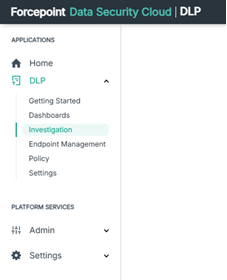
Sign in to the Forcepoint Data Security Cloud using your platform URL. From the left navigation panel, select DLP under Applications to access all DLP menus.
- What happens if I use the old URL?
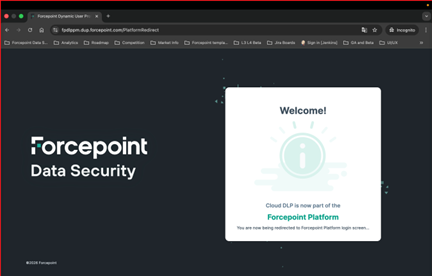
If you use the old URL, the system redirects you automatically to the platform URL.
- How does the migration affect admin accounts?
Admins receive an invitation email to set their Forcepoint Data Security Cloud password.
- Do I need to update my SAML/SSO configuration?
If you use SAML authentication, review your IdP metadata and update it if required. Follow the instructions provided in the SAML SSO Configuration.
- Does this migration affect pricing or licensing?
No. The migration does not change your pricing or licensing terms. No additional cost applies.
- Do I get any new features?
Yes. The Data Security Cloud platform now includes User Provisioning to automatically sync your users and groups with the service. You can sync your users and groups with an on-premises Active Directory or with your cloud Identity Provider using SCIM.
- How can I learn more about Forcepoint Data Security Cloud so that I can prepare in advance?
You can review the Forcepoint Data Security Cloud Online Help for detailed product information and guidance.
- Where can I get help?
Access the Forcepoint Data Security Cloud Online help for product-guidance and troubleshooting information. If you need additional assistance, contact Forcepoint Support at support.forcepoint.com.