Previous release updates
Rule Exception Priority Reordering
Administrators can now drag and reorder exceptions within a rule, giving precise control over exception evaluation order.
Bulk Domain Import via CSV
Administrators can now import multiple domains at once from a CSV file into Policy Elements, replacing the previous one-by-one entry workflow.
Redesigned Rule Details View
Clicking a rule now displays all of its settings in a single view, rather than only its exceptions, improving policy management clarity.
Policy Levels
Policy levels help users manage and prioritize a large number of policies. By organizing policies into different levels, users can ensure that the policy engine processes only the highest-priority policies first.
For more information, refer to Policy Levels.
AI Security Support
Changed the term “CASB” to “Apps” and add 2 new operations, AI Prompt and AI Response, in the Apps API channel (previously known as CASB API) to support AI security use cases.
Alerts Table Column Order
Optimized the alert table column order — placing the most actionable fields (reported time, user, category, policy, channel, severity, and status) first.
Predefined Policies Update
The built-in policy content library has been upgraded, bringing more precise predefined rules and classifiers that help reduce false positive alerts.
Dictionary Element Count Display
User Defined Dictionaries now display the total number of elements they contain, giving administrators immediate visibility into dictionary size directly from the dictionary list. This makes it easier to manage and audit dictionaries without having to open each one individually.
Bulk Rule Deletion
Administrators can now select and delete multiple rules at once within a policy, significantly reducing the time and effort required to clean up or restructure policies with a large number of rules.
Copy Rules Across Policies
Administrators can now copy one or more rules from one policy to another, making it easy to replicate and reuse rule logic across different policies. This promotes consistency in policy configuration and eliminates the need to manually recreate rules from scratch.
Violation Triggers Now Available for Exceptions
Alert details have been expanded to include violation triggers for exceptions, in addition to the existing triggers for rules. When an alert is generated by an exception match, the relevant exception triggers are now displayed in the alert details, giving administrators greater visibility into why an exception was applied and improving investigation accuracy.
Multiple bug fixes
In the current iteration multiple issues are fixed. See Resolved and Known Issues.
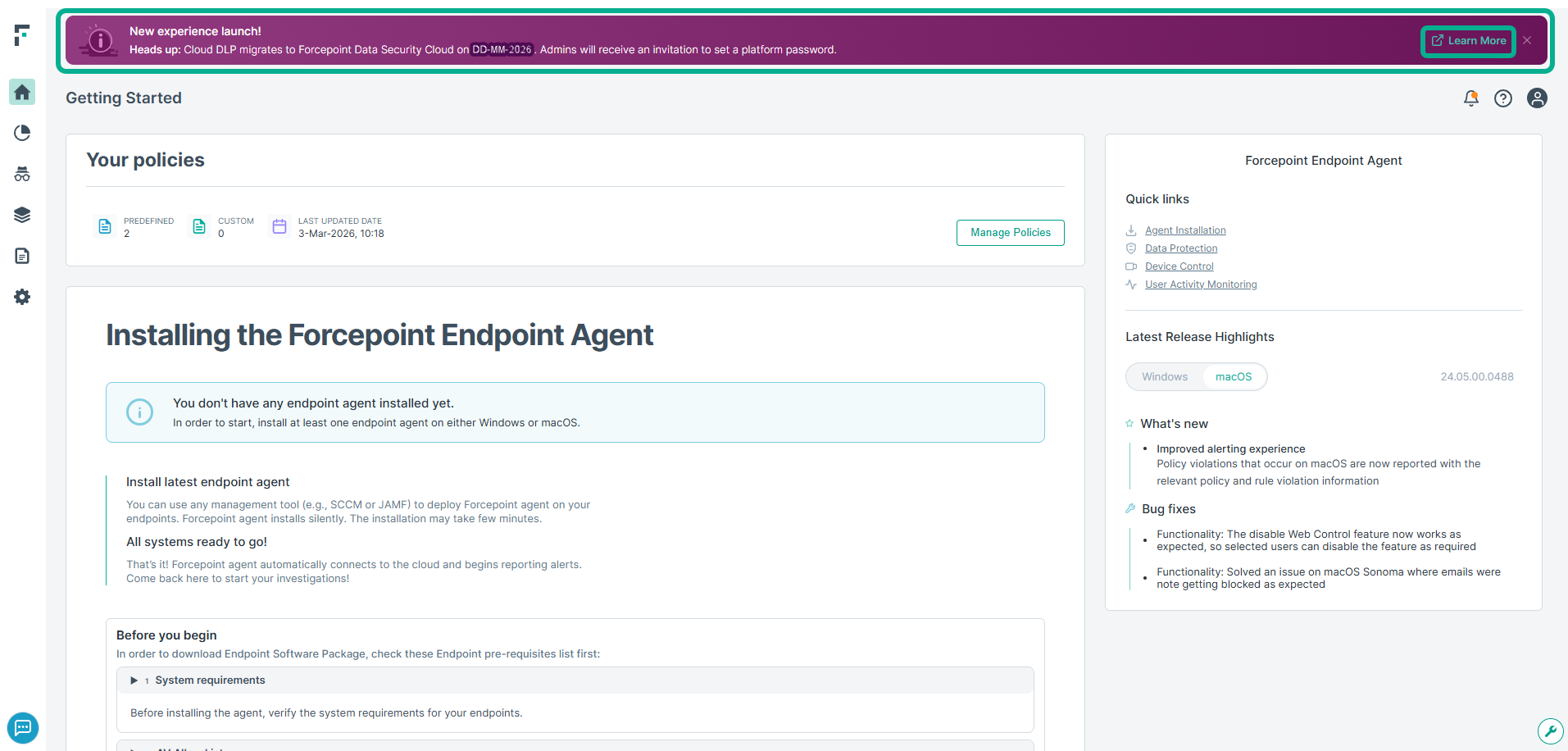
Notification Banner for Cloud DLP Migration
Purpose: This banner notifies administrators about the upcoming migration of Cloud DLP to Forcepoint Data Security Cloud. It provides early awareness of the migration date and informs admins that they will receive an invitation to set up a platform password. The banner also includes a Learn More link on the right side that directs users to the Migration FAQ documentation for detailed information about the migration and next steps.
Scoped Alert Visibility for DLP Admins
Admins can now be restricted to viewing only the alerts that fall within their assigned scope. This allows organizations to limit visibility based on criteria such as geography, business unit, or data domain. For example, a DLP admin assigned to a specific country will see only the alerts generated within that country.
Access Endpoint Management
Endpoint Management can now be accessed as a Forcepoint DS Cloud service. Customers that do not use Cloud DLP can manage their endpoints without going into Forcepoint DS Cloud DLP APP.
Incident Workflows: Comments
Administrators can now add comments to incidents as part of the incident management workflow. See Alert details.
Incident Workflows: History
Incidents history is now displayed to administrators. See Alert details.
Launch app.forcepoint.io for new tenants
Cloud DLP now supports the new platform URL (app.forcepoint.ai) for new customers, while supporting the old URL (forcepointone.com) for existing customers.
Import Exclusion Phrases
Administrators can now import a list of Phrases to Exclude and use them in classifiers. This helps to add a long list of phrases. See Create regular expression classifier
Deduplicate GSuite alerts
G-Suite multiplies emails when there are multiple recipients. Cloud DLP now sends one notification for the same email, even though it is received multiple times.
New AI Application Group
A new Application Group is introduced to monitor AI Applications. Cloud DLP now supports monitoring of copy, cut, paste, and file access activities performed by AI tools on both Windows and Mac endpoints.
Batch block USB copy
A new attribute has been introduced in the endpoint profile to enable configuring the behavior for batch blocking when copying to USB.
Under , navigate to the section Data Protection, the option Enforce batch blocking is enabled. When enabled, files are processed as a batch. If one file is blocked, the entire batch is canceled. When disabled, files are processed individually, reducing incident impact but losing full batch context.
See Default Profile.
New option to exclude phrases
Added an import option in the “Phrases to exclude” classifier setting. For details, see Import Phrases to Excludes.
Vulnerability fixes
Multiple vulnerability has been fixed in this release.
Incident Management - Severity
This version introduces another phase of Incident Workflow Management: severity. Incident severity can be updated individually or in bulk. Administrators can filter incidents by severity to focus on specific cases requiring attention.
For more details, see Alert Severity.
Email Notifications
DLP incidents require timely response. Since administrators aren't continuously monitoring the DLP Management portal, automated notifications ensure prompt incident handling.
The Email Notifications feature enables administrators to create notification templates and configure policy-based triggers that specify when notifications are sent, what data is included, and which recipients receive them. Notifications can be sent to affected employees, their managers, or other relevant stakeholders based on your organization's requirements.
For more details, see Notification Templates.
Incident Management – Assignee
This version introduces another phase of Incident Workflow Management: assignees. A new Assignee field allows administrators to assign incidents as cases progress through the workflow.
Incident assignees can be updated individually or in bulk. Administrators can filter incidents by assignees to focus on specific cases requiring attention.
Additional workflow features such as severity settings will be available in upcoming releases.
For more details, see Alert Assignee.
OCR | Languages configuration
Administrators can now configure languages for OCR.
Policy Quick Setup Wizard
The Policy Quick Setup Wizard streamlines policy configuration using Forcepoint's comprehensive library of predefined policies.
Policy setup is a critical first step in Cloud DLP activation. When no policies are defined, administrators are automatically directed to the Quick Setup Wizard, which guides them through selecting and implementing relevant policies for their environment.
For more details, see Policy Quick Setup Wizard.
Predefined policy set update
Predefined policy set was updated to align with Forcepoint research improvements.
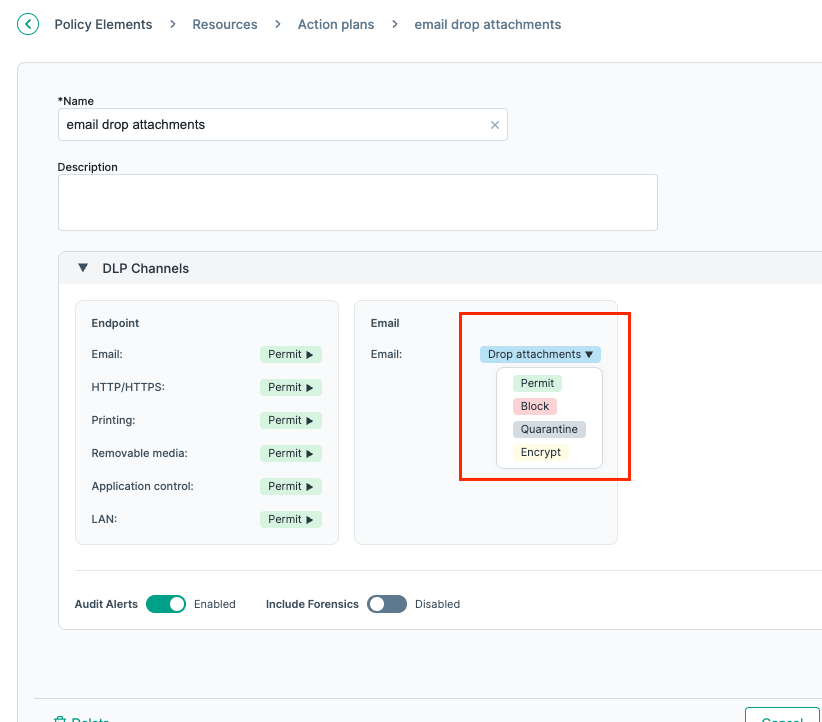
Support for additional email actions
The Drop attachment, Quarantine, and Encrypt options are now supported for email channel.
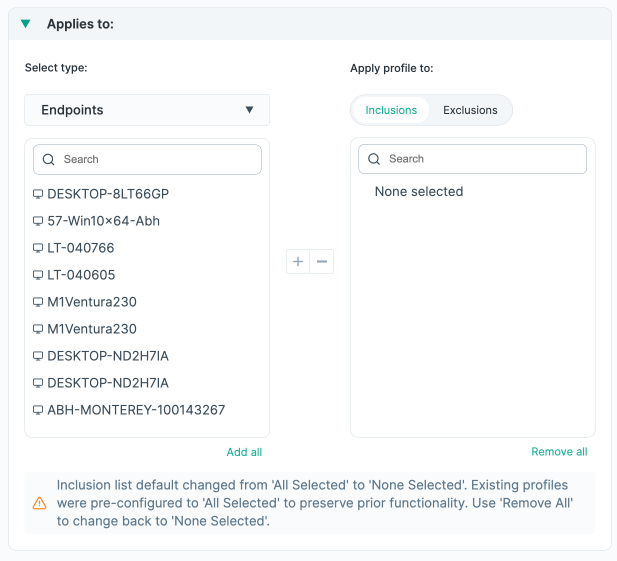
Endpoint Profile “Apply to:” Behavior
The default behavior when the “Apply To:” list is empty was changed from "Applies to All" to "Applies to None". This has an impact on customers that have custom profiles with an empty list - without an action, the behavior of their profiles will be changed. A message to explain this change was added.
Alerts Details Enhancements
The following fields were added:
- Detected By – which Forcepoint product or module detected the violation. For example, in case of the endpoint channel, it will be the endpoint agent.
- Analyzed by – which DLP engine analyzed the content (DPS or Endpoint policy engine), including version where applicable.
Audit Log Enhancements
Changes in the Endpoint Profile settings now contain information about the change, including which setting was updated in case of a profile update.
Flexible Endpoint Management
With this version, customers can now customize the Over the Air (OTA) settings for multiple user segments. This enables customers to set which agent version each segment will use. Customers can use it to gradually roll out new agent versions to their users – introduce each new agent version to a small set of users, test its behavior, gain confidence, and then roll it out gradually to more users.
Updates in this revision
Following user interface improvements are part of this revision:
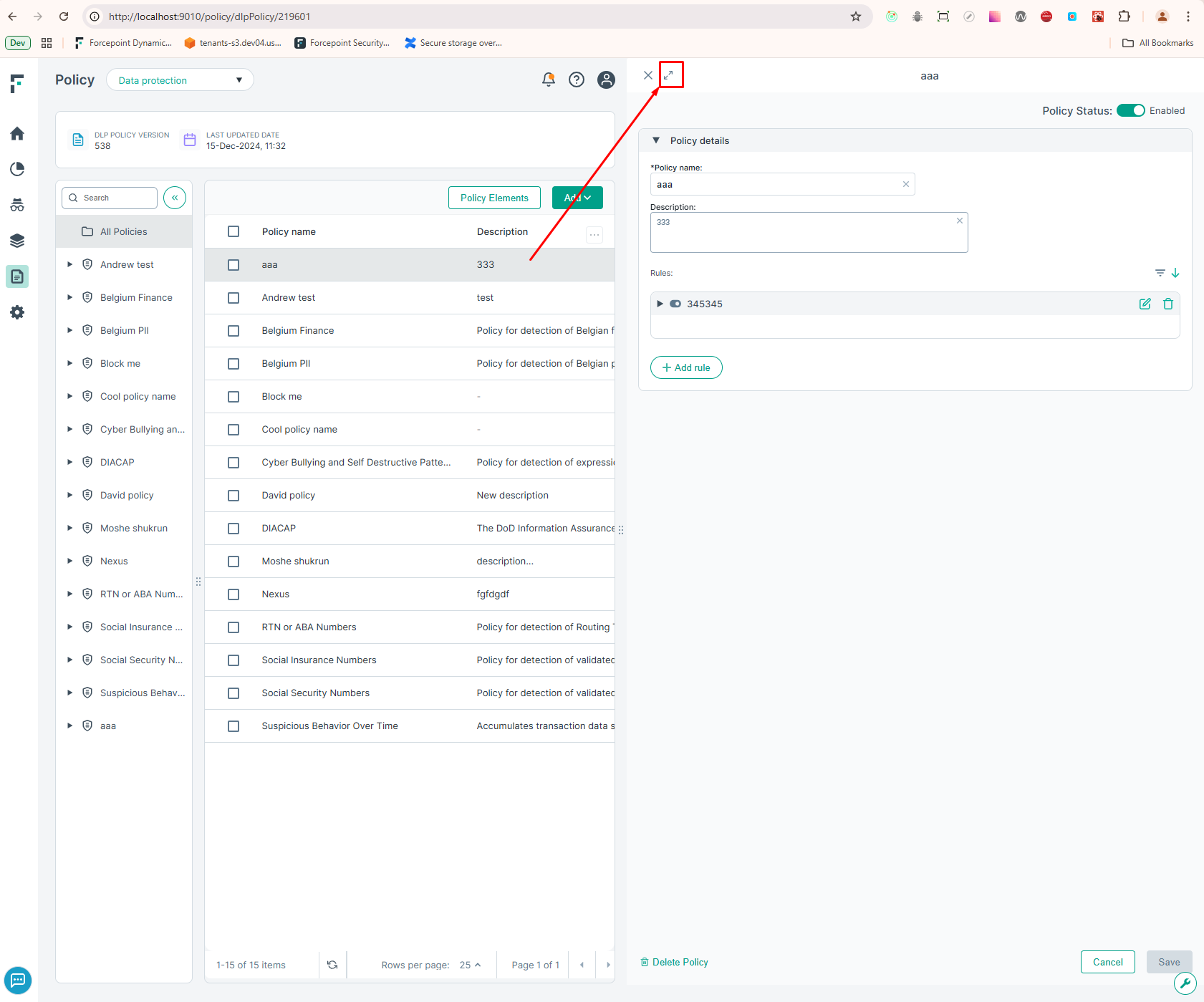
- Policy side panel: The policy side panel can now be expanded when creating and editing policies, allowing administrators to better utilize the screen space.
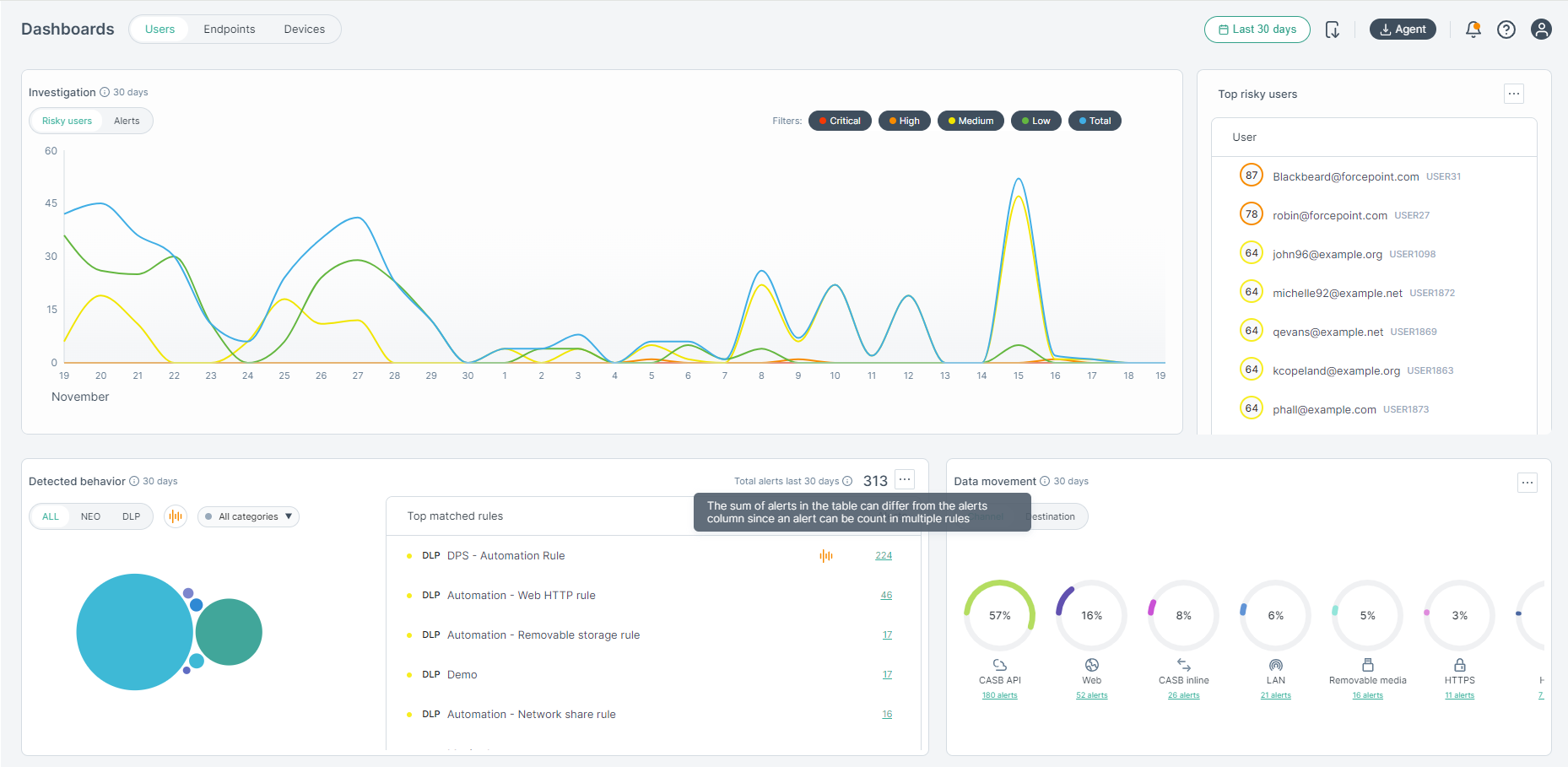
- Dashboard: Clarified the number of alerts in the top matched rules table, which customers found confusing. We have a new message appearing as follows:
Forensics
This version introduce support for Forensics for DPS channels (Cloud Email, Mobile Web and CASB).
Customers can include forensics in the policy rules action plans. When they do, evidence files are stored in Forcepoint Data Security Cloud | DLP secure storage and authorized users can view the violation triggers (the matched content) as well as download the evidence file.
Forensics data is stored in a secure storage (see illustration below). To ensure only authorized people have access to the data, 2 keys are required to access data in a secure storage – a tenant key and a specific key for each artifact.
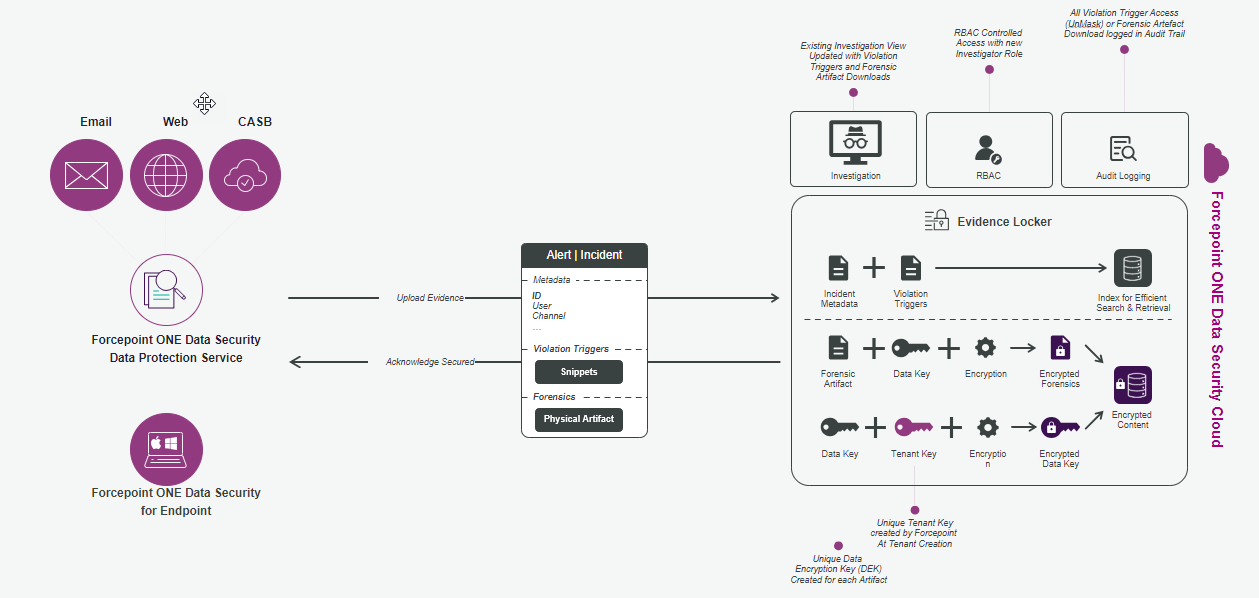
A new role, Investigator, is introduced as part of this feature. Only this role and the Administrator role can access forensics data. The roles and privileges are described in the table below:
| Role | Metadata | Snippets | Artifact |
|---|---|---|---|
| Administrator | View | Can unmask | Decrypt and download |
| Investigator | View | Can unmask | Decrypt and download |
| Analyst | View | Masked only | No access |
| Helpdesk | No access | No access | No access |
JavaScript Injection behavior
A new attribute was added to the Endpoint profile to enable managing the JavaScript Injection behavior. Using this attribute, administrators can now specify lists of domains that will be included and excluded in the JavaScript inspection. This enables applying JavaScript Injection only on specific domains or applying JavaScript Injection on all domains except a list of domains. If both lists are enabled, JavaScript Injection will be applied only to domains that are included and are not in the excluded list. In both list are disabled or the attribute is OFF, no JavaScript injection will be applied.
Integration with Forcepoint ONE
Forcepoint ONE Data Security is now managed from the Forcepoint ONE platform. This enbles Admins to log into Forcepoint ONE once and manage all their Forcepoint products that are part of Forcepoint ONE from the same central place.
The FONE Data Security portal maintains its look and feel and ease of use. While most of the UI remains the same, changes were made to provide smooth user experience as part of the Forcepoint ONE platform.
In addition, relevant resources are synched with the platform to enable admins to enjoy the Forcepoint ONE platform capabilities and the benefits of synergy between the Forcepoint ONE products.
Separation of Endpoint Management Online Help
Data Security related content was removed from Endpoint Management pages to better serve admins that manage endpoints for other Forcepoint products. As part of this change, the endpoint management help is now separate.
Multi profile support phase 2
With this version, all endpoint profile attributes will be customizable except over the air update.
Soft delete
Deleted resources that are in use are marked as deleted but not deleted from the rules that use them. Deleted resources can not be added to more rules.