Setting up the Teradata Datasource Connector for Structured Data
Before you begin
Before you begin, ensure the following:
- The datasource must be reachable from the network where the product is deployed (for example, via a private DNS name or a routable IP address).
- If a firewall is in place, ensure the required port is open.
- Create a user account with read access to the datasource metadata for the product to run the scanning process.
This task describes how to create database credentials for a Teradata datasource connector to scan structured data.
Steps
-
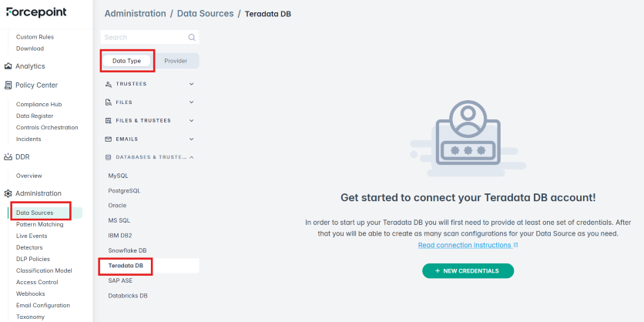
Navigate to and select Teradata DB from the left-hand menu.
-
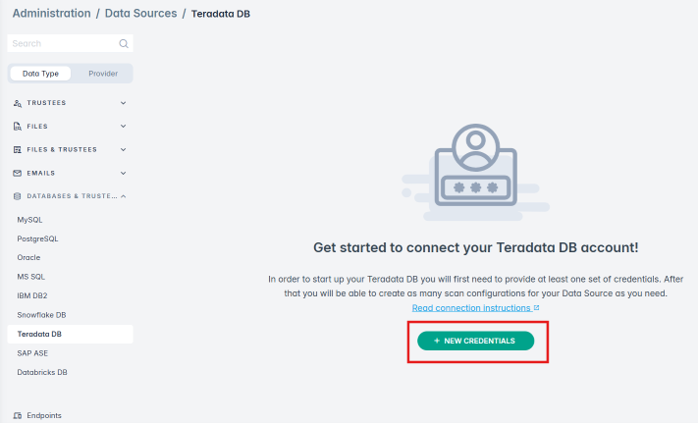
Click New Credentials to create new Teradata DB credentials.
-
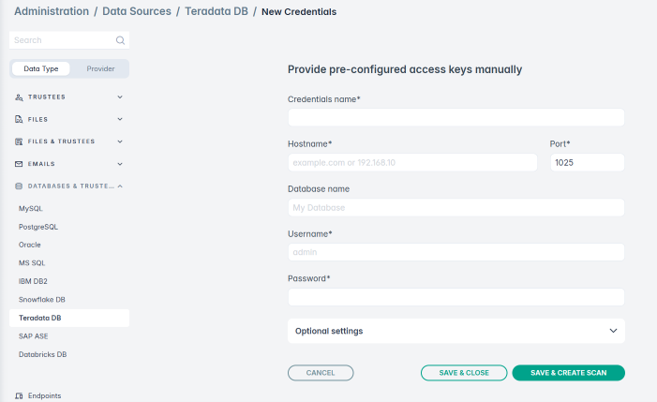
Gather all needed connection details and input them in the relevant fields:
- Credentials name
- Any unique name, for example,
Teradata_datasource1. - Hostname
- The hostname of your Teradata workspace.
- Port
- Port for secure connection.
- Database name
- Your database name.
- Username
- Authentication username.
- Password
- Authentication password.
-
Click SAVE & CREATE SCAN to save the credentials and proceed to the scan configuration.
The system attempts to connect and displays an error if the connection fails.
